Archive for the ‘english’ Category

'no such thing as a stupid question'

May 2nd, 2008

Most people are reasonably discreet by nature. They don't feel an urge to flaunt their personality or draw attention to themselves that often. It's a fact of life that we live in an unfriendly world, amongst aggressive peers. If you stick your neck out more then you'll have to stand up for yourself more. Thus most people develop a (healthy? at least in terms of survival) tendency to not advertise themselves excessively, especially not facts they suspect their peers will consider weaknesses. And so when they find themselves in a classroom with 24 peers, they feel somewhat less than eager to declare ignorance about the current topic. Teachers know this, and they think it's unfortunate that the fear of embarrassment keeps people from learning. And this is when they declare that: There is no such thing as a stupid question!

This is a well meaning encouragement to dare to admit that you're ignorant, because in this room you're allowed to be. Unfortunately, it's also a misleading statement. If you've ever taken a class with a person who wasn't shy, but *did* ask a lot of stupid questions, you already know that a) there *is* such a thing as a stupid question and b) it is ill advised to keep asking them. A person who is either particularly ignorant or exceptionally obtuse is a real disruption to the thought process among people who can follow the material. Just in the same way that you wouldn't want someone to interrupt a movie every 5 minutes and spend 2 minutes explaining what just happened on the screen, it really destroys the flow.

The teacher is probably more tolerant of stupid questions than your peers are, but there is a limit to how much time can be spent explaining obvious things to an ignoramus, because after all the mission is to get through all of today's material. So stupid questions are obviously not appropriate in large quantities, whatever the commercial says.

Interestingly, the expression isn't it's okay to ask stupid questions, so no allowance is made for those questions at all. On the contrary, it redefines all questions to be of the not-stupid nature. Perhaps we should call them "smart questions". The not-stupid reader will notice that the result between that and admitting stupid questions is ultimately the same. Whether you're allowed to ask stupid questions, or you're not allowed to, but there are not stupid questions, it is permission granted to ask all questions. And the strange twist is just a little morale boost for you, an encouragement. We allow stupid questions, but your questions aren't stupid anyway, so don't worry about that. *wink*

As bogus as the expression is, is there any truth to it at all? It defines "stupid questions", some category that apparently must have been discovered by someone. If stupid questions form a subset of all questions, there must be another category that isn't stupid. So is it actually true that it's impossible to distinguish a presumably stupid question from a smart question? Why, that too is completely untrue, anyone who took the class with that stupid-questions-asker knows this.

So we know that a) stupid questions exist and b) you shouldn't be asking them. But here's the problem: how do you know if your question is stupid?

It seems to me that there is no general answer. If we take the literal definition of the word "stupid" we find:

characterized by or proceeding from mental dullness; foolish; senseless: a stupid question.

However, none of these assessments - dullness, foolishness, senselessness - are absolute terms. They take on meaning in context, and only then. So in other words, if you are a globally renowned expert in some field and you receive questions from people all around the world, people whose background you know nothing about, and with whom you've never interacted before, then none of those questions, no matter how elementary, can be stupid. Because it's impossible to infer "mental dullness", or "foolishness", or "senselessness" based on one question.

Wherever you have a congregation of two persons or more the accepted standard of discourse on any topic that comes up is decided within a few minutes, as soon as the participants negotiate an acceptable place to set the bar. Just how this happens is too complicated to cover here, but it's influenced by things like how socially dominant the various participants are, what they stand to win or lose by admitting to competence or ignorance and so on. However, once that standard has been informally negotiated, any questions visibly below the standard will be perceived as stupid.

Although the audience makes an instant determination about a question being asked, this isn't actually a correct assessment. Broadly speaking (although this departs somewhat from the dictionary definition), stupid questions can be divided into two categories.

First, there are ignorant questions, which betray a lack of competence about the topic. This is just an indication that the person doesn't have the same background as everyone else. This is actually less of a failing for the person in question, because you can't really blame someone for not knowing something they haven't had the opportunity to learn, can you? But it's still very disruptive to everyone else.

Second, there are questions that are by definition stupid. "Mental dullness" would be a failing to make the right deductions based on the known facts. So a prior fact "this chair is heavy", combined with a new fact "heavy things hurt when dropped on your foot" would make the question "what happens if I drop this chair on my foot" a stupid question. It would also be a foolish idea, which seems to me as being "mental dullness" in a case where the outcome is unfavorable to you personally. But you could also ask a different question. "But what if this happened on a Tuesday, would it still hurt?" That question makes no sense. It seems to me that "senseless" questions stem from a false conclusion somewhere in deduction, ie. that the day of the week has an impact on your physiological responses.

While questions due to ignorance are an obvious waste of time (depending on the degree of ignorance), questions due to "mental dullness" are socially accepted to a point. The real problem is that the assessment isn't accurate.

To determine whether a person is:

lacking ordinary quickness and keenness of mind

we would have to compare his performance to that of another person. In other words, given the same facts, will the dull person fail to make the deduction while the other succeeds? If so, a question that betrays the absence of this deduction would correctly be described as stupid.

But how to conduct such an experiment? People gather in a classroom from all corners of the city (just to keep it simple). If they attended different schools they would not have had the same curriculum. But even two persons with the exact same schooling does not guarantee that they will have absorbed the same facts. Perhaps one was paying attention while the other didn't, perhaps one was gone that day, perhaps one remembers this fact and the other doesn't, perhaps one never understood it while the other did. Memory tests conducted with groups of participants show that a 30 minute exposure to the same words, images etc produces vastly different recollections of what was seen.

So if we cannot stage such an experiment then we cannot infer dullness of mind, and hence the determination of the stupid question is undecided.

So it cannot be decided from the outside, but the person cannot decide this either. You can ask yourself the question "if there some basic fact that makes this question stupid that I'm not aware of?". If so, it will be judged a stupid question, but it's not stupid based on *your* known facts. And it's only after you've understood the topic that you can determine if it was stupid. If it turns out you were missing necessary information, then it wasn't stupid. If you weren't missing anything, then it would seem you mind was "dull". However, if you have a "dull mind" to begin with, then perhaps you see no anomaly in your performance that day.

The senseless question is an interesting case, because it originates from a false conclusion. What are we to make of this? Is it because you misinterpreted a fact and thus made a wrong turn, or did you have all the facts straight, but still somehow managed to deduce the wrong thing? That brings up the question of whether the mind is capable of making an incorrect deduction like that. Or whether you're guaranteed, having all the right facts, to produce the right answer. That is a common assumption we make when debating with people. We think just as long as we straighted out their warped world view, we can get them thinking straight.

So you can't tell if the question is stupid, and the audience doesn't know if it's stupid, even if it's obvious to them. Maybe that's why someone got really depressed and went into denial, postulating that there are no stupid questions. I guess that means there are no foolish or senseless questions.
renaming sequentially

May 1st, 2008

If you've been dealing with files for a while you will have noticed that there is a slight semantic gap between how humans see files and how computers do. If you've ever seen a file list like this you know what I mean:

Lecture10.pdf
Lecture11.pdf
Lecture12.pdf
Lecture1.pdf
Lecture2.pdf
...

Numbering these files was done in good faith, and a user understands what it means, but the computer doesn't get it. Sorting in dictionary order produces the wrong order as far as the user is concerned. The reason is that the digits in these filenames are not treated and compared as integers, merely as strings. (Actually, . comes before 0 in ASCII, what's going on here?)

While we're not expecting our computers to wisen up about this anytime soon, there is the obvious fix:

Lecture01.pdf
Lecture02.pdf
...
Lecture10.pdf
Lecture11.pdf
Lecture12.pdf

You've probably done this by hand once or twice, while cursing.

On the upshot, this is very easy to fix with a few lines of code:

#!/usr/bin/env python
#
# Author: Martin Matusiak <numerodix@gmail.com>
# Licensed under the GNU Public License, version 3.
#
# revision 1 - support multiple digit runs in filenames

import os, string, glob, re, sys

def renseq():
    if (len(sys.argv) != 2):
        print "Usage:\t" + sys.argv[0] + " <num_digits>"
    else:
        ren_seq_files(sys.argv[1])


def ren_seq_files(num_digits):
    files = glob.glob("*")
    for filename in files:
        m = re.search("(.*)(\..*)", filename)
        ext = ""
        if m: (filename, ext) = m.groups()

        digit_runs = re.finditer("([0-9]+)", filename)
        spans = [m.span() for m in digit_runs if digit_runs]
        if spans:
            spans.reverse()
            arr = list(filename)
            for (s, e) in spans:
                arr[s:e] = string.zfill(str( int(filename[s:e]) ), int(num_digits))
            os.rename(filename+ext, "".join(arr)+ext)


if __name__ == "__main__":
    renseq()

This works on all the files in the current directory. Pass an integer to renseq.py and it will change all the numbers in a filename (if there are any) to the same numbers, padded with zeros if they have fewer digits than the amount you want. So on the example

renseq.py 2

will turn the first list into the second list.

If say, there are filenames with numbers of three digits and you pass 2 to renseq.py, the numbers will be preserved (so it's not a destructive rename), you'll just revert to your incorrect ordering as it was in the beginning.

renseq.py will rewrite all the numbers in a filename, but not the extension. So mp3 won't become mp03. ;)

war is a racket

April 30th, 2008

For all the patriotic baloney nations are fed in pre-war time, with grandiose appeals to moral rightousness and complete confidence in their own success, it is little more than powerful, rich men sending clueless (or powerless) poor men to their death.

War is a racket. It always has been. It is possibly the oldest, easily the most profitable, surely the most vicious. It is international in scope. It is the only one in which the profits are reckoned in dollars and the losses in lives.

A racket is best described, I believe, as something that is not what it seems to the majority of the people. Only a small "inside" group knows what it is about. It is conducted for the benefit of the very few, at the expense of the very many. Out of war a few people make huge fortunes.

Who wrote this? Why, only the highly decorated general Smedley D. Butler, in 1935.

Yeap, that's right, folks. The plot in Inside Man wasn't made up. It was a real plot about a fictional person, crafted on the histories of real people.

Here's another truth ringer:

Like all the members of the military profession, I never had a thought of my own until I left the service.

But of course. Who in their right mind would go kill people at the risk of getting killed just so that a few rich men can get richer?

spiderfetch, part 2

April 27th, 2008

Note: If you haven't read part 1 you may be a little lost here.

So, the inevitable happened (as it always does, duh). I start out with a simple problem and not too many ambitions about what I want to accomplish. But once I reach that plateau, nay well before reaching it, I begin to ever so quietly ask myself the question "wait a second, what if x?" and "this looks specialized, I wonder if I could generalize...". And so before ever even reaching that hill top I've already, covertly, committed myself to taking it one step further. Not through a conscious decision, but through those lingering peripheral thoughts that you know won't disappear once they've struck. A bell cannot be unrung and all that.

I realized this was happening, but I didn't want to get into too much grubby stuff in the first blog entry, so I decided to keep that one simple and continue the story here. The first incarnation of spiderfetch had a couple of flaws that bugged me.

  1. No way to inspect how urls were being matched on the page, or even reason to believe this was happening correctly, other than giving an input and checking that all the expected urls were found. To make matching evident, I would need to be able to see the matches visually on the page.
    This has been addressed with a new option --dumpcolor, which dumps the index page and highlights the matches. This has made it much easier to verify that matching is done correctly.
  2. Matching wasn't sufficiently effective. The regex I had written would match urls inside tags, as long as they were in quotes. But this would still miss unquoted urls, and it also excluded all other urls on the page, which may or may not be of interest. I also realized that a single regex, no matter how refined, would be unlikely to match simultaneously all the urls that may be of interest.
    The obvious response is to add an option for multiple regexes, which is exactly what happened. This obviously adds another layer of complexity to debugging regexes, so the match highlighting was extended to colorize every match in a different color. Furthermore, where two regexes would match the same characters, the highlighting is in bold to indicate this.

With that, I was far happier with the ability to infer and verify correctness in the matching behavior. Surely now everything is honkey dorey?

Or not? (As a classmate of mine likes to say after delivering a convincing argument, but graciously gives you the chance to state your objections anyway). Well, if you read part 1 of this adventure right to the end, noting the observation that spiderfetch could be run recursively, you may have thought what I thought. Well gosh, Bubba, this is starting to sound like wget --mirror. Since I've set up all this infrastructure already -- to spider a single page -- it wouldn't really take much to generalize it to run recursively.

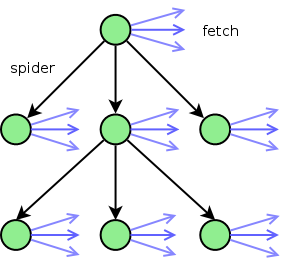
There are a couple of problems to solve, however. Firstly, the operational model for spiderfetch was very simple: spider a page, then fetch all the urls that match the pattern. In terms of multiplicity: 1 page to spider, 1 pattern to match urls against, n urls to find. If we now take this a step further, in the next pass we have n urls to spider (obtained form the n urls found in the first step), and we may need 1 pattern to filter some of them. Next, we spider these pages, which produces (m1+m2+...) (or roughly, n*m) urls and so on. This becomes rather convoluted to explain in words, so let's visualize.

Starting at the url to be spidered (the top green node), we spider the page for urls. For each of the urls found, it ends up in one of three categories:

  1. It matches the spider filter, so it becomes a url to spider in the next round (a black arrow).
  2. It matches the fetch filter, so it becomes a url to fetch (a blue arrow).
  3. It matches neither and is discarded (not shown).

In the next round, we gather up all the urls that are to be spidered (the black arrows starting at the top green node) and do the same thing for each one as we did with just the one page to begin with.

But this complicates matters quite a lot. We now have to deal with a bunch of new issues:

  1. How do we traverse the nodes? wget in mirror/spider modes goes depth-first, which I always thought was eccentric. I don't know why they do it this way, but I'm guessing to minimize memory use. If you go breadth-first then at every step you have to keep track of all the green nodes at the current level, which grows exponentially. Meanwhile, depth-first give you linear growth, so that choice is well justified. But, on the other hand, the traversal order seems a bit unintuitive, because you "jump" from the deepest corner of your filesystem back to the top level and so on. I wonder if this turns out to be foolish (I don't expect spiderfetch to get the same kind of workout that wget does, obviously), but I've chosen the opposite approach, which I think also makes it easier to track what is happening underway.
  2. How deep do we want to go? Do we want to set an upper bound or (gasp) let it run until it stops?
  3. Until now we've only needed one filter (for the blue arrows at the top green node). Now we suddenly have a lot more arrows that we should be able to filter in some meaningful way. Obviously, we don't want a pair of filters for every single node. Not only would that be madness, but we don't know in advance how many nodes there will be.
    Our old friend wget only has one filter you can set for the whole site. But we want to be more specific than that, so there is a pair of filters (spider, fetch) for every level of the tree. This gives pretty decent granularity.

So how can we represent this cleanly? Well, it would be rather messy to have to input this as a command line parameter, besides which a once written scheme for a particular scenario could be reusable. So instead we introduce the idea of a recipe composed of rules. Starting from the top of the tree, each rule applies to the next level of the tree. And once we have no more rules -- or no more urls to spider -- we stop.

Let's take the asx example from part 1, where we had a custom made bash script to do the job. We can now rewrite it like this. First, the recipe is a list of rules, each rule is a hash. So starting from the top green node, we grab the first rule in the list, the one that contains the symbol :spider. This gives us the pattern to match urls on that page for spidering. There are no other patterns in there, so we spider these urls and then move on to the next step. We are now at the level below the top green node in the tree, with a bunch of pages from urls ending in .asx. We now grab the next rule in the recipe. This one gives a pattern for :dump, which means "dump these urls to the screen". So we find all the urls that match this pattern in all of our green nodes and dump them. Since there are no more rules left, this is where we stop.

module Recipe 
	RECIPE = [
		{ :spider => "\.asx$" },
		{ :dump => "^mms:\/\/" },
	]
end

So you would use it like this:

spiderfetch.rb --recipe asx http://www.something.com/somewhere

The options for patterns are :spider, :fetch, and :dump. If you want to repeat the same rule several times (for example to spider an image gallery with 10 pages, which are linked together with Next and Previous links), you can also set :depth to a positive integer value. This will descend in the tree the given number of times, using the same rule again and again.

And if you're feeling completely mental, you can even set :depth => -1, which will repeat the same rule until it runs out of urls to spider. You should probably combine this with --host, which will make sure you only spider the host (domain, to be exact) you started with, rather than the whole internet. (It will still allow :fetch and :dump to match urls on other hosts, so if you're spidering for images and they live on http://img.host.com rather than http://www.host.com, they will still be found.)

Lastly, as a heavy handed arbitration measure, if you execute a recipe and pass either of --dump or --fetch this will switch all your :fetch patterns to :dump or vice versa. Might be nice to be able to check that the right urls are being found before you start fetching, for instance.

Download and go nuts:

spiderfetch-0.3.1.tar.gz

UPDATE: Paul Hawkins wrote to say that wget actually runs in breadth-first mode.

download all media links on a webpage

April 26th, 2008

This has probably happened to you. You come to a web page that has links to a bunch of pictures, or videos, or documents that you want to download. Not one or two, but all. How do you go about it? Personally, I use wget for anything that will take a while to download. It's wonderful, accepts http, https, ftp etc, has options to resume and retry, it never fails. I could just use Firefox, and if it's small files then I do just that, and click all the links in one fell swoop, then let them all download on their own. But if it's larger files then it's not practical. You don't want to download 20 videos of 200mb each in parallel, that's no good. If Firefox crashes within the next few hours (which it probably will) then you'll likely end up with not even one file successfully downloaded. And Firefox doesn't have a resume function (there is a button but it doesn't do anything :rolleyes: ).

So there is a fallback option: copy all the links from Firefox and queue them up for wget: right click in document, Copy Link Location, right click in terminal window. This is painful and I last about 4-5 links before I get sick of it, download the web page and start parsing it instead. That always works, but I have to rig up a new chain of grep, sed, tr and xargs wget (or a for loop) for every page, I can never reuse that and so the effort doesn't go a long way.

There is another option. I could use a Firefox extension for this, there are some of them for this purpose. But that too is fraught with pain. Some of them don't work, some only work for some types of files, some still require some amount of manual effort to pick the right urls and so on, some of them don't support resuming a download after Firefox crashes. Not to mention that every new extension slows down Firefox and adds another upgrade cycle you have to worry about. Want to run Firefox 3? Oh sorry, your download extension isn't compatible. wget, in contrast, never stops working. Most limiting of all, these extensions aren't Unix-y. They assume they know what you want, and they take you from start to end. There's no way you can plug in grep somewhere in the chain to filter out things you don't want, for example.

So the problem is eventually reduced to: how can I still use wget? Well, browsers being as lenient as they are, it's difficult to guarantee that you can parse every page, but you can at least try. spiderfetch, whose name describes its function: spider a page for links and then fetch them, attacks the common scenario. You find a page that links to a bunch of media files. So you feed the url to spiderfetch. It will download the page and find all the links (as best it can). It will then download the files one by one. Internally, it uses wget, so you still get the desired functionality and the familiar output.

If the urls on the page require additional post-processing, say they are .asx files you have to download one by one, grab the mms:// url inside, and mplayer -dumpstream, you at least get the first half of the chain. (Unlikely scenario? If you wanted to download these freely available lectures on compilers from the University of Washington, you have little choice. You could even chain spiderfetch to do both: first spider the index page, download all the .asx files, then spider each .asx file for the mms:// url, print it to the screen and let mplayer take it from there. No more grep or sed. :) )

Features

  • Spiders the page for anything that looks like a url.
  • Ability to filter urls for a regular expression (keep in mind this is still Ruby's regex, so .* to match any character, not * as in file globbing, (true|false) for choice and so on.)
  • Downloads all the urls serially, or just outputs to screen (with --dump) if you want to filter/sort/etc.
  • Can use an existing index file (with --useindex), but then if there are relative links among the urls, they will need post-processing, because the path of the index page on the server is not known after it has been stored locally.
  • Uses wget internally and relays its output as well. Supports http, https and ftp urls.
  • Semantics consistent with for url in urls; do wget $url... does not re-download completed files, resumes downloads, retries interrupted transfers.

Limitations

  • Not guaranteed to find every last url, although the matching is pretty lenient. If you can't match a certain url you're still stuck with grep and sed.
  • If you have to authenticate yourself somehow in the browser to be able to download your media files, spiderfetch won't be able to download them (as with wget in general). However, all is not lost. If the urls are ftp or the web server uses simple authentication, you can still post-process them to: ftp://username:password@the.rest.of.the.url, same for http.

Download spiderfetch:

Recipes

To make the use a bit clearer, let's see some concrete examples.

Recipe: Download the 2008 lectures from Fosdem:

spiderfetch.rb http://www.fosdem.org/2008/media/video 2008.*ogg

Here we use the pattern 2008.*ogg. If you first run spiderfetch with --dump, you'll see that all the urls for the lectures in 2008 contain the string 2008. Further, all the video files have the extension ogg. And whatever characters come in between those two things, we don't care.

Recipe: Download .asx => mms videos

Like it or not, sometimes you have to deal with ugly proprietary protocols. Video files exposed as .asx files are typically pointers to urls of the mms:// protocol. Microsoft calls them metafiles. This snippet illustrates how you can download them. First you spider for all the .asx urls, using the pattern \.asx$, which means "match on strings containing .asx as the last characters of the string". Then we spider each of those urls for actual urls to video files, which begin with mms. And for each one we use mplayer -dumpstream to actually download the video.

#!/bin/bash

mypath=$(cd $(dirname $0); pwd)
webpage="$1"

for url in $($mypath/spiderfetch.rb $webpage "\.asx$" --dump); do 
	video=$($mypath/spiderfetch.rb $url "^mms" --dump)
	mplayer -dumpstream $video -dumpfile $(basename $video)
done