So, assembly.. :nervous: Not exactly second nature for someone who lives in the dynamic language world. Even c seems like a million miles away. But even though I'm not yearning to work in assembly, it would be nice to know something about it. If for no other reason than the fact that all my [compiled] code eventually ends up in assembly (or bytecode, which is not too distant from assembly).
No doubt one way to learn assembly would be to dive in at the deep end with the right manuals. But I've already read about all the opcodes once and it didn't tell me anything, it was all too foreign. So I think a much better way is to see how assembly gets to be the way it is, and maybe it's possible to make sense of that. For this we'll need a super simple example to dissect, because assembly code is much longer than c.
Random walks
The idea of a random walk is that you start out at position=0, and then you flip a coin. If it's heads, take one step to the right (position++). If it's tails take one step to the left (position--). Repeat this for as long as it amuses you. Eventually you terminate and check where you've come. It could be position==0, which means you had just as many heads and tails. Or it could position==-2, so you had more tails etc.
We'll see this algorithm in c, and then compile it to assembly. It's obviously very simple; the only complication is the need for a random number generator. Now, there is a rand() function in stdlib.c, but you still have to seed it with *something* random, so we'll just read bytes from /dev/urandom instead. The byte is a number [0,255], so we'll divide the range in two and see which side of 127 the number was on.
Here it is in c:
#include <stdio.h>
#include <stdlib.h>

void walk() {
    int pos = 0;
    int steps = 100;

    FILE *rand_stream = fopen("/dev/urandom", "r");

    for (int i=0; i<steps; i++) {
	int x = fgetc(rand_stream);
	pos += x < 127 ? -1 : 1;
    }

    fclose(rand_stream);

    printf("Steps taken: %d\n", steps);
    printf("End position: %d\n", pos);
}

int main() {
    walk();
}
Compile with:
gcc -std=c99 -o walks randomwalks.c
But we also want the assembly code:
gcc -std=c99 -S randomwalks.c
The first WTF in assembly is that rather independent of how your c code looks, it doesn't come out in that order. So the first thing to figure out is where the heck execution starts. There should be a function called main somewhere..
main:
    leal    4(%esp), %ecx       /* execution begins */
    andl    $-16, %esp
    pushl   -4(%ecx)
    pushl   %ebp
    movl    %esp, %ebp
    pushl   %ecx
    subl    $4, %esp
    call    walk                /* call walk with no arguments */
    movl    $0, %eax            /* exit code := 0 */
    addl    $4, %esp
    popl    %ecx
    popl    %ebp
    leal    -4(%ecx), %esp
    ret                         /* execution ends */
The only thing that happens here that we can recognize from the c program is the call to walk. The other stuff is all bookkeeping that has to do with how programs start and end. I have no idea what this stuff is for.
Should we just go to walk then? Well, first it seems prudent to mention that all our string literals (which we'll be needing soon) are stored separately from code.
.LC0:
    .string "r"
.LC1:
    .string "/dev/urandom"
.LC2:
    .string "Steps taken: %d\n"
.LC3:
    .string "End position: %d\n"
Let's go to walk now.
Again, the first few instructions have to do with bookkeeping and are not commented. But soon we reach statements from the c program. The first interesting event is the literal 0, written $0, pushed onto the stack, at the location -4(%ebp), which is an offset calculated from the base pointer %ebp. The base pointer has something or other to do with where functions keep their local variables, making sure a successive call doesn't clobber the environment of the caller.
But anyway, -4(%ebp) is the address where literal value 0 is. And this represents the integer variable pos. We know that because this is the first thing that happens in the c program, so it's also the first thing that happens here. Until something new gets put into -4(%ebp) we know that pos==-4(%ebp).
The same thing happens with steps, stored one slot over. The addresses increase by multiples of 4 because this is a 32bit machine and 32bits/8bits/byte = 4 bytes.
Next, two string constants (their addresses, actually) are put on the stack. They have to be set up in this order to call a c function, namely fopen. The result of this call is found in %eax, and represents the variable *rand_stream. This value is the pushed on the stack again, to address -12(%ebp).
Finally, we've reached the for loop. The next instruction assigns i=0, and then we jump to the loop condition.
walk:                           /** walk function body **/
    pushl   %ebp
    movl    %esp, %ebp
    subl    $56, %esp
    movl    $0, -4(%ebp)        /* (pos = 0)        -> -4(%ebp) */
    movl    $100, -8(%ebp)      /* (steps = 100)    -> -8(%ebp) */
    movl    $.LC0, 4(%esp)      /* "r"              -> stack[1] */
    movl    $.LC1, (%esp)       /* "/dev/urandom"   -> stack[0] */
    call    fopen               /* Call fopen with 2 args from stack */
    movl    %eax, -12(%ebp)     /* *rand_stream     -> -12(%ebp) */
    movl    $0, -16(%ebp)       /* (i = 0)          -> -16(%ebp) */
    jmp     .L2                 /* goto loop condition */
In case you're wondering, .L2 is not a function declaration. It's a label, ie. an address you can jump to. Assembly makes no distinction between a label that represents a function and one that doesn't.
What we have here is the loop condition check, followed by the rest of the walk function (excluding the loop body). In other words, suppose the condition were never true, this is how we would execute walk.
We load the address representing the variable i into %eax and compare it to the value of steps. If the comparison is unsuccessful (ie. the body should be executed) we jump to the loop body.
Subsequently, we line up the argument *rand_stream. The extra step of putting into %eax seems silly, perhaps it could be done in one instruction. We then call fclose. The same happens with the calls to printf.
The last two instructions again have to do with bookkeeping and don't correspond to any statements in our c program.
.L2:                            /** loop condition check **/
    movl    -16(%ebp), %eax     /* i                -> %eax */
    cmpl    -8(%ebp), %eax      /* cmp(steps, i)    -> %eax */
    jl      .L5                 /* if (!cmp) goto loop body */

                                /** After for loop **/
    movl    -12(%ebp), %eax     /* *rand_stream                 */
    movl    %eax, (%esp)        /*                  -> stack[0] */
    call    fclose              /* call fclose with 1 arg from stack */
    movl    -8(%ebp), %eax      /* steps                        */
    movl    %eax, 4(%esp)       /*                  -> stack[1] */
    movl    $.LC2, (%esp)       /* "Steps taken.."  -> stack[0] */
    call    printf              /* call printf with 2 args from stack */
    movl    -4(%ebp), %eax      /* pos                          */
    movl    %eax, 4(%esp)       /*                  -> stack[1] */
    movl    $.LC3, (%esp)       /* "End position.." -> stack[0] */
    call    printf              /* call printf with 2 args from stack */
    leave
    ret                         /* return from walk function */
What we have left, then, is the loop body. It looks messy because we have some branching here. But it's not too bad.
The first thing being done is to get ahold of *rand_stream and call fgetc. The result is found in %eax and represents the variable x. We compare this value to the literal $126 (127 in the c program), to see if we should produce the increment 1 or -1.
If x turns out to be below 127 we store the value -1 in -36(%ebp). This value is part of an expression and does not represent any variable in the c program. We then jump over the next assignment. Alternatively, we run the assignment of 1 to -36(%ebp) and skip the first assignment.
Ending up in .L4, we add the value in -36(%ebp), which is either 1 or -1, to pos. Then we increment the loop counter i.
In the full assembly file, .L2 follows after this, which means we re-evaluate the loop condition and possibly execute the loop again. So everything checks out. :)
.L5:                            /** loop body **/
    movl    -12(%ebp), %eax     /* *rand_stream                 */
    movl    %eax, (%esp)        /*                  -> stack[0] */
    call    fgetc               /* call fgetc with 1 arg from stack */
    movl    %eax, -20(%ebp)     /* x                -> -20(%ebp) */
    cmpl    $126, -20(%ebp)     /* cmp(126,x)       -> %eax */
    jg      .L3                 /* if (cmp) goto assign 1 */

                                /** x is <127  => assign -1 **/
    movl    $-1, -36(%ebp)      /* -1               -> -36(%ebp) */

    jmp     .L4                 /* goto pos += ... */

.L3:                            /** x is >=127 => assign 1 **/
    movl    $1, -36(%ebp)       /* 1                -> -36(%ebp) */

.L4:                            /** pos += ... **/
    movl    -36(%ebp), %eax     /* add(1 or -1,              */
    addl    %eax, -4(%ebp)      /*              pos) -> pos  */
    addl    $1, -16(%ebp)       /* add(1, i)         -> i */
So that's a pretty non trivial chunk of code for a trivial c program. Needless to say, it really helps to have the source code when you're looking at assembly. It gets worse when programs are optimized, because the instructions will be pruned and rearranged, so it's gonna be harder to understand.

 June 13th, 2009

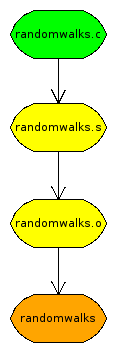 Fittingly, there are quite a few of them. I haven't done an exhaustive review, but I've mentioned
 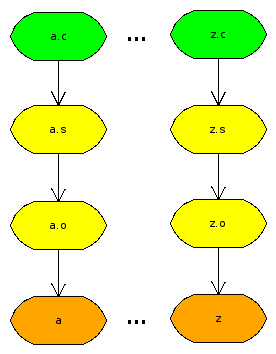 It's one thing if the dependency graph really is complicated. Then the makefile will be too, that's unavoidable. But if it's dead obvious like here, which it often is, then the build instructions should mirror that. I run into a lot of cases where I have the same build sequence for several files. No interdependencies, no multiple sources, precisely as shown in the picture. Then I want a makefile that requires no changes as I add/remove files.
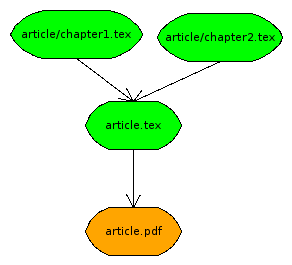 What if it gets more complicated? Latex documents are often split up into chapters. You only compile the master document file, but all the imports are dependencies. Well, you could still use patterns if you were willing to use