Archive for 2006

Project Newman :: The scheduler

August 26th, 2006

Now that we've covered the reporter, the editor and the publisher, we have a functional Newman that can actually post stories. I set up Newman to run in a cron job (ie. at set intervals) to run every three hours, but then it occurred to me that it isn't human behavior to post at 9am, then at 12am, then at 3pm and so on, it just doesn't look real. And if someone were to keep an eye on Newman, they might notice that it always posts at regular intervals, which looks odd. (The point here isn't so much to fool people into believing that Newman is real, it is just to make it so that it seems to exhibit a lot of human qualities.)

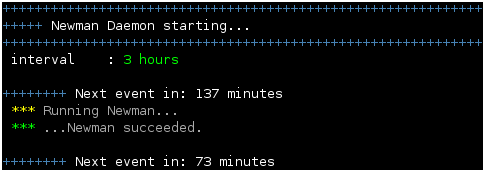
So I thought why not add a scheduler to decide when Newman should run. The scheduler runs as a daemon (ie. an application that runs 24/7 in the background, but only does actual work whenever it is called upon). So the scheduler is given a time interval (for instance: 3 hours), and then it generates a random number between 0 and 3 hours. That's when Newman is going to run. And then it goes to sleep until that time. So if I start the scheduler at 10am, give it an interval of three hours, it may decide that Newman should run at 11.45. So then it goes to sleep until 11.45 and then it runs Newman.

newman_scheduler.png

The advantage of this method is also that if the scheduler runs Newman and Newman crashes, it won't make the scheduler crash. So the scheduler will still keep running and will again run Newman at the next interval. I've also made sure that the scheduler waits for Newman to finish, so that if Newman is taking a lot time to complete and the next interval is in 5 minutes, Newman will not be started again until the current execution is finished.

This entry is part of the series Project Newman.

Project Newman :: The publisher

August 25th, 2006

Compared to what we've talked about so far, the publisher is a pretty simple piece of the puzzle. It receives a list of stories, each one assigned to one or more channels, and simply posts them on the selected target, that is Xtratime.org. For this to work, we must first prepare an account on the forum for Newman. Having done that, the publisher will log in the user, open the thread where the story should be posted and simply post it, adding some vBcode formatting to the text. The image below shows what a typical news post looks like.

newman_publisher.png

While Newman posts articles on Xtratime.org, which is a vBulletin forum, it could just as easily post them on any other website, it's just a matter of reading the html code sent to us from the server and submitting html forms with the correct data. I won't bore you with the details. Of course, there is always a chance that the server may drop the connection while the posting is in progress, or the connection may fail in the first place. In these cases, the publisher will report the error, but it will try to post the next story as if nothing happened.

In the event that vBulletin rejects the post for any reason, Newman tries to read this error and report it. It may be that two stories have been posted too close together (vBulletin has a limit for how often posts can occur by the same user), perhaps something else didn't go to plan. In any event, it handles these errors gracefully without crashing.

In early stages of development, I was testing Newman on a test forum I set up, which was protected with a password. Newman can use basic http authentication to access web sites in that way.

This entry is part of the series Project Newman.

computer nostalgia (bringing format c: to linux)

August 23rd, 2006

As time goes by, there are certain things from the past that stick with us, aren't there? Things that won't quickly be forgotten. Just the other day I was thinking it's been a while since I've seen the good old format c: screen. I remember seeing that screen a lot back when I was a Windows user. All the way from Windows 3.1 to Windows XP, ever so often I would format and reinstall the system. And formatting was the simplest way to start with a clean slate (virus and spyware wise, in later years), it was much quicker than deleting all the files.

format_c.png

The format command also had this mythical quality about it. It was synonymous with destruction, with sabotage even. Whenever we joked about messing up someone's system, we would always joke about formatting c:. I don't recall ever actually doing that to someone for amusement, but it was certainly tempting at times (on school computers especially :D ).

But then I remember one time back in high school, years later, when a friend of mine threw a party for our class. Lots of people showed up that noone seemed to know, but his house was big enough to fit everyone in. A couple of days after the party, he was telling me that at around 1am, at a time when the party was well underway, he came into his room, found his computer was on and the format c: screen was staring him in the face, with the counter at 80%. He said he immediately cut the power. He then turned it back on, the system hadn't been wiped yet. What a relief.

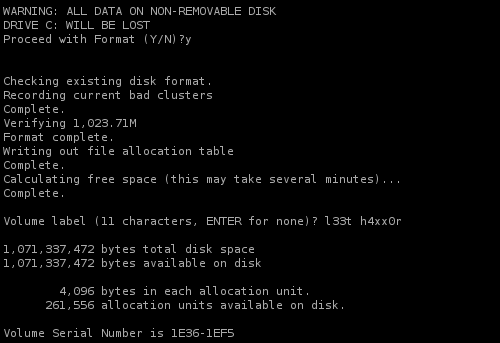
So with this in mind, it occurred to me recently that it would be fun to recreate the mythical format c: screen, given that I never see it anymore. It took me a while to figure out how to print characters and then delete them in bash, but here is the code that recreates the actual format c: screen. It's shown in the screenshot above. The font isn't correct, unless you have your terminal running on the original Lucida Mono font that Ms DOS came with. But other than that, I've tried to recreate it to a T.

#!/bin/bash

if [ "$1" = "" ]; then
	echo "Required parameter missing -"
	exit 1
fi

drive=$(echo $1 | tr [:lower:] [:upper:])

sp="\0040"
bs="\0010"

spaces() {
	e=""
	for i in $(seq 1 $1); do
		e="${e}${sp}"
	done
	echo $e
}

el=$(spaces 50)

label1="\n\nWARNING: ALL DATA ON NON-REMOVABLE DISK
\nDRIVE $drive WILL BE LOST
\nProceed with Format (Y/N)?"
label2="\n\n
\nChecking existing disk format.
\nRecording current bad clusters"
proc1="Complete. $el
\nVerifying 1,023.71M"
proc2="Format complete. $el
\nWriting out file allocation table"
proc3="Complete. $el
\nCalculating free space (this may take several minutes)..."
proc4="Complete. $el
\n\nVolume label (11 characters, ENTER for none)?${sp}"
label3="\n
\n1,071,337,472 bytes total disk space
\n1,071,337,472 bytes available on disk
\n
\n$(spaces 8)4,096 bytes in each allocation unit.
\n$(spaces 6)261,556 allocation units available on disk.
\n\nVolume Serial Number is 1E36-1EF5\n\n\n"

type_delay=0.3
counter_delay_short=0.05
counter_delay_vshort=0.005
counter_delay_long=0.3
cmd_delay=1

pause() {
	sleep $cmd_delay
}

print() {
	for i in $(seq 0 ${#1}); do
		c=${1:$i:1}
		if [ "$c" = " " ]; then
			c=$sp
		fi
		echo -ne $c
		sleep $type_delay
	done
}

counter() {
	for i in $(seq 1 100); do 
		l="${sp}$i percent completed."
		echo -ne $l
		sleep $1

		for j in $(seq 0 ${#l}); do
			echo -en $bs
		done
	done
}


echo -en $label1
pause
print "y"

echo -e $label2
counter $counter_delay_short
echo -e $proc1
counter $counter_delay_long
echo -e $proc2
counter $counter_delay_short
echo -e $proc3
counter $counter_delay_vshort

echo -en $proc4
pause
print "l33t h4xx0r"

echo -en $label3

What it does is... absolutely nothing. Except simulating what happens when you type C:\>format c: [ENTER] in Ms DOS. To run it, download the file, chmod 755 format it, and copy it to a path that is in your $PATH, like /usr/local/bin with cp format /usr/local/bin. (you may have to use sudo here, /usr/local/bin is usually only writable by root). Now you have your very own format command on linux and you can run format c: whenever a bout of nostalgia hits you and you miss the old format command.

Best of all, it doesn't actually nuke your files, but you can still use it to scare the bejeezus out of people. ;) :devil: :D And since you just set its permissions to be executed by any user, any user can run it (perhaps with some persuasion? ;) :D ).

Project Newman :: The editor

August 22nd, 2006

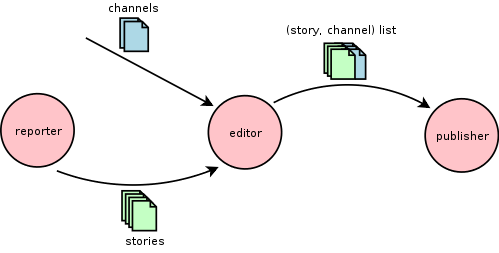
The editor is basically the "brain" of Newman. It's the most complicated part, because it has to handle the most logic. Broadly speaking, it is the editor's job to figure out which news articles to post where. Once the target is set (ie. Xtratime.org), the editor has to figure out whether each of the articles delivered by the reporter should be published in any of the channels (ie. threads) we have available. The illustration below shows the editor's role in the chain.

newman_schematic.png

Finding channels

But before we dive right into it, a small note on channels is in order. Let's start with a rather more basic question: How does a human post news articles? Carson35 will post articles wherever the particular story is relevant - either to the thread at large, or to the last few posts specifically. The question is whether Newman can imitate this behavior. Xtratime.org is divided into lots of forums, one for each club, where threads about that one club are found. Some of these forums have special threads active all through the season, like for instance a "transfer rumours" thread. So what should Newman do to decide where to post an article? It could iterate over the threads in a certain forum to figure out "what this thread is about". But that is rather difficult to do, for a bot. Given just one sentence, how do you mechanically establish such a terribly human observation - what it's "about"? If Newman could do this, it would be quite clever. But, I must admit that I can't think of a method.

So, the approach I took was to input a list of channels manually selected. I can't think of a way to establish what a post is about, or a thread is about, or if a certain story should be posted in a specific thread. So I had to fall back on a human method and simply give Newman a list of threads it can use to post articles in.

The subject filter

So I've built Newman to do all the tedious work for me, but I've already had to produce the channels myself, it would be nice if Newman could do some work too now. Given the channels, we now have a bunch of stories and a bunch of channels - how do we match them? I've selected my channels so that I have one channel per club forum. One thread to post news articles in is already enough to aggravate sensitive forum people, so I'm not going to push my luck. This also means that I have to figure out if a certain story is about a certain club, or not. This I call the subject filter (ie. to establish the subject of the story).

If you think this is already getting hazy, unfortunately it doesn't get any better. I'm not at all interested in trying to deduce the meaning of sentences in English (this would likely take me around forever to finish). Instead, I'm limiting myself to just looking at individual words. So while a complete analysis would reveal that the phrase "the royal club" may be talking about Real Madrid, I won't be getting into that. I will limit myself to looking for just words. Now, it may seem prudent that in order to establish that a story talks about a certain club, it would be helpful to look for the names of players who play for that club. But players change clubs all the time, so the list of players for every club would have to be updated every so often (and remember: we're trying to minimize the human input here). Worse still, half the stories in the papers about Real Madrid discuss possible signings of players who belong to other clubs. To consider adding all players linked with a club to the list of players at every club would be mad.

So, the only thing I will use is the one name that doesn't ever change: the name of the club itself. In its many incarnations. So a story that mentions "Real Madrid" is one that we probably want to classify as eligible for the Real Madrid channel. But it could also just mention Real or Madrid on their own, so we have to consider that too. But then again, Real could also refer to Real Zaragoza, so then "Real" should be a weaker match than "Real Madrid". As you can probably see by now, this is going in the direction of a spam filter: searching for words and scoring them according to certain rules. In addition, it struck me that the position of a word in a text tends to mean something (if it's in the beginning of the story, or in the title, it should give a higher score). Finally, the length of a story matters as well. In a typical story of the kind we like to analyze, the name of a club may appear 2-3 to 5 times. In a very short story, it may only appear once. In a very long story, it may appear more times, in the guise of nicknames and phrases like "the royal club". So a long story may mention Real Madrid 3 times, but may actually be about Barcelona, so we will not give "Real Madrid" as high a score as it would get in a shorter story.

Getting a bit hazy, is it? I thought it might. The subject filter works fairly well in most cases. There have been occasional whoopsies, like a story about Arsenal de Sarandí posted in the Arsenal (the English one) forum. And there was a story about Luis Valencia matching the Valencia channel. I have tried to filter this by searching for Valencia as part of a name (ie. as part of a sequence of capitalized words) - and penalizing that match under suspicion for being the name of a person - but this kind of thing is very imprecise.

The topic filter

So far so good (do I sense hesitation?). For some channels it is enough to use the subject filter. But for others, those which have to do with transfer rumours, we should also decide whether a certain story is about possible transfers. (Incidentally, most soccer news is.) For this I created a separate filter. So that a story matching on "Real Madrid" would then have to pass through the topic filter to see if it seems to be transfer news. For this I used a word list - a list of words that are highly relevant to transfers, such as contract and offer. Then I scored these words just like I did with the subject filter and set the threshold after some trial and error to filter stories fairly reliably. In any case, I would rather filter out more stories wrongly than to post irrelevant news (just like a spam filter would rather allow more spam than to risk losing your non-spam email). This way, some transfer news didn't make the cut, but afterall there are enough stories published everyday to suffice.

Is that all?!?

So finally, after running every story through the subject filter, and if need be the topic filter, I would have a list of stories to publish in certain channels. A story would rarely qualify for more than 2 channels (a transfer from one club to another), it would most often just qualify for one. In addition, the editor filters out stories by date - any story older than 24h is marked outdated.

The proper cherry on the cake would be to create a Channel Finder module - to find channels automatically. But after having thought about this for a few weeks, I still can't think of a way to do it that would assure any kind of half-decent success rate. Certainly not without trying to analyze English language to some extent, which would be incredibly complicated, if even the least bit effective.

This entry is part of the series Project Newman.

Project Newman :: The reporter

August 20th, 2006

The reporter is the part of Newman which retrieves stories from various websites. The process is fairly straightforward:

  1. Retrieve web page containing a list of the latest news stories.
  2. Read the list of stories and retrieve links to individual stories.
  3. Retrieve each story one by one.

This description is generic enough to be satisfied by every site of those I considered reporting from, notably Football Italia, Tribalfootball, Eurosport, and Goal. Every site has a list of stories and then individual stories on separate pages. But that doesn't mean there weren't a few challenges to make this work, notably:

  • Every site uses different html - we have to read the info we need out of the html source by using regular expressions.
  • The result from every story retrieval should be just plain text, no html tags or other code.
  • If the connection fails or times out, Newman should ignore the error and continue, it shouldn't crash.

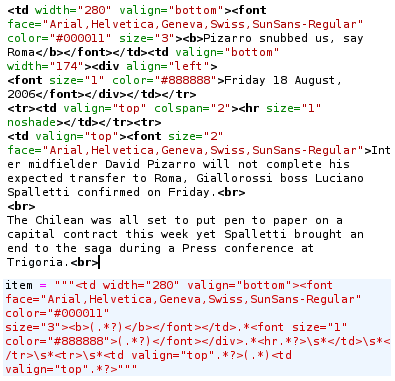
Out of every story we need the title, the date, and the body of the story. The rest we can blissfully ignore. But evenso, Football Italia presents these three elements in the order we want, but Goal prints the date first, then the title and body. It also divides the body into a summary and the rest. So these trivial variations had to be handled specifically for each site. Doing this requires analysis of the html code, which is not something Newman can do automatically. The image below shows a sample of html source and below it the regular expression needed to parse it.

parsing.png

One other point is that this parsing (text analysis) depends on the html being a certain way, everytime. So if one story has two <br> tags between the date and the body, but another story has three, the parsing is likely to fail (the parsing is in fact a bit smarter than that, but it will only work with small variations). Even worse, should one of these sites do a redesign and change their whole html code, the whole analysis would have to be redone (this took me anything from 5 to 30 minutes for every site).

Once the three elements of the story have been read, it all has to be cleaned up and formatted. We don't want any html tags anywhere, and we don't want any funny characters that will come out garbled. Anything retrieved from the web is by definition garbage, so we need to make sure that we clean it up whether or not it is clean. Once we've done that, we need to do some formatting. Again we assume nothing about how the story is formatted when it comes in. For all we know there may be 14 spaces between each word (html ignores whitespaces when there is more than one), 5 line breaks between paragraphs and so on. There are some things we can fix easily - for instance there should never be a space between a character and a comma that follows it - and some things we cannot do much about - it is difficult to determine whether there is a line break within a sentence, because it's hard to tell what is a sentence and what isn't (do sentences always begin with a capital letter? what if there is a typo in the story? or what if a name is capitalized, how do you know if that's the start of the sentence or just a part of it? what if the previous sentence is missing a full stop? etc).

Ultimately, Newman is quite good at reporting stories. It tolerates connection errors and it has a very high success rate in cleaning and formatting stories correctly. It does sometimes miss funky special characters on account of web sites not telling us what character set they use (or saying they use one but then encoding in another one, or differences in encoding from one story to the next etc).

One last important issue the reporter does for us is handle the story cache. When the list of stories is retrieved, Newman stores the story title and url to the story in a cache, so that next time it again retrieves the list of stories, it will know which stories it has already retrieved in the past (to make sure the same story won't be posted multiple times). This reduces the amount of bandwidth that Newman uses (let's be nice to web hosts) and it speeds up Newman as well.

This entry is part of the series Project Newman.