Archive for the ‘code’ Category

havenet: network perimeter test

November 17th, 2008

Network connections fail all the time, we've all been there. There are so many things that can go wrong, the network adapter driver can fail, the dhcp server can revoke the lease, the wifi router can disappear, the routing may be wrong at some point along the line, the dns server can be overloaded, or the remote host may be down. Those are some of the possibilities, and it can be quite a pain to track down the problem.

But the first thing to do is to figure out exactly what is working and what isn't. If you know that much then at least you know where to start. My goal here is to create a fairly simple test to examine the status of the network connection, leading up to a working internet connection. One constraint that I have is that I like it to be portable, so that I can carry it around along with my dotfiles. That means I would like it to work in any location just as long as I can get a shell, it should not require any dependencies.

A fully functional network connection looks like this:
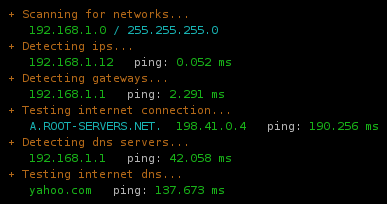
What I do is try to detect the parameters of the network step by step, using the regular tools like route, ifconfig. Once I know what the hosts are, I do a ping. Now, a ping obviously isn't a foolproof test; if you're on a network that doesn't allow outgoing icmp then it's entirely possible that you can tcp out anyway. So what you really should do is tcp on port 80, not ping. But ping is extremely portable, whereas doing a tcp/udp probe is asking a lot more from the environment, needing something like nmap or hping.

Once you've established that the connection is working, and you want to know more about the network, you can go further with something like netscan.

The code is relatively stupid and messy, but that's the way bash is.

# Author: Martin Matusiak <numerodix@gmail.com>
# Licensed under the GNU Public License, version 3


function havenet {
	local init="$(toolsinit)"

	platforminit
	case "$PLATFORM" in
		"Linux")
			echo "Platform: $PLATFORM"
			run_havenet "$init";;
		*)
			echo "Platform: $PLATFORM (local network detection not supported)"
			run_haveinet "$init";;
	esac
}

function haveinet {
	local init="$(toolsinit)"
	platforminit
	echo "Platform: $PLATFORM"
	run_haveinet "$init"
}

function platforminit {
	if $(which uname &>/dev/null); then
		PLATFORM=$(uname 2>/dev/null)
	fi
}

function toolsinit {
	local tools="true"
	local missing=()


	local cmds=(/sbin/route /sbin/ifconfig ping nmap)
	local args=(" -n" "" " -c1 -W2" " -T3")
	local names=(route ifconfig ping nmap)

	local i=-1
	while [ $i -lt $(( ${#names[@]} - 1 )) ]; do i=$(( $i+1 ))
		if [ 0 -eq $(which ${cmds[$i]} &>/dev/null ; echo $?) ]; then
			tools="$tools;local ${names[$i]}=\"${cmds[$i]}${args[$i]}\""
		else
			missing[${#missing[@]}]="${cmds[$i]}"
		fi
	done


	if [ ${#missing[@]} -gt 0 ]; then
		echo -e "Missing tools: ${cred}${missing[*]}${creset}" 1>&2
	fi

	echo "$tools"
}

function run_havenet {

	eval "$@"

	local localranges="169.254 10 172.(1[6-9]|2[0-9]|3[0-1]) 192.168"


	### Scan networks
	
	echo -e "${cyellow} + Scanning for networks...${creset}"
	test=$($route 2>/dev/null | egrep "^[1-9]")
	if [[ $? != 0 ]]; then
		echo -e "    ${cred}none found${creset}"
	else
		local nets=$(echo "$test" | sort | awk '{ print $1 }')
		for net in $nets; do
			local gw=$($route 2>/dev/null | egrep "^$net" | awk '{ print $3 }')
			printf "    ${cgreen}%-15s${creset} ${ccyan}%s${creset}\n" "$net" "/ $gw"
		done

		### Detect ips

		local ips=
		for net in $nets; do
			local r=$(echo $net | sed "s/.0$//g" | sed "s/.0$//g" | sed "s/.0$//g")
			local ip=$($ifconfig 2>/dev/null | grep "inet addr:$r" | sed "s/inet addr:\([0-9.]*\).*$/\1/g")
			ips="$ip $ips"
		done

		echo -e "${cyellow} + Detecting ips...${creset}"
		test=$(echo "$ips" | egrep -v "^[ ]+$")
		if [[ $? != 0 ]]; then
			echo -e "    ${cred}none found${creset}"
		else
			local on_lan=1
			for ip in $ips; do
				printf "    ${cgreen}%-15s${creset}  %s" "$ip" "ping: "
				test=$($ping $ip 2>/dev/null)
				if [[ $? != 0 ]]; then
					echo -e "${cred}failed${creset}"
				else
					local t=$(echo "$test" | grep "min/avg" | sed "s/.*= \([0-9.]*\)\/.*$/\1/g")
					echo -e "${cgreen}$t ms${creset}"
				fi

				### Test ips for lan
				local ip_on_lan=0
				for prefix in $localranges; do
					test=$(echo "$ip" | egrep "^$prefix" 2>/dev/null)
					if [[ $? == 0 ]]; then
						ip_on_lan=1
					fi
				done
				on_lan=$(( $on_lan & $ip_on_lan ))
			done


			if [ $on_lan -eq 1 ]; then
				
				### Detect gateways if on lan

				echo -e "${cyellow} + Detecting gateways (network is local)...${creset}"
				test=$($route 2>/dev/null | grep UG)
				if [[ $? != 0 ]]; then
					echo -e "    ${cred}none found${creset}"
				else
					local gws=$(echo "$test" | awk '{ print $2 }')
					for gw in $gws; do
						printf "    ${cgreen}%-15s${creset}  %s" "$gw" "ping: "
						test=$($ping $gw 2>/dev/null)
						if [[ $? != 0 ]]; then
							echo -e "${cred}failed${creset}"
						else
							local t=$(echo "$test" | grep "min/avg" | sed "s/.*= \([0-9.]*\)\/.*$/\1/g")
							echo -e "${cgreen}$t ms${creset}"
						fi
					done

					### Try inet connection if we have a gateway 
					run_haveinet "$@"
				fi
			else

				### Try inet connection, we're on wan
				run_haveinet "$@"
			fi
		fi
	fi

}


function run_haveinet {

	eval "$@"

	local rootname="A.ROOT-SERVERS.NET."
	local rootip="198.41.0.4"
	
	local dnsport="53"

	local inethosts="yahoo.com google.com"
	local inetport="80"


	### Test inet connection

	echo -e "${cyellow} + Testing internet connection...${creset}"
	echo -en "    ${ccyan}$rootname  ${cgreen}$rootip${creset}   ping: "
	test=$($ping $rootip 2>/dev/null)
	if [[ $? != 0 ]]; then
		echo -e "${cred}failed${creset}"
	else
		local t=$(echo "$test" | grep "min/avg" | sed "s/.*= \([0-9.]*\)\/.*$/\1/g")
		echo -e "${cgreen}$t ms${creset}"
	fi

	### Detect dns

	echo -e "${cyellow} + Detecting dns servers...${creset}"
	test=$(cat /etc/resolv.conf 2>/dev/null | grep ^nameserver)
	if [[ $? != 0 ]]; then
		echo -e "    ${cred}none found${creset}"
	else
		local dnss=$(echo "$test" | awk '{ print $2 }')
		for dns in $dnss; do
			printf "    ${cgreen}%-15s${creset}  %s" "$dns" "ping: "
			test=$($ping $dns 2>/dev/null)
			if [[ $? != 0 ]]; then
				echo -en "${cred}failed${creset}"
			else
				local t=$(echo "$test" | grep "min/avg" | sed "s/.*= \([0-9.]*\)\/.*$/\1/g")
				echo -en "${cgreen}$t ms${creset}"
			fi


			local proto="tcp" ; local udpflags=""
			if [[ `whoami` = "root" ]]; then
				proto="udp"; udpflags="-sU -PN"
			fi
			echo -en "  dns/$proto: "
			test=$($nmap $dns $udpflags -p $dnsport 2>/dev/null)
			if ! echo "$test" | grep "$dnsport/$proto" | grep "open" &>/dev/null; then
				echo -e "${cred}failed${creset}"
			else
				local t=$(echo "$test" | grep "scanned in" | sed "s/^.*in \([0-9.]*\) seconds.*$/\1/g")
				t=$(echo $t*1000 | bc)
				echo -e "${cgreen}$t ms${creset}"
			fi
		done
	fi

	### Test inet dns

	echo -e "${cyellow} + Testing internet dns...${creset}"

	for inethost in $inethosts; do
		printf "    ${cgreen}%-15s${creset}  %s" "$inethost" "ping: "
		test=$($ping $inethost 2>/dev/null)
		if [[ $? != 0 ]]; then
			echo -en "${cred}failed${creset}"
		else
			local t=$(echo "$test" | grep "min/avg" | sed "s/.*= \([0-9.]*\)\/.*$/\1/g")
			echo -en "${cgreen}$t ms${creset}"
		fi

		echo -en "  http: "
		test=$($nmap $inethost -p $inetport 2>/dev/null)
		if ! echo "$test" | grep "$inetport/tcp" | grep "open" &>/dev/null; then
			echo -e "${cred}failed${creset}"
		else
			local t=$(echo "$test" | grep "scanned in" | sed "s/^.*in \([0-9.]*\) seconds.*$/\1/g")
			t=$(echo $t*1000 | bc)
			echo -e "${cgreen}$t ms${creset}"
		fi
	done

}

UPDATE: Replacing with newer version that is a bit more clever.

UPDATE2: Added tool detection and platform detection.
on Perl

October 7th, 2008

I discovered Perl in the old millennium. I was building websites and I found out that HTML isn't Turing complete. Content and layout was cool, but it didn't really *do* anything. That's when I heard about CGI. I would find Perl scripts on sites that don't even exist anymore, upload them, get the 500 error, stare at the logs, revert any changes I had made, and try again. It wasn't sophisticated, and I wasn't even writing any code, all I wanted was to get the damn thing to work. The fact that Perl was the language made no difference to or fro. It was packed with frustration, though.

The principle of surprise

I've written code in Bash, C, C++, Haskell, Java, Pascal, PHP, Python, Ruby. So I feel like I've been around the block a few times, as far as choosing a language. And yet, Perl leaves me bewildered. One of the pillars of Ruby is something called "the principle of least surprise". What it means is that when you're not sure how to do something in Ruby, and you just do what seems most likely to work, it works. It's a wonderful quality, and it seems to be based on Perl, because Perl is the exact opposite.

Perl smacks horribly of apprenticeship culture. One where the novice is carefully guided through the valley of death, across the bridge over the pit of lava, past the nine-headed monsters, by a veteran monk. Send a tourist out there with a map and he's likely to be sent home in several pieces. Take a look at a common mistakes document and you find an immensity of pitfalls, not just in the language itself, but also from version to version.

This quality isn't merely at the fringes, it permeates the languages as a whole. Take arrays, a fundamental type in any language. Type print @arr and you get LarryWall, the elements of the array printed out. Type print @arr."\n" and you get 2<newline>. Que? Put an array in the context where a scalar is expected and you get the length of the array. Better yet, call a function like this: func(@arr, $arg3). Guess how many arguments the function has? Three. The array has been flattened and concated with $arg3. Yep, auto expanding arrays, ain't it grand? I like automation, but this is too automatic.

It's very common to get an integer where you expect to have a string. One common Perl function is chomp, it removes the trailing whitespace. I was getting an integer until I figured out it's a destructive function. This is another weird quality for a scripting language, you have lots of destructive functions that give integers as return values, as if you're doing syscalls in C.

I was stuck on one problem for hours because the value I was printing never made it to the screen. It turns out it was because of line buffering. So how do you flush the buffer? I looked for a flush function, there isn't one. Nah, you set the variable $|. Should have been obvious, but it wasn't.

Here's another one. Say you set a variable in a config module and read it in a code module. Now you want to rename it, how many places do you have to do that? The answer is four. 1) declaration, 2) use, 3) explicit export in config module with Exporter, 4) explicit import in code module. This is ridiculous.

A bag of hacks

When it comes right down to it, Perl is an amalgamation of hacks into a big, messy package. Granted, many of the syntactic hacks are useful, like qw(). Others are completely incomprehensible, like all the variables called $<nonalpha>. These all mean something: $_, $-, $+, $`, $', all related to regular expressions. $_, though, is used all over Perl to store "the thing you may want to have".

Despite all this syntax, there's none for declaring formal parameters to a function. It's just like Bash, pass in whatever you want, and then you read it out from an array. One common idiom is my ($var1, $var2) = @_. If you only have one variable you might be tempted to drop the parentheses and write my $var = @_, which will give you a fun bug (an integer), because now you're assigning an array to a scalar, not to another array.

Most (modern) languages have set a sane policy on pass-by-value vs pass-by-reference. And there are those with a foot in each camp, making the coder constantly second guess himself (thank you, C++). Perl, predictably, is conflicted about the issue. By and large you pass values around like you're in Bash, but pointers/references exist too. Here's a motivating example.. how do you pass two arrays to a function? Derm. You.. can't. When they come out the other end the arrays have auto-flattened and it's now one big array. So here's how: func(\@arr1, \@arr2). And in the function you say my ($arr1, $arr2) = @_. What the? Bear with me. Now you have two references. To dereference you go: @$arr1[2]. Same goes for %$ (hash) and &$ (func/closure reference). You sort of "wrap" the type being pointed to around the pointer. Needless to say, this syntax debauchery doesn't make code simpler.

It gets better. Perl's support for complex data structures is really... interesting. I was messing with an array of hashes once. And I needed to sort the records by a key in the hash. (Picture a table, click on the column name to sort by it, that sort of thing.) This might sound lame, but it's not obvious how to sort this. I spent hours on google and I found all sorts of examples, averaging about 15 lines. 15 lines to sort an array of hashes? What is this, C? I didn't understand them, I kept looking. Eventually I found an academic looking paper about the issue. It demoed various approaches, concluding with a 4 liner that was supposed to be the best, hurrah! The code is so incredible that I have to show you.

my @sorted =
	map $_->[0] =>
	reverse sort { $a->[1] cmp $b->[1] }
	map [ $_, pack('C1' =>
		$_->{"priority"}) ] => @unsorted;

Let me try to unobfuscate this. There's an array of hashes and we're sorting by the key called "priority", an integer value. In pack, we grab the value of "priority" for that particular hash and make a string of it (wtf). The map just outside pack does this for every hash. So what have we? A list of strings. We now run reverse sort (by decreasing integer value) on this. And the outer map is just a way of saying "take the existing array and replace it with this". I think. I still don't understand the details of this code. But imagine, convert all the keys you want to sort by to a frickin string and sort the strings lexically, then figure out which position every string went into and order the hashes accordingly. It's madness.

(Disclaimer: I was a total Perl noob when I was looking for this code, so maybe I missed something, maybe I explained it wrong.)

Somewhere in this madness someone decided to introduce a little order. It's become a standard for Perl code, you put this verse in your module: use strict. What it does is your code will no longer run (presumably the reason it's not on by default). It adds some static checking, so misspelled variable names no longer fail silently and that sort of thing.

Maddening syntax

Perl not only has syntax for "useful things", it has syntax everywhere. Like in PHP, the $ sign must accompany every variable always. Except if it's an array, then you use my @arr = (elem1, elem2), and my %hash = (key=>"value") for hashes. But then again, when you access and array element you write $arr[1], and same for hashes. So what the heck? You can also declare hashes through a reference, which goes my $data = {key=>"value"}. More syntax, more fun, right? Basically, it's @ for arrays, % for hashes, & for functions, and $ for... everything else.

And, of course, always remember my, because Perl thinks all variables should be global by default (wtf?).

I swear my fingers are more tired from Perl than any other language. There is so much syntax to type. At least it's tolerable when you have vim's tab completion set up. It's not "intelligent", so it doesn't filter out suggestions that don't fit the context, but it's good enough so you never have to type an identifier or keyword twice.

So why Perl?

Despite everything, in the end Perl is not such a horrible language. As the saying goes "you get used to everything", which implies than every language is usable, as you will eventually get used to it. The benchmark, then, should be on how long it takes you. And Perl is awful at first, terrible language to "try stuff out" in. Realize you have to change the type of a variable and because of the silly $/@/% syntax you have to run all around your code to change it. On the other hand, if you know what you need, then it's not as painful. And as I'm finding out, it doesn't take that long to adapt.

The nice thing about Perl is that it's so close to the shell, and a sort of power set of the shell. You have grep built-in, you have regular expressions as native as they get, you have various shell commands included, fast access (not necessarily easy access) to sockets, pipes, all the good stuff. It's nice to have thin wrappers around syscalls, sure as hell beats doing it in C. And heck, I like to break lines with . (concat) when printing strings, and because the ; is required I don't have to stress about it.

Beyond that, Perl has its place in the language ecosystem. Learning Perl is a way to understand Ruby, which is based, in part, on Perl. It's also a way to understand C, which Perl inherits from. That isn't to say using $_ in Ruby is a great idea, but now at least I know what it is when I see it.

And you know the blocks/closures that everyone loves about Ruby? They're from Perl. You can't write them as neatly, it is Perl after all, but I do quite like map { /$device on ([^ ]+)/ } $mount_data;

People obviously have their own criteria for picking a language. I've realized that perhaps the most important thing is how the language lets you manage data (or maybe I'm just saying that because I like Python?). Perl is definitely not a great choice here. It has good string handling, but once you get into multidimensional types (and I haven't even mentioned Perl's "object oriented" features) I run screaming back to Python.

I suppose Perl's chaos can in part be excused on historical grounds. After all, modern languages like Python and Ruby that don't have these problems had the benefit of Perl's example. But then again, Perl isn't the only older language still in use, but it does stand out as the most chaotic.

easy peasy full system backup

August 10th, 2008

You know how when someone accidentally deletes their files or their hard drive crashes or some other apocalyptic event occurs, the first thing people ask is "where is your backup"? Of course, we've all seen it (*ahem* been there :/ ). It's a bit unintuitive, because backups have no equivalent in the real world. If you drive your car into a lake, there's no way to get it back. But making backups is the single best way to prevent losing your stuff. So do it!

Don't backup "my files"

But don't just backup "my documents, my pictures, my whatever". If you computer crashes and you have a backup of "my files", then sure, it's not a total loss. It's better than nothing. But it's not what you actually need. You need the whole thing

This "my files" nonsense is born out of the fact that the delightful company that produced your operating system doesn't want you to be able to make a backup of it. Because if you did, you could make trivial copies of the operating system, and they don't like that idea. Have you ever asked yourself why in 30 years, through all manner of viruses, blue screens of death and hardware crashes Microsoft has never given you or sold you a full system backup program? It's not because they never thought of it. (Or because no one asked for it).

Making full backups is easy

If you've ever installed Gentoo manually (ie. not with one of the automated installers)... yes, the demographic for this one is not immense. But then that's why we're here, to spread the happy message! :happy: Anyway, if you have, then you know immensely easy (this is astonishing especially if you have a Windows background) it is to make a full system backup. In the course of a Gentoo install (and yes, I'm about to reveal the big secret here...*drumroll*), you boot from the livecd, you mount your root partition, you download a tar of a minimal Gentoo filesystem that has your basic /bin/ls and so on, and then you just.... untar it. That's it. No magic, no voodoo, no secret foobared locations on the filesystem that can't be written to, just extract the archive and you're done!

To put it bluntly, this is all you have to do:

tar zcvf backup.tar.gz /

And to restore the backup:

tar zxpvf backup.tar.gz -C /mnt/root_partition

Put that in perspective to the Windows world where a whole industry has sprung up to solve problems that Microsoft deliberately introduced with their *ahem* novel engineering. Idiotic programs like Norton Ghost that you have to get your hands on just to do the same simple thing that you can do with tar on a decent operating system.

Making it more convenient

Granted, you could just use the above tar command, but you may want something a little more convenient. For starters, you may want to skip some files on your file system. The method I use is inspired by a script posted on the gentoo forums a long time ago. I used that script for years without really understanding it, but a while back I decided to rewrite it to suit me better.

Besides just tarring the files it also writes a log file that you can grep to see if some particular file of interest is in the backup, it timestamps the backup with the current date/time and it keeps track of how many backups you want to keep.

Backups are made in a special backup_dir location. This directory is supposed to hold lists of files (recipes, if you like) you want to backup. For example, a simple recipe could be called full.lst:

/
--exclude=/backup/*.tgz*
--exclude=/proc/*
--exclude=/sys/*
--exclude=/tmp/*
--one-file-system

The syntax for the file is that of tar, and it's a list of things to backup. / means the full file system will be included. But certain directories are excluded, /backup because we don't want to include our old backup files in new backups, /proc and /sys because they are virtual file systems and don't contain "real" files, and we don't care about /tmp. Finally, we say --one-file-system, which prevents mounted disks, cds and things like that to be included.

And here is the script that makes this possible. Run it, it will produce a backup file that is compressed. Try to get it below 4.3gb and write it on a dvd+rw, now you have a backup system. :party:

#!/bin/bash
#
# Author: Martin Matusiak <numerodix@gmail.com>
# Licensed under the GNU Public License, version 3.

backup_dir=/backup
num_backups=1


verbose="$@"
lists=$backup_dir/*.lst
ext=tgz
date_params="%Y-%m-%d-%H%M"
nice_val="nice -n20"

# colors
wh="\e[1;37m"
pl="\e[m"
ye="\e[1;33m"
cy="\e[1;36m"
re="\e[1;31m"

if [[ "$verbose" && "$verbose" != "-v" ]]; then
	echo "Usage:  $0 [-v]"
	exit 1
fi

if [ ! -d $backup_dir ]; then
	echo -e "${re}Backup dir $backup_dir does not exist.${pl}"; exit 1
fi


for list in $(ls $lists); do
	name=$(basename $list .lst)
	file_root=$backup_dir/$name.$(date +$date_params)
	
	stdout="1> /dev/null"
	stderr="2> $file_root.$ext.err"
	if [ "$verbose" ]; then
		stdout=""
	fi

	cmd="cat $list | $nice_val xargs tar zlcfv \
		$file_root.$ext $stderr | tee $file_root.$ext.log $stdout"

	trap 'echo -e "${re}Received exit signal${pl}"; exit 1' INT TERM

	echo " * Running \`$name\` job..."
	if [ "$verbose" ]; then echo -e ${ye}$cmd${pl}; fi
	echo -en $cy; bash -c "$cmd" ; echo -en $pl
	status_code=$?

	if [ $status_code -gt 0 ]; then
		# Dump error log
		echo -en $re ; cat $file_root.$ext.err
		echo -en $pl ; echo "Tar exit code: $status_code"
	else
		# Kill error file
		rm $file_root.$ext.err
	fi

	# Evict old backups we don't want to keep
	num=$num_backups
	for evict in $(ls -t $backup_dir/$name.*.$ext); do
		if [ $num -le 0 ]; then 
			rm -f "$evict"
		else
			num=$(($num-1))
		fi
	done

	# Report number of files in backup
	echo -n "$(wc -l < $file_root.$ext.log) files"
	echo ", $(ls -l $file_root.$ext | awk '{ print $5 }') bytes"

done

Worse is better

I've been thinking about how to handle backups most effectively, and it occurs to me that backups are a case of "worse is better". The thing is you could make a really nice and easy application to make backups, but .tar.gz is still the optimal format to store them in. Wherever you are, you have tar and gzip available, and restoring backups usually happens under somewhat constricted conditions, sometimes without network access. So you want to avoid introducing dependencies, it's safer to make do with the tools that are there already.

So it may not be the most elegant system, but it's damn reliable.

Limitations (NEW)

Basically what I'm saying is that if you have no backup system then using tar is a pretty decent system. At the very least it has worked well for me the last 5 years. That isn't to say you shouldn't use a different method if you have different needs.

What about scaling? Well, I think this works quite well up to backups of say 4gb or so. My root partition is using 12gb of space at the moment. The purpose of this method is to back up your working system with all the configuration, applications and so on. Not to back up your mp3 collection, I would exclude that (not least because it's pointless to compress mp3 files and other formats that already are well compressed).

What about the bootloader? (NEW)

Some people have asked how this backup method concerns the bootloader. The answer is that it does backup the files that belong to the bootloader (in /boot). It does not backup the actual boot sector of your hard drive (which isn't represented as a file). So if, for example, you want to restore the backup on another computer (which I've done lots of times), you'll still need to use grub/lilo to update the boot sector.

UPDATE: Apologies to the indignant Windows users. I pretty much wrote this in rant mode, without doing any research and what I wrote about Windows is just from my own experience. I would have been more thorough if I had known this would make the frontpage of digg and draw so many hits.

idioms for robust python

July 15th, 2008

Robustness is an interesting notion, isn't it? It isn't about being prepared for what you expect to happen, but actually for what you don't expect. If you take this somewhat vague idea of robustness a step further you drift towards the more software engineering-y practice of defensive programming.

Before delving in, it might be good to consider what precisely you can hope to achieve with robust code. If your program crashes with a KeyError on a dictionary lookup, it's not very robust. On the other hand, if you keep getting AttributeErrors because your socket object is null because the network is dead, you have bigger problems than attribute access.

Robust code doesn't absolve you from error handling. Your program will experience error conditions, and you have to design it so that you can handle them in the right place. If your code is robust, you can achieve this goal: errors will be caught without crashing your program.

Accessing attributes

Attribute access is a minefield. I know, the object oriented philosophy makes it sound like a trifle, but it's not. When you first started coding you probably wrote code like this:

class Bottle(object):
    def capacity(self):
        return 45

# ...

print bottle.capacity()

It looks very innocuous, but what could go wrong here? We make the assumption, perhaps unwittingly, that bottle has been initialized at this point in time. Suppose bottle is an instance member that was set to None initially, and was supposed to be instantiated by the time we execute this line. Those of us who've been on a few java gulags know that this is how the recurring NullPointerException nightmare begins. In Python you get an AttributeError (sounds more benign, doesn't it?).

If you expected to receive bottle from a database or the network, you probably have good reason to suspect that it might be null. So you'll probably write a lot of code like this:

if bottle and bottle.capacity:
    print bottle.capacity()

If bottle isn't null (None, 0 or an empty string/iterable), we think everything is in order. We might also check the attribute we want to make sure that too is not null. The trouble is, that is an attribute access. So if bottle isn't null, but missing capacity, there's your AttributeError again!

It should be obvious by now, that calling any method on bottle is off the table, in case bottle is null. Instead, let's do it this way:

f = getattr(bottle, 'capacity', None)
if f:
    print f()

getattr is a very clever idea. You tell it to get the capacity attribute from the bottle object, and in case that attribute doesn't exist, just return None. The only way you'll get an exception here (a NameError) is if bottle isn't defined in the namespace. So once we have this object, either capacity or None, we check that it's not null, and then call the method.

You might think that this seems like low level nitpicking. And anyway, how do you know that capacity is a method, you could still get a TypeError here. Why not just check if bottle is an instance of the class Bottle. If it is, then it's reasonable to expect capacity is a method too:

if isinstance(bottle, Bottle):
    print bottle.capacity()

This isn't as robust as it seems. Remember that we're trying to prepare for something that wasn't planned. Suppose that someone moved capacity to a baseclass (superclass) of Bottle. Now we are saying only Bottle instances can use the capacity method, even though other objects also have it.

It's more Pythonic to cast a wider net and not be so restrictive. We could use getattr to get the object that we expect is a method. And then we can check if it's a function:

unkn = getattr(bottle, 'capacity', None)
import types
if isinstance(unkn, types.FunctionType):
    print unkn()

This doesn't work, because a method is not of type function. You can call it, but it's not a function (queer, isn't it?). An instance of a class that implements __call__ is also callable, but also not a function. So we should check if the object has a __call__ method, because that's what makes it callable:

unkn = getattr(bottle, 'capacity', None)
if callable(unkn):
    print unkn()

Now obviously, writing every method call in your program like this would be madness. As a coder, you have to consider the degree of uncertainty about your objects.

Another way to go about this is to embrace exceptions. You could also write the most naive code and just wrap a try/except around it. I don't enjoy that style as much, because try/except alters the control flow of your program. This merits a longer discussion, but basically you have to increment the level of indentation, variable scope is a concern, and exceptions easily add up.

Setting attributes

If you only want to set a predetermined attribute, then nothing is easier (obviously this won't work on objects that use slots, like a dict). You can set attributes both for instances and classes:

bottle.volume = 4
Bottle.volume = 4

But if the attribute name is going to be determined by some piece of data (like the name of a field in a database table, say), you need another approach. You could just set the attribute in the object's __dict__:

bottle.__dict__['volume'] = 4
Bottle.__dict__['volume'] = 4    ## fails

But this is considered poor style, __dict__ isn't supposed to be accessed explicitly by other objects. Furthermore, the __dict__ of a class is exposed as a dictproxy object, so you can't do this to set a class attribute. But you can use setattr:

setattr(bottle, 'volume', 4)
setattr(Bottle, 'volume', 4)

Dictionary lookup

Dictionaries, the bedrock of Python. We use them all the time, not always wisely. The naive approach is to assume the key exists:

bases = {"first": "Who", "second": "What"}

print bases["third"]    ## raises KeyError

Failing that, dicts have a has_key method just for this purpose:

if bases.has_key("third"):
    print bases["third"]

But it's more Pythonic to keep it simple as can be:

if "third" in bases:
    print bases["third"]

dicts also have a failsafe method equivalent to getattr, called get. You can also give it a default value (as the second parameter, not shown here) to return if the key doesn't exist:

third = bases.get("third")
if third:
    print third

I would argue that it's preferable, because you don't have to look up the element twice. (And you don't risk defeat snatched from the jaws of victory if a context switch occurs between those two statements and another thread removes the key after you've checked for it.)

killdupes: detect duplicate and incomplete files

July 6th, 2008

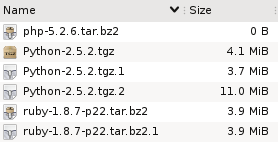
Suppose you have these files in a directory. What do you think has happened here?

Well, it looks like someone tried to download the php interpreter, and for some reason that didn't work, because the file is empty.

Then we have two copies of the ruby distribution, and both have the same size. So it looks like that download did complete successfully, but maybe the person downloaded it once and then forgot about it?

Finally, there are three files that contain the python distribution, but they are all different sizes. Since we know that wget adds extensions like .1 to avoid overwriting files, it looks like the first two attempts at this download failed, and the third succeeded.

Three types of redundant files

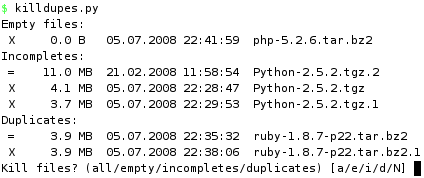
These three cases demonstrate classes of redundant files:

  1. Empty files.
    The filename hints at what the intended content was, but since there is no data, there's no way to tell.
  2. Duplicate files.
    Multiple files have the exact same content.
  3. Incomplete/partial files.
    The content of one file comprises the partial content of another, larger file. The smaller file is a failed attempt at producing the larger one.

Now look back at the first screenshot and tell me how quickly would you detect these three cases if a) the files didn't have descriptive names (random names, say), and b) they were buried in a directory of 1000 other files? More importantly, how long would you even bother looking?

What if you had a tree of directories where you wanted to eliminated duplicate or incomplete files? Even worse.

How to proceed?

Finding empty files is trivial. Finding duplicate files is also relatively easy if you just look for files that have the same size. But to be sure that they are equal, you have to actually examine their contents. One way is to compute checksums (md5, for instance) and compare them.

But that doesn't help with partial files, because any file that is smaller than another file could potentially be incomplete relative to the larger one.

I set out to solve this without expecting that it would be very hard, but it turns out to be complicated. The code is rather ugly and I wonder if there is an easier way. In a nutshell, we read sequential chunks from all the files in the directory, hashing the data as we go along. The hashes then become keys in a dictionary, which will put files whose chunks hash to the same value in the same bucket. And that's how we know they are identical. As long as any bucket has more than two files (ie. so far they are the same), we keep on going.

All in all, we keep reading chunks from those files (beginning with all) whose data produce a hash that belongs to more than one file. In other words, we have to read all the common bytes in all the files + one extra chunk from each (to determine that the commonality has ended).

The size of a chunk is set to 100kb, but will be determined by how far we can read into a file depending on the size of the other files "in the running". Suppose we are at position (offset) 100kb, where one file is 300kb and another is 110kb, then we can only read 10kb from each to check if the data is the same. Whatever the outcome, we don't need to read any more than that, because we've reached the end of the smaller one.

Obviously, this won't work on files that aren't constructed sequentially (torrent and whatever).

The nitty gritty

The center piece of the code is a hash table called offsets. The keys, indeed, represent offsets into the mass of files we are working on. The values are themselves hash tables which contain hashes of chunks read from the files.

So we start out in offsets[0], which is a hash table with only one item, containing all of the files. We read up to 100kb from each file, until we reach the chunk size or the end of the smallest file. The size read is captured in readsize, which determines new_offset. We will now have a new entry called offsets[new_offset]. We how hash (with md5) a readsize number of bytes of data from each file, so that each hash becomes an entry into the new hash table at offsets[new_offset]. As the value we store the file that produced it.

And so it continues. Every iteration produces a new offset and a new set of hashes, in each case the new hash combines the old hash with the new data. In the end, we have a number of lists indexed by hash at every offset level. If there are multiple files in such a list, then they have all hashed to the same value up to this point in the file (they are the same so far).

The interesting lists are those where at least one file has reached eof. Because that means we have read the whole file and its full contents is equal to that of another file. If they are the same size (both have reached eof), they are duplicates of each other. If not, the smaller is incomplete relative to the larger.

How lazy are we?

Unfortunately, it's hard to predict how many bytes have to be read, because that depends entirely on how much the files have in common. If you have two copies of an 700mb iso image you might as well md5sum them both, we can't do any better than that. But if they aren't the same, we stop reading chunks as soon as they become distinct, which is likely to be at the very beginning. Equally, memory use will be highest at the start since we're reading from all of the files.

Performance

The slowest part of execution is obviously disk io. So what if we run it on a hot cache so that all (or most) of the blocks are already in memory?

In the worst case, we have two 700mb files that are identical (populated from /dev/urandom).

5.6s  md5sum testfile*
9.4s  killdupes.py 'testfile*'

Slower, but not horribly slow. Now let's try the best case. Same files, but we delete the first byte from one of them, displacing every byte by one to the left relative to the original.

6.2s   md5sum testfile*
0.02s  killdupes.py 'testfile*'

And there it is! No need to hash the whole thing since they're not equal, not even at byte 1.

On the other hand, a rougher test is to set it free on a directory with lots of files. For instance, in a directory of 85k files, there are 42 empty files, 7 incomplete and 28 duplicates. We had to read 2gb of data to find all these. Not surprisingly, md5sum didn't enjoy that one as much.

41m  md5sum
36m  killdupes.py

So that's pretty slow, but can you make it faster?

#!/usr/bin/env python
#
# Author: Martin Matusiak <numerodix@gmail.com>
# Licensed under the GNU Public License, version 3.
#
# revision 3 - Sort by smallest size before reading files in bucket
# revision 2 - Add dashboard display
# revision 1 - Add total byte count


from __future__ import with_statement
import glob
import hashlib
import os
import sys
import time


CHUNK = 1024*100
BYTES_READ = 0

_units = { 0: "B", 1: "KB", 2: "MB", 3: "GB", 4: "TB", 5: "PB", 6: "EB"}

class Record(object):
    def __init__(self, filename, data=None, eof=False):
        self.filename = filename
        self.data = data
        self.eof = eof

def format_size(size):
    if size == None:
        size = -1

    c = 0
    while size > 999:
        size = size / 1024.
        c += 1
    r = "%3.1f" % size
    u = "%s" % _units[c]
    return r.rjust(5) + " " + u.ljust(2)

def format_date(date):
    return time.strftime("%d.%m.%Y %H:%M:%S", time.gmtime(date))

def format_file(filename):
    st = os.stat(filename)
    return ("%s  %s  %s" % 
          (format_size(st.st_size), format_date(st.st_mtime), filename))

def write(s):
    sys.stdout.write(s)
    sys.stdout.flush()

def clear():
    write(79*" "+"\r")

def write_fileline(prefix, filename):
    write("%s %s\n" % (prefix, format_file(filename)))

def get_hash(idx, data):
    m = hashlib.md5()
    m.update(str(idx) + data)
    return m.hexdigest()

def get_filelist(pattern=None, lst=None):
    files = []
    it = lst or glob.iglob(pattern)
    for file in it:
        file = file.strip()
        if os.path.isfile(file) and not os.path.islink(file):
            files.append(Record(file))
    return files

def get_chunk(offset, length, filename):
    try:
        with open(filename, 'r') as f:
            f.seek(max(offset,0))
            data = f.read(length)
            ln = len(data)
            global BYTES_READ
            BYTES_READ += ln
            return ln, data
    except IOError, e:
        write("%s\n" % e)
        return 0, ""

def short_name(lst):
    lst.sort(cmp=lambda x, y: cmp((len(x), x), (len(y), y)))
    return lst

def rev_file_size(lst):
    lst.sort(reverse=True,
             cmp=lambda x, y: cmp(os.path.getsize(x), os.path.getsize(y)))
    return lst

def rec_file_size(lst):
    lst.sort(cmp=lambda x, y: cmp(os.path.getsize(x.filename),
                                  os.path.getsize(y.filename)))
    return lst

def compute(pattern=None, lst=None):
    zerosized = []
    incompletes = {}
    duplicates = {}

    offsets = {}
    offsets[0] = {}
    key = get_hash(0, "")

    write("Building file list..\r")
    offsets[0][key] = get_filelist(pattern=pattern, lst=lst)

    offsets_keys = offsets.keys()
    for offset in offsets_keys:
        offset_hashes = [(h,r) for (h,r) in offsets[offset].items() if len(r) > 1]
        buckets = len(offset_hashes)
        for (hid, (hash, rs)) in enumerate(offset_hashes):
            rs = rec_file_size(rs) # sort by shortest to not read redundant data
            reads = []
            readsize = CHUNK
            for (rid, record) in enumerate(rs):
                ln, data = get_chunk(offset, readsize, record.filename)
                s = ("%s | Offs %s | Buck %s/%s | File %s/%s | Rs %s" % 
                      (format_size(BYTES_READ),
                       format_size(offset),
                       hid+1,
                       buckets,
                       rid+1,
                       len(rs),
                       format_size(readsize)
                      )).ljust(79)
                write("%s\r" % s)
                if ln == 0:
                    record.eof = True
                else:
                    r = Record(record.filename, data)
                    if ln < readsize:
                        readsize = ln
                    reads.append(r)
            
            if reads:
                new_offset = offset+readsize
                if new_offset not in offsets:
                    offsets[new_offset] = {}
                    offsets_keys.append(new_offset)
                    offsets_keys.sort()

            for r in reads:
                new_hash = get_hash(new_offset, hash+r.data[:readsize])
                r.data = None
                if new_hash not in offsets[new_offset]:
                    offsets[new_offset][new_hash] = []
                offsets[new_offset][new_hash].append(r)
    clear() # terminate offset output

    offsets_keys = offsets.keys()
    offsets_keys.sort(reverse=True)
    for offset in offsets_keys:
        offset_hashes = offsets[offset]
        for (hash, rs) in offset_hashes.items():
            if offset == 0:
                zerosized = [r.filename for r in rs if r.eof]
            else:
                if len(rs) > 1:
                    eofs = [r for r in rs if r.eof]
                    n_eofs = [r for r in rs if not r.eof]
                    if len(eofs) >= 2 and len(n_eofs) == 0:
                        duplicates[eofs[0].filename] = [r.filename for r in eofs[1:]]
                    if len(eofs) >= 1 and len(n_eofs) >= 1:
                        key = rev_file_size([r.filename for r in n_eofs])[0]
                        if not key in incompletes:
                            incompletes[key] = []
                        for r in eofs:
                            if r.filename not in incompletes[key]:
                                incompletes[key].append(r.filename)

    return zerosized, incompletes, duplicates

def main(pattern=None, lst=None):
    zerosized, incompletes, duplicates = compute(pattern=pattern, lst=lst)
    if zerosized or incompletes or duplicates:

        kill = " X "
        keep = " = "

        q_zero = []
        q_inc  = []
        q_dupe = []

        if zerosized:
            write("Empty files:\n")
            for f in zerosized: 
                q_zero.append(f)
                write_fileline(kill, f)

        if incompletes:
            write("Incompletes:\n")
            for (idx, (f, fs)) in enumerate(incompletes.items()):
                fs.append(f)
                fs = rev_file_size(fs)
                for (i, f) in enumerate(fs):
                    prefix = keep
                    if os.path.getsize(f) < os.path.getsize(fs[0]):
                        q_inc.append(f)
                        prefix = kill
                    write_fileline(prefix, f)
                if idx < len(incompletes) - 1:
                    write('\n')

        if duplicates:
            write("Duplicates:\n")
            for (idx, (f, fs)) in enumerate(duplicates.items()):
                fs.append(f)
                fs = short_name(fs)
                for (i, f) in enumerate(fs):
                    prefix = keep
                    if i > 0:
                        q_dupe.append(f)
                        prefix = kill
                    write_fileline(prefix, f)
                if idx < len(duplicates) - 1:
                    write('\n')

        inp = raw_input("Kill files? (all/empty/incompletes/duplicates) [a/e/i/d/N] ")

        if "e" in inp or "a" in inp:
            for f in q_zero: os.unlink(f)
        if "i" in inp or "a" in inp:
            for f in q_inc: os.unlink(f)
        if "d" in inp or "a" in inp:
            for f in q_dupe: os.unlink(f)

if __name__ == "__main__":
    pat = '*'
    if len(sys.argv) > 1:
        if sys.argv[1] == "-h":
            write("Usage:  %s ['<glob pattern>'|--file <file>]\n" %
                  os.path.basename(sys.argv[0]))
            sys.exit(2)
        elif sys.argv[1] == "--file":
            lst = open(sys.argv[2], 'r').readlines()
            main(lst=lst)
        else:
            pat = sys.argv[1]
            main(pattern=pat)
    else:
        main(pattern='*')