Archive for the ‘code’ Category

renewip: when the router keeps disconnecting

June 15th, 2008

So we now all have broadband connections and everything is great, right? Well, not quite. Some providers have better services than others. My connection seems rather fragile at times and tends to die about once in three-four days. When that happens, no amount of resetting the equipment helps to get it working again. It's an upstream issue that I have no control over.

But there is another problem. Once the cable modem starts working again, the router (which receives an IP address from my provider, and serves LAN and wifi locally) doesn't seem to know this and doesn't automatically re-establish a connection. Or I'm not really sure what it does, it's a black box and there is a web interface to it, where there's a button to press to do this, which sometimes works. But what really is happening, who knows. There seems to be a weird timing problem to the whole thing, where if I kill the power for both the modem and the router and they both come back at the same time, it generally works. However, if the modem is taking longer to negotiate a link, the router will be disconnected. And apparently doesn't try to reconnect on its own, so I've been stuck rebooting the two a few times until the timing is right. Resetting them separately for some reason doesn't seem to work.

So what can be done about it? Well, the router does have that stupid web interface, so it's possible to make those clicks automatically if we're disconnected. Python's urllib makes this very easy to do. First we login with router_login, which submits a form with POST. Then we check the state of the internet connection with check_router_state, which just reads out the relevant information from the page. And if it's disconnected we run renew_router_connection to submit another form (ie. simulating the button click on the web page).

Testing connectivity

More than just testing if the router has a connection to the provider, broadband connections sometimes have connectivity problems. Even if you can get a connection, the provider sometimes has problems on his network, meaning your connection doesn't work anyway.

So I came up with a test to see how well the connection is working. It's an optimistic test, so that first we assume we have a fully functional connection and ping yahoo.com. It doesn't matter what host we use here, just some internet host that is known to be reliable and "always" available. For this to work these conditions must be met:

  1. We have to reach the gateway of the subnet where our broadband IP address lives.
  2. We have to reach the provider's nameserver (known as dns1 in the code) to look up the host "yahoo.com".
  3. We have to reach yahoo.com (we have their IP address now).

So first we ping yahoo.com. If that fails, it could be because dns lookup failed. So we ping the provider's nameserver. If that fails, the provider's internal routing is probably screwed up, so we ping the gateway. And if that fails too then we know that although we have an IP address, the connection is dead (or very unstable).

#!/usr/bin/env python
#
# Author: Martin Matusiak <numerodix@gmail.com>
# Licensed under the GNU Public License, version 3.

import os
import re
import sys
import time
import urllib

ip_factory = "192.168.2.1"
password = ""

inet_host = "yahoo.com"


def write(s):
    sys.stdout.write(s)
    sys.stdout.flush()

def grep(needle, haystack):
    if needle and haystack:
        m = re.search(needle, haystack)
        if m and m.groups(): return m.groups()[0]

def invoke(cmd):
    (sin, sout) = os.popen2(cmd)
    return sout.read()

def ping(host):
    cmd = 'ping -c1 -n -w2 ' + host + ' 2>&1'
    res = invoke(cmd)
    v = grep("rtt min/avg/max/mdev = [0-9.]+/([0-9.]+)/[0-9.]+/[0-9.]+ ms", res)
    if v: return int(float(v))

def find_lan_gateway():
    cmd = "route -n"
    res = invoke(cmd)
    v = grep("[0-9.]+\s+([0-9.]+)\s+[0-9.]+\s+UG", res)
    if v: return v

def load_url(url, params=None):
    data = None
    if params: data = urllib.urlencode(params)
    f = urllib.urlopen(url, data)
    return f.read()


def router_login():
    form = {"page": "login", "pws": password}
    load_url("http://%s/login.htm" % ip, form)

def check_router_state():
    state = { "conn": None, "gateway": None, "dns1": None }
    router_login()
    s = load_url("http://%s/js/js_status_main.htm" % ip)
    if s:
        v = grep("var bWanConnected=([0-9]);", s)
        if v == "1": state['conn'] = True
        elif v == "0": state['conn'] = False
        if state['conn']:
            g = grep('writit\("([0-9.]+)","GATEWAY"\);', s)
            if g and g != "0.0.0.0": state['gateway'] = g
            g = grep('writit\("([0-9.]+)","DNSIP"\);', s)
            if g and g != "0.0.0.0": state['dns1'] = g
    return state
    
def renew_router_connection():
    router_login()
    form = {"page": "status_main", "button": "dhcprenew"}
    s = load_url("http://%s/status_main.htm" % ip, form)
    return s


ip = find_lan_gateway()
if not ip:
    ip = ip_factory
    write("LAN gateway detection failed, using factory ip %s for router\n" % ip_factory)
else:
    write("Router ip: %s\n" % ip)

while True:
    try:
        router = check_router_state()
        t = time.strftime("%H:%M:%S", time.localtime())
        if router['conn']:
            
            hosts = [(inet_host, inet_host),
                ("dns1", router['dns1']), ("gateway", router['gateway'])]
            connectivity = ""
            write("[%s] Connected  " % t)
            for (name, host) in hosts:
                delay = ping(host)
                if delay:
                    write("(%s: %s) " % (name, delay))
                    break
                else:
                    write("(%s !!) " % name)

            write("\n")
        else:
            write("[%s] NOT CONNECTED, attempting reconnect\n" % t)
            renew_router_connection()
    except Exception, e:
        cls = grep("<type 'exceptions.(.*)'", str(e.__class__))
        write("%s: %s\n" % (cls, e))
    time.sleep(3)

sorting algorithms

May 12th, 2008

People always seem to say that datastructures and algorithms are supposed to be embarrassingly obvious to anyone who's a coder. I wonder to what extent this is actually the case. I recall taking a course on this way back in college when I wasn't quite ready for it yet, of which not a whole lot remains in memory.

So I thought it would be fun to revisit that stuff and write some of the algorithms. As a bonus, why not write them in c, a language I know almost nothing about, just to add some spice to the menu. The way I was doing is I would look up the algorithm on 'pedia, figure out what it does, and then try to write it. And if I got totally stuck I would peer at the code to debug my broken mental model. This only happened once.

From the outset, I was thinking that it would be useful to compare them on performance as well, so timing would definitely be involved. I remember we did some timing back in college, which was pretty amateurish. Clocking runtimes and curve fitting, that was lame. It doesn't address the core of the problem. We don't actually care whether an algorithm is fast or slow, that's not the point. What we're really interested in is how much work it's doing. Speed is just a function of that. Naive algorithms do too much work, they go grocery shopping and leave the shopping list at home, so they have to go home and back for every item to see what it was.

So taking that concern into account, I devised a simple struct to accumulate some metrics as the algorithm is executing. cmp stores the number of comparisons made during execution, ie. comparing elements of the array against each other. ass stores the number of assignments of array elements. rec stores the number of function calls to the particular function (interesting when functions are recursive). Finally, unit and ulen are just type variables that define the type of array elements and array indexes (lengths) respectively.

typedef unsigned long unit;
typedef unsigned long ulen;

typedef struct {
	char *name;
	ulen cmp;
	ulen ass;
	ulen rec;
} Metrics;

With that out of the way, the data types should be clear (as clear as they'll ever be I guess). I actually did it this way so I could switch the type in just one place while I was playing with it. (It's a bit easier to see if a few shorts are in order before you go to large datasets and want a wide value space.)

Before we move along to the algorithms themselves, one thing to consider is what sort of data they'll be sorting. Different algorithms have different performance characteristics depending on how much of the data is already sorted. I decided it would be most instructive to give them a real workout, so I'm feeding data from /dev/urandom. This is essentially the worst case scenario, the data is pretty damn random and the stats below reflect this.

One last thing. In order to collect metrics the algorithms were mildly instrumented. I've tried to make this as unintrusive as possible, but it necessarily adds a line here and there. I'm not sure if the metrics are exactly right, but they should at least give you a decent order-of-magnitude idea.

Bubble sort

The first algorithm making an appearance is bubble sort. What bubble sort does is start at the beginning of the array, and repeat the same action for each position in the array. It takes the element that is found there, and if it's larger than the element on the right, it swaps them. And then it keeps swapping up the array until it finds a neighbor that isn't smaller. Once that happens, it moves on to the next position in the array.

It turns out that when you do this for each position in the array, you get all the elements in order. If you're still skeptical think of it this way. The largest element will have been swapped all the way to the end, so it's definitely in order. The smallest element, no matter where it happened to start out, will have been swapped past by all the larger elements to its left, so it eventually ends up at the very beginning. And the same holds for all the elements in between.

Metrics bubblesort(unit *arr, ulen length) {
	Metrics ms = {"bubblesort", 0, 0, 1};
	ulen swaps = 1;
	unit swap;
	for(ulen i=0; i<length-1 && swaps > 0; i++) {
		swaps = 0;
		for (ulen j=0; j<length-1; j++, ms.cmp++) {
			if (arr[j] > arr[j+1]) {
				swaps += 3;
				swap = arr[j];
				arr[j] = arr[j+1];
				arr[j+1] = swap;
			}
		}
		ms.ass += swaps;
	}
	return ms;
}

=== bubblesort ===
n          : 100000
n*log(n)   : 1660964
n^2        : 10000000000
calls      : 1
comparisons: 9938500614
assignments: 7498934958
runtime    : 30.540000s

As you'll have spotted, ms is the variable carrying the metrics, so any reference to ms.something has to do with collecting metrics, the rest is algorithm logic. Below the code is the metric listing I computed. Just to keep it consistent all these runs were done on 100,000 item arrays. For your convenience, there are also the values for n2 and n·log(n), useful reference points for sorting algorithms.

This algorithm stops working once it determines that no more sorting is necessary. In this case, you'll notice the number of comparisons made actually approaches n2, which is a pretty good indication that the data was quite random indeed. The assignments counter shows that the assignments in the innermost if block were executed once for every four comparisons. I would imagine that assignments are more expensive than comparisons, but I don't really know, and it's really an implementation detail. Obviously, the reason to make a comparison is to set the stage for an assignment, so the two numbers always follow in the same order of magnitude.

The runtime shows how long the algorithm took to execute, but it's a somewhat less useful measure, influenced as it is by how heavy the traffic was to the supermarket that day.

Selection sort

Selection sort works more the way that a human would sort things. It first scans the whole array for the smallest element, and then swaps it with the element in the first position. It then moves one slot over and again scans the rest of the array for the smallest element, swapping it into the second position. This obviously produces a sorted array.

Metrics selectionsort(unit *arr, ulen length) {
	Metrics ms = {"selectionsort", 0, 0, 1};
	unit swap;
	ulen cursor;
	for(ulen i=0; i<length-1; i++) {
		cursor = 0;
		for(ulen j=i+1; j<length; j++, ms.cmp+=2) {
			if (arr[i] > arr[j] && (cursor == 0 || arr[cursor] >= arr[j])) {
				cursor = j;
			}
		}
		if (cursor > 0) {
			swap = arr[i];
			arr[i] = arr[cursor];
			arr[cursor] = swap;
			ms.ass += 3;
		}
	}
	return ms;
}

=== selectionsort ===
n          : 100000
n*log(n)   : 1660964
n^2        : 10000000000
calls      : 1
comparisons: 9999900000
assignments: 299958
runtime    : 27.130000s

Sorting this way is more predictable, because after every pass in the sorting you know that you have a fully sorted sub array at the beginning that needs no further work. And therefore you know that the remainder of the array that is going to be scanned on every subsequent pass will shrink steadily. This is in contrast to bubble sort where even after coming half way you don't know how many comparisons will have to be made on the next pass.

But there is still a whole lot of comparisons to be made to find the smallest element each time. There are far fewer assignments, however, because the element once located is put in its final position.

Insertion sort

Insertion sort is rather different from the first two. Instead of working on the whole array and finding the global minimum, it sorts a growing part of the array for every pass. Starting at the beginning, it compares the element in the second position with the one in the first position and inserts it where it's supposed to go, either in position one or doing nothing (remains in position two). It then looks at the third element and inserts it where it's supposed to go, and so on.

The difference here is that the portion that has been sorted isn't final yet, because there are a bunch of elements remaining that will be inserted somewhere in between those we have in order.

Metrics insertionsort(unit *arr, ulen length) {
	Metrics ms = {"insertionsort", 0, 0, 1};
	ulen j;
	unit swap;
	for(ulen i=1; i<length; i++, ms.ass+=2) {
		swap = arr[i];
		for(j=i-1; ms.cmp++, j>=0 && arr[j] > swap; j--, ms.ass++) {
			arr[j+1] = arr[j];
		}
		arr[j+1] = swap;
	}
	return ms;
}

=== insertionsort ===
n          : 100000
n*log(n)   : 1660964
n^2        : 10000000000
calls      : 1
comparisons: 2499744985
assignments: 2499844984
runtime    : 3.860000s

Insertion sort is substantially more efficient, and the big win comes from not looking at the whole array to find the right element. Instead, elements are admitted in the order they stand, and put away in the right place. This dramatically reduces the number of comparisons and assignments alike. However, there is still the undesirable case of having to insert a small element near the beginning of a long sorted sub array, having to move all the elements to the right up the array, by one.

But even though it is more clever, we can't get away from the fact that insertion sort is still an O(n2) algorithm, as the numbers show.

Quicksort

In order to break the n2 barrier we have to look at algorithms that actually guarantee never having to look through the whole array, because that's what really takes a lot of work. Quicksort is an odd one, because it doesn't give this guarantee, but it's sufficiently unpredictable to almost never have to do this.

Here's how it works. It picks a random element called the pivot. This can be any element really, in our case it will be the first one in the array. Now what we want to achieve is that the pivot is put in the right place. So we run through the whole array (but just the first time!) and assemble two new arrays, for those elements smaller than the pivot, and those greater. We don't know anything else about the elements in these two sub lists, only that they are on either side of the pivot. But by now we've already moved all the elements that belong to the left of the pivot over to that side, and vice versa. Which means that we can sort the two halves independently. So for each half we again choose a pivot, assemble two sub lists, and so on.

Eventually this division gives two sub arrays of just one element, with a pivot in the middle, which don't have to be sorted any further. So then we're all done, and we just collect all the sub results into one array.

Metrics quicksort(unit *arr, ulen length) {
	Metrics ms = {"quicksort", 0, 0, 1};
	if (length > 1) {
		unit pivot = arr[0];

		unit *left = malloc(length * sizeof(unit));
		unit *right = malloc(length * sizeof(unit));

		ulen l = 0, r = 0;
		for(ulen i=1; i<length; i++, ms.cmp++, ms.ass++) {
			if (arr[i] < pivot) {
				left[l++] = arr[i];
			} else {
				right[r++] = arr[i];
			}
		}

		arr[l] = pivot;
		memcpy(arr, left, l * sizeof(unit));
		memcpy(&arr[l+1], right, r * sizeof(unit));

		free(left);
		free(right);

		Metrics lms = quicksort(arr, l);
		Metrics rms = quicksort(&arr[l+1], r);

		ms.cmp += lms.cmp + rms.cmp;
		ms.ass += lms.ass + rms.ass + length + 1;
		ms.rec += lms.rec + rms.rec;
	}
	return ms;
}

=== quicksort ===
n          : 100000
n*log(n)   : 1660964
n^2        : 10000000000
calls      : 133599
comparisons: 1923150
assignments: 3979898
runtime    : 0.040000s

What makes the implementation a bit complicated is that it's an in-place sort, so every time we have a pivot and a pair of sub arrays ready, we copy them back into the original array, overwriting it. Quicksort is a bit simpler when it returns a new array, but just to make it consistent with the other algorithms (which are in-place), we do it this way.

Since this is a recursive algorithm, the number of times it gets called depends on the length of the array. We want this number to be high. That might seem strange at first, but we know that the more calls we have, the more evenly we're dividing the array each time, ie. the quicker it's going to get shorter. Recall that at every step we need to scan the entire current sub array so that we can move the pivot into the middle position. And that is a lot of work, so if the sub arrays are half as large each time, this won't be so bad, but if they decrease by only one element (ie. the pivot is always at the very end), it's going to be very tiresome. Notice that the number of comparisons is still a lot higher than the number of calls, so we can afford to maximize the calls. What we get out of it is more calls that each do less work, rather than fewer calls that each do more work.

To make this more concrete, let's look at it more carefully. If we divide the array evenly each time, we first get 1 call on the whole array, then 2 calls on the two halves, then 4 and so on. This gives a total of Sum(2x,1,m), where m = log2n, ie. around 260,000 calls (with m = log2100,000 ~= 17). This must also be the upper bound for the number of calls possible, because if you divide each piece up evenly then they cannot possibly be subdivided any more. On the other hand, if we were unfortunate to choose the pivot on the end of the array each time, we would have 100,000 calls, but each call would do much more work, and we'd be back in n2 territory.

This is why Quicksort isn't guaranteed to do n·log(n) work, it depends on the input data (random data will cause the pivot to be chosen randomly, whereas on [mostly] sorted data the algorithm should make sure the pivot is chosen at random).

Merge sort

What we've seen so far is that a recursive algorithm should maximize the number of calls to minimize the amount of work on each call. Merge sort is an algorithm that takes this to heart. It's less chaotic and more structured than Quicksort, because it always sub divides into equal chunks.

Here's how it goes. First we divide the array in subsequent calls into halves. Once we have arrays of size 1, we start merging each pair of arrays into one. When we're merging we know that each half that needs to be merged is sorted internally. So we take the head of each half, compare the two elements, and stick the smallest one in the result array. We continue this as long as we have elements left in both halves. Once we run out, we know that the half that remains belongs on the end of the result array. And so we're merged two halves into one, which keeps on going until the whole array has been put back together.

Metrics mergesort(unit *arr, ulen length) {
	Metrics ms = {"mergesort", 0, 0, 1};
	if (length > 1) {
		ulen mid = length / 2;
		Metrics rms = mergesort(arr, mid);
		Metrics lms = mergesort(&arr[mid], length-mid);

		unit *temp = malloc(length * sizeof(unit)); 

		ulen i, l = 0, r = mid;
		for(i=0; i<length && l < mid && r < length; i++, ms.cmp++, ms.ass++) {
			if (arr[l] < arr[r]) {
				temp[i] = arr[l++];
			} else {
				temp[i] = arr[r++];
			}
		}
		if (l < mid)
			memcpy(&temp[i], &arr[l], (length-i) * sizeof(unit));
		if (r < length)
			memcpy(&temp[i], &arr[r], (length-i) * sizeof(unit));

		memcpy(arr, temp, length * sizeof(unit));
		free(temp);

		ms.cmp += lms.cmp + rms.cmp;
		ms.ass += lms.ass + rms.ass + (length - i) + length;
		ms.rec += lms.rec + rms.rec;
	}
	return ms;
}

=== mergesort ===
n          : 100000
n*log(n)   : 1660964
n^2        : 10000000000
calls      : 199999
comparisons: 1536114
assignments: 3337856
runtime    : 0.040000s

Here again we gradually overwrite the input array with chunks of sorted elements. This is safe, because at each stage we're working with half the previous array, which we know isn't affected by what happens in the other half. Once both halves are sorted, we merge them together into a temporary result array, and once that is done, write that back over the input array.

As with Quicksort before, rather than iterate over elements in order to copy them across from one array to another verbatim, we use the helpful memcpy function, which probably is a bit faster. But we still count the number of assignments in terms of how many actual elements are being copied when this happens.

Unlike Quicksort, we actually have more calls with this algorithm. There are two reasons for this: a) we don't have pivot elements, so there are more elements to sub divide, and b) the division is exactly symmetrical. This reduces the number of comparisons and gets us right under the n·log(n) limit, officially in logarithmic territory.

So there you have it, 5 different sorting algorithms, each with their own special characteristic. Want to take a closer look? Here is the whole thing:

sorting.c

Build with:

gcc -std=c99 -lm sorting.c

Unfortunately, noone has yet been clever enough to discover a general sorting algorithm that would only do n work. But as should be plain by now, n·log(n) is a dramatic improvement over n2. When in doubt just remember: lazy is better. If you had to do this by hand you'd be lazy and figure out a way to get paid the same money for less work, so let your program get the same deal. ;)

EDIT: Fixed a mistake in the selection sort algorithm.

UPDATE: I just realized this code doesn't run particularly well on x86, because the int data types start to overflow, long just isn't long enough. I didn't notice this as I was running on x86_64.

renaming sequentially

May 1st, 2008

If you've been dealing with files for a while you will have noticed that there is a slight semantic gap between how humans see files and how computers do. If you've ever seen a file list like this you know what I mean:

Lecture10.pdf
Lecture11.pdf
Lecture12.pdf
Lecture1.pdf
Lecture2.pdf
...

Numbering these files was done in good faith, and a user understands what it means, but the computer doesn't get it. Sorting in dictionary order produces the wrong order as far as the user is concerned. The reason is that the digits in these filenames are not treated and compared as integers, merely as strings. (Actually, . comes before 0 in ASCII, what's going on here?)

While we're not expecting our computers to wisen up about this anytime soon, there is the obvious fix:

Lecture01.pdf
Lecture02.pdf
...
Lecture10.pdf
Lecture11.pdf
Lecture12.pdf

You've probably done this by hand once or twice, while cursing.

On the upshot, this is very easy to fix with a few lines of code:

#!/usr/bin/env python
#
# Author: Martin Matusiak <numerodix@gmail.com>
# Licensed under the GNU Public License, version 3.
#
# revision 1 - support multiple digit runs in filenames

import os, string, glob, re, sys

def renseq():
    if (len(sys.argv) != 2):
        print "Usage:\t" + sys.argv[0] + " <num_digits>"
    else:
        ren_seq_files(sys.argv[1])


def ren_seq_files(num_digits):
    files = glob.glob("*")
    for filename in files:
        m = re.search("(.*)(\..*)", filename)
        ext = ""
        if m: (filename, ext) = m.groups()

        digit_runs = re.finditer("([0-9]+)", filename)
        spans = [m.span() for m in digit_runs if digit_runs]
        if spans:
            spans.reverse()
            arr = list(filename)
            for (s, e) in spans:
                arr[s:e] = string.zfill(str( int(filename[s:e]) ), int(num_digits))
            os.rename(filename+ext, "".join(arr)+ext)


if __name__ == "__main__":
    renseq()

This works on all the files in the current directory. Pass an integer to renseq.py and it will change all the numbers in a filename (if there are any) to the same numbers, padded with zeros if they have fewer digits than the amount you want. So on the example

renseq.py 2

will turn the first list into the second list.

If say, there are filenames with numbers of three digits and you pass 2 to renseq.py, the numbers will be preserved (so it's not a destructive rename), you'll just revert to your incorrect ordering as it was in the beginning.

renseq.py will rewrite all the numbers in a filename, but not the extension. So mp3 won't become mp03. ;)

video playback on the iAudio F2

February 26th, 2008

I have one of those mp3 players that make an iPod look like a Boeing 747. It's actually the smallest media device I've ever owned. It's fabulous, 20h of music playback and tiny and light as it is (40 grams) I barely even feel it in my pocket. And yet the displays on those things keep getting bigger. My old iRiver iFP-899 has a tiny screen that can display 3 rows of text in monochrome. I've had the Cowon iAudio F2 for a couple of years, and half the surface area is dedicated to the screen. The other half is filled with buttons, which are still rather small. But as it happens the thing actually has a color display that's able to display, well... your holiday pictures in miniature. I got the thing to play music, so I really didn't put much stock in what the display is like. But I have to say a color screen is a step forward, these devices are becoming ever more sophisticated.

So much so that the latest gimmick is movie playback. I know what you're thinking. One of those larger hand held thingys where the whole area is just a display, must be ridiculous to watch video on that tiny thing. But no. My teensy player actually has video playback too if you can believe it. I thought the whole thing was just silly so I never even tried it. But curiosity gets to you eventually, so I thought I'd check it out.

It is pretty amazing that you can get video playback on that tiny thing at all, so obviously scaling the image is a little bit more than you can expect from the playback capability. That means you have to transcode every video you want to put on it. I found handy instructions for this without looking very long. It turns out the video decoder on the player is a little temperamental, so you have to post process the transcoded files, but it's still very easy to do. I threw together a quick script that does it in one step. We're using mencoder to transcode, so whatever it is mplayer is capable of playing (which is *everything*) you can now put it on your player. (Just make sure you have mplayer with mp3lame and xvid encoding capabilities.)

#!/bin/bash

home_path=`dirname "$0"`

input="$1"
temp="tmp.avi"
output=`basename "$input"`
output="iaudio_$output"

[ -f "$temp" ] && rm "$temp"

mencoder -ofps 12 -vf scale=160:128 -ovc xvid -xvidencopts bitrate=384:max_bframes=0:max_key_interval=1 -oac mp3lame -lameopts cbr:br=128 -of avi -o "$temp" "$input" &&
$home_path/i7remux-0.1/i7remux -i "$temp" -o "$output" &&
rm "$temp"

Run this from the location where you desire the output file to be created, and supply the video file you want to transcode as argument. This will create an avi file encoded with xvid and mp3, in 160x128 pixel dimensions. You will also need the i7remux program to perform the mentioned post processing on the video file, so just download the full package:

Execute the classic ./configure && make inside the i7remux-0.1 directory and you're all set.

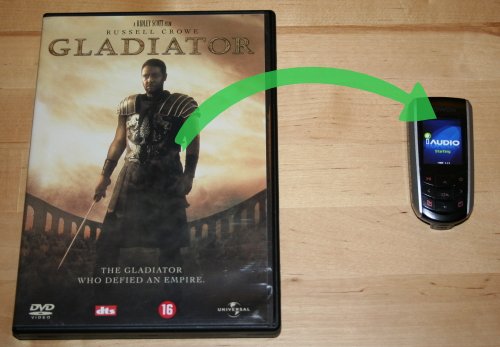
The resulting video file will be playable on the iAudio F2 as well as the iAudio 7 (and possibly other models if they use the same video format, haven't checked). And now for the big moment. *drumroll* Who says you need a gigantic plastic disc to watch a movie? ;)

Yep, that's Gladiator, all 2 hours and 28 minutes of it. The file size is 543mb, which means I can fit in about 10 of those babies in the 4gb of memory. :cap: Notice the ungodly waste of precious pixels because the movie doesn't fit the aspect ratio of the screen. :D

So how does it play? Surprisingly well, actually. It tends to stutter a bit in the beginning, but if you let it run for a bit or fast forward it goes away. From there on it behaves like a normal video player. You now have a fully equipped cinema for ants.

I haven't checked the battery life for movie playback, but I imagine it's probably quite disastrous. :D

Ps. If you're wondering how to get the DVD movie into a file to begin with, you may find undvd useful.

desktop hackery with grep

August 15th, 2007

Just as every self respecting Unix user knows (and every Mac user should know, but probably doesn't), grep is the tool supreme for finding stuff in text files.

Here I describe harvest, a similar tool to grep for searching in all kinds of files (and not).

Why on earth?
facebook_sign.jpgThe original problem was rather contrived, admittedly. I had been resisting the facebook bandwagon for the longest time, but finally a friend talked me into trying it. If you know facebook, you how the system works with adding "friends". And it's rather nice in how it imports your contacts from gmail and such. Of course, when you have your contacts elsewhere, you're left with a chunk of manual labor, searching&adding one-by-one. Not that it's a big problem, just a one time thing after all. But I was reluctant to undertake it, so I was clicking through facebook instead and found an import contacts from file feature, hm now that sounds more like it.

So I thought to myself in my university email account, I have a year worth of email history.. wouldn't it be satisfying to scan the whole thing and produce a list of email addresses I can import straight into facebook? Yes, I'm quite aware that my train of thought is somewhat off the beaten path much of the time. :D

In case you didn't know, email is just text. You may get a different idea when your email reader hides all the technical bits and just shows you the body of the message, but a stack of messages is just a bunch of text files, so there's no reason you can't treat them as any other text. So I went along and downloaded the whole thing, some 30mb. Now for the fun part. :cool:

So I need a tool that will scan the huge chunk of text and extract all the email addresses, and print them out in csv format. Preferably also remove duplicates from the list. Since I'm riding the ruby wave these days, it was the obvious choice, not least because I like how it handles regular expressions natively. So I hack up a script to do this, calling it harvest. It gets the data from the standard input, scans it for matches, and spits out the email addresses, very simple. And it works like a charm on my huge hunk of email data.

At this point you'll be wondering why on earth not use grep? Because to my knowledge grep only matches line-by-line, whereas I wanted something more general than that. And of course it's also the case that once you actually code it up, you have all the freedom you could ask for, rather than being limited to what grep does and doesn't do.

Can you make this thing go any faster?
make_it_go_faster.jpgLater on I realized that I can run harvest on just any file, and it would still work. Not that I had just discovered a new continent, strings already extracts all text strings from any file, including binaries. But the difference was I could search for things. So I found a nice test subject, pagefile.sys, which is Windows's swap file. :D I boot Windows once every few months, and when I do I rarely remember what I was doing last time. But apparently I had decided at some point that the swap file should be 1.5gb.

So I run harvest on it, while keeping an eye on things in htop. And ouch, harvest is consuming the entire file and reading it into memory. Next it's going to search for email addresses in a 1.5gb long string. :D Needless to say, that wasn't a success, the system started choking as it ran out of memory.

So I thought it would be better to buffer the file and read a chunk at a time. The only question is how do I still match for strings in a file of which there is only a chunk available? I wasn't exactly planning on matching super long strings, but then again there is the case where a string you want to find is part in the chunk currently in memory, and part in the next one, so how do you make sure you don't miss it? I tried an algorithm, and it was no good. It turns out for a long time I was barking up the wrong tree, and as a result I rewrote it about five times until I got it right. It is uncanny how the best solution is usually the simplest also.

To make sure it runs at an acceptable speed, I also experimented with the buffer size vis a vis speed and memory use, finding that a small buffer is actually better. When hunting for performance problems, it's often a good idea to run your app through a profiler just to be sure that it does what you think it will.

With a 10kb buffer (79s):

%   cumulative   self              self     total
 time   seconds   seconds    calls  ms/call  ms/call  name
 10.43     8.27      8.27   156723     0.05     0.05  Regexp#match
  8.73    15.19      6.92   618095     0.01     0.01  String#length
  6.87    20.64      5.45   153806     0.04     0.04  IO#read
  4.45    24.17      3.53   153810     0.02     0.02  String#+

This surprised me. I thought it should be spending far more time matching than say reading from disk. So I tried with a bigger buffer to see if I could marginalize disk io in the overall cost.

With a 10mb buffer (115s):

%   cumulative   self              self     total
 time   seconds   seconds    calls  ms/call  ms/call  name
 94.46   108.96    108.96     3057    35.64    35.64  Regexp#match
  2.52   111.87      2.91      152    19.14    19.14  IO#read
  1.31   113.38      1.51      156     9.68     9.68  String#+
  0.28   113.70      0.32       75     4.27    33.47  Kernel.require

This is more like what I expected, now almost all the time is spent matching. But it actually takes longer (and uses more memory as well, obviously), so there's nothing to gain by increasing the buffer unless the string we're searching for is so long that we need a buffer of megabytes. (Obviously, emails and urls are much shorter than that.)

To profile your script in ruby, try:

ruby -rprofile ninja.rb

The script now runs pretty fast, scanning the Windows pagefile in a couple of minutes, which I'm quite satisfied with.

More fun than a bag of chips, but useful?
the famous sliced breadI'm sure you're still wondering if the facebook scheme was a success. It wasn't. :D It turns out that out of all the emails harvested, a single one was found on facebook. As popular as the site is in Norway, apparently it doesn't have any Dutch users. :confused:

But since I already had harvest, I thought I would add an option to find urls as well, just for the heck of it. I also discovered that I could run it on any kind of file, not just text files. For instance, if you visited some cool site and forgot to bookmark it, it's probably still in Firefox's history file, so you can do:

harvest.rb --dat < ~/.mozilla/firefox/<profile>/history.dat

And not just files, either. To take a rather unexpected use case.. say you had an important email address, like for a job interview at the chocolate tasting lab, and you lost it.. well maybe it was swapped out at some point. Use harvest to scan your swap for email addresses:

cat /dev/hdXY | harvest.rb --email

And you can run that on any filesystem actually. :cool: I don't know how to access live memory in the same way, but that would be fun to try also. :cap: Things like zip files won't work, of course, because the text is scrambled, but otherwise (most of the time) you can read text out of any file whether it's a text file or not.

So is it actually useful? Not really. :D

But the useful observation is that your data is right there, and though you may not see it directly, it doesn't take more than this to actually look through it.

#!/usr/bin/env ruby
#
# Author: Martin Matusiak <numerodix@gmail.com>
# Licensed under the GNU Public License, version 3.
#
# revision 3 - allow spaces in urls
# revision 2 - introduce buffering to handle large files out of memory
# revision 1 - performance hacking: output entries immediately, only sort on
# emailcsv


require "optparse"


email = /([a-zA-Z0-9_\.-])+@(([a-zA-Z0-9-])+\.)+([a-zA-Z0-9]{2,4})+/m
url_orig = /([A-Za-z][A-Za-z0-9+.-]{1,120}:[A-Za-z0-9\/](([A-Za-z0-9$_.+!*,;\/?:@&~=-])|%[A-Fa-f0-9]{2}){1,333}(#([a-zA-Z0-9][a-zA-Z0-9$_.+!*,;\/?:@&~=%-]{0,1000}))?)/m
url = /([A-Za-z][A-Za-z0-9+.-]{1,120}:\/\/(([A-Za-z0-9$_.+!*,;\/?:@&~(){}\[\]=-])|%[A-Fa-f0-9]{2}){1,333}(#([a-zA-Z0-9][a-zA-Z0-9 $_.+!*,;\/?:@&~(){}\[\]=%-]{0,1000}))?)/m

pattern=url
joinlines=false
emailcsv=false
buffer_size=10*1024
hardlimit=100


## parse options
OptionParser.new do |opts|
	opts.on("--url", "url format") do |v|
		pattern = url
	end
	opts.on("--dat", "firefox history.dat format = \\\\n in urls") do |v|
		joinlines = true
	end
	opts.on("--email", "email format") do |v|
		pattern = email
	end
	opts.on("--emailcsv", "csv output (facebook contact import)") do |v|
		pattern = email
		emailcsv = true
	end
end.parse!


entries = []
previous = ""
while string = previous + STDIN.read(buffer_size).to_s and string.length > previous.length do
	partial = ""
	joinlines and string.gsub!(/\\\n/, "")
	while string and m = pattern.match(string) and m.size > 0 do
		m.end(0) == string.length and partial = m.to_s
		if partial.empty?
			if emailcsv
				entries << m.to_s
			else
				puts m.to_s
			end
		end
		pos = m.end(0)
		string = string[pos..-1]
	end
	if !partial.empty?
		previous = partial
	else
		if hardlimit < string.length
			previous = string[string.length-hardlimit..-1]
		else
			previous = string
		end
	end
end

# special stuff for csv email output
if !entries.empty?
	entries = entries.sort{ |a, b| a.downcase <=> b.downcase }.uniq
	puts '"Email Address","Formatted Name"'
	entries.each { |i| puts '"' + i + '",""' }
end