Archive for the ‘english’ Category

idioms for robust python

July 15th, 2008

Robustness is an interesting notion, isn't it? It isn't about being prepared for what you expect to happen, but actually for what you don't expect. If you take this somewhat vague idea of robustness a step further you drift towards the more software engineering-y practice of defensive programming.

Before delving in, it might be good to consider what precisely you can hope to achieve with robust code. If your program crashes with a KeyError on a dictionary lookup, it's not very robust. On the other hand, if you keep getting AttributeErrors because your socket object is null because the network is dead, you have bigger problems than attribute access.

Robust code doesn't absolve you from error handling. Your program will experience error conditions, and you have to design it so that you can handle them in the right place. If your code is robust, you can achieve this goal: errors will be caught without crashing your program.

Accessing attributes

Attribute access is a minefield. I know, the object oriented philosophy makes it sound like a trifle, but it's not. When you first started coding you probably wrote code like this:

class Bottle(object):
    def capacity(self):
        return 45

# ...

print bottle.capacity()

It looks very innocuous, but what could go wrong here? We make the assumption, perhaps unwittingly, that bottle has been initialized at this point in time. Suppose bottle is an instance member that was set to None initially, and was supposed to be instantiated by the time we execute this line. Those of us who've been on a few java gulags know that this is how the recurring NullPointerException nightmare begins. In Python you get an AttributeError (sounds more benign, doesn't it?).

If you expected to receive bottle from a database or the network, you probably have good reason to suspect that it might be null. So you'll probably write a lot of code like this:

if bottle and bottle.capacity:
    print bottle.capacity()

If bottle isn't null (None, 0 or an empty string/iterable), we think everything is in order. We might also check the attribute we want to make sure that too is not null. The trouble is, that is an attribute access. So if bottle isn't null, but missing capacity, there's your AttributeError again!

It should be obvious by now, that calling any method on bottle is off the table, in case bottle is null. Instead, let's do it this way:

f = getattr(bottle, 'capacity', None)
if f:
    print f()

getattr is a very clever idea. You tell it to get the capacity attribute from the bottle object, and in case that attribute doesn't exist, just return None. The only way you'll get an exception here (a NameError) is if bottle isn't defined in the namespace. So once we have this object, either capacity or None, we check that it's not null, and then call the method.

You might think that this seems like low level nitpicking. And anyway, how do you know that capacity is a method, you could still get a TypeError here. Why not just check if bottle is an instance of the class Bottle. If it is, then it's reasonable to expect capacity is a method too:

if isinstance(bottle, Bottle):
    print bottle.capacity()

This isn't as robust as it seems. Remember that we're trying to prepare for something that wasn't planned. Suppose that someone moved capacity to a baseclass (superclass) of Bottle. Now we are saying only Bottle instances can use the capacity method, even though other objects also have it.

It's more Pythonic to cast a wider net and not be so restrictive. We could use getattr to get the object that we expect is a method. And then we can check if it's a function:

unkn = getattr(bottle, 'capacity', None)
import types
if isinstance(unkn, types.FunctionType):
    print unkn()

This doesn't work, because a method is not of type function. You can call it, but it's not a function (queer, isn't it?). An instance of a class that implements __call__ is also callable, but also not a function. So we should check if the object has a __call__ method, because that's what makes it callable:

unkn = getattr(bottle, 'capacity', None)
if callable(unkn):
    print unkn()

Now obviously, writing every method call in your program like this would be madness. As a coder, you have to consider the degree of uncertainty about your objects.

Another way to go about this is to embrace exceptions. You could also write the most naive code and just wrap a try/except around it. I don't enjoy that style as much, because try/except alters the control flow of your program. This merits a longer discussion, but basically you have to increment the level of indentation, variable scope is a concern, and exceptions easily add up.

Setting attributes

If you only want to set a predetermined attribute, then nothing is easier (obviously this won't work on objects that use slots, like a dict). You can set attributes both for instances and classes:

bottle.volume = 4
Bottle.volume = 4

But if the attribute name is going to be determined by some piece of data (like the name of a field in a database table, say), you need another approach. You could just set the attribute in the object's __dict__:

bottle.__dict__['volume'] = 4
Bottle.__dict__['volume'] = 4    ## fails

But this is considered poor style, __dict__ isn't supposed to be accessed explicitly by other objects. Furthermore, the __dict__ of a class is exposed as a dictproxy object, so you can't do this to set a class attribute. But you can use setattr:

setattr(bottle, 'volume', 4)
setattr(Bottle, 'volume', 4)

Dictionary lookup

Dictionaries, the bedrock of Python. We use them all the time, not always wisely. The naive approach is to assume the key exists:

bases = {"first": "Who", "second": "What"}

print bases["third"]    ## raises KeyError

Failing that, dicts have a has_key method just for this purpose:

if bases.has_key("third"):
    print bases["third"]

But it's more Pythonic to keep it simple as can be:

if "third" in bases:
    print bases["third"]

dicts also have a failsafe method equivalent to getattr, called get. You can also give it a default value (as the second parameter, not shown here) to return if the key doesn't exist:

third = bases.get("third")
if third:
    print third

I would argue that it's preferable, because you don't have to look up the element twice. (And you don't risk defeat snatched from the jaws of victory if a context switch occurs between those two statements and another thread removes the key after you've checked for it.)
resume downloads safely

July 8th, 2008

You can resume an http download by setting the Range header, or an ftp download with the REST command. Not all hosts support this, but many do.

If you use wget a lot, have you ever asked yourself why --continue isn't on by default? Surely it's better to resume an interrupted download than to restart it? If you look up the man page, it has this healthy reminder for you:

-c, --continue
Continue getting a partially-downloaded file. This is useful when you want to finish up a download started by a previous instance of Wget, or by another program. For instance:

wget -c ftp://sunsite.doc.ic.ac.uk/ls-lR.Z

If there is a file named ls-lR.Z in the current directory, Wget will assume that it is the first portion of the remote file, and will ask the server to continue the retrieval from an offset equal to the length of the local file.

Note that you don’t need to specify this option if you just want the cur‐ rent invocation of Wget to retry downloading a file should the connection be lost midway through. This is the default behavior. -c only affects resumption of downloads started prior to this invocation of Wget, and whose local files are still sitting around.

Without -c, the previous example would just download the remote file to ls-lR.Z.1, leaving the truncated ls-lR.Z file alone.

Beginning with Wget 1.7, if you use -c on a non-empty file, and it turns out that the server does not support continued downloading, Wget will refuse to start the download from scratch, which would effectively ruin existing contents. If you really want the download to start from scratch, remove the file.

Also beginning with Wget 1.7, if you use -c on a file which is of equal size as the one on the server, Wget will refuse to download the file and print an explanatory message. The same happens when the file is smaller on the server than locally (presumably because it was changed on the server since your last download attempt)---because ‘‘continuing’’ is not meaningful, no download occurs.

On the other side of the coin, while using -c, any file that’s bigger on the server than locally will be considered an incomplete download and only "(length(remote) - length(local))" bytes will be downloaded and tacked onto the end of the local file. This behavior can be desirable in certain cases---for instance, you can use wget -c to download just the new portion that’s been appended to a data collection or log file.

However, if the file is bigger on the server because it’s been changed, as opposed to just appended to, you’ll end up with a garbled file. Wget has no way of verifying that the local file is really a valid prefix of the remote file. You need to be especially careful of this when using -c in conjunction with -r, since every file will be considered as an "incomplete download" candidate.

Another instance where you’ll get a garbled file if you try to use -c is if you have a lame HTTP proxy that inserts a ‘‘transfer interrupted’’ string into the local file. In the future a ‘‘rollback’’ option may be added to deal with this case.

I pasted the whole thing here, because it nicely summarizes the many reasons why "resume by default" is not safe.

As a matter of fact, that's not all. wget doesn't even know if the local file with the same name is the same file that's on the server. And even if it is, the first attempt at downloading presumably didn't succeed, which while it may be unlikely, could perhaps have corrupted the local file. So even if you download the rest of it, you won't be able to use it anyway.

What can we do about this? To be sure that a) it's the same file and b) it's uncorrupted, we have to download the whole thing. That is, for obvious reasons, not desirable. Instead, I propose re-downloading the last portion of the file as a checksum. The fetcher in spiderfetch uses the last 10kb of the local file to determine if the resume should proceed. If the last 10kb of the local file doesn't agree with the same 10kb of the remote file, the fetcher exits with a "checksum" error.

The main benefit of this method is to verify that it's the same file. Clearly, it can still fail, but I imagine that with most file formats 10kb is enough to detect a divergence between two files.

killdupes: detect duplicate and incomplete files

July 6th, 2008

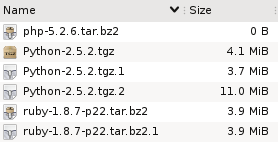
Suppose you have these files in a directory. What do you think has happened here?

Well, it looks like someone tried to download the php interpreter, and for some reason that didn't work, because the file is empty.

Then we have two copies of the ruby distribution, and both have the same size. So it looks like that download did complete successfully, but maybe the person downloaded it once and then forgot about it?

Finally, there are three files that contain the python distribution, but they are all different sizes. Since we know that wget adds extensions like .1 to avoid overwriting files, it looks like the first two attempts at this download failed, and the third succeeded.

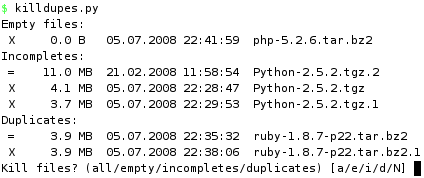
Three types of redundant files

These three cases demonstrate classes of redundant files:

  1. Empty files.
    The filename hints at what the intended content was, but since there is no data, there's no way to tell.
  2. Duplicate files.
    Multiple files have the exact same content.
  3. Incomplete/partial files.
    The content of one file comprises the partial content of another, larger file. The smaller file is a failed attempt at producing the larger one.

Now look back at the first screenshot and tell me how quickly would you detect these three cases if a) the files didn't have descriptive names (random names, say), and b) they were buried in a directory of 1000 other files? More importantly, how long would you even bother looking?

What if you had a tree of directories where you wanted to eliminated duplicate or incomplete files? Even worse.

How to proceed?

Finding empty files is trivial. Finding duplicate files is also relatively easy if you just look for files that have the same size. But to be sure that they are equal, you have to actually examine their contents. One way is to compute checksums (md5, for instance) and compare them.

But that doesn't help with partial files, because any file that is smaller than another file could potentially be incomplete relative to the larger one.

I set out to solve this without expecting that it would be very hard, but it turns out to be complicated. The code is rather ugly and I wonder if there is an easier way. In a nutshell, we read sequential chunks from all the files in the directory, hashing the data as we go along. The hashes then become keys in a dictionary, which will put files whose chunks hash to the same value in the same bucket. And that's how we know they are identical. As long as any bucket has more than two files (ie. so far they are the same), we keep on going.

All in all, we keep reading chunks from those files (beginning with all) whose data produce a hash that belongs to more than one file. In other words, we have to read all the common bytes in all the files + one extra chunk from each (to determine that the commonality has ended).

The size of a chunk is set to 100kb, but will be determined by how far we can read into a file depending on the size of the other files "in the running". Suppose we are at position (offset) 100kb, where one file is 300kb and another is 110kb, then we can only read 10kb from each to check if the data is the same. Whatever the outcome, we don't need to read any more than that, because we've reached the end of the smaller one.

Obviously, this won't work on files that aren't constructed sequentially (torrent and whatever).

The nitty gritty

The center piece of the code is a hash table called offsets. The keys, indeed, represent offsets into the mass of files we are working on. The values are themselves hash tables which contain hashes of chunks read from the files.

So we start out in offsets[0], which is a hash table with only one item, containing all of the files. We read up to 100kb from each file, until we reach the chunk size or the end of the smallest file. The size read is captured in readsize, which determines new_offset. We will now have a new entry called offsets[new_offset]. We how hash (with md5) a readsize number of bytes of data from each file, so that each hash becomes an entry into the new hash table at offsets[new_offset]. As the value we store the file that produced it.

And so it continues. Every iteration produces a new offset and a new set of hashes, in each case the new hash combines the old hash with the new data. In the end, we have a number of lists indexed by hash at every offset level. If there are multiple files in such a list, then they have all hashed to the same value up to this point in the file (they are the same so far).

The interesting lists are those where at least one file has reached eof. Because that means we have read the whole file and its full contents is equal to that of another file. If they are the same size (both have reached eof), they are duplicates of each other. If not, the smaller is incomplete relative to the larger.

How lazy are we?

Unfortunately, it's hard to predict how many bytes have to be read, because that depends entirely on how much the files have in common. If you have two copies of an 700mb iso image you might as well md5sum them both, we can't do any better than that. But if they aren't the same, we stop reading chunks as soon as they become distinct, which is likely to be at the very beginning. Equally, memory use will be highest at the start since we're reading from all of the files.

Performance

The slowest part of execution is obviously disk io. So what if we run it on a hot cache so that all (or most) of the blocks are already in memory?

In the worst case, we have two 700mb files that are identical (populated from /dev/urandom).

5.6s  md5sum testfile*
9.4s  killdupes.py 'testfile*'

Slower, but not horribly slow. Now let's try the best case. Same files, but we delete the first byte from one of them, displacing every byte by one to the left relative to the original.

6.2s   md5sum testfile*
0.02s  killdupes.py 'testfile*'

And there it is! No need to hash the whole thing since they're not equal, not even at byte 1.

On the other hand, a rougher test is to set it free on a directory with lots of files. For instance, in a directory of 85k files, there are 42 empty files, 7 incomplete and 28 duplicates. We had to read 2gb of data to find all these. Not surprisingly, md5sum didn't enjoy that one as much.

41m  md5sum
36m  killdupes.py

So that's pretty slow, but can you make it faster?

#!/usr/bin/env python
#
# Author: Martin Matusiak <numerodix@gmail.com>
# Licensed under the GNU Public License, version 3.
#
# revision 3 - Sort by smallest size before reading files in bucket
# revision 2 - Add dashboard display
# revision 1 - Add total byte count


from __future__ import with_statement
import glob
import hashlib
import os
import sys
import time


CHUNK = 1024*100
BYTES_READ = 0

_units = { 0: "B", 1: "KB", 2: "MB", 3: "GB", 4: "TB", 5: "PB", 6: "EB"}

class Record(object):
    def __init__(self, filename, data=None, eof=False):
        self.filename = filename
        self.data = data
        self.eof = eof

def format_size(size):
    if size == None:
        size = -1

    c = 0
    while size > 999:
        size = size / 1024.
        c += 1
    r = "%3.1f" % size
    u = "%s" % _units[c]
    return r.rjust(5) + " " + u.ljust(2)

def format_date(date):
    return time.strftime("%d.%m.%Y %H:%M:%S", time.gmtime(date))

def format_file(filename):
    st = os.stat(filename)
    return ("%s  %s  %s" % 
          (format_size(st.st_size), format_date(st.st_mtime), filename))

def write(s):
    sys.stdout.write(s)
    sys.stdout.flush()

def clear():
    write(79*" "+"\r")

def write_fileline(prefix, filename):
    write("%s %s\n" % (prefix, format_file(filename)))

def get_hash(idx, data):
    m = hashlib.md5()
    m.update(str(idx) + data)
    return m.hexdigest()

def get_filelist(pattern=None, lst=None):
    files = []
    it = lst or glob.iglob(pattern)
    for file in it:
        file = file.strip()
        if os.path.isfile(file) and not os.path.islink(file):
            files.append(Record(file))
    return files

def get_chunk(offset, length, filename):
    try:
        with open(filename, 'r') as f:
            f.seek(max(offset,0))
            data = f.read(length)
            ln = len(data)
            global BYTES_READ
            BYTES_READ += ln
            return ln, data
    except IOError, e:
        write("%s\n" % e)
        return 0, ""

def short_name(lst):
    lst.sort(cmp=lambda x, y: cmp((len(x), x), (len(y), y)))
    return lst

def rev_file_size(lst):
    lst.sort(reverse=True,
             cmp=lambda x, y: cmp(os.path.getsize(x), os.path.getsize(y)))
    return lst

def rec_file_size(lst):
    lst.sort(cmp=lambda x, y: cmp(os.path.getsize(x.filename),
                                  os.path.getsize(y.filename)))
    return lst

def compute(pattern=None, lst=None):
    zerosized = []
    incompletes = {}
    duplicates = {}

    offsets = {}
    offsets[0] = {}
    key = get_hash(0, "")

    write("Building file list..\r")
    offsets[0][key] = get_filelist(pattern=pattern, lst=lst)

    offsets_keys = offsets.keys()
    for offset in offsets_keys:
        offset_hashes = [(h,r) for (h,r) in offsets[offset].items() if len(r) > 1]
        buckets = len(offset_hashes)
        for (hid, (hash, rs)) in enumerate(offset_hashes):
            rs = rec_file_size(rs) # sort by shortest to not read redundant data
            reads = []
            readsize = CHUNK
            for (rid, record) in enumerate(rs):
                ln, data = get_chunk(offset, readsize, record.filename)
                s = ("%s | Offs %s | Buck %s/%s | File %s/%s | Rs %s" % 
                      (format_size(BYTES_READ),
                       format_size(offset),
                       hid+1,
                       buckets,
                       rid+1,
                       len(rs),
                       format_size(readsize)
                      )).ljust(79)
                write("%s\r" % s)
                if ln == 0:
                    record.eof = True
                else:
                    r = Record(record.filename, data)
                    if ln < readsize:
                        readsize = ln
                    reads.append(r)
            
            if reads:
                new_offset = offset+readsize
                if new_offset not in offsets:
                    offsets[new_offset] = {}
                    offsets_keys.append(new_offset)
                    offsets_keys.sort()

            for r in reads:
                new_hash = get_hash(new_offset, hash+r.data[:readsize])
                r.data = None
                if new_hash not in offsets[new_offset]:
                    offsets[new_offset][new_hash] = []
                offsets[new_offset][new_hash].append(r)
    clear() # terminate offset output

    offsets_keys = offsets.keys()
    offsets_keys.sort(reverse=True)
    for offset in offsets_keys:
        offset_hashes = offsets[offset]
        for (hash, rs) in offset_hashes.items():
            if offset == 0:
                zerosized = [r.filename for r in rs if r.eof]
            else:
                if len(rs) > 1:
                    eofs = [r for r in rs if r.eof]
                    n_eofs = [r for r in rs if not r.eof]
                    if len(eofs) >= 2 and len(n_eofs) == 0:
                        duplicates[eofs[0].filename] = [r.filename for r in eofs[1:]]
                    if len(eofs) >= 1 and len(n_eofs) >= 1:
                        key = rev_file_size([r.filename for r in n_eofs])[0]
                        if not key in incompletes:
                            incompletes[key] = []
                        for r in eofs:
                            if r.filename not in incompletes[key]:
                                incompletes[key].append(r.filename)

    return zerosized, incompletes, duplicates

def main(pattern=None, lst=None):
    zerosized, incompletes, duplicates = compute(pattern=pattern, lst=lst)
    if zerosized or incompletes or duplicates:

        kill = " X "
        keep = " = "

        q_zero = []
        q_inc  = []
        q_dupe = []

        if zerosized:
            write("Empty files:\n")
            for f in zerosized: 
                q_zero.append(f)
                write_fileline(kill, f)

        if incompletes:
            write("Incompletes:\n")
            for (idx, (f, fs)) in enumerate(incompletes.items()):
                fs.append(f)
                fs = rev_file_size(fs)
                for (i, f) in enumerate(fs):
                    prefix = keep
                    if os.path.getsize(f) < os.path.getsize(fs[0]):
                        q_inc.append(f)
                        prefix = kill
                    write_fileline(prefix, f)
                if idx < len(incompletes) - 1:
                    write('\n')

        if duplicates:
            write("Duplicates:\n")
            for (idx, (f, fs)) in enumerate(duplicates.items()):
                fs.append(f)
                fs = short_name(fs)
                for (i, f) in enumerate(fs):
                    prefix = keep
                    if i > 0:
                        q_dupe.append(f)
                        prefix = kill
                    write_fileline(prefix, f)
                if idx < len(duplicates) - 1:
                    write('\n')

        inp = raw_input("Kill files? (all/empty/incompletes/duplicates) [a/e/i/d/N] ")

        if "e" in inp or "a" in inp:
            for f in q_zero: os.unlink(f)
        if "i" in inp or "a" in inp:
            for f in q_inc: os.unlink(f)
        if "d" in inp or "a" in inp:
            for f in q_dupe: os.unlink(f)

if __name__ == "__main__":
    pat = '*'
    if len(sys.argv) > 1:
        if sys.argv[1] == "-h":
            write("Usage:  %s ['<glob pattern>'|--file <file>]\n" %
                  os.path.basename(sys.argv[0]))
            sys.exit(2)
        elif sys.argv[1] == "--file":
            lst = open(sys.argv[2], 'r').readlines()
            main(lst=lst)
        else:
            pat = sys.argv[1]
            main(pattern=pat)
    else:
        main(pattern='*')

great ui writing is precious

July 4th, 2008

Writing about ui is difficult, not because it's difficult to describe the flaws of an interface, but because of how emotionally draining and depressing it is to point out the problems in a product with which your experience has been infuriating. It's like re-living the experience, you just want to forget all about it and run away.

It is hereby my pleasure to present to you a piece of wonderful ui writing which describes the beloved Adobe Acrobat Reader. Here's a taste:

After the unpacking, the install process itself took 10 minutes. I could only thank Adobe’s engineers, presuming they were filling up my hard drive with yummy icons, tasty DLLs, and amazing 3D JavaScript add-ons. No matter — the 210 MB it required was there to be used.

can hidden complexity be good?

July 1st, 2008

The intuitive answer would be: no. Complexity is the huge cross we have to bear, the great weight that squashes our systems and makes them unmaintainable. We fight complexity tooth and nail, and hidden complexity is the worst kind, because it breaks things for reasons we don't understand. So the least you can achieve with a system is grok the full complexity of it, even if it's too much of a mess to do anything with.

On the other hand... if you take a step back and think about what programming really *is* then you might have to rethink that conclusion. It is, plainly, finding ways to solve problems of data processing in one way or another. And to be a coder that's really all you need to know. It does mean that you risk ending up on thedailywtf, however. So now, how is "good code" different from "just code"? What characterizes code that wins our approval? In a word: simplicity. The smartest way of doing something is the simplest way, without missing any of the requirements. A simple solution is an elegant solution, isn't it? Simplest often means shortest, too. The principle of simplicity also relates directly to the issue of complexity in a technical sense. High performance code is efficient because it's the most lazy way to do the job. Inefficient code, conversely, does too much work -- it's for suckers.

What "good programming" is

This ingrained characteristic of programming is reflected very clearly in just about any discussion of code that is "too slow". People critique the code for being awkward, for doing things in a round about manner. Eventually you arrive at a solution that is typically both shorter, and clearer. On the other end of the spectrum you have concepts like "beautiful code" and "code that stands the test of time". And when you look at the code they're raving about, the same observation transpires. It's simple. It's both blindingly obvious (once you get around to thinking about the problem in that particular way) and impressively simple for something *that* hard. It is the ultimate optimization of problem vs effort.

Our product smacks somewhat of mathematical proofs. In mathematics you score points for simple solutions, but it's not strictly necessary. All it takes is for someone to read your proof and verify that it all fits together. No one is gonna run the proof on their machine a thousand times per second.

And that is what I'm driving at here. Programming is the activity of solving a problem such that the solution exerts the least amount of effort. It's kind of funny that we of all people are dedicated to this particular discipline. Us, with the expensive silicone that can perform more operations than any other machine.

Set in those terms, programming is the art of doing as little as possible. And the great pieces of code are great not in what they *do* but in what they *don't do*. In other words, if you write good code, it's because you've found a way to take an input and do the least amount of work to produce the output. Baked into that is the secret of choosing your input very carefully in the first place. So if you can gain something from the form that the input is in, then you're achieving something without writing any code for it. This is step 1 toward your brilliant piece of code.

Hidden complexity

But this is also when you start introducing complexity. Even if it's external to your program, it is still an assumption that must hold. Is this good or bad? From your classical software engineering perspective, you badly want to minimize the amount of text you have to read to look at a piece of code and make sense of it. But then again, you need to know everything, because ignorance will bite you.

For example, in spiderfetch I spider a web page for urls. And it can run in a mode that will just output the urls and stop there. Now, if the urls are in the same order that they appear on the page, this is a big advantage, because the average web page can easily yield 50 urls and the user won't be able to easily recognize them if they come up in some random order. But this is also too cosmetic an issue to be an explicit requirement. I certainly didn't think of this particular issue when I started working on it. If you really wanted to document this kind of behavior down to the smallest detail, your documentation would be enormous. Pragmatically speaking, this behavior probably would not be documented.

Why is this an issue? Because giving a unique list of urls *is* a requirement which will influence this particular issue. (Hence, list(set(urls)) won't do the trick).

Suppose you find a way to produce the desired behavior without doing any work (or doing very little). Should this be documented in order to make this bit of complexity explicit? If this added bit of complexity doesn't affect the working of the function much at all, then it's quite peripheral anyway. What are the risks? If you break the function then obviously the peripheral complexity doesn't affect you. If you refactor you might break the peripheral bit, because it wasn't written down anywhere. On other other hand, if all such peripheral bits were to be specified, it would take you that much longer to grok the code at all.

The message we send

The question we like to ask ourselves is: what happens to the person who inherits the code? Will he notice the "hidden" (or more precisely: incidental) desirable behavior? If not, is it really important enough to document it? And if yes, will he understand why it works that way? If you lose this behavior you haven't broken the program. You have degraded it in a cosmetic way, but it still works well enough. So does it really need to be explicit?

The so-called clever coder that every middle manager is blogging his heart out about hiring, will, obvously, notice the hidden complexity. And know both how and why it's there. The less clever coder might not notice. Or he might notice, but not understand the thought process behind it. What do we want to say to him? It's okay if you mess this up, it's not that important -or- Pay close attention to the detailed documentation or you might break something?