Archive for the ‘technology’ Category

svn builds for the commoner

January 12th, 2009

I had a small revelation this week. I got svn builds working, both with Mono, and at along last, KDE4. It turns out it doesn't have to be maddeningly error prone.

Mono SVN

To build Mono you should look at the release tarballs of a recent release, like 2.0.1. That tells you which modules you need. It doesn't really tell you much about the order in which you should build them, however. Then you grab the sources from svn. The names of the modules in trunk/ largely match the names of the tarballs in the release.

I found this order to work okay:

  1. libgdiplus
  2. mcs (download only, mono module builds both)
  3. mono
  4. debugger
  5. mono-addins
  6. mono-tools
  7. gtk-sharp
  8. gnome-sharp
  9. monodoc-widgets
  10. monodevelop
  11. paint-mono (from http://paint-mono.googlecode.com, yes it runs!)

When you're checking out from svn, don't check out the entire history (this would take forever to download), use

svn checkout -r HEAD <url>

so that you only get the current HEAD.

Before you set out, it's also a really good idea to set up a special build/runtime environment for this process. That way your existing Mono (if you have it installed) won't interfere with the svn build.

Now for the building. Generally, this is all you need:

  1. ./autogen.sh --prefix=/opt/mono-svn
  2. make
  3. make install

There are slight variations in that some packages use bootstrap.sh instead of autogen.sh, but this you'll find in the respective READMEs. And those instructions actually worked for me. :cap: The mono module is a bit more complicated, because there is the whole concern about building mono using mono. So I recommend using

make get-monolite-latest

first to bootstrap the build. And then it works.

Sometimes you'll have failures because of missing dependencies. There will be a message like "You need package Hello". In that case look in your package manager for something resembling libhello-dev and that's more than likely it.

Last but not least, you obviously need a working toolchain.

KDE4

To build KDE4 there is a great tool called kdesvn-build. It comes with a sample config file you just tweak and then run the script.

Again, you'll probably have some failures, but kdesvn-build saves *all* output. So just look in log/latest/<module>/<operation>.log and you should be able to figure out what happened. Cmake has a very nice summary at the end of its output, where you can see exactly what was set up to be built.

The same note applies with respect to missing libraries as with Mono.

NOTE: KDE and Qt are massive and the amount of disk space this will cost you runs in gigabytes, so make sure you have plenty. My kde-sources directory with a full KDE build in progress is now 7gb, I kid you not. Mono is much smaller: 2gb.
the good that Apple does

January 10th, 2009

Technology is a market. As all markets, it's prone to the forces of supply and demand, of perceived demand, of risk, and hype, and potential revenue in the wide digits. But let's face it, far too much time is spent standing around wondering what the "next big thing" is going to be.

Phones

That's where Apple is different. They just say "We want this, so we're building this. To hell with everyone else." Now, if this were a tree in an empty forest (if it were empty, there wouldn't be any other trees, would there?), noone would know about their products. But Apple has this talent for attracting attention. They're so secretive, and they love to surprise you. So when they stand next to that new statue and lift the veil, the technology press feels obligated to clap and cheer despite themselves, because of the anticipation.

Now, in this market of ours, Apple creates an action, widely perceived. This sends all those drones waiting for "the next big thing" running out of the room to their labs. The action creates a reaction. Google says "We want to build a phone, also with a rich runtime environment, but one that *doesn't* make the owner feel like he lives in Guantanamo Bay." Would Google have created Android without the iPhone? Who knows, but the fact is they didn't. Along come other responses. Palm is getting in on the game now. And Nokia finally got to work on a Linux-based phone platform (what on earth have they been waiting for all these years??).

It's a strange thing. Now, all these companies are rolling up their sleeves to build better phones. So why the hell didn't they before? The same exact companies that have been selling junk for a decade are now trying to improve their products. Why? Because Apple got everyone thinking that there is a demand for this. Before the iPhone, all the companies kept stealing quick glances at each other, scrambling to deliver whatever new tiny piece of junk the other was selling.

Apple, despite the murkiest of intentions, have brought about a positive development.

Software

Vendors in free software don't spend a lot of time on marketing, it's not their game. And even if they did, they don't have armies of marketeers and astronomical advertising budgets, so it's a different kind of marketing. KDE4 might be the best example of that; they really made an effort to be heard. But they're not in a position to stir up the same kind of hype that Apple can do with hard cash on the table. And thus the role of free software is often that, not of actor, but of reactor.

Free software is often the re-implementor. It doesn't seem very glamorous, but it delivers a very important product. OpenOffice is clearly a ploy to replace Ms Office, but its users are nevertheless very grateful that it's there. Mono isn't a "new thing", but it does bring the rich .NET runtime to Linux. Linux itself is just a reimplementation of Unix, but who could argue it hasn't been a wonderfully positive force? And how much good has the Wine project done, enabling countless people to run their legacy apps?

Sometimes a reaction is just the thing you need to get what you want. Stallman spent a decade warning people about the "java trap". Now that java is free software, does that make the people who worked on Classpath, Kaffe and all the other free java projects feel stupid? I doubt it, because it was their response that led to a free java. Sun, who had been forever clutching to java like a kid to his teddybear, didn't want to give up control of java. But they realized that left unchecked, this activity in the community would replace java and they would lose all control over it. So they made it free. But someone had to make them do it.

Hello .NET

January 8th, 2009

So I'm researching .NET/Mono for an application I might be doing for Windows. There are two important constraints:

  • The application shall not require installation privileges. (Or users in locked down environments might not be able to run it.)
  • The application shall be maximally robust with respect to runtime environment. (So that I can leave it behind with the best possible hope that it will work for years.)

The first rules out shipping an install bundle of any sort, and the runtime environment is presumed to be a vanilla Windows install. At most I can hope for a .NET runtime since it comes with XP-SP2 (I think) and certainly Vista and onwards. As for the second, I've considered things like py2exe, which bundles code with .dlls for Qt and whatever else the python code actually uses. While this seems to produce a self sufficient bundle (without requiring an install), how do I know if py2exe is going to be around in a few years when I may need to rebuild? And the Qt libs for that matter, they depend on OS-level libs that may change over time, that I have no control over.

So .NET seems to be the best only choice. Now, I obviously want to be able to run it on Mono as well, if for no other reason than to run it myself. So I have to stay clear of .NET-only bits.

That means hello Windows Forms (WPF is out, Mono doesn't support it). Now, I should say first off the bat that I'm not a gui coder. I don't like gui, it takes too much work to produce a really good gui, and it's way more hassle than I like to put up with. Nevertheless, I've seen a few of them. And Windows Forms... it's something else. On the face of it, the .NET library seems to be stocked reasonably, with classes for gui controls (System.Windows.Forms) and for drawing primitives (System.Drawing).

But then you look at some example code and you have to pinch yourself cause it's so unbelievable. I should preempt here by saying that all the gui toolkits I have seen in recent history handle layouting the same way: with layouts. You create a container that is, say, a grid, and put some widgets in it. The layout takes care of distributing the widgets in the container in a particular way. This takes care of resizing, because the widgets scale to the size of the container (and the containers, in turn, to the size of the gui). Containers can be nested to produce panels and so on.

Far be it for me to say that I like coding gui this way. It's a huge pain to set all this up. And it doesn't make resizing work well either, you have to put in a lot of extra effort just for that part. But at least it's a reasonably clean solution, and it's how Swing, WxWidgets, and I'm pretty sure Gtk and Qt as well, work.

Not Windows Forms. In Windows Forms you have containers, but there are no layouts. Everything is positioned with coordinates. As in here is a button, put it 5 pixels from the edge of the container; here's another button, put it in this location I have computed manually based on the first button. This has implications:

  • positioning is pixel based,
  • dimensioning is absolute - no resizing possible,
  • there is no rendering.

As it turns out, the gui form is basically a canvas you can paint on. Widgets and drawing mix freely on the same pane. But remember that Drawing api I mention? It's pixel based, no Qt or Cairo rendering for shapes or fonts. Neither does .NET have any kind of svg-based rendering that I know of.

The whole thing makes me feel like a time traveler. Remember that Windows Forms isn't a deprecated library, it's still actively used (and Mono just recently got done implementing it).

So why bring this up? It's good to remember sometimes that just because something is hyped a lot doesn't make it good. Remember, .NET 3 only appeared recently, in 2006. That makes Windows Forms the designated gui toolkit right up to that point. Swing, ugly as it may be to look at (and sluggish as it's always been) came out with Java 1.2 in 1998. (As a matter of fact, I think even AWT had layout managers in 1995.)

linux audio confusing as ever

December 19th, 2008

Audio in linux, how to put it into words? How about: oss, alsa, pulseaudio, esound, arts, portaudio, jack, gstreamer, phonon. :googly: Did I miss any? Embarrassment of riches? Or just embarrassment?

I will not rehash history any more than to say that between buggy/incomplete drivers for sound cards and the wonderful world of alsa I've never been able to understand how the hell audio works beyond getting output and, sporadically, input. I am the quintessential dumb user of linux audio, even though I have tried to figure it out.

But let past be past. Ubuntu 8.10 Intrepid. Pulseaudio ready and everything, since 8.04. Why Ubuntu decided to plug in pulseaudio without setting up any gui controls for it is beyond me. All I know is that occasionally sound output will stop working (I get 2 seconds of output and then it stops) and then "pkill pulse" cures it.

Let's run through the list.

alsamixer

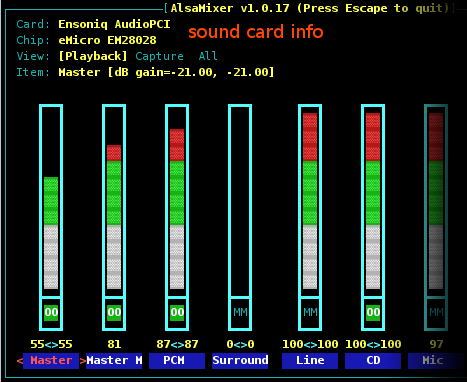
I've learned to use alsamixer to fix low level audio problems. It is reliable in that it gives me all the channels on my sound card, so I always use it to mute/unmute my microphone and to untangle the master/pcm/headphones/front speakers settings caused by mixers that only allow me to control the volume of one channel and apps that output on god knows what channel.

That's alsamixer on a Ubuntu 8.10 desktop with all updates installed as per today. Here's the same thing on my laptop.

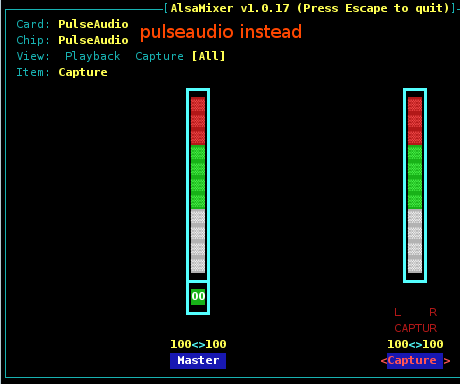
Same distro, same version, all updates installed. And I have made no conscious choice for this to come about, all I did was install the pulsaudio gui tools. All of a sudden, alsamixer is useless as it only has access to a single "master" channel. It would appear now that pulseaudio is sitting between the sound card and alsa, but does that sound right?

pulseaudio gui

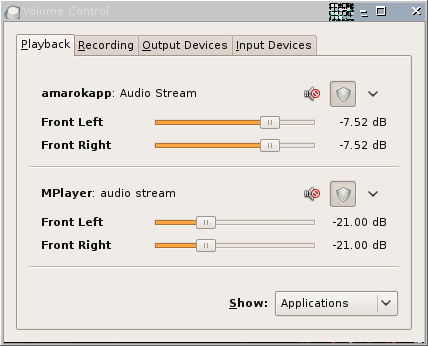
pulseaudio is here, might as well use it, right? Ubuntu ships a bunch of pa* packages that are gui tools for pulseaudio (not installed by default). This one is called pavucontrol. It lets you set volume per audio stream. I love this, I've wanted to have it since forever.

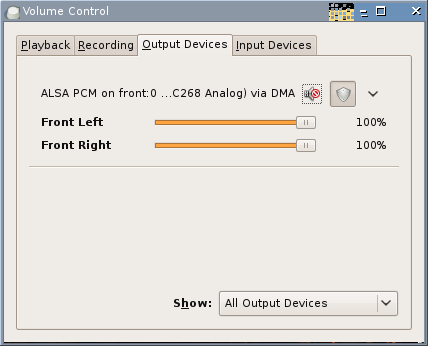
But then it comes to output and what do I see?

A single output device. Where is my master, my pcm, all my channels? What's more bizzarre is that pulseaudio says it's connecting to alsa while alsamixer says it's connecting to pulsaudio. Surely that way madness lies?

What's worse, pavucontrol is a gui app without any kind of systray integration, so much as I would like to use it as an easy-to-reach mixer, I can't.

kmix

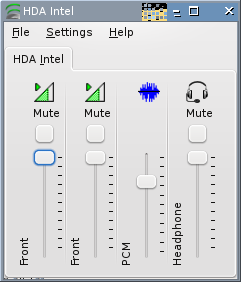
I run kmix in my tray, it lets me set the volume by scrolling the mousewheel over the icon, which is exactly what I want. It's not a terribly impressive mixer, as it only lets me select one channel to control, whereas what I really would like is to be able to lock several output channels into one, otherwise I'm never really in control. So the best I can do is set the volume to max on master, and tell kmix to show me pcm. That seems to work well enough.

It appears I have two identical channels, but the leftmost is misnamed, that's actually Master.

Now, let's see. alsamixer doesn't show any of these channels, because it delegates to pulseaudio. So kmix connects to... god knows what, but at least I can access these channels.

gnome-volume-control

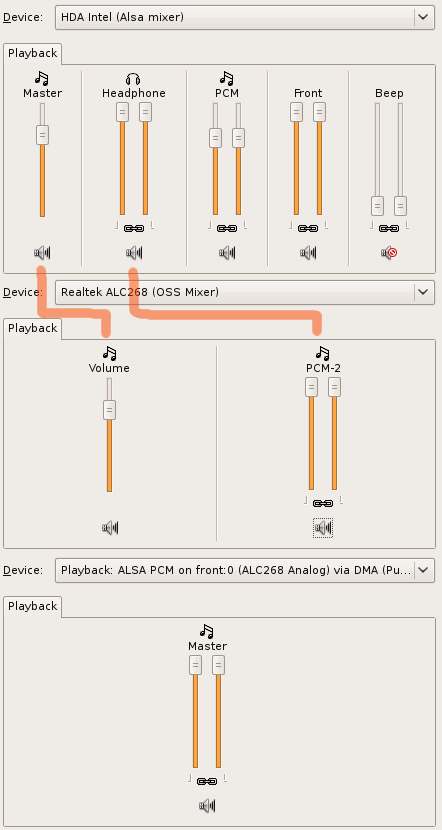
Gnome's volume manager is an interesting one. It has a combo box for devices. I'm showing here all the devices related to output and how channels are connected.

The good news is that the channels in the default mixer correspond to those in kmix (sweet sanity!). But then there is that bottom mixer with a channel of the same name as the single output channel in pavucontrol. And yes, they are the same (and the same as the single output in alsamixer).

But this channel appears to be some kind of composite output channel that has no bearing on any of the output channels in the top mixer (or in kmix). (Ie. while it might appear to be a composite pipe that aggregates the flow of all these standard channels, it's actually a pipe that sits after all of them. If pcm volume is 0, this channel won't receive any input, and will be mute no matter its volume setting.)

So neither can I effect the settings of master/pcm/etc with this channel nor vice versa. That means if I want to use this single channel as my master volume control, I have to make sure that absolutely no application can mess with the volume for any of the standard master/pcm/etc channels. Good luck with that.

A sane spec

I know this sounds crazy, but what's it gonna take to get a single server+mixer applet that

  • captures every possible audio stream, no matter the audio server/api it's on,
  • prevents applications from messing with master volume controls (eg. mplayer),
  • has a single virtual channel controlling all the underlying output channels, so that I can have a single master volume slider,
  • has per stream/app volume controls pulseaudio style,
  • integrates well into the systray,
  • integrates with laptop hotkeys

?

UPDATE: Ubuntu users can now vote on a proposal to unify sound systems on ubuntu brainstorm. Hopefully this idea and the related ones can gain some traction with Canonical to attack the problem.

deferred aliasing

November 27th, 2008

Shell users like to tailor their environment to speed up common tasks. The alias mechanism is very handy for this, you bind a short idiom to the sequence you run a lot. For instance, I have this line in my alias list:

alias lh='ls --color -Flah'

Having done that, you can also rig up a system of pulleys so that you can take the whole thing with you wherever you go.

All is well so far, but now comes the icky part. If you take this bundle of joy to murky neighborhoods like BSD or commercial Unices you'll find out that the userland isn't the same everywhere, even though you have the shell. BSD (DesktopBSD), for instance, doesn't support the whimsical --color switch, they like monochrome.

So what to do? What I would like to have is the same alias bound to something that works on the given platform, let it degrade gracefully. The only way to know that is to test for it, then bind the alias accordingly. That's what happens here, I try the incantation I want and if that doesn't work, I use the failsafe one.

setalias() {
	if eval $2 &>/dev/null; then
		eval "alias $1='$2'"
	else
		eval "alias $1='$3'"
	fi
}

setalias "lh" "ls --color -Flah" "ls -Flah"

But this is still a bit lacking. You obviously set up the aliases to run at shell startup, not manually. But there are instances when you might need a new shell, but you might have high io latency, or the io might be locked up through a system error. In such a case, you really just want to do as much as is necessary to start the shell, without doing a lot of io stuff in the startup files. So running ls and things like that for the purpose of setting up an alias is to be avoided.

Here's where an idea from compilers can help. First, let's think about the setalias function as code to be executed. This code runs on shell startup. But it doesn't have to. We could just as well bind the alias to the function code itself, to make it run the first time the alias is executed. That's what happens here, the shell starts and binds the alias to a string. The first time the alias is executed, it runs the test and then does the binding. And then runs the actual command we wanted to run.

setalias() {
	alias "$1"="if eval $2 &>/dev/null; then
		eval \"alias $1='$2'\"
	else
		eval \"alias $1='$3'\"
	fi; eval $1"
}

setalias "lh" "ls --color -Flah" "ls -Flah"

It's like a just-in-time compiler, we do some extra work the first time, but from then on it's all set up.

There's a lot more you can do with eval, so go nuts!