Archive for the ‘technology’ Category

hierarchical temporal memory

November 26th, 2008

As is often said, we humans (if you are not one of us you can join on the website, membership fees are high but not impossible) are pattern seeking animals. This implies that it is difficult for us to understand a completely "new kind of thing", we tend to seek something else that we can compare it to. Psychology got a minor win when computers emerged, because it finally had a model for the brain. Psychology professors could point to the computer and say "the brain, it's somewhat like that". It behooves psychology that the computer we know has a distinct memory, a processing/reasoning unit, and input channels that receive transmissions of "sensory perception".

The computer as we know it is the so called Von Neumann architecture, every computer we've ever had has been designed in those basic components. This design is simple enough (and, in fact, dumb enough) to handle just about anything at all, it is the general purpose computer (a way of saying that it doesn't have any purpose).

Now a bunch of neuroscientists have figured out that the memory in our computers is too dumb to do certain things well. Our linear memory, where a memory cell has no relationship to the neighboring cells, is abstract and general enough for anyone's pleasure, but it's not the way human memory works. Our memory is hierarchical, that is to say it's made up of levels where the bottom levels remember very simple things, like shapes and sounds in time. As you ascend the hierarchy, the levels above that do not remember "discrete" things, they remember unifications over the simple things. That is the way in which you understand that a leg is both a discrete thing as well as it can be part of a human body, one part in something larger.

Now, if you think about it, this is a crude first model for learning, you are being fed a lot of facts in the hope that you will be able to unify them and see "meaning" to them as a whole. This, unfortunately, is necessary, because we don't know how to transmit the meaning itself, we think the only way is to send the facts and then the mind will infer the meaning by itself. (It's quite an optimistic strategy, isn't it?) Interestingly, there is a trade off at this point. Apparently, you cannot both remember all the discrete facts *and* be able to unify them. So that could explain how some people have a propensity for lots of facts without seeing the bigger picture, while others can't hold on to all the little pieces. In a way it makes sense, doesn't it? Like doing research. Once you've stated your thesis, you don't need all those little notes anymore, they are subsumed in the larger unifying rationale.

But now back to technology. A bunch of people have built this model of memory in software, calling it a "hierarchical temporal memory". It's an absolutely fascinating premise.

havenet: network perimeter test

November 17th, 2008

Network connections fail all the time, we've all been there. There are so many things that can go wrong, the network adapter driver can fail, the dhcp server can revoke the lease, the wifi router can disappear, the routing may be wrong at some point along the line, the dns server can be overloaded, or the remote host may be down. Those are some of the possibilities, and it can be quite a pain to track down the problem.

But the first thing to do is to figure out exactly what is working and what isn't. If you know that much then at least you know where to start. My goal here is to create a fairly simple test to examine the status of the network connection, leading up to a working internet connection. One constraint that I have is that I like it to be portable, so that I can carry it around along with my dotfiles. That means I would like it to work in any location just as long as I can get a shell, it should not require any dependencies.

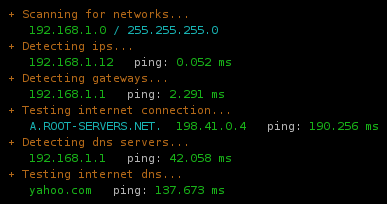
A fully functional network connection looks like this:

What I do is try to detect the parameters of the network step by step, using the regular tools like route, ifconfig. Once I know what the hosts are, I do a ping. Now, a ping obviously isn't a foolproof test; if you're on a network that doesn't allow outgoing icmp then it's entirely possible that you can tcp out anyway. So what you really should do is tcp on port 80, not ping. But ping is extremely portable, whereas doing a tcp/udp probe is asking a lot more from the environment, needing something like nmap or hping.

Once you've established that the connection is working, and you want to know more about the network, you can go further with something like netscan.

The code is relatively stupid and messy, but that's the way bash is.

# Author: Martin Matusiak <numerodix@gmail.com>
# Licensed under the GNU Public License, version 3


function havenet {
	local init="$(toolsinit)"

	platforminit
	case "$PLATFORM" in
		"Linux")
			echo "Platform: $PLATFORM"
			run_havenet "$init";;
		*)
			echo "Platform: $PLATFORM (local network detection not supported)"
			run_haveinet "$init";;
	esac
}

function haveinet {
	local init="$(toolsinit)"
	platforminit
	echo "Platform: $PLATFORM"
	run_haveinet "$init"
}

function platforminit {
	if $(which uname &>/dev/null); then
		PLATFORM=$(uname 2>/dev/null)
	fi
}

function toolsinit {
	local tools="true"
	local missing=()


	local cmds=(/sbin/route /sbin/ifconfig ping nmap)
	local args=(" -n" "" " -c1 -W2" " -T3")
	local names=(route ifconfig ping nmap)

	local i=-1
	while [ $i -lt $(( ${#names[@]} - 1 )) ]; do i=$(( $i+1 ))
		if [ 0 -eq $(which ${cmds[$i]} &>/dev/null ; echo $?) ]; then
			tools="$tools;local ${names[$i]}=\"${cmds[$i]}${args[$i]}\""
		else
			missing[${#missing[@]}]="${cmds[$i]}"
		fi
	done


	if [ ${#missing[@]} -gt 0 ]; then
		echo -e "Missing tools: ${cred}${missing[*]}${creset}" 1>&2
	fi

	echo "$tools"
}

function run_havenet {

	eval "$@"

	local localranges="169.254 10 172.(1[6-9]|2[0-9]|3[0-1]) 192.168"


	### Scan networks
	
	echo -e "${cyellow} + Scanning for networks...${creset}"
	test=$($route 2>/dev/null | egrep "^[1-9]")
	if [[ $? != 0 ]]; then
		echo -e "    ${cred}none found${creset}"
	else
		local nets=$(echo "$test" | sort | awk '{ print $1 }')
		for net in $nets; do
			local gw=$($route 2>/dev/null | egrep "^$net" | awk '{ print $3 }')
			printf "    ${cgreen}%-15s${creset} ${ccyan}%s${creset}\n" "$net" "/ $gw"
		done

		### Detect ips

		local ips=
		for net in $nets; do
			local r=$(echo $net | sed "s/.0$//g" | sed "s/.0$//g" | sed "s/.0$//g")
			local ip=$($ifconfig 2>/dev/null | grep "inet addr:$r" | sed "s/inet addr:\([0-9.]*\).*$/\1/g")
			ips="$ip $ips"
		done

		echo -e "${cyellow} + Detecting ips...${creset}"
		test=$(echo "$ips" | egrep -v "^[ ]+$")
		if [[ $? != 0 ]]; then
			echo -e "    ${cred}none found${creset}"
		else
			local on_lan=1
			for ip in $ips; do
				printf "    ${cgreen}%-15s${creset}  %s" "$ip" "ping: "
				test=$($ping $ip 2>/dev/null)
				if [[ $? != 0 ]]; then
					echo -e "${cred}failed${creset}"
				else
					local t=$(echo "$test" | grep "min/avg" | sed "s/.*= \([0-9.]*\)\/.*$/\1/g")
					echo -e "${cgreen}$t ms${creset}"
				fi

				### Test ips for lan
				local ip_on_lan=0
				for prefix in $localranges; do
					test=$(echo "$ip" | egrep "^$prefix" 2>/dev/null)
					if [[ $? == 0 ]]; then
						ip_on_lan=1
					fi
				done
				on_lan=$(( $on_lan & $ip_on_lan ))
			done


			if [ $on_lan -eq 1 ]; then
				
				### Detect gateways if on lan

				echo -e "${cyellow} + Detecting gateways (network is local)...${creset}"
				test=$($route 2>/dev/null | grep UG)
				if [[ $? != 0 ]]; then
					echo -e "    ${cred}none found${creset}"
				else
					local gws=$(echo "$test" | awk '{ print $2 }')
					for gw in $gws; do
						printf "    ${cgreen}%-15s${creset}  %s" "$gw" "ping: "
						test=$($ping $gw 2>/dev/null)
						if [[ $? != 0 ]]; then
							echo -e "${cred}failed${creset}"
						else
							local t=$(echo "$test" | grep "min/avg" | sed "s/.*= \([0-9.]*\)\/.*$/\1/g")
							echo -e "${cgreen}$t ms${creset}"
						fi
					done

					### Try inet connection if we have a gateway 
					run_haveinet "$@"
				fi
			else

				### Try inet connection, we're on wan
				run_haveinet "$@"
			fi
		fi
	fi

}


function run_haveinet {

	eval "$@"

	local rootname="A.ROOT-SERVERS.NET."
	local rootip="198.41.0.4"
	
	local dnsport="53"

	local inethosts="yahoo.com google.com"
	local inetport="80"


	### Test inet connection

	echo -e "${cyellow} + Testing internet connection...${creset}"
	echo -en "    ${ccyan}$rootname  ${cgreen}$rootip${creset}   ping: "
	test=$($ping $rootip 2>/dev/null)
	if [[ $? != 0 ]]; then
		echo -e "${cred}failed${creset}"
	else
		local t=$(echo "$test" | grep "min/avg" | sed "s/.*= \([0-9.]*\)\/.*$/\1/g")
		echo -e "${cgreen}$t ms${creset}"
	fi

	### Detect dns

	echo -e "${cyellow} + Detecting dns servers...${creset}"
	test=$(cat /etc/resolv.conf 2>/dev/null | grep ^nameserver)
	if [[ $? != 0 ]]; then
		echo -e "    ${cred}none found${creset}"
	else
		local dnss=$(echo "$test" | awk '{ print $2 }')
		for dns in $dnss; do
			printf "    ${cgreen}%-15s${creset}  %s" "$dns" "ping: "
			test=$($ping $dns 2>/dev/null)
			if [[ $? != 0 ]]; then
				echo -en "${cred}failed${creset}"
			else
				local t=$(echo "$test" | grep "min/avg" | sed "s/.*= \([0-9.]*\)\/.*$/\1/g")
				echo -en "${cgreen}$t ms${creset}"
			fi


			local proto="tcp" ; local udpflags=""
			if [[ `whoami` = "root" ]]; then
				proto="udp"; udpflags="-sU -PN"
			fi
			echo -en "  dns/$proto: "
			test=$($nmap $dns $udpflags -p $dnsport 2>/dev/null)
			if ! echo "$test" | grep "$dnsport/$proto" | grep "open" &>/dev/null; then
				echo -e "${cred}failed${creset}"
			else
				local t=$(echo "$test" | grep "scanned in" | sed "s/^.*in \([0-9.]*\) seconds.*$/\1/g")
				t=$(echo $t*1000 | bc)
				echo -e "${cgreen}$t ms${creset}"
			fi
		done
	fi

	### Test inet dns

	echo -e "${cyellow} + Testing internet dns...${creset}"

	for inethost in $inethosts; do
		printf "    ${cgreen}%-15s${creset}  %s" "$inethost" "ping: "
		test=$($ping $inethost 2>/dev/null)
		if [[ $? != 0 ]]; then
			echo -en "${cred}failed${creset}"
		else
			local t=$(echo "$test" | grep "min/avg" | sed "s/.*= \([0-9.]*\)\/.*$/\1/g")
			echo -en "${cgreen}$t ms${creset}"
		fi

		echo -en "  http: "
		test=$($nmap $inethost -p $inetport 2>/dev/null)
		if ! echo "$test" | grep "$inetport/tcp" | grep "open" &>/dev/null; then
			echo -e "${cred}failed${creset}"
		else
			local t=$(echo "$test" | grep "scanned in" | sed "s/^.*in \([0-9.]*\) seconds.*$/\1/g")
			t=$(echo $t*1000 | bc)
			echo -e "${cgreen}$t ms${creset}"
		fi
	done

}

UPDATE: Replacing with newer version that is a bit more clever.

UPDATE2: Added tool detection and platform detection.

what's in a fixed point?

November 9th, 2008

The fixed point is a very intuitive idea that we know from daily life. It's the notion that if something is a certain way, and you do something to change it, it will change. Some things you can go on changing forever by repeating the same action, but other things reach a limit beyond which repeating the action has no effect. Suppose you are going 50km/h in your car and you step on the brake. The car slows down. You step on the brake again, the car slows down again. But eventually the car will have come to a complete stop and stepping on the brake doesn't do anything anymore. The point at which the action has no effect anymore has a scary math name: a fixed point.

It's easy enough to write a function that finds the fixed point of another function f. You apply f to the argument and you get a value, you apply f to that and you get a value, you apply f to that and you get a value etc. And every time you check if the new value is different from the old. (Or even if it's just sufficiently similar, Newton-Raphson says hello.) Here is how it goes:

fixfinder :: (Eq a) => (a -> a) -> a -> a
fixfinder f arg =
    let val = f arg
    in if val == arg
        then arg
        else (fixfinder f val)

{-
*Main> fixfinder sqrt 68
1.0
-}

We can try it on a function whose fixed point we know, like the square root. Back in school, did you ever hit the square root key on your calculator repeatedly out of shear boredom? Eventually you'd get 1. (You can also take the square root of 0 and get 0, the second fixed point, but that's not particularly exciting.)

So far so good, now comes the mysterious part. The fixed point idea exists in programming, but in a different guise. In Data.Function there is a function called fix. It makes a very odd promise: to find the fixed point of a function without using a value. Que? How can you return the fixed point value (leaving aside for the moment the question of how you can even calculate it) if you don't have a single value to begin with? Heck, without an input value you don't even know what type the output is, if f is a polymorphic function.

fix :: (a -> a) -> a
fix f = f (fix f)

{-
*Main> fix sqrt
*** Exception: stack overflow
-}

The function doesn't look promising at all. It applies f, but there is no termination condition. Once you reach the fixed point (if there is one), how do you stop? It obviously can't figure out the square root function.

It turns out that fix is a trick used to perform recursion in languages that don't have a recursion primitive (ie. the compiler reaches an expression containing the name of the function in its own body and doesn't know what to do). The trick is that you write a function expecting among other things, a function argument (fix). Then, at the point in your function where you need to recurse, you call fix. Fix then calls the function back, so it's a sort of mutual recursion. In pure lambda calculus fix is called the y-combinator. The formula is so ridiculously cryptic that some have taken to tattoo it on their arms, obviously given up on remembering.

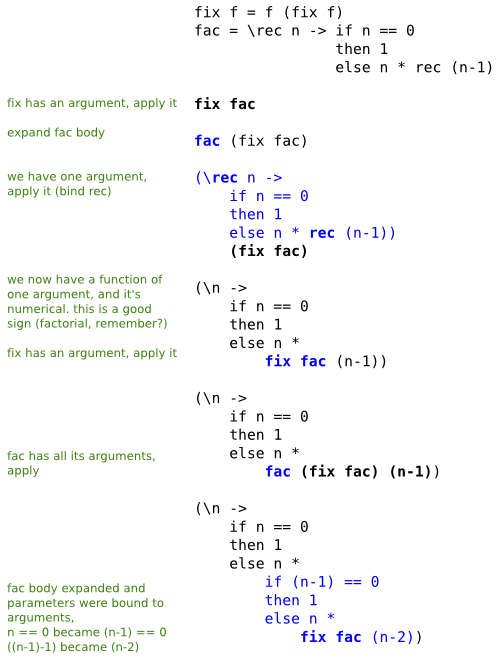
So what do you get out of it? Solely the fact that you get around calling the function within itself, from what I can see. And clearly that's all it does too. How do you prevent the seemingly inevitable infinite loop? You put the termination condition in your semantic function. So you write your recursive function exactly the same, but you give it an extra argument, fix. Then, at the point of recursion, instead of calling the function, you call fix. It's so bizarre that I've written out the evaluation sequence to shed some light on it.

Daredevil that I am, I'm using the factorial function. What's happening here, supposedly, is that fix is computing the fixed point of fac. We can then take that result and apply it to a number, it finds the factorial, it doesn't diverge.

What's happening here? It looks like a sort of loop unrolling, which can clearly proceed ad infinitum, were it not for Haskell's lazy nature. And, one can speculate, it's unrolling the recursion exactly the number of times it needs to be expanded (but then again, evaluation with a value already does that), but how could you possibly know that before you have a value to calculate with? It's not actually computing anything, is it? How is this any different from any old recursive function?

What fac really does is take one step toward the factorial. Multiply one factor, then call fix, which calls fac again. Eventually, the termination condition within fac kicks in. But that doesn't mean we've found the fixed point of fac, which is fac(1) = 1 and fac(2) = 2.  In fact, it seems to me we're walking right past these two fixed points, and calling fac one last time with n=0, because how else can fac terminate?

There is a lot more to fixed points, there's even something called a fixed point datatype that my small brain completely fails to comprehend. The most sane description on fix that I found is in the Haskell Book if you want to take a look. I wish you luck.

conquer your file associations in kde!

November 4th, 2008

So everyone knows KDE is a mammoth. And that it's very configurable. The problem is when you have to configure something for which there isn't a gui. For all I know, KDE's system of config files is completely sane and reasonable, but as a user I've never known how to understand it or where to read the explanation.

One thing that has always annoyed me across operating systems is mime types/file associations. You need some kind of mapping between file types and associated applications, and it always ends up being a kind of registry that's a pain to maintain. KDE is like that too.

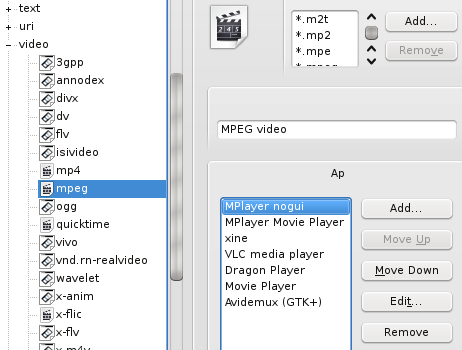
Here's what I've found out. The application entries that appear in that gui are defined in .desktop files that live in /usr/share/applications. So to get your app in there, you clone an existing .desktop file and edit. In my case, I like to play all video media in mplayer, the non-gui version. Because it's non-gui, it's usually not set up through the package. Instead gmplayer, which I don't want, is. So I've made my own mplayer-nogui.desktop file.

[syntax,mplayer-nogui.desktop,bash]

Now, to make your app appear under the file types you want, you just put this in the .desktop file. Once you've done that, you have a reusable mplayer-nogui.desktop that you can push into /usr/share/applications on any distro that fails to set up mplayer without a gui.

The next step is to make MPlayer nogui the preferred app for every file type that it's associated with. This is stored in ~/.kde/share/config/profilerc. The file is easy to figure out, and ideally I'd want an easy way to just select all and then override with MPlayer nogui. But to do that I'd have to write a parser, and it's frankly not worth the effort. So I just go through the list of video filetypes and manually move MPlayer nogui to the top. It would be nice to automate this.

In terms of maintenance, linux is not the jungle that Windows is, which means apps you install later won't generally try to steal the preferred status. But they might. So again, it would be nice to automate reseting that (or maybe locking down the preferences somehow).

It would be nice if the KDE guys came out with a gui that made it possible to set up your file associations in 30 seconds, but until then this is the best I got.

update on undvd packages

October 9th, 2008

One of the benefits of coding in a scripting language is the ability to easily move the code around and it runs everywhere. undvd is easy to install, you just extract the source and it's ready to go. Or, if you want to install it globally on the system, just run make install and you're set.

But undvd depends on a bunch of other tools, so what you really want is to let your package manager deal with satisfying the dependencies, and let you upgrade easily when a new version comes out.

Where can I find undvd?

I package undvd in three flavors myself: Gentoo, Fedora and Ubuntu. I run Gentoo and Ubuntu on my boxen, so those are the most well tested. In addition, ripdvd's author wedge does the honors for Slackware. :cool:

But there are some unofficial packages out there as well, so when you add it all up undvd is pretty well supported at this point.

Making friends with posix

Recently, a user expressed an interest in running undvd on a Mac, which is a whole new angle. I guess it never occurred to me that someone would use undvd outside linux, but why not. The recent switch to perl has obsoleted the many external tools that undvd previously relied on, which is a big [if unplanned] step towards portability. I ran some tests that revealed there were still a couple linuxisms left, so I've gotten rid of them now.

undvd-0.7.1 should in principle run on a Posix system with perl-5.8.8. The big thing isn't undvd, it's getting mplayer and the other binaries, cause they have to be built specifically for that platform. And outside linux, there's sometimes no standard package manager, which doesn't help at all.

At the end of the day, there is no escaping the fact that undvd on Posix is a fish out of water (true not only of undvd but probably most free software) - the environment just isn't as well supported as it is in a linux distribution that ships all the tools. There are no packages for any of these, but you can just extract the tarball and run undvd from whatever location.

DesktopBSD 1.6 (FreeBSD Ubuntufied)

It runs (except mencoder can't find x264, so I used xvid). The dvd device is called /dev/cdrom or /dev/acd0. Cloning with dd fails, vobcopy works.

OpenSolaris 2008.05

It runs (except mencoder can't find x264, so I used xvid). I have no idea how the device naming works, but when you put in a cd/dvd it should automount and you can look up the dvd device in the mount table. Packages for mplayer are available from Blastwave. Playback with mplayer worked, encoding segfaulted mencoder.

Mac OS X Leopard

It runs. The dvd device is called something like /dev/rdisk1. Mac people seem to be obsessed with guis, so any builds I could find only had mplayer playback, no encoding. Your best bet is probably MacPorts, modeled loosely on FreeBSD's ports. You'll want to build mplayer with the codecs you want selected as variants (think Gentoo USE flags). Disc cloning doesn't seem to work at all.

To install globally you'll want something like DESTDIR=/opt/local sudo make install.

Cygwin

It runs, and you can get builds of mplayer from the official site. The dvd device is called d: (or some other drive letter). Set PATH=/cygdrive/c/mplayer:$PATH and make sure c:\mplayer doesn't contain both a directory mplayer/ and a binary mplayer.exe, this makes cygwin very confused. On the whole it seems to work quite well, the process even successfully sets the cpu priority (nice).