Archive for the ‘technology’ Category

general purpose video conversion has arrived!

September 18th, 2008

When I started undvd I set out to solve one very specific, yet sizeable, problem: dvd ripping&encoding. I did that not because I really felt like diving head first into the problem would be fun, but because there was nothing "out there" that I could use with my set of skills (none). Meanwhile, I needed a dvd ripper from time to time, and since I didn't need it often I would completely forget everything I had researched the last time I had used one. This was a big hassle, I felt like I had no control over the process, and I could never assure myself that the result would be good. Somehow, somewhere, there was a reason why all my outputs seemed distinctly mediocre. Visibly downgraded from the source material.

Writing undvd was a decent challenge in itself, because of all the complexity involved in the process. I had to find out all the stuff about video encoding that I didn't really care about, but I thought if I put it into undvd, and make sure it works, then I can safely forget all about it and just use my encoder from that point on. When you start a project you really have no idea of where it's going to end up. undvd has evolved far beyond anything I originally set out to build. That's just what happens when you add a little piece here and another piece there. It adds up.

It's been about 20 months. undvd is quite well tested and has been "stable" (meaning I don't find bugs in it myself anymore) for over a year. One of the by products is a tool called vidstat for checking properties of videos. I wrote that one just so I could easily check the video files undvd was producing. But it turns out to be useful and I use it all the time now (way more than undvd). In the beginning I was overwhelmed by the number of variables that go into video encoding, and I wanted to keep as many of them as I could under tight control. I have since backtracked on a number of features I initially thought would be a really bad idea for encoding stability. But that's just the way code matures, you start with something simple and when you've given it enough thought and enough tests, you can afford to build a little more complexity into the code.

Codec selection landed just recently. And once I was done scratching my head and trying to decide which ones to allow and/or suggest, I suddenly realized that with this last piece of the puzzle I was a stone's throw away from opening up undvd to general video conversion. Urgently needed? Not really. But since it's so easy to do at this point, why not empower?

The new tool is called encvid. It works just like undvd, stripped of everything dvd specific. It also doesn't scale the video by default (generally in conversion you don't want that). So if you've figured out how to use undvd, you already know how to use encvid, you dig? :cap:

Demo time

Suppose you want to watch a talk from this year's Fosdem (which incidentally, you can fetch with spiderfetch if you're so inclined). You get the video and play it. But what's this? Seeking doesn't work, mplayer seems to think the video stream is 21 hours long, that's obviously not correct (incidentally, I heard a rumor that ffmpeg svn finally fixed this venerable bug). It seems a little heavy handed, but if you want to fix a problem like this, one obvious option is to transcode. If the source video is good quality, at least from my observations so far, the conversion won't noticeably degrade it.

So there you go, a conversion with the default options. You can also set the codecs and container to your heart's content.

You can also use encvid (or undvd for that matter) to cut some segment of a video with the --start and --end options. :)

I'm sold, where can I buy it?

how to pick a codec

September 10th, 2008

The great thing about standards is there are so many to choose from.
- Someone

undvd 0.5.0 introduced a new option to choose the codec and container for the rip. The only problem is that you have to know which ones to choose. mencoder supports a staggering number of codecs and containers, most of which are now exposed also in undvd. The resulting rip can also be remuxed to a couple of other popular containers with additional tools.

But I wasn't content with solving a problem by introducing a new problem. Now, it's not so easy to say exactly which combinations are good and bad, but if at least you knew which ones definitely do not work, that would be a start, wouldn't it? Then at least you can rescue the user from phase one of the Monte Carlo method in getting something that actually works.

The methodology is like this:

  1. Rip 5 seconds of the dvd using undvd with a given container/video codec/audio codec combination.
  2. Attempt playback with mplayer.

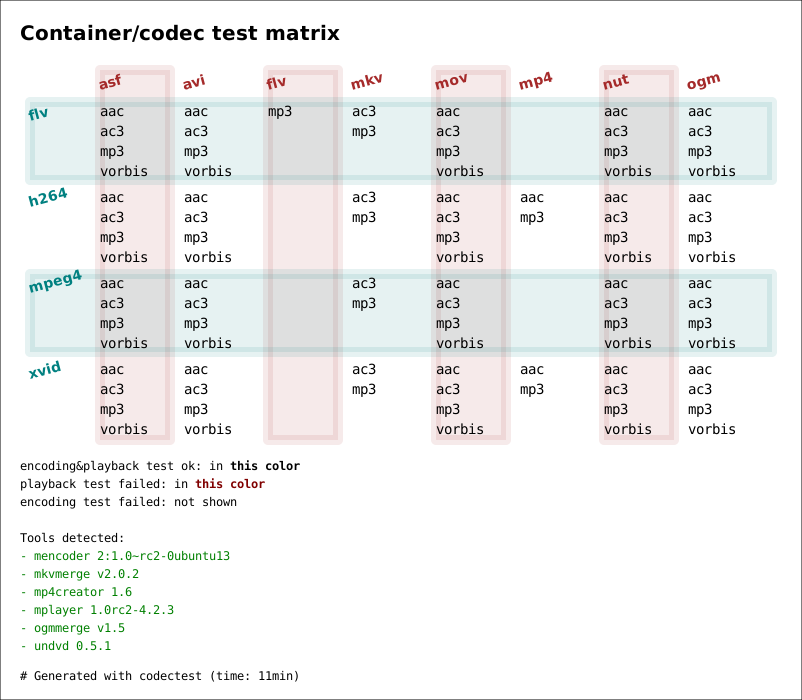
This is what codectest does. The result is either a text file showing line by line whether or not the given combination successfully produced a rip, or a pretty matrix picture. This gives you an idea of what you can expect to use. If you run this on your system, it's also a tip off if you see something that should work but doesn't.

I must stress that if the given combination of codecs does produce a file, this is no guarantee that the file is to be considered a good rip. It may not play on other media players, it may not even play on mplayer (incidentally, this is something akin to a fuzzer, I've discovered that some combinations really aren't expected :D ). So if codectest says it works, verify that you get a working video file out of it!

The standard set looks something like this:

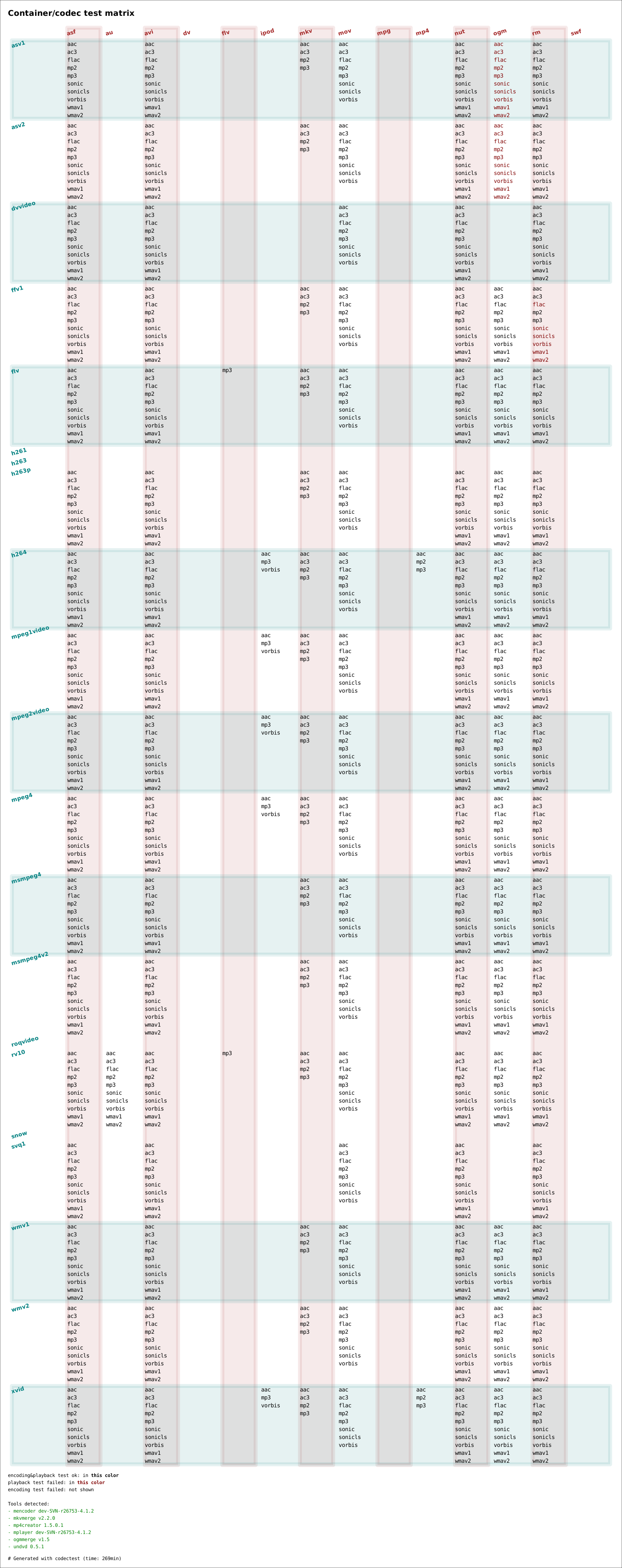
It's also possible to run it on the full combination of all codecs and containers that are now exposed in undvd. You'll need a few hours to do it:

of codecs and containers

September 8th, 2008

I have been very skeptical about adding options for other codecs in undvd, purely because of the test burden. With a single combination of container and pair of audio/video codecs I can be reasonably confident that I've done enough manual testing (and judging video quality doesn't trivially lend itself to automated testing, sadly) to account for most potential problems.

But at the end of the day it's a question of priorities, and having scratched all the important technical itches by now, if anything this is the right time for it. I got some user feedback recently that set me onto this path. The user was having trouble playing the files encoded in the classical avi+h264+mp3 format on other platforms, and that's when I asked myself how important is it really to have a single format? As long as the default still works well, what's the harm in offering a little customization?

Testing is a huge problem, which is why this new feature is considered to be experimental. The most common seems to be bad a/v sync. There is just no way to account for all the possible combinations of codecs and containers, and to maintain an up-to-date document for this as things evolve. So the burden of testing is squarely on the user here (which is quite unfortunate).

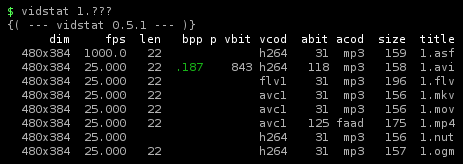
The new functionality is available in undvd 0.5 and up. Here's a shot of the new goodness. All these files were encoded from the same dvd title. A 22 minute title was ripped with different containers (represented with different filenames). The audio codec is mostly the same in all cases (mad = mp3), except for 1.mp4 (faad = aac). The video codec is also mostly the same (h264 = avc1), except for 1.flv. The only variation here is the container being set to different values, all the other settings are defaults. You can also witness that some containers are more wasteful than others (given the same a/v streams), but not by a huge amount. (The audio bitrates shown are actually misleading, mplayer seems to give the lowest bitrate in a vbr setting.)

This demo is by no means exhaustive of the full collection of codecs that can be used, for that see the user guide. There is also an option to use the copy codec, which just copies the audio/video stream as is.

tahple or twople?

August 21st, 2008

The word tuple is used quite a lot in computing. That's what database people call a row in a table. It's also what several programming languages call a structure where the fields are ordered but not named.

It seems to be one of those words that is hard to translate, so other languages often use the English word. And yet there is some confusion about pronunciation. Some say tahple, some say twople. As far as I know there is no dispute about the spelling, it's tuple. So where do you get twople from that?

I think having a lot of exceptions on pronunciation from what is the obvious pronunciation is bad for language. There are words that are fancy or interesting enough to perhaps deserve it, but tuple isn't one of them. So I'm going to keep saying tahple.

long passwords are evil

August 12th, 2008

I'm writing this partly in response to Jürgen's post a week or so back about passwords. Of course, he's not the only one to advocate long passwords, a lot of people are doing that these days in the name of security. Today's sad reality is that if your password is not "test" or "password" you are more secure than most people.

I do think, however, that any idea for improvement should stand to be evaluated on usability. After all, my first loyalty is to the user in me. Failing to do that produces wide adoption of bad ideas like captchas that are directly hostile to users. (Incidentally, that's why so many people who build systems for others build them badly. The implication of using it every day never takes a foothold.)

Short passwords have too little entropy, therefore they are easy to break.  Granted. So the response is "use long passwords", or better yet "not passwords, pass phrases". Such as oh bugger, my cat has cancer. With or without the spaces and punctuation it makes a perfectly acceptable password in terms of length. But tell me now who is willing to actually type these monstrosities?

The evil of password typing is reduced by our methods to avoid typing them all the time. Use public keys with ssh, never type the password again. Save passwords in the browser, avoid typing those. It's a fabulous usability gimmick.

But short passwords, bad for security, are great for another closely related purpose: being able to actually type them in. If you have a short password you don't need much practice to be able to type it. It's a sort of sweet spot between usability and security, more secure than nothing, not too painful to type if you have to. My password input rate might be something like 98%. I rarely fail to log in. But with pass phrases of 29 characters like the one above, how confident would you be? You don't see what you're typing either, just echo characters at best. I expect the likelihood of typing it correctly falls dramatically, maybe to as low as 75-80% for the average user, in the average point of his learning curve to learn typing it (does not apply to hackers with stellar typing skills yadayadayada). If you're doing something once, 80% is pretty good odds. But if you're doing it everyday, it's no longer odds, it's a statistical average. Imagine if those were your parking odds. One in five times you fail to maneuver through the opening of your garage, I don't think you'd be happy.

I tested myself on cancer cat just now, 6/10. On a sentence I've never typed before. And that's while seeing the characters on the screen.

And then there's the chance that you'll forget it, or remember it wrong, switch a character in your mind, use the wrong case. It's hard to estimate how likely that is, but with long passwords it seems rather likely. Inputing passwords is not an approximation, it has to be exact. And it's not just one of those phrases you have to remember *exactly*, you need one for every distinct password you keep.

Security is a social problem, not a technical one. If you force people to use long passwords they struggle to input (for christ's sake, they *already* use post-it's on the monitor), we will just embrace ways of avoiding passwords all the more. Passwordless ssh is great, but if I'm using every trick in the book to avoid typing my long password, I haven't had enough practice typing it when I actually have to type it.

That is, if I even remember it correctly. And I somehow doubt sysadmins will give you more tries to type a long password than they currently give you, 3 tries or whatever it is. And then you're locked out.

It's the perfect anti-security. The bad guys have a shot at my account (but they have to be pretty clever), but I myself am locked out.