Archive for the ‘technology’ Category

what can you do with django?

December 2nd, 2007

So I'm reading about Django, which is a really groovy web framework for Python. As the Django people themselves say, there have been *a lot* of web frameworks for Python alone, and it's clear that a lot of lessons have been learned along the way. Personally I've only looked briefly at Zope before, but I was a bit intimidated by how complicated it seemed to be. I also once inherited a project that used Webware for Python, which was pretty nice to work with, but radically different from what I'd known because pages are constructed using a sort of abstract html notation (basically every html tag is a function etc).

There is a lot to like about Django. The MVC pattern is executed quite elegantly (or as they call it in Djangoland, the MTV (model - template - view) pattern). Templates are written in what resembles a server side language, but it's actually a specialized, both restricted and enhanced, Python-like templating language. Templates can inherit from each other to fill in placeholders in a cascading manner, very interesting design choice.

Then there is a nice separation between objects and persistence. Data is declared in terms of Python classes (called "the model") which are then translated somehow on-the-fly to sql-du-jour depending on your database backend. You can even run a Python shell to interact with your model to de facto edit your database.

The model and the template mechanism are both tied together with "views", which is the application code you write for your webapp. A cool thing here is that urls are decoupled from execution code, and the two things are mapped via regular expressions, so you have something like a mod_rewrite declaration (but nicer) that dispatches to functions.

All the same, if I were to work with Django I have a couple of concerns up front:

  1. Templates are written in html with inline Python-line expressions. This makes them both simple and transparent, because the html code that will be served is written by hand. However, considering the present situation with html and browser support, it would be nice if Django could enforce/validate html. But this would probably imply an abstraction over html (to prevent raw html being written) and a layer of code generation for html (which may or may not be easy/possible to cache efficiently).
  2. And that brings me to the second point. I have seen no mention of CSS anywhere. It appears that Django leaves the fairly heavy burden of supplying styles to the designer, without any intelligent mechanisms to help.
  3. Data models are represented in Python code, which is very convenient and provides a much sought after quick access to the contents of your database. Django will instantiate tables for you based on a model, but only for creation. It doesn't seem to enforce or update the correspondence between the Python model and the database schema. The Django book has a mention of strategies for keeping things in check, but this particular section is missing.

There is no doubt Django embodies a lot of what we've learnt about building web applications, but currently I would say it seems a bit incomplete (also pre v1.0 still), if terribly elegant in some parts.

Another question concerns performance. Ruby on Rails has been known to suffer when pitted against the effective but ugly php. Does Django fall in the same bracket or does it have a lower overhead? In general Python is an older and more refined environment, so one might expect Django to scale better.
latex sucks! (for presentations)

November 28th, 2007

Hold your fire.

Got your attention there, didn't I? :D

Latex is good at what it was built to do - markup big documents. Fine for writing reports, articles, books. The problem is that we have no other tools nearly as good, so we end up using latex for things it wasn't meant for. Like presentation slides.

Why is this? Well, let's see. There's Powerpoint. It's a toy. It's one step up from drawing each slide separately in Paint: it has no structure, it makes you duplicate all common elements, no indexing, no outline. What does it offer you? Oh yeah, a spell checker. It sucks. Then there's latex. You reuse everything you already know about it, it has a ton of helpful packages, and with beamer you can actually write slides without hurting too much. Except.. it's still latex.

Here is the problem. Presentation slides are not the same as prose. Everything latex is good at has to do with handling text. Everything presentations are supposed to be is not centered on text. Giving a presentation is just as much about showing as it is about telling. And you're already telling when you're talking, so you should compose your slides so that you can show people what you mean.

We have horrid tool support for writing presentations. No wonder almost every talk you see is frame after frame of bullet points that no one will remember anyway. People actually paste parts of their text from articles into slides, as if that is supposed to produce a good visual device! :googly:

I have given 8 presentations in the last 12 months, and I'm set to do 4 more by the end of the year. Almost all of them written in latex with beamer. And you know what? I didn't enjoy myself. On the surface it looks promising. The beamer class has a ton of features, you use regular latex, and you output a pdf. But when you get down to the details...

The ratio of illustrations, diagrams, source code and other example materials is much higher than it is in prose. It's supposed to be that way. This is what latex is awkward at. Presentations are visual, so the first thing people think about is the slide design. Well guess what, if you have the perfect design already, good for you, but if don't, you're stuck editing latex styles, which no one understands. Strike one.

Then there is importing images into your slides. Raster images work fairly well, but obviously you have the resize problem - a raster image displayed at a non-native resolution will look jagged. You don't want that. So you hack up a vector image in something like dia. But you can't use that directly in latex, you have to convert it to either eps or pdf. I have found the latter least painful of late. So now not only do you have to know latex and dia, you have to author Makefiles to get a sane build process out of this. That is if you can remember to include just the right latex packages in your document, make sure they are installed both locally and any other place you may want to do a last minute recompile. Strike two.

Speaking of Makefiles, everyone knows you have to recompile a latex document to see the changes you've made. But with presentations these changes are much more often concerned with layout than they are with content. And it's a huge pain to recompile again and again to debug something as simple as a two column layout (use \minipage and set the width in absolute units just right so they fit next to each other). So now I have a compile loop running every second that invokes make and I see the updates in kpdf. All because I want to tweak the layout of my content. Speaking of compiling, have you seen those latex error messages lately? They're not meant for humans. And as far as languages go, latex isn't exactly the most... robust of them all. Make one tiny mistake here and your compile detonates. Strike three.

It is a pain. It is a pain to have to recheck old documents to remind myself of how I included a piece of source code. Or how I handled a particular image. Latex is extremely hackish. It makes it friggin' hard to generalize anything so that it becomes reusable. I find myself copy pasting code all the time from one document to another. There is nothing sensible about how things are done, it's just a matter of writing something that works, and having a copy of it somewhere. The more presentations I write the more difficult to remember which trick I used where. An unmaintainable mess.

And then there's time pressure. When you're writing a technical document, you have the time to work out the little quirks you will encounter. It's a permanent document, it will continue to exist for years after the fact, it's worth the effort. But presentation slides are not. You just want to write them fairly quick so that you can give the talk and move on. You're not going to be investing time in this, it's a one time thing. And yet writing slides requires a lot more patience with latex than writing prose does.

Nevermind that, writing slides is a creative process. It is not filling in predefined sections of a document, like an article for a conference is. You want to be able to experiment, to try things just for the hell of it. Latex is horrid for this. Let's see if I can fit this figure next to the text here. Okay, let me first look up how I do that. How do you actually find this out? I already covered that earlier. Then try it, debug the layout, finally I can see if I got what I wanted. No, that didn't work out, let's switch it back to the way it was. Compile error. Goddamn it, now what? Okay, let me gradually undo to a state that does compile and that way I can figure out what's causing it.

Not. how. it. was. meant. to. be. done.

KVM: the state of the game

November 16th, 2007

KVM is one of those things I've kept an eye open for ever since I heard about it. First of all, I should mention that there is currently a great deal happening on the virtualization front, here's a list of virtual machines to look over. What is more, it is not so much a wealth of competing products, because it seems that everyone has their own little twist on the matter, and none of these are completely equivalent solutions. There is a host of different terms to describe these techniques to boot.

I've known about VMware for 5-6 years, and that is how I originally started out playing around with linux in a safe and easy environment. Since then there have been many linux centric projects that have made waves at some time or another, not all of which I've tried. I think User Mode Linux was the first one I heard about. It ran a modified host kernel and could host multiple guest machines that would also be running a modified kernel. You could use it to host Virtual Private Servers, which has been common now for a while, but wasn't all that common back then. You could also set up honeypots with them. There was also a VMware competitor called Win4Lin (for Win9x) which was like a poor man's VMware. It would run fairly well, but it was far from being equally polished and feature complete. It also had the advantage of being strictly an application, no kernel hooks. A couple of years later there was a new project that was very loud, namely Xen. Xen is one of those odd projects that had a lot of potential and broad support, and yet didn't quite have the kind of adoption one would expect. It was quite a complicated piece of code that required a lot of setting up and so on, but Fedora shipped it by default (I'm not sure if they still do) and it worked out of the box. Again it was a modified host kernel, but the guests could run completely unmodified. I'm not sure how recent this is, but nowadays Xen also runs various operating systems, although in some cases they need to be modified. Then there was CoLinux, which approached the issue from the opposite side of the table: Linux as guest. I never got around to trying it as I never had to use Windows for long stretches of time, but a lot of people (those poor souls trapped on Windows) were very enthusiastic about it.

So what about KVM? Well, KVM is interesting because of how "close to the metal" it is. Obviously, any kind of virtualization adds some overhead due to the unavoidable indirection. But KVM actually does not position itself above the kernel, as most virtual machines do, but uses kernel primitives to host guests (in fact it sets up a whole new kernel execution mode guest for this). It also uses cpu virtualization extensions (current Intel and AMD chips) to gain speed. All of this is fairly recent stuff, KVM was merged into the kernel for 2.6.20. So, of course, the major advantage of KVM is that it's well supported and well tested in kernel mainline.

However, KVM is not a virtual machine in itself, in the sense of being a complete application. It's more like an access layer which exposes a /dev/kvm interface. The way to run KVM is through QEMU, which is actually an emulator. I haven't mentioned emulators so far, but they are in a sense the second type of virtualizer/emulator software. The difference is that a virtualizer creates a virtual machines with virtual hardware (eg. network adapter) for the guest operating system to run on, but the cpu is still that of the host. An emulator instead emulated the guest cpu, and therefore has to translate every machine instruction into a different one. This means that you can run say a powerpc guest on an x86 host. It sounds very cool, but it's orders of magnitude slower, so it's not as much of a hot topic.

But back to KVM. As I said, the application is still QEMU, but it's accelerated through KVM. I had been looking forward to taking it for a spin, especially now that I also have an Intel chip with the virtualizing extensions. On Ubuntu it's all ready to go, just install the userland applications from the repo (qemu and kvm) and you're set. Qemu is quite nice and simple to use, but the combo is temperamental and unforgiving. You can set up your guest machine in 2 minutes, but with Windows I had quite a number of fatal crashes (Exception 13) that aren't that obvious to figure out. Furthermore, it seems that even linux distros aren't trivial to run on KVM/QEMU. In terms of a complete machine virtualization it leaves something to be desired. Notably, the video flickers quite visibly while running on a vesa driver. That isn't to say that other virtual machines cannot or will not use KVM as part of their solution.

But for the time being VirtualBox (something of a lightweight VMware, which is also free software) is more convenient.

Disclaimer: This entry is something of a historical account of my exposure to virtual machines. I did not do any fact checking here, and the statements only reflect what I recall about the particular products.

Ubuntu Gutsy on the Toshiba U300

October 31st, 2007

Screen resolution too small

The native resolution 1280x800 is not recognized correctly. Bugs #153160, #135169, #136783. To fix it:

echo "deb http://ppa.launchpad.net/kyle/ubuntu/ gutsy main" >> /etc/apt/sources.list
apt-get update
apt-get upgrade
dpkg-reconfigure xserver-xorg

No sound

The soundcard seems to be recognized, but outputs no perceptible sound. Bug #159045.

The fix is not very obvious, but you need to install Realtek's audio driver for this. This workaround pretty much nukes your alsa installation and messes with ubuntu's configuration, but if the config wasn't working at all, what good is it?

Make sure you have lib32ncurses5-dev installed, or alsa-utils will fail silently.

wget ftp://202.65.194.211/pc/audio/realtek-linux-audiopack-4.07a.tar.bz2
tar xjvf realtek-linux-audiopack-4.07a.tar.bz2
cd realtek-linux-audiopack-4.07a
sudo ./install

I haven't done any exhaustive testing, but sound output works, at least.

References: toshiba laptops, u300

EDIT: Okay, one problem. Plugging in headphones does not interfere at all with sound output from the speakers, and the two have separate volume controls. This is fixed partially by using:

modprobe snd_hda_intel model=toshiba probe_mask=1

In /etc/modprobe.d/alsa-base :

options snd-hda-intel model=toshiba probe_mask=1

I say partially, because what I observe is that sound output is now sent to the right place, but the master volume control does not control the headphones. So if you have the headphones plugged in, you need a separate control for that. Still an improvement.

UPDATE: Discard the above, this seems to fix it conclusively.

(k)ubuntu: for the love of god stop crippling KDE

October 14th, 2007

Here's the thing. KDE is a wonderful project run by inspired people. It has its problem yes, but all the same it delivers a really outstanding product. It's by far the most exciting happening on the desktop the last couple of years. These people know what they're doing.

You are Kubuntu. You want to bring KDE to Ubuntu users, because it rocks. But here's the problem: you think you know better. You don't. Being a packager does *not* make you an authority on what people want. KDE is fine as it is, stop messing it up.

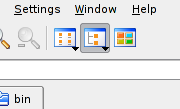
I use konqueror as a file manager, it's great for that. In Gentoo, this is what my toolbar looks like. Notice the selected button, it's called Tree View. I use tree view 99.6% of the time. The button next to it is called Icon View. When you install konqueror in Ubuntu you only get this button. Frankly I don't care about the Tree View button, I can get tree view by using the drop down list on the Icon View button. (Yes it takes longer but I so rarely switch view mode.) Here is what I do care about. When I set the view mode to tree view in my current tab and then open a new tab, in the new tab I get icon view. Congratulations, you have just reproduced one of the most infuriating behaviors of Windows. I have looked around and there is no configuration setting for this in the dialogs. In Gentoo I set tree view and it "just works", tree view all around. Kubuntu just couldn't help themselves, they had to break it.
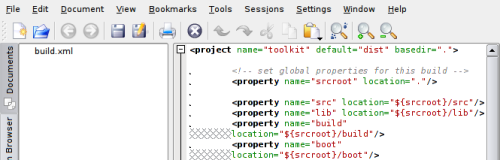
Another application I use all the time is kate. It's the most practical editor to view files in, although gvim is a bit nicer when you have much editing to do. When I open a file in kate the document list tab always opens. I don't want it to always open, I want it to save on exit. It also does not remember the size of the tab, so the result is this:

One third of the window size is wasted on the document list, even though the filename obviously doesn't need all of it. Meanwhile I get line wrapping in the document pane. Once again, on Gentoo the size is remembered and it "just works", on Ubuntu it's broken.

Here's the thing about user interface experience. It's a very fragile thing. Even if everything else works as it should, one little problem, if it keeps coming up *all the time* can destroy a good experience. And especially knowing that this has worked seamlessly on Gentoo for years is completely infuriating.

Bug #152621

EDIT: Fix for the tree view breakage.