Archive for the ‘technology’ Category

the lamentable state of ati-drivers

November 17th, 2006

It's a well known fact that for modern ATI video cards, that is for cards with chips R300 and later, the open source driver that comes with Xorg does not support them. The only driver that does, is ATI's proprietary closed source driver. The driver has new releases about once a month and supports all of the modern ATI cards. However, it does not hold the same quality as most linux drivers.

In the first place, support for new cards lags way behind hardware releases. I have a Radeon Mobility X1300 card, which was released in October 2005. According to ATI's site, the first version of their driver which supported this card was 8.24.8, released in April 2006. How would you feel if you bought a new car, but when it was delivered, it had no seats, no steering wheel, and no pedals? Then the company made you wait 7 months until you could actually drive the car?

Secondly, the driver just isn't very good. The Xorg open source driver for radeon cards, which I used for years in the past, may or may not perform as well as ATI's driver when it comes to 3D acceleration, but it does support the features I use perfectly well. ATI's driver, however, has certain deficiencies. For instance, X-video support for my card was only introduced in version 8.30.3 last month. Even so, it's buggy. When playing movies in mplayer with X-video, I see symptoms that never surfaced when using Xorg's driver with an older card, like the video will start to lag and framedrop, cpu usage will spike, old frames in the movie will reappear less than a second after they have been shown, zooming the video to full screen and then back to windowed will freeze parts of the last frame in full screen mode onto the desktop wallpaper etc. I doubt this is supposed to happen, and over a year has passed since this video card was first sold. Another thing is 3D performance. I was concerned with how low my framerate was in glxgears, for what is supposed to be a fairly modern video card. I was getting about 100fps. After installing version 8.31.5 released a few days ago, this has now jumped to 850fps, so I'm guessing whatever the problem was, it's now fixed.

But in any case, it _should_ be possible to buy a video card and use it from day one. The fact that you can buy an older card, which by now is well supported by Xorg, is positive, but new computers are sold with new cards, so if you want a laptop, you're stuck. I wonder just how long it will be until the X1300 card is fully supported and the driver is as good as bug free..

software suspend, oy vey

November 7th, 2006

It is so damn annoying to spend hours trying to fix something which appears to be so simple (and which happens to work perfectly on that other OS) without even getting anywhere. Software suspend has been problematic in linux for years, and that's really why I've never insisted on fixing it on my laptop. But enough is enough, and today I decided I was going to fix it once and for all. Easier said that done.

Like I said, it has been years since people started trying to get this working and there's now tons of howtos and personal stories about what they did and what worked. Of course, just about everything that people say is model specific and what works for one laptop is not sure to work for any other etc. The number of options alone underlines that problem. But it seems that the most widely used (or should I assume the method that has the widest catchment area) is suspend2. So I started out with that, suspend2-sources, setting up the kernel etc. Of course, the more refined your setup is, the more pain you are about to receive. I have a nice framebuffer with a boot screen, which I dumped along the way just to simplify things.

suspend2 in my case was incredibly flaky. Hibernating would work once, the next time it would freeze at "Doing atomic copy" and I'd have to hard boot. I experimented a lot in the console with this, not being able to find any combination of settings that worked reliably. There is a log file for the application, but even setting the logging verbosity to the maximum would only print what it was doing before actually suspending (and then nothing about why the suspending itself failed). Adding fglrx to the equation, as I had feared, was a definite suicide move. Attempting to hibernate with fglrx loaded would consistently kernel panic (is that a verb yet? let's make it one!) and there's no way (that I'm aware of) to keep X running while unloading fglrx.

So much for suspend2. Then there's still Software Suspend. I don't recall having tried this before, somehow it was always described as obsolete and not recommended. The thing is that suspend2 comes with scripts and a bunch of config files, suspend[1] doesn't, so it wasn't too clear how to actually suspend the system. Trying to hibernate with suspend[1] was not a great deal more successful, hibernation seemed to work, but resuming was not always blissful. Again lots of hard boots and I was getting really sick of it. Reading what people had said about my particular video card didn't seem to help at all.

Then I came across suspend to ram in /sys/power/state (which is actually what I wanted, rather than hibernation which requires you to go through grub and all). It turns out this method actually resembles the Windows suspend, you suspend, screen goes blank, power is cut. Then you press the power button, desktop appears right away. Perfect. This isn't software suspend at all (which seems to focus on hibernation), this is acpi sleep. I still need the suspend2-sources, but I can disable everything called 'software suspend'.

At last, after hours of trial and error, scrambling for information on google and reading outdated documentation, I had found the answer. This suspend-to-ram works beautifully even with fglrx (unlike suspend2's 'to-ram' function which never worked for me once). So now I wanted to map this function to a spare button I have on my keyboard and mapping aside, this was a lot harder than expected.

The suspend function is a simple echo mem > /sys/power/state, but, of course, it takes root privileges. This works fine on the command line, but putting that line into a script just didn't work, the screen would go blank, but power wasn't cut, it was as if it waited for the command to terminate first. How ridiculous! So while people had just put that line into a suspend script, it wasn't working in my case. I finally landed on using

sudo bash -c "echo -n mem > /sys/power/state" &

in combining sudo with & to make sure it wouldn't wait for termination. And this put into /usr/local/bin/suspend.sh, mapped to my spare keyboard key actually works now, I finally have software suspend (or sleep, or whatever you call it) working as it should. There's no hibernation, which doesn't bother me as I don't need it.

There's still a small hitch when running suspend.sh in the console. When resuming, the screen is just blank. I can start X and this will make the video card start drawing, which brings the display back to life. Then if I kill X, I have my console visible again. I don't know if this has to do with using a framebuffer or something else, but I can live with it, suspending in X is the whole point of this anyway.

So if you have a Dell Inspiron 6400, here's a suspend-to-ram method that works-for-me (and will probably be outdated by the time you find it, making it useless to you). Enjoy!

UPDATE: No, it's definitely broken. I don't think my soundcard handles suspend very well (or at least the driver doesn't seem to), so I can't suspend if I want my sound working after resuming. Of course, in Windows it works without a hitch. :lazy: Meanwhile, I still have no software suspend..

source code indexed

October 5th, 2006

Google have a billion different projects, many of which never see much success. But the latest thing is indexing source code and making it searchable. So say you want a sorting function in... Ada, and you don't want to write it yourself, you can just search for it. It also has info for licenses, so you can look for code under a license that you can safely use.

On a far more trivial note, you can search for names. My name turns up what is probably the most trivial software "release" I've ever done, the two files in this blog entry. There is more code out there that has my name on it, like galleryforge, but that hasn't been indexed. Other names, like Linus Torvalds turn up more matches (in his case only 50), whereas others still, like Bill Gates, only mentions the person in the source, but not as an author of the code. (Which is not that shocking, since Bill isn't eminent for his open source activities.)

In any case, Google Code Search is a pretty cool resource!

gmail beta vs yahoo mail beta

October 1st, 2006

By now everyone knows gmail, it's practically become a verb, just like google. Yahoo then, not wanting to trail too far behind, has stepped up its efforts to polish off its webmail offering to match gmail. gmail offers 2.7gb of storage space, yahoomail gives you 1gb, either way it's much more than anyone will ever need. Of course, yahoomail has been around for a very long time, it long outlives gmail. And it has received periodic updates and improvements over time, but the new yahoomail beta is supposed to rival gmail - big headlines, big launch, big news.

My software engineering books would always mention "the zero solution". Before you start building a new system, you have to compare its cost and projected benefit against the current system. What will be the benefit of the new system compared to doing nothing at all? This is how you would determine whether the project has any kind of potential at all. In that spirit, let's spare a thought for the soon-to-be-extinct old yahoomail, the existing solution.

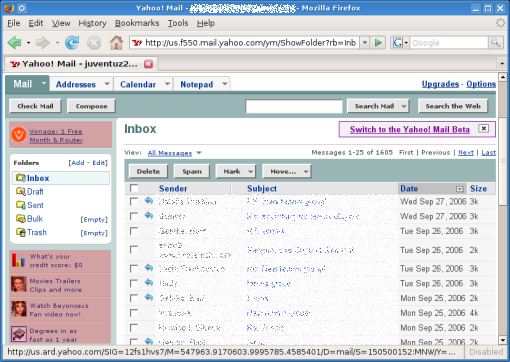
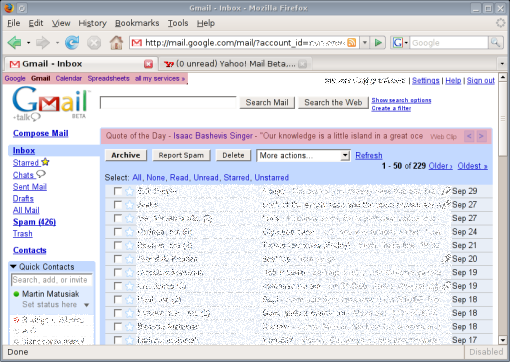
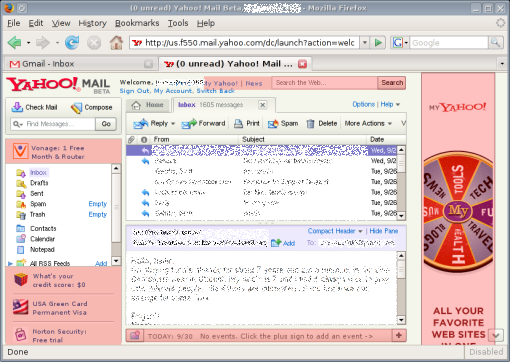
But before we do anything, let's mark out the perimeter. In the upcoming screenshots, I've allocated 828x588 pixels to Firefox, which is exactly the amount of space it gets on my desktop. Each of the services will be presented in that space. Free webmail services tend to support themselves with advertising, so that is a necessary evil for us users. To make this more obvious, I've marked out, in pink, the areas on the page which contain either advertising or endorsement of the site's own services.
yahoo_old.png

Starting with the existing yahoomail, the service, I'd say, is quite functional. When I log in, I come to an "overview page", which is basically Yahoo's pretext for showing me ads. It also has some clearly non-localized stories from Associated Press which I've never even looked at. I've learned to ignore this page and click on my inbox, which opens the page shown in the screenshot. Here I have a list of messages, with folders on the left. Clicking on a message takes me to it (no AJAX, so I have to wait for a new page to load), but I can middle-click to open a bunch of messages in separate tabs, which I often do. This interface can be quite slow at times (whenever my connection is poor, or yahoomail is overloaded), so loading each new messages can take a while in those circumstances. There is an address book, and I can explicitly add entries to it by typing in new contacts. The message composer is very basic, but it has auto-completion for typing in email addresses in the recipient field (pulled from the address book, naturally). yahoomail has a spam filter, suspected spam lands in my Bulk folder, but I have mixed results with the filter. The ads are all concentrated on the left sidebar and aren't intrusive at all, the trained eye can easily ignore them. The total screen area occupied by ads is 6.6%.
gmail.png

Then came gmail, and made big, big waves. No other webmail service has made so much noise before. Well, gmail was one of the first mainstream websites to introduce AJAX to the world. When I log into gmail, I immediately see my inbox. This tends to take a little while, apparently there are quite a few things to load behind the scenes. But once it pops up, I see what the screenshot shows. Again, I have a list of messages front and center, with a list of folders on the side. It also displays my contacts below that. Interestingly, the contact list is not a static entity, it is built dynamically out of contacts with which I exchange emails. So I don't have to type in entries in my address book manually, it is done for me. (As a small sidebar, I can also use the contact list to chat with my contacts over googletalk, without leaving my inbox.)

Clicking on a message here opens the message on the same page, which is quicker than loading a new page. Unfortunately, middle-clicking on the message title doesn't work here. gmail is packed with AJAX functions, however. For instance, marking messages as spam removes the message from sight dynamically. The message composer is a bit more advanced, there is a rich editor available, and a built-in spell checker. Once again, auto-completion for typing in message recipients (pulled from my dynamic contact list). gmail's spam filter is very good, I only get the odd message in my inbox that doesn't belong there. The advertising is also very discrete, just text, no images, and blends right in with the rest of the page. The advertising area is 4.4% of the page.

The search function, powered by google, enables me to find old messages with good accuracy, which is something yahoomail doesn't have at all.
yahoo_beta.png

gmail isn't news, it was news. Let us then turn to what is news presently - the new yahoomail beta. The new service has received some glowing reviews, I won't bother digging for them - those who have written it know who they are. yahoomail beta is Yahoo!'s response to gmail, then. Let's see how they compare. The first thing very striking about the new service is the amount of advertising they have put on it. It's impossible not to notice this, it immediately strikes me as one of the more ad infested websites I use. The pink bits here make up for a total of 20.8% of the whole page. Do you see the little arrow in the bottom right corner? The tooltip for that reads "Click to scroll down to view the rest of this advertisement". How adorable is that? Has anyone ever scrolled to see more of an ad? Okay, let's put that aside for now. Logging into yahoomail beta again opens an "overview page", which is again just a place to display ads and news stories. I'm not the slightest bit interested in news, I'm looking for my email. So I click on the Inbox tab.

This is Yahoo hoping that frames will come back in style. I have a list of my messages, with a display area below it, just like in most mail clients. So when I click on a message title, I see the message in the display area. Below the message display area there's an endorsement for Yahoo's calendar, which I have absolutely no use for (and it's impossible to remove the little ad to better use the available screen space). On the right, there's a huge ad. This interface is horrid design. Web design 101 says every website should be tested across a wide range of screen resolutions, to make sure it functions well in them all. Either Yahoo is oblivious to this, or they just don't care. At the same time, the fonts have become smaller, which suggests that the pages aren't meant to be viewed at high screen resolutions anyway (ie. they really want you to have that kind of ads-to-content ratio). With the amount of space occupied by ads, the list of messages and the message display area beneath is squashed in between frames, and is a real pain to use. When I open my inbox, I only see about 7 messages in the list, and there's no way for me to scroll the page, because the list is in a damn frame. When I click on a message title, I get about 5 lines of message text displayed in the display area, which is about as convenient as reading the same message off the screen of a cell phone. And this is it, there is no "open message in a new tab/window" or anything like that, this is the only way to view messages. The most important element of a webmail system is browsing the inbox and reading messages, and Yahoo have completely botched it. I could just as well end it here and declare yahoomail beta a broken service. But in the spirit of completeness, let's finish this.

On the left, I have my list of folders, and a new search box to search my email, which I guess is a brand new gmail-ish feature that yahoomail beta is hoping will make it possible for us users to maintain some idea of our email history. The classic yahoomail really lacks this, it only gives me an option to browse old messages, 25 message titles per page, until I find the one I'm looking for.

The address book does not seem to have changed in the new yahoomail, I still have to add contacts by hand. The spam filter I imagine is the same as with classic yahoomail, but I haven't used the service long enough to know for sure. The message composer has been given a makeover, it now has a rich text editor and a spell checker. There are some AJAX additions to the interface, like "dynamic" spam classification of messages (like gmail has). But these additions are very underwhelming considering how slow and bulky the service generally feels. There are way too many ads, gmail's pages are much simpler and more to the point.

gmail is head and shoulders above yahoomail beta, it is intelligently designed to be efficient and "smart". yahoomail beta is a patchwork of half baked ideas and compromises, which results in a service that is less functional than the original one. yahoomail beta is not about to win significant market share unless it gets a complete redesign (which is generally not something you do with beta software). I am migrating my email increasingly to gmail, and the launch of yahoomail beta has begun to speed that up.

In a few parting words, here are some of the quotes yahoomail beta proudly prints on its opening page.

  • "The new interface is stunning in its simplicity and ease of use."
    — PC Magazine
  • "Yahoo! Mail came out on top again."
    — Associated Press
  • "Graceful, swift, and respectful of your privacy, Yahoo! Mail Beta makes a gracious e-mail host..."
    — CNET

Enough to impress executives, is it? But will it fool the users? Not a chance.

EDIT: Apparently the classical yahoomail does have a facility to search in messages, this seems to be a recent addition as I've never seen it before.

why do Windows filesystems suck so?

September 26th, 2006

As far as I know, there has been *no* development on the filesystem front at Microsoft. Of course, there was the vaporware WinFS, but that was supposed to be a meta fs on top of ntfs anyway. So, I think it's safe to assume that the filesystem that shipped with Windows NT, ntfs, continues to please. Otherwise there is still fat32, and the WinXP installer gives you the option to use either one. I am not impressed by any of these two.

Historically, fat32 was a replacement for fat16, it was great when it first came out with Windows95, supporting long file names, files up to 4gb size etc. But today, 4gb is a size exceeded by lots of files. fat32 is also fairly prone to crashes. If you pull the cord just as a file write is in progress, the drive halts in a corrupted state. So next time you boot, Windows will run scandisk to examine the state of the damage. This could be harmless, it could also be quite serious, depending on your luck.

Enter ntfs, the "industrial strength" filesystem the world was waiting for. ntfs I think is the only option in Windows Vista, and it looks like Microsoft will be banking on it for many years yet. And yet I've had more unrecoverable crashes with ntfs than I've had with fat32 (which I've use longer). I recall using Partition Magic back in the days, which worked like a charm with anything but ntfs. And the checks for corruption on ntfs volumes would also takes ages to complete. I stopped using ntfs as I just didn't trust it. It's like a complicated beast of a system (which I guess is why old PowerQuest didn't do such a great job of supporting it), that noone (save for MS) seems to understand, that only works well in ideal conditions (don't try to resize it or anything 'crazy' like that) and if it crashes, who knows what to do. The lack of ntfs support on linux also tells the story of a filesystem which might just be more complicated than it needs to be. In addition, there's no straightforward way to make a full system backup (without specialized 3rd party software), because of all the special locks and restrictions MS has on selected files.

While it's evident that fat32 is antiquated, I would only use ntfs while vigorously backing it up (to the extent that it's even possible), knowing that if it blows up, there's a host of complicated ntfs recovery tools out there, most very limited in what they offer, but none that I've actually succeeded doing anything with.