Archive for the ‘technology’ Category

python bytecode: modules

August 8th, 2013

If you're new here I recommend starting with part 1.

Last time we looked at statements inside function bodies. Exciting stuff, but a bit puzzling. I bet you were asking yourself: How did those functions get into that module in the first place?

Statements at module level

For some reason dis.dis does not seem to produce any output when given a module object other than showing you its functions. For a more insightful view we will use python -m dis module.py.

Let's try a really simple one first.

a = 7
b = a + a

# disassembly
  1           0 LOAD_CONST               0 (7)
              3 STORE_NAME               0 (a)

  2           6 LOAD_NAME                0 (a)
              9 LOAD_NAME                0 (a)
             12 BINARY_ADD          
             13 STORE_NAME               1 (b)
             16 LOAD_CONST               1 (None)
             19 RETURN_VALUE

The first thing to notice is the use of LOAD_NAME and STORE_NAME. We're at module level here, and LOAD_FAST/STORE_FAST only apply to local variables in a function body. But just like a function object a module stores the names it contains in a tuple which can be indexed into, as shown here.

It's a bit more obscure to get at that storage, because a module does not have a func_code attribute attached to it like a function does. But we can create a module object ourselves and see what it contains:

code = compile("a = 7; b = a + a", "module.py", "exec")
print code.co_names
# ('a', 'b')

And there's our storage. The module has various other co_* attributes which we won't go into right now.

Also worth noting: modules return None like functions do, which seems a bit redundant given that there isn't a way to capture that return value: value = import os is not valid syntax. And module imports feel like statements, not like expressions.

Functions

Think about this first: when you import a module which contains two functions, what do you expect its namespace to contain? Those two names bound to their function objects, of course! See, that was not a trick question!

def plus(a, b):
    return a + b

def main():
    print plus(2, 3)

# disassembly
  1           0 LOAD_CONST               0 (<code object plus at 0xb73f4920, file "funcs.py", line 1>)
              3 MAKE_FUNCTION            0
              6 STORE_NAME               0 (plus)

  4           9 LOAD_CONST               1 (<code object main at 0xb73f47b8, file "funcs.py", line 4>)
             12 MAKE_FUNCTION            0
             15 STORE_NAME               1 (main)
             18 LOAD_CONST               2 (None)
             21 RETURN_VALUE

And so it is. Python will not give any special treatment to functions over other things like integers. A function definition (in source code) becomes a function object, and its body becomes a code object attached to that function object.

We see in this output that the code object is available. It's loaded onto the stack with LOAD_CONST just like an integer would be. MAKE_FUNCTION will wrap that in a function object. And STORE_NAME simply binds the function object to the name we gave the function.

There is so little going on here that it's almost eerie. But what if the function body makes no sense?? What if it uses names that are not defined?!? Recall that Python is a dynamic language, and that dynamism is expressed by the fact that we don't care about the function body until someone calls the function! It could literally be anything (as long as it can be compiled successfully to bytecode).

It's enough that the function object knows what arguments it expects, and that it has a compiled function body ready to execute. That's all the preparation we need for that function call. No, really!

Classes

Classes are much like functions, just a bit more complicated.

class Person(object):
    def how_old(self):
        return 5

# disassembly
  1           0 LOAD_CONST               0 ('Person')
              3 LOAD_NAME                0 (object)
              6 BUILD_TUPLE              1
              9 LOAD_CONST               1 (<code object Person at 0xb74987b8, file "funcs.py", line 1>)
             12 MAKE_FUNCTION            0
             15 CALL_FUNCTION            0
             18 BUILD_CLASS         
             19 STORE_NAME               1 (Person)
             22 LOAD_CONST               2 (None)
             25 RETURN_VALUE

Let's start in the middle this time, at location 9. The code object for the entire class has been compiled, just like the function we saw before. At module level we have no visibility into this class, all we have is this single code object.

With MAKE_FUNCTION we wrap it in a function object and then call that function using CALL_FUNCTION. This will return something, but we can't tell from the bytecode what kind of object that is. Not to worry, we'll figure this out somehow.

What we know is that we have some object at the top of the stack. Just below that we have a tuple of the base classes for our new class. And below that we have the name we want to give to the class. With all those lined up, we call BUILD_CLASS.

If we peek at the documentation we can find out that BUILD_CLASS takes three arguments, the first being a dictionary of methods. So: methods_dict, bases, name. This looks pretty familiar - it's the same inputs needed for the __new__ method in a metaclass! At this point it would not be outlandish to suspect that the __new__ method is being called behind the scenes when this opcode is being executed.

python bytecode: single scope

August 6th, 2013

Python bytecode, meet the language behind the language! It's a language like any other, with its own syntax, semantics, design patterns and pitfalls. It's even better than Python, because it's executed directly, not compiled to some intermediate easy-enough-to-interpret language. So if those bytecode compilation times are bugging you, you know what to do.

As you know, CPython is a stack based VM. Okay, what does that mean? It means that if you examine a simple Python expression it will generally follow this pattern:

  1. Push (load) the operand on the stack. This can be a constant or a variable.
  2. Perform the operation on the operand.
    This will consume the operand and replace it on the stack with the result of the operation.
  3. Store the value in a variable (if there is an assignment) or discard it (if there isn't).

If the operation were binary you would push two operands on the stack instead, and so on. And each of the steps is a bytecode instruction, so one "atomic" looking Python expression becomes a handful of bytecode instructions. The stack is like a desk - you put something down that you're going to use, perform the work, and clean up the desk afterwards (just like we all do in real life, amirite?).

An assignment statement

Not convinced? import dis and follow me, then.

def main(a):
    # We will disassemble the body of this function
    a = a + 7

import dis
dis.dis(main)

Disassembly of main:
  2           0 LOAD_FAST                0 (a)
              3 LOAD_CONST               1 (7)
              6 BINARY_ADD          
              7 STORE_FAST               0 (a)
             10 LOAD_CONST               0 (None)
             13 RETURN_VALUE

Woah, what's this? The 2 in the left column is the line number of where this function starts. It's actually the first line in the module, so that would be line 0 or line 1 depending on your counting system, but close enough.

Let's dig in. We have 6 instructions just to do a = a + 7, seems a little much.

The first instruction is LOAD_FAST 0. LOAD_FAST operates on local variables, so it will load the zeroth local variable from somewhere onto the stack. You can see dis printing the value of the variables/constants in parentheses in the right column. The value is a.

The next instruction is LOAD_CONST 1, whose value is 7. We are loading the first constant onto the stack. (Which seems odd, as I only spot one constant in this function, what's the zeroth constant then? Patience, Robinson, we'll get there soon.)

Next, we have BINARY_ADD, which does not take an argument. Conveniently, it finds two operands ready and waiting on the stack, however. It pops them both off, performs the operation, and pushes the result onto the stack again.

Finally, we have STORE_FAST 0, which stores whatever is on the stack into the zeroth local variable, whose name is a. So we've accounted for our Python code and everything looks rosy.

But the bytecode compiler has a dilemma. This is a function it's compiling, and functions are supposed to have return values, even if this one doesn't. The caller of the function will be pissed if he doesn't get a return value.

A cunning plan. Why not just return nothing? Push the value None on the stack (by golly, there's our zeroth constant!), then return it.

A branch

Okay, loading variables and literals, performing operations. *shrug* What if you had a branch, tough guy, would you indent your bytecode, huh?

def main(a):
    if condition:
        a = 7
    else:
        a = 9

Disassembly of main:
  2           0 LOAD_GLOBAL              0 (condition)
              3 POP_JUMP_IF_FALSE       15

  3           6 LOAD_CONST               1 (7)
              9 STORE_FAST               0 (a)
             12 JUMP_FORWARD             6 (to 21)

  5     >>   15 LOAD_CONST               2 (9)
             18 STORE_FAST               0 (a)
        >>   21 LOAD_CONST               0 (None)
             24 RETURN_VALUE

Well, no. And hang tight, because this is where Python bytecode becomes a little assembly-ish.

We load the condition variable and perform the check. If true we just continue to the next instruction, but if false we jump to location 15, which is the body of the else block.

a) if we're executing the if case, we perform the assignment, then jump forward by 6 locations to location 21, which is the end of the function (and return None).

b) if we're executing the else case, we perform the assignment and just continue on, returning None.

Object lookups

So far we have looked at some very basic operations, and the opcodes are pretty similar to what you would find when compiling the same code in C and looking at the assembly. (Well, except that we are still in the world of dynamic typing and BINARY_ADD has _no idea_ what kind of things it will be trying to add until it actually tries to perform the operation and only then! discovers the types of the operands.)

Let's try something more high level - like operations on objects. Two of the most common things we do in Python are: indexing into objects (for lists and dicts), and looking up attributes on them.

def main(obj):
    obj[x]
    obj.x

Disassembly of main:
  2           0 LOAD_FAST                0 (obj)
              3 LOAD_GLOBAL              0 (x)
              6 BINARY_SUBSCR       
              7 POP_TOP             

  3           8 LOAD_FAST                0 (obj)
             11 LOAD_ATTR                0 (x)
             14 POP_TOP             
             15 LOAD_CONST               0 (None)
             18 RETURN_VALUE

Why that seems surprisingly concise! The index operation aside (a single opcode), attribute lookup is a complicated piece of logic that involves looking at obj.__dict__, looking at the class dict (and base class dicts), calling __getattribute__ and possibly __getattr__. All of that in a single opcode? That's value for money in my book.

At this point it should dawn on you that bytecode compilation does not actually compile the program very much. It's basically rewriting the same thing in bytecode, and that's why the compilation is so fast.

Approaches to interpretation

So why bother? Let's think about our options.

  1. Parse and interpret Python source code on-the-fly.
    Impractical, because the code you need to execute determines how many tokens you need to parse. An assignment may only need the rest of the tokens on the line, but a class definition needs the whole class body. Noone actually does this.
  2. Parse the source code to an Abstract Syntax Tree (AST) and write the interpreter as an AST walker.
    Possible, but it makes the interpreter a bit complicated. It has to remain in sync with the structure of the AST at all times. Ruby MRI 1.8 uses this approach.
  3. Parse the source code to an AST, compile that to bytecode, interpret the bytecode.
    Most interpreted languages use this approach. It decouples the interpreter from the AST, so instead of traversing a tree you're executing a linear stream of instructions.

python timings

April 14th, 2013

On the one hand, we measure database query latency in milliseconds. On the other hand, a read from L1 cache costs less than a nanosecond. That got me thinking that there is a pretty big spectrum in between the two. I wonder how much time typical language constructs cost. Just as a reminder, here is the typical list of important timings:

0.5 ns        read from L1 cache
            1   ns        execute cpu instruction
            7   ns        read from L2 cache
          100   ns        read from memory
       20,000   ns        transmit over local network
    8,000,000   ns        read from disk
  150,000,000   ns        transmit over the internet Europe -> US
1,000,000,000   ns        one second

There happens to be a really easy way to do a quick and dirty measurement using ipython, with its built-in timing feature. It takes an expression that it will execute a number of times, depending on how long it takes, with an upper bound in seconds. So for really trivial expressions you get a large number of repetitions:

In [66]: %timeit 1+2
10000000 loops, best of 3: 20.7 ns per loop

The catch is that timeit expects an expression, so the simplest way to get around that is to make every test a function call, and in there we can run arbitrary expressions and statements alike. The baseline will then be a function with an empty body.

Here are the results from my cpython 2.7.3:

5 ns        assignment
            4 ns        integer_addition
           10 ns        string_concat
            5 ns        string_interpolate
           35 ns        dict_lookup
           77 ns        list_comprehension

           22 ns        branch
        1,095 ns        try_catch

       86,895 ns        create_class        
           97 ns        instantiate_class
          135 ns        call_method
          105 ns        call_function

          217 ns        get_current_time
        1,745 ns        get_current_date

Clearly this leaves a lot to be desired from a methodological standpoint. The reference list of latencies is not scaled to my laptop in particular, plus we are adding the overhead of a function call to every measurement (and then trying to subtract it out), but at least it's constant across all measurements. At best these numbers are a rough indication of how much things cost, but that's good enough for our purpose.

Finally, here is the code:

def call_function():  # 105ns
    pass

def create_class():  # 87us
    class C(object):
        pass

class D(object):
    def meth(self):
        pass

def instantiate_class():  # 202ns
    D()

d = D()
def call_method():  # 240ns
    d.meth()

def assignment():  # 110ns
    a = 1

def branch():  # 127ns
    if True:
        pass

def try_catch():  # 1.2us
    try:
        raise Exception
    except:
        pass


def integer_addition():  # 109ns
    1 + 2

def string_concat():  # 115ns
    "a" + "b"

def string_interpolate():  # 110ns
    "a%s" % "b"

d = {'a': 1}
def dict_lookup():  # 140ns
    d['a']

l = []
def list_comprehension():  # 182ns
    [x for x in l]

import time
def get_current_time():  # 322ns
    time.time()

from datetime import datetime
def get_current_date():  # 1.85us
    datetime.now()

monads for the layman

March 11th, 2012

I've done a fair bit of coding in Haskell, yet I could never fully understand monads. And if you don't get monads then coding Haskell is... tense. I could still get things done with some amount of cargo culting, so I was able to use them, but I couldn't understand what they really were.

I tried several times to figure it out, but all the explanations seemed to suck. People are so excited by the universality of monads that they make up all kinds of esoteric metaphors and the more of them you hear about the less you understand. Meanwhile there's no simple explanation to be found. That's when they're not simply too eager to skip ahead to equations that have them weeping like an art critic in front of the Mona Lisa and tell you all about the monadic laws as it that helps.

Fortunately, help is at hand, for today I will show you the first truly good explanation of monads I've ever seen, written by the charming Dan Piponi in the distant 2006 (I rather wish I had found it sooner). What I will do here is use Dan's method to explain it, using some python examples for easier comprehension, and keep it even more basic.

Rationale

monads_primitive_funcsIt's good to get this one straightened out right off the bat. Basically, it's nice to be able to have some piece of data that you can pass to any number of functions, however many times you want, and in whatever order you want. Imagine them lined up one after another like a pipeline, and your data goes through it. In other words: function composition. We like that because it makes for clear and concise code.

To achieve this we need functions that can be composed, ie. have the same signature:

def inc(x):
    return x+1

def double(x):
    return x*2

print "Primitive funcs:", double( inc(1) )
# Primitive funcs: 4

Logging functions

monads_logging_funcsSometimes, however, you find that you want to add something to a function that is not strictly necessary to participate in the pipeline. Something that is more like metadata. What if you wanted your functions to also log that they had been called?

def inc_log(x):
    return inc(x), "inc_log called."

def double_log(x):
    return double(x), "double_log called."

# This will not work properly:
print "Logging funcs:", double_log( inc_log(1) )
# Logging funcs: ((2, 'inc_log called.', 2, 'inc_log called.'), 'double_log called.')

# What we wanted:
# Logging funcs: (4, 'inc_log called.double_log called.')

Now, instead of each function taking one input and giving one output, it gives two outputs. So what happened when we ran it was this:

  1. inc_log received 1
  2. inc_log returned (2, 'inc_log called.')
  3. double_log received (2, 'inc_log called.')
  4. double_log returned ((2, 'inc_log called.', 2, 'inc_log called.'), 'double_log called.')
    Instead of doubling the number it doubled the tuple.

Restoring composability (bind)

monads_bindSo how can we solve this? It's not that hard. If you look at the diagram you see that inc_log produces two outputs, yet double_log should only receive one of these. The other should still be saved, somehow, and then joined with the output of double_log after it's finished executing. So we need a wrapper around double_log to change the arguments it receives and change the arguments it returns!

def bind(g):
    def new_g(pair):
        f_num, f_str = pair
        g_num, g_str = g(f_num)
        return g_num, f_str + g_str
    return new_g

new_double_log = bind(double_log)

print "Logging funcs:", new_double_log( inc_log(1) )
# Logging funcs: (4, 'inc_log called.double_log called.')

The name "bind" is not the most self explanatory imaginable, but what the wrapper does is just what we said in the description:

  1. Receive a pair of values.
  2. Call double_log with the first of these values.
  3. Receive a new pair of values from double_log.
  4. Return a third pair of values that we construct from the other pairs.

The key thing to notice is this: we have "adapted" double_log to be a function that accepts two inputs and returns two outputs. We could use the wrapper on any number of other functions with the same "shape" as double_log and chain them all together this way, even though their inputs don't match their outputs!

Mixing function types

monads_decSo far so good, but what if we now we want to mix logging functions with primitive functions in our pipeline?
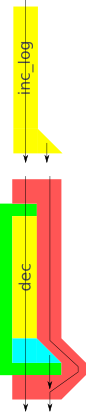
def dec(x):
    return x-1

# This will not work:
new_dec = bind(dec)
print "Logging funcs:", new_dec( inc_log(1) )

Granted dec is not a logging function, so we can't expect it to do any logging. Still, it would be nice if we could use it without the logging.

But we can't use bind with dec, because bind expects a function with two outputs. dec simply does not have have the shape of a logging functions, so we are back to square one. Unless...

Using bind with primitive functions

Unless we could fake it, that is. And make dec look like a logging function. In the diagram we can see that there is a gap between the end point of dec and that of bind. bind is expecting two outputs from dec, but it only receives one. What if we could plug that gap with a function that lets the first output through and just makes up a second one?

def unit(x):
    return x, ""

monads_liftYes, just like that! Except that now we have two functions dec and unit, and we don't want to think of them as such, because we really just care about dec. So let's wrap them up so that they look like one!

def lift(func):
    return lambda x: unit( func(x) )

lifted_dec = lift(dec)
new_dec = bind(lifted_dec)

print "Logging funcs:", new_dec( inc_log(1) )
# Logging funcs: (1, 'inc_log called.')

So lift does nothing more than calling dec first, then passing the output to unit and that's it. dec+unit now has the shape of a logging function and lift wraps around them both, making the whole thing into a single function.

And with the lifted dec (a logging function should anyone inquire), we use bind as we've done with logging functions before. And it all works out!

The log says that we've only called inc_log. And yet dec has done its magic too, as we see from the output value.

Conclusions

If you look back at the diagram you might think we've gone to a lot of trouble just to call dec, quite a lot of overhead! But that's also the strength of this technique, namely that we don't have to rewrite functions like dec in order to use them in cases we hadn't anticipated. We can let dec do what it's meant for and do the needed plumbing independently.

If you look back at the code and diagrams you should see one other thing: if we change the shape of logging functions there are two functions we need to update: bind and unit. These two know how many outputs we're dealing with, whereas lift is blissfully ignorant of that.

re: for the man with many repos

November 13th, 2011

As it often goes, re is a tool that grew out of a bunch of shell scripts. I kept adding stuff to the scripts for a long time, but eventually it went beyond the point of being manageable.

The tool addresses three different issues:

  • Cloning/pulling multiple repos in one step.
  • Keeping repo clones in sync across machines.
  • Better handling of local tracking branches.

Listing repos

Let's start with a basic situation. I've cloned some of my repos on github:

$ ls -F
galleryforge/  italian-course/  re/  spiderfetch/

I run re list to scan the current path recursively and discover all the repos that exist:

$ re list                                                                                
[galleryforge:git]
    origin.url = git@github.com:numerodix/galleryforge.git
[italian-course:git]
    origin.url = git@github.com:numerodix/italian-course.git
[re:git]
    origin.url = git@github.com:numerodix/re.git
[spiderfetch:git]
    origin.url = git@github.com:numerodix/spiderfetch.git
> Run with -u to update .reconfig

It creates a configuration file called .reconfig that contains the output you see there. By default it doesn't overwrite the config, just shows you the result of the detection action. Pass -u to update it.

This file format is similar to .git/config. Every block is a repo, and :git is a tag saying "this is a git repo". (By design re is vcs agnostic, but in practice I only ever use git and the only backend right now is for git. It probably smells a lot of git in any case.)

Every line inside a block represents a remote (git terminology). By default there is only one. If you add add a remote in the repo and re-run re list it will detect it. But it will assume that origin is the canonical remote (more on why this matters later).

Pulling repos

Now let's say I want to pull all those repos to sync them with github. I use (you guessed it) re pull:

$ re pull                                                                                
> Fetching galleryforge
> Fetching italian-course                                                                
> Fetching re                                                                            
> Fetching spiderfetch                                                                   
> Merging galleryforge                                                                   
> Merging italian-course                                                                 
> Merging re                                                                             
> Merging spiderfetch                                                                    
-> Setting up local tracking branch ruby-legacy                                          
-> Setting up local tracking branch sqlite-try                                           
-> Setting up local tracking branch db-subclass                                          
-> Setting up local tracking branch next

As you can see it does fetching and merging in separate steps. Fetching is where all the network traffic happens, merging is local, which is why I think it's nice to separate them. (But there are more reasons to avoid git pull.)

What it also does is set up local tracking branches against the canonical remote. The canonical remote is the one listed first in .reconfig. So it doesn't matter what it's called, but it's a good idea to make it origin, because that's what re list will assume when you use it to update .reconfig after you add/remove repos.

It handles local tracking branches only against one remote, because if both origin and sourceforge have a branch called stable then it's not clear which one of those the local branch stable is supposed to track. I find this convention quite handy, but your mileage may vary.

If I later remove the branch ruby-legacy from github and run re pull, it's going to detect that I have a local tracking branch that is pointing at something that doesn't exist anymore:

$ re pull spiderfetch
> Fetching spiderfetch
> Merging spiderfetch                                                                    
-> Stale local tracking branch ruby-legacy, remove? [yN]

Scaling beyond a single machine

Now, re helps you manage multiple repos, but it also helps you keep your repos synced across machines. .reconfig is a kind of spec for what you want your repo-hosting directory to contain, so you can just ship it to a different machine, re pull and it will clone all the repos over there, set up local tracking branches, all the same stuff.

In fact, why not keep .reconfig itself in a repo, which again you can push to a central location and from which you can pull onto all your machines:

$ re list                                                                                
[.:git]
    origin.url = user@host:~/repohost.git
[galleryforge:git]
    origin.url = git@github.com:numerodix/galleryforge.git
[italian-course:git]
    origin.url = git@github.com:numerodix/italian-course.git
[re:git]
    origin.url = git@github.com:numerodix/re.git
[spiderfetch:git]
    origin.url = git@github.com:numerodix/spiderfetch.git
> Run with -u to update .reconfig

It does not manage .gitignore, so you have to do that yourself.

Advanced uses

Those are the basics of re, but the thing to realize is that it doesn't limit you to a situation like the one we've seen in the examples so far, with a single directory that contains repos. You can have repos at any level of depth, you can have .reconfigs at different levels too, and you can then use a single re pull -r to recursively pull absolutely everything in one step.

Get it from github: