Archive for the ‘technology’ Category

full system encryption

June 2nd, 2011

In the age of laptops I was thinking maybe it's time I finally try encrypting my disk. I've never done it before, so before going for it I needed a small approfondimento.

The common strategy seems to be roughly:

  1. Leave /boot unencrypted.
  2. Encrypt the rest of the disk with LUKS. You then have dm-crypt that provides a mapping between the partition (according to the partition table) and the corresponding unencrypted block device, which becomes a node like /dev/mapper/nodename, depending on what you call it.
  3. Use /dev/mapper/nodename as the "physical" partition which you assign to lvm and make into a volume group.
  4. Create logical volumes in the volume group, so that each logical volume corresponds to what we used to call a partition on the old model, ie. /, /home, /var etc.

lvm is practical here, because you need at least two partitions, / and swap. You could just as well create multiple partitions sda5,sda6,... and encrypt each one, but then you'd have to unlock them individually on boot, which is hacky.

The setup is a bit involved and I would rather be spared the trouble of doing it manually. The ubuntu alternate install cd has a fully automatic feature that does this, using the whole disk. If you're happy with the basic scheme, but you want more partitions or you want to size them differently, you can use the curses gui following a nice guide like this one.

So far so good, but now comes the inevitable question. Much like with compression you want to be able to not only compress but also to decompress. What if I screw up my boot sector or my fstab and I need to boot from a rescue cd? How do I mount /dev/sda5 now?

Mounting manually

First of all, in case we don't have all the tools we need:

$ apt-get install lvm2
$ modprobe dm-mod

We obviously need to know what the physical partitions actually are:

$ fdisk -l /dev/sda

Disk /dev/sda: 32.2 GB, 32212254720 bytes
255 heads, 63 sectors/track, 3916 cylinders
Units = cylinders of 16065 * 512 = 8225280 bytes
Sector size (logical/physical): 512 bytes / 512 bytes
I/O size (minimum/optimal): 512 bytes / 512 bytes
Disk identifier: 0x000a30a5

   Device Boot      Start         End      Blocks   Id  System
/dev/sda1   *           1          13       96256   83  Linux
Partition 1 does not end on cylinder boundary.
/dev/sda2              13        3917    31357953    5  Extended
/dev/sda5              13        3917    31357952   83  Linux

/dev/sda1 is /boot, that's easy. Then we have /dev/sda5, which is the encrypted partition and mounting it directly will not work. This is where dm-crypt comes into the picture: we are going to unlock the partition, obtaining a block device that represents the unencrypted view of the partition.

$ cryptsetup luksOpen /dev/sda5 vg0
$ cd /dev/mapper
$ ls -lh
crw-------    1 root     root       10, 236 Jun  2 16:44 control
lrwxrwxrwx    1 root     root           7 Jun  2 16:47 vg0 -> ../dm-0

We have decided to call the block device vg0, and it thus appears as /dev/mapper/vg0. Since we know this is an lvm volume group we use the lvm tools to figure out what it contains:

$ vgscan
  Reading all physical volumes.  This may take a while...
  Found volume group "vg0" using metadata type lvm2
$ vgs
  VG   #PV #LV #SN Attr   VSize  VFree
  vg0    1   2   0 wz--n- 29.90g    0 
$ lvscan
  inactive          '/dev/vg0/swap' [1.86 GiB] inherit
  inactive          '/dev/vg0/root' [28.04 GiB] inherit

We have two logical volumes in there. But they are inactive, which means they are not visible under /dev, ie. we can't mount them. To make them active:

$ vgchange -a y
  2 logical volume(s) in volume group "vg0" now active

The device names listed before are now visible and we can mount them:

$ cd /dev/vg0
$ ls -lh
lrwxrwxrwx 1 root root 7 Jun  2 18:24 root -> ../dm-2
lrwxrwxrwx 1 root root 7 Jun  2 18:24 swap -> ../dm-1
$ swapon /dev/vg0/swap
$ mount /dev/vg0/root /mnt

ironpython + gtk

April 9th, 2011

nametrans_about_box I develop a bunch of tools for my own use that usually run in the terminal, for the simple reason that this maximizes their usability to me. It's also true that usually a terminal program takes much less code and effort to write than a gui program.

But occasionally I want to make something of mine usable to the so-called "end users" that we keep hearing about. So what I was wondering about was: What would it be like to add a gui to an existing python program and run it on .NET?

How do you find out? You try it. This is something that I've been meaning to try for a while anyway.

Pros:

  • 2.3mb download

Cons:

  • gtk# dependency
  • sluggish gui

Gtk

This is the first time I've used gtk. I've written one program in the past using winforms and it was quite painful, so I wanted to try gtk.

To build the gui I naturally use glade, which is the best gui design experience ever. I then have to find out how to connect the signals, write the handlers and all that stuff.

Mono's api docs on gtk seem quite complete, so you can usually find out what you need to know. I seem to remember looking at these in the past seeing nothing but "Documentation for this section has not yet been entered", so perhaps they have improved this recently. I have to say they do use the beloved javadoc model of having the left frame list all the classes, which makes navigation a pain. Api doc presentation is not really known to be a cutting edge field, it really could use work. Then again, the presentation of the docs can't help reflect the organization of the api to a large extent and if your api is organized as a kingdom of nouns rather than thematic modules then there's probably little magic the api doc guy can wield.

Gtk is not as discoverable as it could be, due to the fact that they have invented some terminology. A window resize event is not a ResizeEvent, it's an ExposeEvent. When I tried to discover this one I tried connecting all the signals that mention resizing in the api docs and none of them worked. Maybe this one belongs to a base class that wasn't listed in the api doc I was looking at? Could be. (You see how api docs matter?)

In general though, I get the impression that the more you know about gtk the more it makes sense, it seems a really well engineered toolkit. This, of course, in stark contrast to winforms, where the more you know about it the worse it gets. I don't know what gtk is like in c, but at least under .NET it doesn't have the manual memory management "feature" of winforms.

Gtk is hugely superior in many ways and that I don't think is even debatable. The layouting is great, internationalization support is painless, pango rendering is lovely and lets you use markup etc. One advantage that winforms has is the way it appears under Windows. But this I think is more a theming issue than a toolkit issue. Winforms looks nice under Windows and gtk looks mediocre. On the other hand, if I boot Mono's livecd with the latest mono on it, and I run the samples there, gtk looks lovely and winforms looks atrocious, even though this is ostensibly supposed to demonstrate how well both of them run on the latest mono. So I take it from this that simply not enough people care about gtk on Windows to make it look better.

For the python coder, you can apply the api docs for c# directly, because the binding exposes the same names to python. This is very helpful. There are also quite a few pygtk examples around the web you can find if you need to discover how to do something in gtk.

IronPython

Let's start with the positives. If you give it an existing python program and tell it where the standard library is, it will run your program. In this case I had to work around some platform nastiness and patch some code that's using os (throwing false positive OSErrors on file renames) that works fine on CPython/Windows but doesn't on IronPython/Windows. But in general it seems to work quite well.

Development experience

But if all you're going to do is write code using the standard library, there is absolutely no reason to use IronPython. How do you access .NET apis from Python? No, seriously, that's not a rhetorical question. IronPython ships with a number of assemblies, so where are the api docs for these? Are they browsable on the web? Are they viewable locally? The only thing I can see documentation wise is, next to IronPython.dll, something called IronPython.xml. It seems to be an aggregate of all the inline api comments in the source code. Is this it? Is this how you're supposed to view the api doc? IronPython 2.7 does something interesting. It ships a file called IronPython.chm, but only the .msi installer package includes this. As I'm sure the IronPython guys are well aware, the installer is Windows only and the .chm file too is Windows only (although I think there is something called kchmviewer that could read it).

In fact, the .chm file is basically the original Python 2.7 documentation (written in .rst, which compiles to html), renamed to IronPython 2.7, and includes a few additional pages about IronPython. Except that instead of throwing the html files on the web or including them in the download, they have compiled them into a .chm which they only give to the Windows people. And this is supposed to be a platform independent runtime? Is this a prank?

IronPython ships some examples, but it's not enough to figure out how to use the apis. To write a veritable IronPython gui program you need to produce an assembly, which has to be compiled with -target:winexe so that it does not show a terminal window on Windows. The simplest way seems to be to write a wrapper in c#, using the runtime hosting api, and execute your python in there. That's what the Pyjama project uses (they also use gtk#), so I was able to look that up. But when I needed to set up sys.argv and sys.version using the hosting apis before launching the python I had no idea how. How are you supposed to find this out without documentation?

It turns out that you need to do something like this:

ScriptScope scope = Python.ImportModule(runtime, "sys");
scope.SetVariable("version", "ironpython");

Easy, right? Yeah, when you know it, of course it is. But what if you didn't? How would you know that there is a function ImportModule in the Python namespace?

And how do you set sys.argv?

IronPython.Runtime.List lst = (IronPython.Runtime.List) scope.GetVariable("argv");

How would you know that IronPython.Runtime.List is the class that models a python list? You can use it like a python list:

lst.append("program.py");

In the end your best bet might actually be dir(). So how do you find out what's in the Python namespace when coding c#? Use python:

clr.AddReference("IronPython")
import IronPython
print dir(IronPython.Hosting.Python)

You could actually use this method to recursively dir() the assemblies and produce a map of what's in there, generating some kind of api doc in the end, but this is getting quite out of hand now.

At this point I was going to mention msdn and how that ought to host all the .NET related api docs you could ever want, but I see that the site is even worse than it used to be and I don't have the palest idea of where to find anything anymore. I can only imagine that if you install the latest Visual Studio Ultimate Premium Professional it will enhance your hard drive with untold gigabytes of xml compiled to a proprietary binary file format worth of api docs, which you can only browse in the proprietary api doc reader, which internally just renders html anyway. But actually, since IronPython was ousted by Microsoft and since it has the stigma of being an open source project, it could well be that it would be considered too tainted to include its api docs in the Visual Studio-installed doc browser.

As your final recourse, I suggest you warm up your grep, git clone this IronLanguages repo and hope for the best.

Debugging

When I try this somewhere in my hosted python program:

v = None + 1

this is what I get:

Unhandled Exception: Microsoft.Scripting.ArgumentTypeException: unsupported operand type(s) for +: 'NoneType' and 'int'

And the rest of the stack trace doesn't mention the python code at all. Better than "Segmentation fault", yes, but not by a whole lot. No filename, no line number.

This being the case I would strongly recommend developing your python with CPython first and then, once it's in good shape, build the gui so you can do most of your debugging under CPython.

Upgrade cycle

I mentioned IronPython 2.7 earlier, but funny thing, I've never actually tried it. The 2.7 release is compiled against .NET 4.0, which is not supported by the mono packages in Ubuntu. I thought that since I have everything working with .NET 2.0/IronPython 2.6 I could just throw in the newer assemblies, run my makefile and compile it against .NET 4.0, on a mono release recent enough to support 4.0 (such as the mono livecd I mentioned before). But no deal. And if you just install .NET 4.0 under Windows it doesn't come with a compiler or anything, so there's no way to try it.

IronPython + Gtk

So how responsive is an ironpython/gtk application, even a tiny one like this?

Start up speed on my Ubuntu system is something like 4s, which is just about fast enough not to notice that it runs on IronPython instead of CPython. But Ubuntu uses gtk natively, so the libraries are in memory. On Windows it varies from a warm start of 6s to 20s+, for a cold start. In the worst case the first hello message from python appears after maybe 5s, so the rest must be accounted for by loading gtk.

Once it's running, it can be a bit sluggish, in particular halting the program on Ubuntu sometimes seems to freeze the gui for a few seconds before it goes away. On Windows the issue (as usual) seems to be io. This program scans the filesystem whenever the input parameters change, which produces a list of files that is eventually displayed in the gui. But I'm not convinced that it's any slower than CPython/Windows.

nametrans: renaming with search/replace

March 25th, 2011

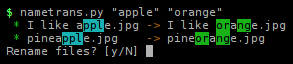
Keeping filenames properly organized is a pain when all you have available for the job is renaming files one by one. It's most disheartening when there is something you have to do to all the files in the current directory. This is where a method of renaming by search and replace, just as in a text document, would help immensely. Something like this perhaps:

nametrans_ss

Simple substitutions

The simplest use is just a straight search and replace. All the files in the current directory will be tried to see if they match the search string.

$ nametrans.py "apple" "orange"
 * I like apple.jpg    -> I like orange.jpg
 * pineapple.jpg       -> pineorange.jpg
 * The best apples.jpg -> The best oranges.jpg

There are also a number of options that simply common tasks. Options can be combined and the order in which they are set does not matter.

Ignore case

Matching against strings with different case is easy.

$ nametrans.py -i "pine" "wood"                                                        
 * pineapple.jpg -> woodapple.jpg
 * Pinetree.jpg  -> woodtree.jpg

Literal

The search string is actually a regular expression. If you use characters that have a special meaning in regular expressions then set the literal option and it will do a standard search and replace. (If you don't know what regular expressions are, just use this option always and you'll be fine.)

$ nametrans.py --lit "(1)" "1" 
 * funny picture (1).jpg -> funny picture 1.jpg

Root

If you prefer the spelling "oranje" instead of "orange" you can replace the G with a J. This will also match the extension ".jpg", however. So in a case like this set the root option to consider only the root of the filename for matching.

$ nametrans.py --root "g" "j"
 * I like orange.jpg    -> I like oranje.jpg
 * pineorange.jpg       -> pineoranje.jpg
 * The best oranges.jpg -> The best oranjes.jpg

Hygienic uses

Short of specific cases of transforms, there are some general options that have to do with maintaining consistency in filenames that can apply to many scenarios.

Neat

The neat option tries to make filenames neater by capitalizing words and removing characters that are typically junk. It also does some simple sanity checks like removing spaces or underscores at the ends of the name.

$ nametrans.py --neat                                                                    
 * _funny___picture_(1).jpg -> Funny - Picture (1).jpg
 * i like apple.jpg         -> I Like Apple.jpg
 * i like peach.jpg         -> I Like Peach.jpg
 * pineapple.jpg            -> Pineapple.jpg
 * the best apples.jpg      -> The Best Apples.jpg

Lower

If you prefer lowercase, here is the option for you.

$ nametrans.py --lower
 * Funny - Picture (1).jpg -> funny - picture (1).jpg
 * I Like Apple.jpg        -> i like apple.jpg
 * I Like Peach.JPG        -> i like peach.jpg
 * Pineapple.jpg           -> pineapple.jpg
 * The Best Apples.jpg     -> the best apples.jpg

If you want the result of neat and then lowercase, just set them both. (If you like underscores instead of spaces, also set --under.)

Non-flat uses

Presuming the files are named consistently you can throw them into separate directories by changing some character into the path separator.

Note: On Windows, the path separator is \ and you may have to write it as "\\\\".

$ nametrans.py " - " "/"
 * france - nice - seaside.jpg -> france/nice/seaside.jpg
 * italy - rome.jpg            -> italy/rome.jpg

The inverse operation is to flatten the entire directory tree so that all the files are put in the current directory. The empty directories are removed.

$ nametrans.py --flatten
 * france/nice/seaside.jpg -> france - nice - seaside.jpg
 * italy/rome.jpg          -> italy - rome.jpg

In general, the recursive option will take all files found recursively and make them available for substitutions. It can be combined with other options to do the same thing recursively as would otherwise happen in a single directory.

$ nametrans.py -r --neat 
 * france/nice/seaside.jpg -> France/Nice/Seaside.jpg
 * italy/rome.jpg          -> Italy/Rome.jpg

In recursive mode the whole path will be matched against. You can make sure the matching only happens against the file part of the path with --files or only the directory part with --dirs.

Special uses

Directory name

Sometimes filenames carry no useful information and serve only to maintain them in a specific order. The typical case is pictures from your camera that have meaningless sequential names, often with gaps in the sequence where you have deleted some pictures that didn't turn out well. In this case you might want to just use the name of the directory to rename all the files sequentially.

$ nametrans.py -r --dirname                                                              
 * rome/DSC00001.jpg -> rome/rome 1.jpg
 * rome/DSC00007.jpg -> rome/rome 2.jpg
 * rome/DSC00037.jpg -> rome/rome 3.jpg
 * rome/DSC00039.jpg -> rome/rome 4.jpg

Rename sequentially

Still in the area of sequential names, at times the numbers have either too few leading zeros to be sorted correctly or too many unnecessary zeros. With this option you can specify how many leading zeros you want (and if you don't say how many, it will find out on its own). Based on an old piece of code that has been integrated.

$ nametrans.py -r --renseq 1:3                                                           
 * rome/1.jpg   -> rome/001.jpg
 * rome/7.jpg   -> rome/007.jpg
 * rome/14.jpg  -> rome/014.jpg
 * rome/18.jpg  -> rome/018.jpg
 * rome/123.jpg -> rome/123.jpg

The argument required here means field:width, so in a name like:

series14_angle3_shot045.jpg

the number 045 can be shortened to 45 with "3:2" (third field from the beginning) or "-1:2" (first field from the end).

Get it from sourceforge:

everything that is wrong with bookmarks

February 15th, 2011

The history of bookmarks is one of those tragic stories in technology. When bookmarks were first introduced (by Netscape? or maybe it was Mosaic?) they were a huge step forward. Trying to memorize urls or writing them on paper clearly weren't methods that worked well. The idea -- and so simple too -- that the browser could remember the urls for you was the perfect solution.

Sadly, since the "big bang" of bookmarks there have been precious few new explosions.

The basic problem

The introduction of bookmarks, welcome as it was, created a problem that remains with us today. Once you start bookmarking pages, you inevitably produce a list of bookmarks that becomes more chaotic and less useful the longer it gets. Sure, a list of bookmarks is useful when you can look at it and quickly know what is there, and when you can see the bookmark you want to load right now.

But when you start having to scroll the list, and not only that but use the PageUp/PageDown keys to scroll the list quicker, it's a good sign that it's getting out of hand.

A collection of bookmarks is all well and good, but it needs some kind of structure superimposed on it to remain effective.

The bookmark toolbar

The bookmark toolbar encapsulates the insight that some bookmarks are more important than others and offers a number of improvements:

  1. Allows marking some bookmarks as more important/more frequently used.
  2. Gives them better visibility.
  3. Provides quicker access to them (by not having to go into the bookmark menu).

The bookmarks are displayed on a toolbar, either as links or as links-within-folders.

badbookmarks-toolbar

Despite how useful this feature is, browsers have historically treated it as something of a marginal feature. Firefox, for instance, used to view the launcher toolbar as just another folder in the bookmarks collection (albeit with a special name, like "Personal Toolbar Folder"), which you could accidentally rename or delete, and then it wouldn't show up as a toolbar anymore.

Another thing that matters a lot to the usability of the toolbar is the drag-and-dropability of bookmarks onto the toolbar, into the folders, and from one place to another. Even today, for instance, in Google Chrome I can't reorder the items in a folder on the toolbar without opening the Bookmark Manager.

Import/export (and the silo)

It hardly needs stating that once you have a bookmark collection in one browser, you don't want to manually recreate it if you decide to use another one. Browsers have historically been reluctant about giving out their bookmarks. All too often, despite making a show of offering to import your bookmarks from another browser, the import mechanism has bordered on the useless.

First and foremost, every browser vendor since the Ice Age has been eager to supply you with a tasty selection of bookmarks that he was convinced you would love. Importing your own bookmarks, therefore, could at best be seen as a supplement. No browser would ever just take your existing bookmarks and overwrite its own vendor-supplied ones, which is exactly what the user wants. Instead, it would stash them somewhere in the bookmark collection, well out of sight. Any additional metadata that was implicitly stored in your bookmarks would often be lost, like the order in which they were listed.

In particular, the browser would make no bones about trying to find out if you have a bookmark toolbar in there, and replace it with its own (despite the browser having a toolbar feature that worked exactly the same).

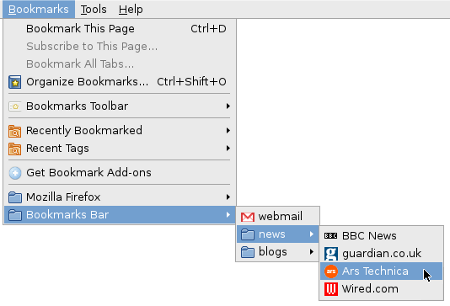
badbookmarks-ff-toolbar
badbookmarks-bad-import

So having done an "import", you would typically have to manually organize your bookmarks, nuke the stupid vendor bookmarks, and sometimes you'd even have to recreate the folder structure of your bookmark toolbar, all before you had been able to achieve the same state as in your other browser.

This kind of situation is standard silo behavior. By making the import feature so mediocre, the browser vendor would pretty much ensure that the user would not switch browsers without paying a high price for it. Simply using more than one browser on a daily basis, with an easy way to manage your bookmarks across them by a quick sync, is just not realistic.

Bookmark sync (and more silo)

A way of keeping your bookmarks synced across computers has been a no-brainer feature since the era when people started accessing the web both at home and at school/work. And yet, a working synchronization feature is a pretty recent development in bookmarks. I recall some failed attempts with Firefox extensions in the remote past, but at last it is here.

A number of browsers have a sync feature now, and it's a big step forward in bookmarks. Even if your bookmark collection is a mess, you can at least have the same mess all over the place. Clean it up and it's clean everywhere.

And yet, bookmark sync is yet more silo behavior: you can sync your bookmarks from Opera to Opera, but not from Opera to Firefox. The fact that bookmark sync doesn't do the same half-assed job of the import feature might seem strange, but the motive is very obvious:

  • ability to have your bookmarks up to date in our browser on every computer = good for the vendor
  • ability to have your bookmarks up to date in every browser = bad for the vendor

Browser vendors know very well that if bookmark sync worked as poorly as bookmark import, they couldn't sell it as a feature, because noone would use it.

Bad page titles

Strangely enough, I've come all this way without mentioning just about the most glaring problem that bookmarks have: bad page titles. Since the name of the bookmark is simply the title of the page in 99.99% of the cases, the title ought to be both descriptive and concise. Instead, we have historically seen that web creators much prefer titles that are variations on this theme:

The Excessively Long Title Of My Website Which Is Very Nice Indeed: Section Title: Article Title

With titles like that, all too often you can't even see the title of the article in your bookmark list, because the text is truncated somewhere in the middle.

Quite apart from the length problem, web sites often prefer to give articles catchy titles rather than descriptive ones. So with a title like:

Something Amusing That Makes You Think About What The Page Really Is About

you have the short term benefit of being amused at the cost of the long term benefit of a descriptive title.

Bad metadata

Bookmarks belong eminently to the category of things where the number of items is so large that it would be great to have a way of automating the retrieval/organization of the items.

Yet, despite announcements from Mozilla in the past that they would soon obliterate the old model of bookmarks-as-a-list, and introduce a new and all-conquering search based approach, we still have the list. The fact is that bookmarks don't contain enough metadata to make search useful. A bookmark has two pieces of data:

  1. The name of the bookmark.
  2. The url.

Sure, some browsers give you the option to store other things too, like tags, but if we all agree that the user can't be bothered to keep their bookmarks organized, let's not pretend he will actually input any of the optional stuff. And even if he does, 90% of his bookmarks won't have any other data associated with them, so we're back to the short list above.

So why doesn't search make sense? Because much too often neither the title nor the url contains any of the keywords that you would want to use in order to find this bookmark. Web sites don't pay too much attention to titles, and the real data that would be useful to search is the page itself, which is not available.

Bookmark oblivion

What should seem ironic is that bookmarking a page often has the effect of not bookmarking it at all. The bookmark is saved somewhere in the long list and then never seen again, either because the list is too long to really bother looking at beyond the most recently added items, or because the page title is useless, or because it was bookmarked "for future reference", and by the time we return to this topic we've forgotten about the bookmark.

We tend to grow pretty oblivious as to what's in our bookmarks. Over time, some pages expire, others drift out of our sphere of interest, yet the bookmark collection doesn't get updated.

Just about the most obvious feature a browser might offer is to try loading the bookmarks from time to time, in the background, and marking the ones that return 404.

Another idea might be to offer to list bookmarks according to how often they are loaded, making the never used ones fall to the bottom of the list. Applying this to the bookmark folder might be especially useful, so the user doesn't have to reorder the bookmarks to make the frequent ones quicker to reach.

things I hate about haskell

September 4th, 2010

As the title for this blog entry popped into my head today I realized I had been silently writing this for five years. I want to stress one word in the title and that's the word "I". It might be that what I have to say is no more insightful than people who don't like python because of the whitespace, or people who can't get over the parens in lisp. But I happen to believe that a subjective point of view is valid, because someone, somewhere had a reaction to something and it's crooked trying to pretend that "the system is immune to such faults".

My complaints have little to do with the big ideas in haskell, and those ideas can just as well be realized in another language. In fact, the way things are going, it's likely that haskell's bag of tricks will be the smörgåsbord for many a language to choose from. F# from Microsoft, clojure making waves, and lambdas that have reached even java. As James Hague wrote, functional programming went mainstream years ago.

Elitism

I don't mean elitism in the sense that you sometimes hear about lisp mailing lists, that the people are hostile to newbies with a harsh rtfm culture prevailing. I haven't met any nasty haskell people, it's the culture where the elitism is encoded.

I don't think I have to explain that if you, as a software engineer, meet with a client for whom you are building a product then you don't insist that the conversation be held in terms of concurrency primitives or state diagrams. If you want to get anything done, you have to speak the language of the customer. And that's a general principle: if you are the more expert party in the field that the conversation concerns, then it's your responsibility to bridge the gap. If you don't understand your customer, then you have a problem. And if you do understand him, but you don't care, then there's a word for that... oh yes, elitism.

What I mean by elitism in haskell is the belief that "what we have is so great that we're doing you a favor if we let you be a part of it." Trying to learn haskell is something like being a fly on the wall at a congress of high priests. There is theological jargon flying all around and if you happen to make out some of it, we'll let you live, that's how nice we are. There seems to be a tacit assumption in place that if you touch haskell then either a) you have been brought up in the faith or b) you have scrubbed your soul clean of the sins of your former life. That is to say if you're comfortable coding in lambda calculus then you'll have a smooth run, but if you code in any of the top 10 most widely used languages then good luck to you. "Enough already, do I have to spell it out for you: forget everything you know about programming and imprint these ideas on your brain."

Here, I'm pleased to mention Simon Peyton Jones who makes an effort to speak the language of his audience. And when you read his papers you get the impression that he's saying "okay, so maybe you're not a gray beard in this field, but I'll try to explain this so that you get something out of it". Alas, Simon is miles ahead of the pack.

Still, it's changing over time. There seems to be a new generation of haskell coders who don't live in that ivory tower and actually do sympathize with their fellow man. (To the mild chagrin of the high priests, one imagines.)  The first time I really knew that haskell was on the right track in the language ecosystem evolution was the appearance of Real World Haskell. It's the first book that I knew about that wasn't for the in-group, with a provocative title that seems to say "the language isn't about you crazy puritans in the programming language lab, it's about people trying to solve their everyday problems". Since then I have seen further evidence of this development, notably Learn You a Haskell, a "port" of Why's Poignant Guide to Ruby, the first book about Ruby that really took the newbie programmer seriously (and I'm pretty sure did wonders for Ruby adoption).

Math envy

One of the earliest things I ever read about haskell was "the neat thing about haskell is that functions looks almost like functions in math". I remember thinking "why is that supposed to be a selling point?" Unless you are actually implementing math in code (which is a pretty minuscule part of the programming domain), who cares? As I would discover later, it was a sign of things to come.

I read a couple of books recently about the craft of software engineering that are written in the form of interviews with famous coders. I recall that on several occasions there would be a passage more or less like this "but when I went back to look at the code I had written back then I was ashamed that I had used so many single character variable names". Exactly how many more articles and books have to get written until people stop writing code like this:

(>=>) :: Monad m => (a -> m b) -> (b -> m c) -> a -> m c
m >=> n = \x -> do { y <- m x; n y }

Is this an entry in a code obfuscation competition? (Is there some way you could obfuscate this further?) Why does reading code in haskell have to be some sort of ill conceived exercise in symbol analysis where you have to try to infer the meaning of a variable based on the position of the parameter? I'll be honest, I have no memory for these kinds of things, half way down the page I have long since forgotten what all the letters stand for. Why on earth wasn't it written like this?

(>=>) :: Monad tmon => (tx -> tmon ty) -> (ty -> tmon tz) -> tx -> tmon tz
f1 >=> f2 = \x -> do { y <- f1 x; f2 y }

Maybe that's not the optimal convention, but it's far better than the original. Almost anything is. (It's still pretty minimalistic by the standards of most languages.) Haskell prides itself on its type system. As a programmer you have that type information, so for goodness sake use it in your naming.

This kind of thing is normal in math: pick the next unused letter in the alphabet (or even better, the Greek alphabet!) and you have yourself a variable name. It's horrible there and it's horrible here.

Syntax optimized for papers

If you read about the history of haskell this is not really all that surprising. Before haskell there was a community of people doing research on topics in functional languages, but to do that they had to invent little demonstration languages all the time. So eventually they decided to work on a common language they could all use and that became haskell.

Haskell snippets look nice in papers no doubt. But how practical is this syntax?

main = do putStrLn "Who are you?"
          name <- getLine
          case M.lookup name errorsPerLine of
               Nothing -> putStrLn "I don't know you"
               Just n  -> do putStr "Errors per line: "
                             print n

Is your editor set up for haskell, does it know to indent this way? If not you're going to suffer. Haskell breaks with the ancient convention of using tabs for indentation, so if what follows a do or a case doesn't line up with a tab stop, you're out of luck. Unless your editor supports haskell specifically, that is. So all you people using some random editor: bite me.

Because of the offside rule, and haskell's obsession with pattern matching/case statements, all your code ends up in the bottom right of the screen in functions past a certain size.

And haskell is obsessed with non-letter operator names, because letters are so tiresome, right? Haskell people love to author papers in latex and generate pretty pdfs where all the operators have been turned into nice symbols (and Latin letters become Greek letters, more math envy). Sometimes when you're reading the paper you don't even know how to type it into an editor. It's almost like coding haskell is also an exercise in typesetting. "Yes, it's ascii, but just think how lovely it's gonna look in a document!"