Archive for the ‘technology’ Category

ansicolor: because the view is better in colors

August 6th, 2010

If you're a coder you probably try to modularize everything to death on a daily basis. If not, your practices are a little suspicious. :nervous: Alas, it's not so easy to knock out something that I can say with confidence will be reusable in the future. One piece of functionality I keep reimplementing is output in colors, because it's hugely helpful to making things look more distinct. The first time I wrote this module I knew I would be using it again and I wished to make it nice and reusable, but I didn't know what the future uses would be. So I put that off until "later". In the meantime I copy/pasted it a couple of times into other projects. Shameful, but effective.

I finally got around to organizing these types of bits that have no specific place of their own into a new github repository, appropriately named "pybits". It holds the pretty printer and this rewritten ansicolor module, and it'll probably grow with the ages.

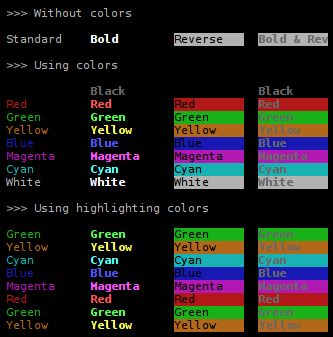
But to business. Anyone spitting out ansi escapes who has figured out the system knows it's trivial to make a color chart. So to keep the tradition going, here's proof that ansicolor is able to enumerate the colors:
ansicolor_chart

Notice that section at the bottom about highlighting colors. As you might be able to deduce by sheer logic, black and white are not great colors for highlighting something in a terminal, because they are typically used respectively as the background and foreground of the term (or vice versa). (The colors of a term can actually be anything, but black and white are the common ones. Ideally, code should detect this at runtime, but I don't know of a way to check for this. Besides, lots of programs [eg. portage] do make this assumption also.) So the highlighting colors are supposed to be useful for when you want to output a wall of text and mark something in the middle of it, so the user can spot it.

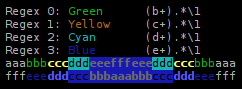
Suppose you are (as I have been in the past) developing a regular expression and you can't get it right on the first try (yeah, unbelievable, I know). Well, what you do is highlight the string so you can see how the matching worked out:

ansicolor_1regex

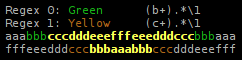
Regular expressions tend to get hairy (yes way) so it helps to compare their results when you're trying to unify two half-working variants into one. Adding a second regex will show the matches from both. Where they overlap the styling is bold:
ansicolor_2regex

Think of the green highlighting as a layer of paint on the wall. You then paint a layer of yellow on top, but you don't cover exactly the same area. So where the green wasn't painted over it's still green. Where the yellow covered it, the paint is thicker. And where the yellow didn't overlap the green it's just plain yellow.

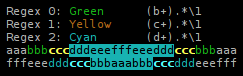
Adding a third regex potentially produces segments highlighted three layers thick, so there the color becomes reverse.
ansicolor_3regex

And then bold and reverse.

ansicolor_4regex

ansicolor doesn't support background colors, but that's a product of my use so far, I've never needed it. I don't think they improve readability.

You will find this cutting edge technology in the repo:
cygwin essentials

July 21st, 2010

This isn't really appropriate for a blog entry, because it's bound to be updated over and over, but I need a place to keep these notes.

Essential packages (not including pre-selected):

  • xinit. Effectively what is called Cygwin/X. (Creates a new shortcut in the start menu called XWin Server that you probably should stick in your startup list.) With this you can run gvim, xterm etc.
  • binutils (if you want strings)
  • file
  • git, gitk
  • openssh
  • ping
  • python
  • rsync
  • vim, gvim
  • wget, curl
  • zip, unzip
  • make/patch

Decent terminals:

  • mintty
  • puttycyg (ie. putty modded to use locally) You have to get this one separately, but it has a nicer feel to it imo.

pretty printing for everyone!

April 25th, 2010

I've been toying with the idea of trying my hand a generic pretty printer module for a while. Lately I've had to deal with cyclic object graphs and things like that, where having a dump of the data is pretty handy. Granted there is a pprint module in the standard library. But what it does is format and print iterables (lists, dicts, tuples..), it doesn't attempt to show you the contents of an object. Of course, when you're messing with objects this is very useful to have.

So I thought that I would build a recursive iterable that I can give to pprint. Here's an example:

class Node(object):
    classatt = 'hidden'
    def __init__(self, name):
        self.name = name

a, b, c, d = Node('A'), Node('B'), Node('C'), Node('D')
a.refs = [b, d]
b.refs = [c]
c.refs = [a]
d.refs = [c]

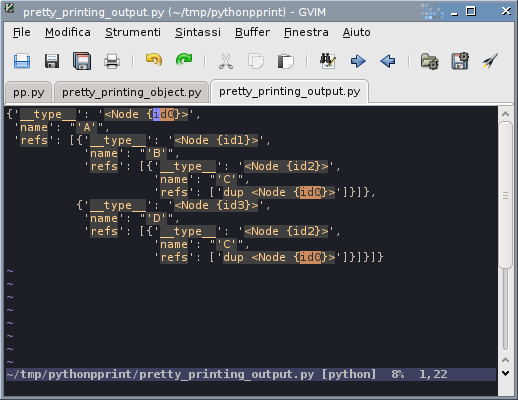
This will give you:

{'__type__': '<Node {id0}>',
 'name': "'A'",
 'refs': [{'__type__': '<Node {id1}>',
           'name': "'B'",
           'refs': [{'__type__': '<Node {id2}>',
                     'name': "'C'",
                     'refs': ['dup <Node {id0}>']}]},
          {'__type__': '<Node {id3}>',
           'name': "'D'",
           'refs': [{'__type__': '<Node {id2}>',
                     'name': "'C'",
                     'refs': ['dup <Node {id0}>']}]}]}

There are two things being shown here:

  • node C is reachable through ABC and ADC.
  • A takes part in two cycles: ABCA and ADCA.

It would be nice to have a way to see this from the output. So aside from the object attributes themselves there is also a __type__ attribute which tells you the type that you're looking at. And it has a marker of the form {id1}, where id1 is an identifier for this object, so that you can see where it pops up in a different part of the graph.

Now, suppose we follow A to B to C and then to A. We are now seeing A for the second time. Instead of printing the object again we print a duplicate marker: dup <Node {id0}>. The identifier is supposed to be vim * friendly, so if you pipe the output to vim, put the cursor over it and hit * (also might want to do set hlsearch) then you'll see it light up all the other instances of it in the graph.

pretty_printing_gvim

Well, that's all for now. It's definitely not the last word in pretty printing, but it's useful already.

I thought maybe github's gists would be appropriate for something like this:

lessons from "Coders at work"

April 16th, 2010

I already mentioned Coders at work in an earlier entry. The point of this one is not to write a review, but to make a note for myself of what I've gotten out of the book. I think I could do better to read more books with a pen and a pad so I have a better chance of exploiting the content.

So these are notes to myself. I wouldn't take it upon myself to summarize a more general listing of notes that would somehow apply to the average person, because I think we're all in very different places in the universe that is called "learning to program (well)", and every person has to figure out for himself what he most needs to learn relative to where he now is.

Advice: Read code

Read other people's code, "open black boxes". This is something I never really do, I should start. Just take some codebase and check it out, get used to the practice. Reading code is not the easiest thing to get into, so here are some tips:

  1. First, get it to build.
    Sometimes everything you have to do to build it already teaches you a number of things about the codebase. And once you have it built, you can start making changes to it and try out little things dynamically.
  2. Read while building.
    Making builds for any codebase can be hairy and painful, so parallelize this activity with code reading. Great way to use the time you'd otherwise waste in between debugging the build.

Advice: Write unit tests for new library

You've found a library for something that you've never used before: how do you figure out how to use it? Write unit tests. Some libraries have bad unit tests (or no tests) to begin with, so it could be a way to improve it. In any case you can test your basic hypotheses of how the library works.

Ideas to investigate

  1. OO and classes vs prototypes (JavaScript).
  2. "There is a lack of reuse in OO because there is too much state inside". Libraries must expose too much of their innards through APIs, functional programming model should be better at this.

Pointers

Articles:

  1. Richard P. Gabriel - Worse Is Better

Blogs:

  1. How to read code – a primer

Books:

  1. Douglas Crockford - JavaScript: The Good Parts
    In the absence of the book, Crockford's lecture series on JavaScript is probably a good start.
  2. William Strunk, Jr. and E.B. White - The Elements of Style
    For writing better English.
  3. Steve McConnell - Code Complete
    On software engineering process and best practices.
  4. Gerald Weinberg - The Psychology of Computer Programming

Talks:

  1. Joshua Bloch - How to Design a Good API and Why it Matters

systems are too complicated, dammit!

April 14th, 2010

I'm reading Peter Seibel's book "Coders at work". It's a collection of interviews with famous programmers. This is the kind of book I really like, it's not a technical book, but it's a meta sort of book where these people tell you what they think about various relevant issues in the industry. And not just issues that concern them directly, but general trends too. It's a very easy read, perfect for the plane or the airport.

There are 15 interviews and almost all these people started playing with computers sort of roughly before there were computers. So if there is a theme running through the book, it is this:

  1. Kids today don't understand how the metal works.
  2. I don't like all these layers of software.

I think it's an understandable point of view coming from people who've written operating systems and compilers and coded assembly and machine code because there was nothing else available. But I don't find it a very helpful perspective.

The basic complaint is this:

  1. Things used to be simple.
  2. Instead of remaining simple, they got complex, but not in a good way (ie. bad technical decisions).

I think this is an "argument from nostalgia", essentially. Back in the days, systems were simpler. Today they are very complicated. And so we wish things were simpler. But this is because some people were present more or less at the "birth" of computer science. The field went from zero and just keeps expanding. That's normal, though.

If a physicist said "I hate how when you discover a layer of particles, there's always something smaller than that!" would people nod in agreement? I remember learning about atomic orbitals and not understanding them and I kept thinking "what was wrong with the Bohr model, that one was so much simpler and nicer?"

The difference between physics and computer science is that in physics there's noone to blame for what is there. There is this sense of "nature is the goddess who bestows gifts upon us and we have the privilege to explore them". In computer science we're not trying to explain or discover anything, we make all this stuff up!

In physics there's no way you can remove the complexity and be left with a simple system, the complexity is there at all levels. But in computers you can delete everything save for the kernel and you indeed have a simple system. (Better yet, delete the kernel too and install a simpler one that you wrote yourself.)

The fundamental difference, to me, is that there is someone to blame. There is noone to blame for atomic orbitals and "why do they have to be so complicated??", but there is someone to blame for every programming language and every system. I don't think for a minute that we wouldn't do the same in physics if we had the chance, though.

What's Plan B?

Of course, the difference between the physical sciences and computer science raises the old "is it a science?" question, but at any rate it is becoming more like physics in the sense of a top to bottom system that is difficult to understand at all levels.

In physics you don't say things like "I would like to throw all this out and start over, make it simple". This is something you can totally do in computers, but chances are you're not gonna have much impact. Sometimes people bemoan how there hasn't been any innovation in operating systems in 30 years. So go write your own, see how many people you can convince to use it.

In a way, the answer is right there. The fact that there aren't any new operating systems taking over from the old ones, _means_ that the old ones have succeeded. They've successfully laid that layer of bricks that has proven to be a strong enough abstraction to move away from that layer in the system and focus our attention on something higher up. They're not works of art in terms of simplicity and purity, but neither are layers of abstraction in physics. *ducks*

Complexity is often presented as a mistake, but the fact that we have all this complexity is not really an accident, it has to be there to do the kinds of things that we want to do.