Archive for the ‘technology’ Category

how do you structure your python codebase?

April 13th, 2010

One thing that's awesome in python is having a small codebase that can fit in a single directory. It's a comfy setting, everything is right there at your fingertips, no directory traversal needed to get a hold of a file.

Flat structure

Let's check out one right now:

./frame.py
./master.py
./mystring.py
./page.py
./sentence.py
./user.py

And here's the import relationship between them:
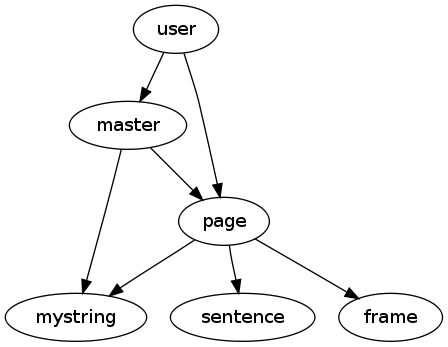
python_codebase_structure

Easy, straightforward. I can execute any one of the files by itself to make sure the syntax is correct or to run an "if __main__" style unit test on it.

Tree structure

But suppose the codebase is expanding and I decide I have to get a bit more structured? I devise a directory structure like this:

./media/book/__init__.py
./media/book/page.py
./media/book/sentence.py
./media/__init__.py
./media/master.py
./media/movie/frame.py
./media/movie/__init__.py
./media/mystring.py
./user.py

The same files, but now with __init__.py files all over the codebase to tell python to treat each directory as a package. And now my import statements have to be changed too, let's see master:

# from:
import mystring
import page
# to:
import media.mystring
import media.book.page

Nice one. Okay, let's see how this works now:

$ python user.py
page says hello!
sentence says hello!
frame says hello!
mystring says hello!
master says hello!

user imports page and then master. The first 4 lines are due to page, which imports three modules, and finally we see master arriving at the scene. All the files it imports have already been imported, so python doesn't redo those. Everything is in order.

As you can see, imports between modules in the tree work out just fine, page finds both the local sentence and the distant frame.

But if we run master it's a different story:

$ python media/master.py
master says hello!
Traceback (most recent call last):
  File "media/master.py", line 3, in <module>
    import media.mystring
ImportError: No module named media.mystring

And it doesn't actually matter if we run master from media/ or run media/master from ., it's the same result. And it's the same story with page, which is deeper in the tree.

These modules, which used to be executable standalone, no longer are. :(

A hackish solution

So we need something. The nature of the problem is that once we traverse into media/, python no longer can see that there is a package called media, because it's not found anywhere on sys.path. What if we could tell it?

The problem pops up when the module is being executed directly, in fact when __name__ == '__main__'. So this is the case in which we need to do something differently.

Here's the idea. We put a file in the root directory of the codebase, a file we can find that marks where the root is. Then, whenever we need to find the root, we traverse up the tree until we find it. The file is called .codebase_root. And for our special when-executed logic, we use a file called __path__ that we import conditionally. Here's what it looks like:

import os
import sys

def find_codebase(mypath, codebase_rootfile):
    root, branch = mypath, 'nonempty'
    while branch:
        if os.path.exists(os.path.join(root, codebase_rootfile)):
            codebase_root = os.path.dirname(root)
            return codebase_root
        root, branch = os.path.split(root)

def main(codebase_rootfile):
    thisfile = os.path.abspath(sys.modules[__name__].__file__)
    mypath = os.path.dirname(thisfile)
    codebase_root = find_codebase(mypath, codebase_rootfile)

    if codebase_root:
        if codebase_root not in sys.path:
            sys.path.insert(0, codebase_root)

codebase_rootfile = '.codebase_root'
main(codebase_rootfile)

So now, when we find ourselves in a module that's somewhere inside the media/ package, we have this bit of special handling:

print "master says hello!"

if __name__ == '__main__':
    import __path__
import media.mystring
import media.book.page

Unfortunately, importing __path__ unconditionally breaks the case where the file is not being executed directly and I haven't been able to figure out why, so it has to be done like this. :/
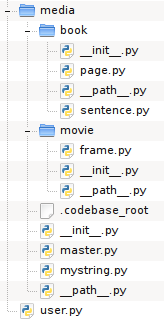
python_codebase_structure_treeYou end up with a tree looking as you can see in the screenshot.

I've pushed the example to Github so by all means have a look:

We pass the test, all the modules are executable standalone again. But I can't say that it's awesome to have to do it like this.
aopy: aspect oriented python

March 12th, 2010

Aspect oriented programming is one of those old new ideas that haven't really made a big impact (although perhaps it still will, research ideas sometimes take decades to appear in the professional world). The idea is really neat. We've had a few decades now to practice our modularity and the problem hasn't really been solved fully (the number of design patterns that have been invented I think is telling). What's different about AOP from just plain old "architecture" is the notion of "horizontal" composition. That is to say you don't solve the problem by decomposing and choosing your parts more carefully, you inject code into critical places instead. The technique is just as general, but I would suggest differently applicable.

I realized I haven't really explained anything yet, so let's look at a suitably contrived example.

A network manager

Suppose you're writing a network manager type of application (I actually tried that once). You might have a class called NetworkIface. And the class has an attribute ip. So how does ip get its value? Well, it can be set statically, or via dhcp. In the latter case there is a method dhcp_request, which requests an ip address and assigns to ip.

# <./main.py>
class NetworkIface(object):
    def __init__(self):
        self.ip = None

    def dhcp_request(self):
        self.ip = (10,0,0,131) # XXX magic goes here


if __name__ == '__main__':
    iface = NetworkIface()
    iface.ip = (10,0,0,1)
    iface.ip = (10,0,0,2)
    iface.dhcp_request()

Now suppose you are in the course of writing this application, and you need to do some debugging. It would be nice to know a few things about NetworkIface:

  1. The dhcp server seems to be assigning ip addresses to clients in a (possibly) erroneous manner. We'd like to keep a list of all the ips we've been assigned.
  2. Sometimes the time between making a dhcp request and getting a response seems longer than reasonable. We'd like to time the execution of the dhcp_request method.
  3. Some users are reporting strange failures that we can't seem to reproduce. We would like to do exhaustive logging, ie. every method entry and exit, with parameters.

Now, this kind of debugging logic, however we realize it, is not really something we want in the release version of the application. It doesn't belong. It belongs in debug builds, and we're probably not going to need it permanently.

Here we will demo how to achieve the first point and omit the other two for brevity.

Where AOP comes in

Common to these issues is the fact that they all have to do with information gathering. But that's not necessarily the only thing we might want to do. We might want to tweak the behavior of dhcp_request for the purpose of debugging. For instance, if it took too long to get an ip, we could set one statically after some seconds. Again, that would be a temporary piece of logic not meant to be in the release version.

Now, AOP says "don't change your code, you'll only make a mess of it". Instead you can write that piece of code you need to write, but quite separately from your codebase. This you call an aspect, with the intention that it captures some aspect of behavior you want to inject into your code. And then, during compilation from source code to bytecode (or object code) you inject the aspect code where you want it to go. Compiler? Yes, AOP comes with a special compiler, which makes injection very toggable. Want vanilla code? Use the regular compiler. Want aspected code? Use the AOP compiler.

How does the compiler know where to inject the aspect code? AOP defines strategic injection points called join points. Exactly what these are depends on the programming language, but typically there is a join point preceding a method body, a join point preceding a method call, a method return and so on. (As we shall see, in aopy we are being more Pythonic.) Join points are defined by the AOP framework. But how do you tell it to inject there? With point cuts. A point cut is a matching string (ie. regular expression) which is matched against every join point and determines if injection happens there.

Back to you, John

Enough chatter, the code is getting cold! As it happens, Python has first rate facilities for writing AOP-ish code. We already have language features that can modify or add behavior to existing code:

  • Properties let us micromanage assignment to/reading from instance variables.
  • Decorators let us wrap function execution with additional logic, or even replace the original function with another.
  • Metaclasses can do just about anything to a class by rebinding the class namespace arbitrarily.

We will use these language constructs as units of code injection, called advice in AOP. This way we can reuse all the decorators and metaclasses we already have and we can do AOP much the way we write code already. Let's see the aspects then.

A caching aspect

The first thing we wanted was to cache the values of ip. For this we have a pair of functions which will become methods in NetworkIface and make ip a property.

# <aspects/cache.py>
class Cache():
    def __init__(self):
        self.values = set()
        self.value = None
cache = Cache()

def get(self):
    return cache.value

def set(self, value):
    if value:
        print "c New value: %s" % str(value)
    if any(cache.values):
        prev = ", ".join([str(val) for val in cache.values])
        print "c  Previous values: %s" % prev
    if value:
        cache.values = cache.values.union([value])
    cache.value = value

Cache is the helper class that will store all the values.

A spec

Aspects are defined in specification files which provide the actual link between the codebase and the aspect code.

# <./spec.py>
import aopy

import aspects.cache

caching_aspect = aopy.Aspect()
caching_aspect.add_property('main:NetworkIface/ip', 
    fget=aspects.cache.get, fset=aspects.cache.set)

__all__ = ['caching_aspect']

We start by importing the aopy library and the aspect code we've written. Then we create an Aspect instance and call add_property to add a property advice to this aspect. The first argument is the point cut, ie. the matching string which defines what this property is to be applied to. Here we say "in a module called main, in a class called NetworkIface, find a member called ip". The other two arguments provide the two functions we wish to use in this property.

Compiling

To compile the aspect into the codebase we run the compiler, giving the spec file. And we give it a module (or a path) that indicates the codebase.

$ aopyc -t spec.py main.py
Transforming module /home/alex/uu/colloq/aopy/code/main.py
Pattern matched: main:NetworkIface/ip on main:NetworkIface/ip

The compiler will examine all the modules in the codebase (in this case only main.py) and attempt code injection in each one. Whenever a point cut matches, injection happens. The transformed module is then compiled to bytecode and written to disk (as main.pyc).

main.pyc now looks like this:

# <./main.py> transformed
import sys ### <-- injected
for path in ('.'): ### <-- injected
    if path not in sys.path: ### <-- injected
        sys.path.append(path) ### <-- injected

import aspects.cache as cache ### <-- injected

class NetworkIface(object):
    def __init__(self):
        self.ip = None

    def dhcp_request(self):
        self.ip = (10,0,0,131) # XXX magic goes here
    
    ip = property(fget=cache.get, fset=cache.set) ### <-- injected


if __name__ == '__main__':
    iface = NetworkIface()
    iface.ip = (10,0,0,1)
    iface.ip = (10,0,0,2)
    iface.dhcp_request()

Injected lines are marked. First we find some import statements that are meant to ensure that the codebase can find the aspect code on disk. Then we import the actual aspect module that holds our advice. And finally we can ascertain that NetworkIface has gained a property, with get and set methods pulled in from our aspect code.

Running aspected

When we now run main.pyc we get a message every time ip gets a new value. We also get a printout of all the previous values.

c New value: (10, 0, 0, 1)
c New value: (10, 0, 0, 2)
c  Previous values: (10, 0, 0, 1)
c New value: (10, 0, 0, 131)
c  Previous values: (10, 0, 0, 1), (10, 0, 0, 2)

And the yet the codebase has not been touched, if we execute main.py instead we find the original code.

Here the show endeth

And that wraps up a hasty introduction to AOP with aopy. There is a lot more to be said, both about AOP in Python and aopy in particular. Interested parties are kindly directed to these two papers:

  1. Strategies for aspect oriented programming in Python
  2. aopy: A program transformation-based aspect oriented framework for Python

If you prefer reading code rather than English (variable names are still in English though, sorry about that), here is the repo for your pleasure:

And if you still have no idea what AOP is and think the whole thing is bogus then you can watch this google talk (and who doesn't love a google talk!) by mr. AOP himself.

python patterns for graph traversal

March 8th, 2010

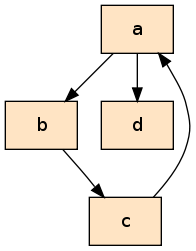
python_graphtraversal_picGraphs, they are fun. You can use them for all sorts of things, like drawing a picture of the internet (or your favorite regular expression!)

For example, look at that handsome guy there on the right. Is that a gorgeous graph, or what? (Incidentally, if you aren't yet a fan of graphviz, it's time to become one, it's superb!)

Now take a gander at the code snippet below, that's the python representation of it.

class Node(object):
    def __init__(self, name):
        self.name = name

a, b, c, d = Node('a'), Node('b'), Node('c'), Node('d')
a.refs = [b, d]
b.refs = [c]
c.refs = [a]
d.refs = []

But it's not there just to be stared at, so let's do something with it! One thing we could do is go over the graph and print out the nodes. But let's do one better, let's also show how deep into the graph we are by indenting the output! What we want is this:

a
__b
____c
__d

We don't have the nice arrows here, but you can still make out the shape of the graph.

First iteration

def traverse_naive(node, depth):
    print('__'*depth + node.name)
    for ref in node.refs:
        traverse_naive(ref, depth+1)

Very simple. Print the name of the node at the current level of depth, and then recurse down the outgoing edges. But when we run this something bad happens:

>>> traverse_naive(a, 0)
a
__b
____c
______a
________b
..
RuntimeError: maximum recursion depth exceeded

There's no sign of d, instead we keep going round and round along the path a-b-c-a. Woops.

Preempting cycles

Traditionally, graph traversal algorithms have set properties on nodes in the graph to indicate to themselves that a particular node had been seen before. For example, we could set node.been_here_before = True every time we enter a node, and then we could check for this property to make sure we don't re-enter the node later.

But this is not awesome, because we then have to change the graph as we traverse it. What if we want to traverse it again later, do we then need another traversal algorithm to remove all the markers or what?

There is another way to do this, however. We can use a data structure completely outside the graph in which we keep track of what we've seen so far (imagine a guy walking around a warehouse with a clipboard, he then doesn't have to mark any of the merchandise!).

So instead of checking the value of node.been_here_before, we're going to check the value of cache[node].

Now, there are two main strategies for where to do this check. We can do it right before the recursive call, or right after.

def traverse_check_before(node, depth, cache):
    cache[node] = None

    print('__'*depth + node.name)
    for ref in node.refs:
        # we are about to recurse, first check if the node we want
        # to recurse on is in the cache
        if ref in cache:
            print('Already in cache: %s' % ref.name)
            continue
        # recurse if we reach this point
        traverse_cached(ref, depth+1, cache)


def traverse_check_after(node, depth, cache):
    # we have just recursed, return if this node is already in
    # the cache
    if node in cache:
        print('Already in cache: %s' % node.name)
        return
    cache[node] = None

    print('__'*depth + node.name)
    for ref in node.refs:
        # recurse without exception
        traverse_cached(ref, depth+1, cache)

Here it doesn't matter which one we use, so we're just going to use the second option.

Second iteration

At this point you might be thinking that everything is going swimmingly, but in fact a small problem has crept up. It cannot have escaped your attention that we've snuck another parameter into that function definition. This means that we have to call the function like this:

>>> traverse_check_after(a, 0, {})
a
__b
____c
Already in cache: a
__d

The function works, but we really, really don't want to have to do it like this. There is no reason the caller has to know about the cache, let alone that it is a dictionary. And if we ever decide to change the cache mechanism, we have to update all the client code.

So what can we do? We can't set up the cache in the function body, because the function is recursive!

This is where you might get that look in your eye that you get when you're being clever. Hah, but what about this:

def traverse_cached(node, depth, cache={}):
    if node in cache:
        print('Already in cache: %s' % node.name)
        return
    cache[node] = None

    print('__'*depth + node.name)
    for ref in node.refs:
        traverse_cached(ref, depth+1, cache=cache)

Brilliant! We don't have to set up the cache neither inside the function body nor at the call site. This cache has to be initialized somewhere between the call and the function being executed, but somehow we've found a magical in-between, haven't we!

Keyword parameters really are a tremendous boon, but unfortunately they will not save our skin this time. Do you know what happens if we do this?

>>> traverse_cached(a, 0)

Read and weep:

>>> traverse_cached(a, 0)
a
__b
____c
Already in cache: a
__d
>>> traverse_cached(a, 0)
Already in cache: a

Keyword parameters

Keyword parameters don't do what you thought they did. You thought traverse_cached would get a new dictionary every time it was called without a cache argument. But that's not what happens. (But isn't python magical???)

In fact, it works like this. The cache keyword parameter gets initialized once and for all when the function is compiled. Since the value it is set to is an empty dictionary, the dict object is initially empty. But every time you call the function, it's the same dictionary that gets passed in! :eek:

Third iteration

It's come to this, I'm afraid. The problem is unsurmountable. We can't not pass the cache parameter. But we definitely don't want to do it at the call site. Which leaves no other option than...

def traverse_cached_fixed(node, depth):
    def rec(node, depth, cache):
        if node in cache:
            print('Already in cache: %s' % node.name)
            return
        cache[node] = None

        print('__'*depth + node.name)
        for ref in node.refs:
            rec(ref, depth+1, cache)
    rec(node, depth, {})

I really hate using an inner function just for this. It makes it messier, you have to route the arguments through an extra function call. But that's the price you pay, I'm afraid.

Postscript

By now you must be fuming at the fact that I've come all this way while pretending that the function call didn't have another parameter that was completely pointless and indeed deserving of the very same criticism.

Well, the difference is that you can set depth=0 as a keyword parameter in the function definition, so that you don't have to pass it. And this doesn't break anything. But why??

The answer is found when poking around python. A function is in fact a mutable object. Have a look:

def f(a=0):
    a = 1

>>> print f.func_defaults
(0,)

func_defaults is the tuple that stores the values of the keyword parameters which have a default value. The value we see here is the integer 0, and it will not change no matter how many times we execute the function.

But collection types (and your own types too) are different:

def g(a=[]):
    a.append(1)
    print a

>>> print g.func_defaults
([],)
>>> g()
[1]
>>> print g.func_defaults
([1],)
>>> g()
[1, 1]

Despite different, it actually works the same way (sorta). The binding of the keyword default is constant. But with an integer, the parameter is bound to the constant 0, whereas with "heavier" objects, it is bound to the object, but the object's inner properties can very well mutate!!!

fake a dual monitor display!

January 30th, 2010

Wouldn't we all love to have a beefy workstation with at least two giant lcd monitors? Alas, I have a slim laptop with a small screen. And another laptop, almost 10 years old, albeit with a nice and large screen. I naturally prefer to use the newer machine for performance, but it also means making do with a small monitor.

I can tell you it's a real pain to author latex documents this way, I can't fit both the kile and evince on the screen at the same time. It wasn't until recently that it hit me what I was doing wrong. There are three processes involved here:

  1. Document editor.
  2. Compiler (I run a loop that invokes make continuously in the background).
  3. Document viewer.

Come to think of it, this applies just as well to coding if you think "running the code" on the last step.

Well, X11 is a display server, for peet's sake! So you have the editor on the workstation, but then you log in from the other laptop (with the larger screen) and run evince to display there.

Just do:

oldlaptop$ ssh -XYC workstation

Don't ask me why -Y, I don't know, but that's how I get my ubuntu to allow remote connections.

a firewall in layman's terms

January 20th, 2010

Dealing with companies can be frustrating, because they like to appear opaque to the outside world. When you look on the website you find a page with contact information. You'll find a phone number and an email address, and maybe more than one if it's a large company with several departments. But they all point to the reception. Few companies are generous enough to give you direct access to their personnel with a listing of employees and their contact information.

So if there is a person you have to get to you have to do it through the reception. "Yes, I am blah and I need bleh and why don't you just transfer me to the person I need to talk to, per favore!" It's not a lot of fun, but this way whoever makes this decision to give out only the number of the reception can also decide who may and may not receive calls. And even on what conditions. If you say the magic word then, yes, you can get Frank on the line, otherwise not. And maybe Steve has been known to say too much and has a history of divulging information he wasn't supposed to. So no, you can't talk to Steve.

Well, this is the principle of a firewall. The reception screens calls with the discretion to reject or divert according to the protocol that has been instituted. Some people can be reached anytime, others only at certain intervals. Some are available depending on your request, and some are completely unreachable.

This picture, however, conflicts with the original meaning of the word firewall, which is a wall erected to stop a fire from spreading. Unconditionally.