Build systems are probably not the most beloved pieces of machinery in this world, but hey we need them. If your compiler doesn't resolve dependencies, you need a build system. You may also want one for any repeated task that involves generating targets from sources as the sources change over time (building dist packages, xml -> html, latex -> pdf etc).
 Fittingly, there are quite a few of them. I haven't done an exhaustive review, but I've mentioned ant and scons in the past. They have their strengths, but the biggest problem, as always, is portability. If you're shipping java then having ant is a reasonable assumption. But if not.. Same goes for python, especially if you're using scons as build system for something that generally gets installed before "luxury packages" like python. Besides, scons isn't popular. I also had a look at cmake, which is disgustingly verbose.
Make is the lowest common denominator and thus the safest option by far. So over the years I've tried as best to cope with it. Fortunately, I tend to have fairly simple builds. There's also autotools, but for a latex document it seems like overkill, to put it politely.
One to one, single instance
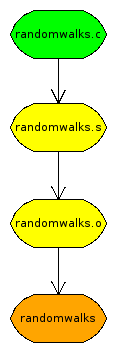
So what's the problem here anyway? Let's use a simple example, the randomwalks code. The green file is the source. The orange file is the target. And you have to go through all the yellow ones on the way. The problem is that make only knows about the green one. That's the only one that exists.
So the simplest thing you can do is state these dependencies explicitly, pointing each successive file at the previous one. Then it will say "randomwalks.s? That doesn't exist, but I know how to produce it." And so on.
targets := randomwalks

all: $(targets)

randomwalks : randomwalks.o
	cc -o randomwalks randomwalks.o

randomwalks.o : randomwalks.s
	as -o randomwalks.o randomwalks.s

randomwalks.s : randomwalks.c
	cc -S -o randomwalks.s randomwalks.c

clean:
	rm -f *.o *.s $(targets)
Is this what we want? No, not really. Unfortunately, it's what most make tutorials (yes, I'm looking at you, interwebs) teach you. It sucks for maintainability. Say you rename that file. Have fun renaming every occurrence of it in the makefile! Say you add a second file to be compiled with the same sequence. Copy and paste? Shameful.
One to one, multiple instances
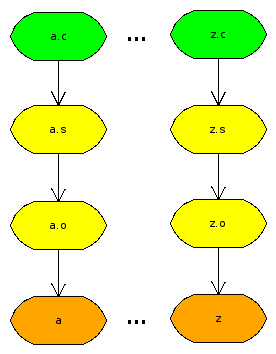 It's one thing if the dependency graph really is complicated. Then the makefile will be too, that's unavoidable. But if it's dead obvious like here, which it often is, then the build instructions should mirror that. I run into a lot of cases where I have the same build sequence for several files. No interdependencies, no multiple sources, precisely as shown in the picture. Then I want a makefile that requires no changes as I add/remove files.
I've tried and failed to get this to work several times. The trick is you can't use variables, you have to use patterns. Otherwise you break the "foreach" logic that runs the same command on one file at a time. But then patterns are tricky to combine with other rules. For instance, you can't put a pattern as a dependency to all.
At long last, I came up with a working makefile. Use a wildcard and substitution to manufacture a list of the target files. Then use patterns to state the actual dependencies. It's also helpful to unset .SUFFIXES so that the default patterns don't get in the way.
targets := $(patsubst %.c,%,$(wildcard *.c))

all: $(targets)

% : %.o
	cc -o $@ $<

%.o : %.s
	as -o $@ $<

%.s : %.c
	cc -S -o $@ $<

clean:
	rm -f *.o *.s $(targets)

.SUFFIXES:
Many to one
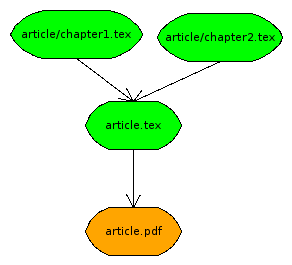 What if it gets more complicated? Latex documents are often split up into chapters. You only compile the master document file, but all the imports are dependencies. Well, you could still use patterns if you were willing to use
 article.tex as the main document and stash all the imports in article/.
This works as expected, $< gets bound to article.tex, while the *.tex files in article/ correctly function as dependencies. Now add another document story.tex with chapters in story/ and watch it scale. :cap:
targets := $(patsubst %.tex,%.pdf,$(wildcard *.tex))

all: $(targets)

%.pdf : %.tex %/*.tex
	pdflatex $<

clean:
	rm -f *.aux *.log *.pdf
Many to many
Latex documents don't often have interdependencies. Code does. And besides, I doubt you want to force this structure of subdirectories onto your codebase anyway. So I guess you'll have to bite the bullet and put some filenames in your makefile, but you should still be able to abstract away a lot of cruft with patterns. Make also has a filter-out function, so you could state your targets explicitly, then wildcard on all source files and filter out the ones corresponding to targets, and use the resulting list as dependencies. Obviously, you'd have to be willing to use all non-targets as dependencies to every target, which yields some unnecessary builds. But at this point the only alternative is to maintain the makefile manually, so I'd still go for it on a small codebase.
PS. First time I used kivio to draw the diagrams. It works quite okay and decent on functionality, even if the user interface is a bit awkward. Rendering leaves something to be desired clearly.

 August 6th, 2009


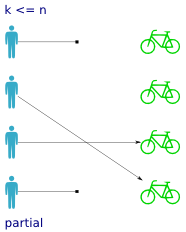 Partial functions are pretty self explanatory. All you have to remember is which side the partiality concerns. In our example a partial function means that not every person has been assigned a bike. Some persons do not have bikes, so
 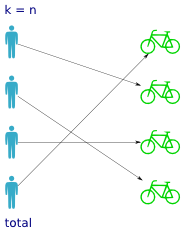 Not surprisingly, total functions are the counterpart to partial functions. A total function has a value for every possible input, so that means every person has been assigned a bike. But it doesn't tell you anything about how the bikes are distributed over the persons; whether it's one-to-one, all persons sharing the same bike etc.
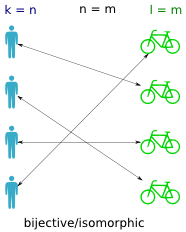 A bijective function (also called isomorphic) is a one-to-one mapping between the persons and the bikes (between the domain and codomain). It means that if you find a bike, you can trace it back to exactly one person, and that if you have a person you can trace it to exactly one bike. In other words it means the inverse function works, that is both
 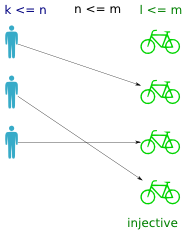 An injective function returns a distinct value for every input. That is, no bike is assigned to more than one person. If the function is total, then what prevents it from being bijective is the unequal cardinality of the domain and codomain (ie. more bikes than persons).
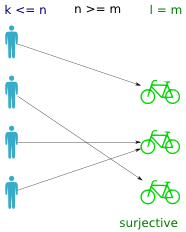 A surjective function is one where all values in the codomain are used (ie. all bikes are assigned). In a way it is the inverse property of a total function (where all persons have a bike).