Archive for the ‘technology’ Category

bugs are better when fun

August 12th, 2007

Gentoo is fabled to be the maverick of a distro that blows up right, left and center. While I find that to be a gross exaggeration, it does occasionally crash in scary ways. :) Although I don't think it's any worse than the others, upgrading Ubuntu from release to another is still broken (Edgy -> Feisty, check), and last time I tried the Fedora upgrade cycle it was busted as well. Obviously, I wouldn't be running Gentoo these last five years if it were as fragile as some people think. I actually find it the most sane distro in many ways.

But yesterday I must say I had quite a bit of fun with it. I keep to a fairly recent upgrade path, so I rarely fall behind more than a week. The expat1->2 upgrade had been in the works for some time, but the einfo flew by without me seeing it, as it often is. Interestingly, half the packages on the system depend on expat, and all of them were suddenly broken. The first thing I noticed was Firefox behaving odd.

Some things cannot readily be captured in a picture, an audio recording, or a video. Not even in a piece of text. A cool bug is one of those things. It has to be investigated, experimented upon, to understand the extent of it. I regret that I had no way to record this work of art for posterity. So Firefox was running happily along, as it had been doing for hours. Then at one point, I open a new tab and type fa in the location field to call up facebook from the drop down list. But I never got to a. Just as I hit f on the keyboard, Firefox crashed.

Of course, Firefox *does* love the crash, it crashes several times a day. But it almost always crashes over Adobe's frightfully stable flash plugin. This was not one of those times, I didn't have flash content in any of the open tabs. Well, never mind, it was probably a coincidence. So I start it up again, I get my tabs back, and again I open a new tab to load facebook. Again I never get to a. :D Hm, this is starting to get interesting.

It turns out that a single key press would crash Firefox, but it didn't have a problem with the mouse. And not just Firefox, any Gtk application. :cool: At this point I was quite amused.

Not surprisingly, bugs are more fun when you have an idea what to do about them. I did track down the expat problem after some digging, but it made me recompile a boat load of packages. All of them seem to work again, although revdep-rebuild hadn't been run for a while and exposed some other problems. One package that didn't recover, however, was digikam. I'm back on 0.8.2-r1 after running 0.9.2 happily for weeks. Odd.

The moral is this: if you're going to crash, find a fun way to crash. :party:
toward click-free guis

July 29th, 2007

I think that a big part of user interface improvement lies in re-examining old answers to still existing questions. For example: when do we really need to click the mouse?

Motivation

I think we could do with less mouse clicks. And if nothing else, a click-free mode you can turn on if you want to.

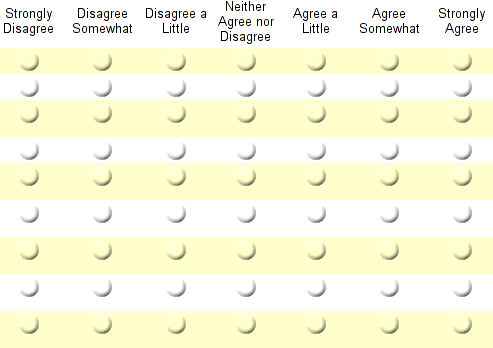
survey_sheet.png

I don't know how many long surveys you've taken, but I find them daunting. My question is: why do we need to click to select?

I think the answer is that most people use their mouse pointer liberally and they think as long as I don't click anything, there's no way I can screw up. And thus introducing selection-on-mouseover would be too subtle, and too confusing.

So let's eliminate the confusion.

A mockup

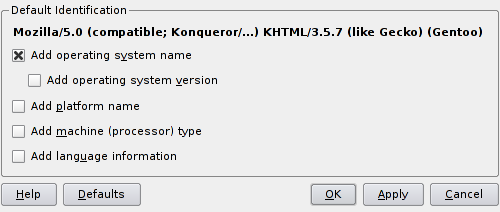
This is a configuration dialog from Konqueror (slightly modded to just show the part I'm interested in). Nothing has happened here yet, this is how it looked when it came up.

konq_dialog.png

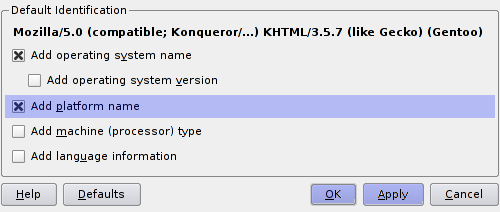
Now I want to select the platform option, so I move my pointer over it and the dialog changes to look like this:

konq_dialog_modify.png

The option I selected has become blue, which tells me that this option has been modified.

The two buttons OK and Apply have also become blue, which means that if I click one of them I confirm the modification I have made.

(Should it be necessary to click the buttons or can I just move the mouse over them? Let's go conservative for now and require a click.)

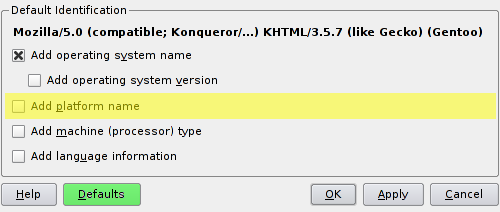
But suppose I don't want to turn on this option after all. I move my pointer away from it, and then I move it over it again:

konq_dialog_unmodify.png

The checkbox has become unchecked again, so the option is deselected. But since I considered turning it on, it's highlighted in yellow to tell me that I thought about it.

Also, the Defaults button is now highlighted, to show that the current settings correspond to the defaults. It's highlighted green to tell me that I have re-entered the default settings.

All good?

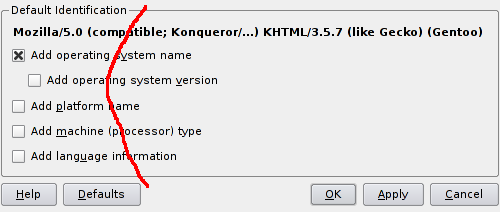
One problem that comes to mind is this. If I move my pointer over the dialog I select every option unless I'm very careful:

konq_dialog_pointer.png

One solution could be to set a certain interval during which the pointer has to be on the option I want to select. For example half a second. This would be configurable, of course.

using your dotfiles on the go

July 27th, 2007

Chances are you use more than one computer in your daily/weekly/monthly routine. Probably not because you want to; it would be more practical for all of us to just have one place to store all our stuff, but alas.

A problem

Anyway, if you do then you know the pain of sitting down somewhere to not use your carefully set up and configured environment, dropped into some sub par default world that doesn't have all your personal goodies.

I've endured this for a number of years, until eventually I decided to fix it. Mind you, the reason there isn't a standard solution for this is that the problem has a rather large number of variables. But for this you need:

  • a universal storage (http, ftp, etc)
  • bash or zsh

The idea came up when I started fiddling around with zsh, trying to get a reasonable prompt working. Once I finally had, obviously I wanted the same environment that I do in bash already. And not knowing whether I'd love zsh enough to use it permanently, I also wanted the option to use bash whenever I might want to.

To complicate things a bit, I also like the option to have my prompt look slightly different depending on the host I'm logged into. One too many reboots when logged into a remote server (thinking I was rebooting the local machine) made me introduce that as policy. :D

So my prompt looks like this, where the hostname always has a different color on every host. I also change the curdir to be red when I'm root to remind me of that fact.

bash_prompt.png

After a lot of trial and error I eventually got my zsh prompt looking very similar.

Finally, there's the aspect that perhaps on some hosts you need some local settings as well, so one should make allowances for that. For instance, perhaps you want to set PATH or LD_LIBRARY_PATH on just one host.

A solution

All of these concerns produced the following files:

.zshrc
.zlogout
.zsh/functions/
.zsh/functions/prompt_numerodix_setup
.bashrc
.bash_profile
.bash_logout
.myshell/bash_local
.myshell/colors
.myshell/colors_zsh
.myshell/common
.myshell/common_local
.myshell/hostcolor_local
.myshell/zsh_local

The .bash* and .z* files are the usual stuff, of course. But everything common to bash and zsh is contained in .myshell/common, which is imported by both .bashrc and .zsh. That way we can share stuff between them. Further, everything called *local is local to the specific host, so these files are not distributed as part of the config update.

But the most useful bit is the pair of functions called pushcfg and pullcfg, in .myshell/common, which do the actual work of storing updates of these files in the central location. I use a website for this, but you could use some other easy-to-reach location just as well.

To see what happens, let's see the pullcfg function.

pullcfg(){
	oldcwd=$(pwd); cd ~
	wget http://www.matusiak.eu/numerodix/configs/cfg.tar.gz
	gunzip cfg.tar.gz
	tar xvf cfg.tar
	rm cfg.tar
	touch .myshell/common_local .myshell/bash_local .myshell/zsh_local .myshell/hostcolor_local
	find .zsh | xargs chmod 700 -R
	cd $oldcwd
}

So the tar file is downloaded and extracted, overwriting the existing files. Then all the local files are created empty (unless they already exist) so you don't have to remember their names.

So all you do is log into a host, download the file and unpack, then to update run pullcfg. And after that you should logout and login to see the effects.

But back to the prompt issue. A common problem with bash is that it has colors but there's no easy way to use them. The file .myshell/colors defines variable names for them, so everything related to colors is made much simpler. From there on, the prompt can be set quite simply like so.

PS1="${cbwhite}[\u@${host}\H${cbwhite}] ${cbgreen}\w \n${cbblue}$ ${creset}"

cbwhite means "color, bold, white", while cwhite means "color, white" and is the darker shade of the same color. Now, since zsh handles colors differently, .myshell/colors_zsh redefines these variables just for zsh, so that they work in both shells.

But what about changing the color of the hostname with every host? Glad you ask. The first time I extract the tar file on a new host, the prompt is not colored. This is to remind me that I haven't set a color for the hostname on this host yet. The hostname's color is defined in .myshell/hostcolor_local. So in the screenshot above it contains the line "cbmagenta". Once this file exists, and is non-emtpy, the prompt will become colored.

And so the whole thing works, with equally enough organization and flexibility to do just the right things. :)

Want to test drive? Download the tar file:

Of course, once the opportunity presents itself to migrate settings, I take advantage of that to also include .vimrc and whatever else is useful to have.

eliminate mouse wheel clicks

July 14th, 2007

As much as the mouse wheel was a good idea, making it a clickable button was a *bad* idea. The mouse wheel is more sensitive than the left and right buttons, and it has too many jobs. Newer mice also do horizontal scrolling, which makes it even more flexible. Pushing down the mouse wheel to click has always been uncomfortable, for the simple reason that it *moves* in other directions beside down, it's not static.

When the mouse wheel was introduced, it was de facto a third button, and so the "natural thing" was to just make it that, adding to the scrolling functionality. Of course, the old Unix standard of mice also had three buttons, so that fits.

This button is important, because it's the Unix paste button, you use it all the time. In addition, Firefox made it its own, for opening links in tabs and for closing tabs. It has always bugged me that I had to use the mouse wheel button for that. Not enough to actually do something about it, but enough to bother me. :lazy:

So today I got the Logitech MX 400, where the mouse wheel button is actually harder to press in, and I decided to finally fix the problem. So here's what you do.

First you should know how many buttons your mouse has. You count every button, you also count scrolling (back, and forth, each count as a button). For example, my mouse has 9; the front two, a mouse wheel with 4 directions of scrolling, the mouse wheel button, and two side buttons. If you have some extra side buttons to use, you can use one of these as the paste button.

But you need to know which is which. Here's how:

$ xev

ButtonRelease event, serial 29, synthetic NO, window 0x2c00001,
root 0x61, subw 0x0, time 8209381, (102,133), root:(946,186),
state 0x100, button 1, same_screen YES

Here I started up xev, which brings up a little window. It prints lots of output about mouse and keyboard activity. When I move the pointer into the window and click, I get a piece of output like the above. Here I clicked the left front button, which is called button 1. In the same way, I find out that the mouse wheel button is number 2. While the side button I want to use as paste button is number 8.

Knowing this, I can remap the two buttons, switch their positions. Like so:

xmodmap -e "pointer = 1 8 3 4 5 6 7 2 9"

Here the numbers are sequential, except that 2 and 8 are swapped. Run this while X is running and you get the desired effect.

To make this permanent, you need to add it to your X session script. KDE is not very nice, because it doesn't give you an easy way to do it, so I just added the line to the startkde script (ugly hack):

...

xmodmap -e "pointer = 1 8 3 4 5 6 7 2 9"
# finally, give the session control to the session manager
# see kdebase/ksmserver for the description of the rest of the startup sequence
...

does ogg suck or does ogg support suck?

July 5th, 2007

So ogg is well known as the open format for audio and people seem to love it, it has broad support. To be precise, ogg is just a container format, so just the fact that a file is an ogg file doesn't tell you much more about it than a zip file tells you about its content.

On the video side of things, noone seems to use ogg. Even though it is an open and by all accounts free format, I very rarely come across ogg videos. And sadly when I do, often they are broken. Since Theora seems to be the most used codec for ogg video, I'm assuming they're all encoded in that format (I know I've never seen an ogg video not in theora, although I don't make a point of checking).

Common symptoms:

  • Timer is completely bonkers, saying a 20 minute video is several hours long and whatnot.
  • Video stream has lots of bugs, frame freezes.
  • Audio/video sync can be way off.

Case in point, download this video from Akademy. In mplayer and vlc alike the timer is confused, and the video stream freezes as well. This is the kind of problem I've seen a lot of times with ogg videos.

Now it may be a production mishap for this particular video. But I've seen these bugs with ogg a lot more than with other formats. In mplayer, even if you reindex the stream the timer still doesn't get it right. It tells me the video is 412:29:15 long.

So what is it? Is ogg/theora busted or is the implementation busted? Is the encoder so bad that it's impossible to produce a video without bugs? Or is the decoder buggy?