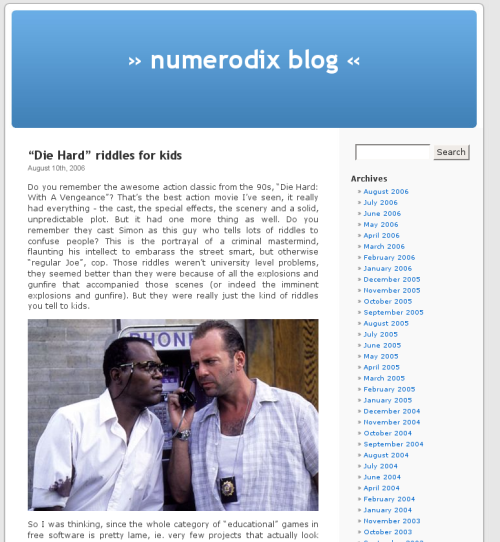
As you can see, the blog just got a bit of a facelift. "But", you interject, "if it ain't broketh, why fixeth", as it were. I've been meaning to do this for some time, I was never 100% happy with the blog software I was using. Granted, Radek Hulán's extensions to Nucleus in the shape of BLOG:CMS result in a very powerful and customizable package, but it is a bit rough around the edges. It would frustrate me in certain ways, like the rich content editor being buggy and not working well with images. Like the stylesheets being as good as unintelligible - even though I modified them to my liking, I knew it would be hell to try and change at any point. Like the xml feeds not always working well. It feels quite hackish. The admin control panel, for instance, is quite rough looking and frustrating. The templates are very difficult to make out, they're all stored in the database and it took me quite a bit of trial and error to figure out what comes out where. Basically, I felt locked into a system that worked, but I would rather use something that is more friendly to change.
Back in 2003, Nucleus was a good choice, but the landscape has changed somewhat. WordPress has made great strides and over the years I've seen quite a few great looking WordPress blogs. What makes them stand out is the attention to typography that WordPress has, which is a nice quality to have for publishing software. WordPress blogs are always good to read, because the fonts are a certain type and size etc. They also tend to have a very clean look. And since it's now widely used, I thought I would probably find enough plugins to satisfy my modest needs.
To get a general idea of what my blog could look like, I started browsing the hundreds of themes there are out there for WordPress. Surprisingly, I couldn't find one that was actually good enough to use. To be fair, it's not that there aren't any usable themes, just that I couldn't find one that would suit me. Since I don't want my blog pink or black or the post section very narrow with two sidebars, I soon realized I would have to make my own theme. Given how many attractive WordPress sites I've seen in the past, it's astounding that there isn't one theme of the kind I was looking for (predominantly light colors) in about 200 I looked through that would actually be good looking. A lot of them look good in some ways, like good choice of fonts, but there's always some problem, like the menu looks 1995. Or the header image along with the color scheme looks great, but the fonts are Times New Roman italic or something like that. It's strange that someone would be competent enough to produce a professional looking design with balanced colors and images, but completely botch the choice of fonts that go on the page. I'm no designer myself, I can pick fonts that look good and with some effort find a decent color scheme. But my skills are limited, I see websites all the time that I couldn't design, because I don't have the eye for it.
So I would have to roll my own. When hacking existing code, it's essential to start with a good base, ideally the fewer changes the better. The standard WordPress theme is a good place to start. It does look quite good, but it has a few problems. For one thing, the items on the sidebar are not ordered in a particularly inviting way. There is a page full of archives, so just about noone is going to see what's further down. Another problems is the way the posts are presented. The space allocated to them is too narrow. In some of my posts, I have images up to 500px in width, this post area is only 450px wide. It's also so narrow that the page looks funny, as if the post wasn't supposed to take up any more space, even though there is nothing else to look at. And strangely, on the single page, where the sidebar doesn't appear, it's still just as narrow.
Unlike BLOG:CMS, WordPress does not come with a rich admin control panel for changing the styles. In fact, they seem to encourage editing the actual files. At first, this felt unnatural, as I'm used to vBulletin also installing hundreds of templates that go in the database. But this is actually a better way of doing it, it's easier [quicker] to modify files on disk than rows in a database. It also means I can use nano or vim instead of having to enter the code in a textarea.
WordPress, seemingly, is documented to death. It has so much documentation that I wouldn't even consider starting reading it. Instead I made a copy of the default theme and started changing things. Themes are separated very cleanly and there is no need to modify anything that shouldn't be touched (outside the theme). Basically, all you need is in there. The stylesheet makes for a nice change of pace, it's actually logically divided and documented. But debugging css is always a pain anyway, so I found a couple of Firefox extensions that make it hurt considerably less:
These things are a blessing when trying to make sense of things! So after a while I came up with the theme you're looking at. It aims to preserve all the strengths of the theme I used in BLOG:CMS and I'm quite happy with it. One thing that isn't part of a theme are the smilies. WordPress comes with its set of smilies and I wanted to use xtorg, which I use for everything, because it's basically the best smilies set known to man. ;) This should technically be very simple, such is the hypothesis. Smilies are declared in wp-includes/vars.php, in a simple associative array. Little did I know how much effort it would take to get that array "right". It kept breaking in strange ways (parsing totally out of whack) and finally I realized that for smilies that do *not* begin _and_ end with a colon, I need to add a space at the beginning, so for instance in the case of word :D , WordPress will not recognize :D at the end, it must be prepended with a whitespace. This little quirk isn't documented in the source, and as far as I could see, isn't documented on wordpress.org either. This particular example doesn't seem to square with "code is poetry" - WordPress's slogan - but is there not an exception to every rule? In any case, I've added support for WordPress to xtorg, so anyone can now easily use those smilies in WordPress. For those just posting comments here, use either colon-text-colon or just the msn codes, those will work too.
One thing I thoroughly enjoyed in BLOG:CMS was the random quotes that would appear on the single post pages. I've ripped them off and added them on the index page. Another thing I wanted to preserve was the "Now Playing" feature, but there is no plugin for that in WordPress. Meanwhile, there is a host of plugins for pulling in data from last.fm. Well, I could use that to display the last song I listened to, but I don't quite know where. The sidebar is quite full as it is, so for the time being, it's off.
Finally (and this post isn't quite in chronological order), with WordPress set up and configured, it was time to import my posts from BLOG:CMS. As it turns out, WordPress *still* hasn't developed a script for that, but a few people have tried it. I tried every script I could find, but only one of them worked, and it was Leonid Mamchenkov's nucleus2wordpress.perl. The script ran without a hitch, actually. I realized I would have to hack it a bit, because the images weren't showing up (and this is something WordPress is very stupid with - hardcoding image paths in posts). There was also a problem with the charset - WordPress uses utf-8, BLOG:CMS uses iso-latin-1. I had to research how to encode text in perl and surprisingly, I pulled it off with two lines of code that worked (w00t! w00t!). I say that, because I don't actualy know perl. So now the rare post in Norwegian shows up in all its utf-8 splendor.
So, there it is. Without doubt, the most documented software installation in my life. :D
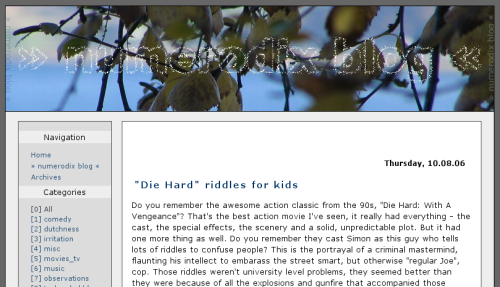
And here is one last look at the past:

 August 14th, 2006