Archive for the ‘technology’ Category

spiderfetch, now in python

June 28th, 2008

Coding at its most fun is exploratory. It's exciting to try your hand at something new and see how it develops, choosing a route as you go along. Some poeple like to call this "expanding your ignorance", to convey that you cannot decide on things you don't know about, so first you have to become aware - and ignorant - of them. Then you can tackle them. If you want a buzzword for this I suppose you could call this "impulse driven development".

spiderfetch was driven completely by impulse. The original idea was to get rid of awkward, one-time grep/sed/awk parsing to extract urls from web pages. Then came the impulse "hey, it took so much work to get this working well, why not make it recursive at little added effort". And from there on countless more impulses happened, to the point that it would be a challenge to recreate the thought process from there to here.

Eventually it landed on a 400 line ruby script that worked quite nicely, supported recipes to drive the spider and various other gimmicks. Because the process was completely driven by impulse, the code became increasingly dense and monolithic as more impulses were realized. And it got to the point where the code worked, but was pretty much a dead end from a development point of view. Generally speaking, the deeper you go into a project, gradually the lesser the ideas have to be to be realized without major changes.

Introducing the web

The most disruptive new impulse was that since we're spidering anyway, it might be fun to collect these urls in a graph and be able to do little queries on them. At the very least things like "what page did I find this url on" and "how did I get here from the root url" could be useful.

spiderfetch introduces the web, a local representation of the urls the spider has seen, either visited (spidered) or matched by any of the rules. Webs are stored, quite simply, in .web files. Technically speaking, the web is a graph of url nodes, with a hash table frontend for quick lookup and duplicate detection. Every node carries information about incoming urls (locations where this url was found) and outgoing urls (links to other documents), so the path from the root to any given url can be traced.

Detecting file types

Aside from the web impulse, the single biggest flaw in spiderfetch was the lack of logic to deal with filetypes. Filetypes on the web work pretty much as well as they do on your local computer, which means if you rename a .jpg to a .gif, suddenly it's not a .jpg anymore. File extensions are a very weak form of metadata and largely useless. Just the same with spidering, if you find a url on a page you have no idea what it is. If it ends in .html then it's probably that, but it can also not have an extension at all. Or it can be misleading, which when taken to perverse lengths (eg. scripts like gallery), does away with .jpgs altogether and encodes everything as .php.

In other words, file extensions tell you nothing that you can actually trust. And that's a crucial distinction: what information do I have vs what can I trust. In Linux we deal with this using magic. The file command opens the file, reads a portion of it, and scans for well known content that would identify the file as a known type.
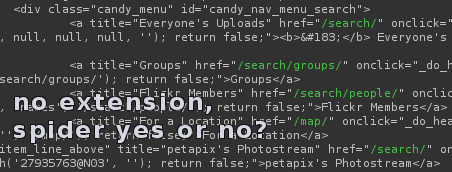
For a spider this is a big roadblock, because if you don't know what urls are actual html files that you want to spider, you have to pretty much download everything. Including potentially large files like videos that are a complete waste of time (and bandwidth). So spiderfetch brings the "magic" principle to spidering. We start a download and wait until we have enough of the file to check the type. If it's the wrong type, we abort. Right now we only detect html, but there is a potential for extending this with all the information the file command has (this would involve writing a parser for "magic" files, though).

A brand new fetcher
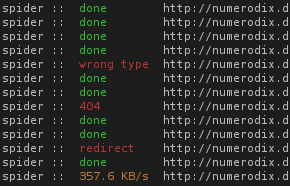
To make filetype detection work, we have to be able to do more than just start a download and wait until it's done. spiderfetch has a completely new fetcher in pure python (no more calling wget). The fetcher is actually the whole reason why the switch to python happened in the first place. I was looking through the ruby documentation in terms of what I needed from the library and I soon realized it wasn't cutting it. The http stuff was just too puny. I looked up the same topic in the python docs and immediately realized that it will support what I want to do. In retrospect, the python urllib/httplib library has covered me very well.

The fetcher has to do a lot of error handling on all the various conditions that can occur, which means it also has a much deeper awareness of the possible errors. It's very useful to know whether a fetch failed on 404 or a dns error. The python library also makes it easy to customize what happens on the various http status codes.

A modular approach

The present python code is a far cry from the abandoned ruby codebase. For starters, it's three times larger. Python may be a little more verbose than ruby, but the increase is due to a new modularity and most of all, new features. While the ruby code had eventually evolved into one big chunk of code, the python codebase is a number of modules, each of which can be extended quite easily. The spider and fetcher can both be used on their own, there is the new web module to deal with webs, and there is spiderfetch itself. dumpstream has also been rewritten from shellscript to python and has become more reliable.

Grab it from github:

spiderfetch-0.4.0

emacs that firefox!

June 24th, 2008

So the other day I was thinking what a pain it is to handle text in input boxes on web pages, especially when you're writing something longer. Since I started using vim for coding I've become aware of how much more efficient it is to edit when you have keyboard shortcuts to accelerate common input operations.

I discovered a while back that bash has input modes for both vi and emacs and ever since then editing earlier commands is so much easier. And not only does it work in bash, but just as well in anything else, like ipython, irb, whatever. :cap:

So now only Firefox remains of my most used applications that still has the problem of stoneage editing, and I'm stuck using the mouse way too much. It bugs me that I can't do Ctrl+w to kill a word. Thus I went hunting for an emacs extensions and what do you know, of course there is one: Firemacs. Turns out it works well, and it also has keyboard shortcuts for navigation. > gets you to the bottom of the page, no more having to hold down <space>. :thumbup:

renewip: when the router keeps disconnecting

June 15th, 2008

So we now all have broadband connections and everything is great, right? Well, not quite. Some providers have better services than others. My connection seems rather fragile at times and tends to die about once in three-four days. When that happens, no amount of resetting the equipment helps to get it working again. It's an upstream issue that I have no control over.

But there is another problem. Once the cable modem starts working again, the router (which receives an IP address from my provider, and serves LAN and wifi locally) doesn't seem to know this and doesn't automatically re-establish a connection. Or I'm not really sure what it does, it's a black box and there is a web interface to it, where there's a button to press to do this, which sometimes works. But what really is happening, who knows. There seems to be a weird timing problem to the whole thing, where if I kill the power for both the modem and the router and they both come back at the same time, it generally works. However, if the modem is taking longer to negotiate a link, the router will be disconnected. And apparently doesn't try to reconnect on its own, so I've been stuck rebooting the two a few times until the timing is right. Resetting them separately for some reason doesn't seem to work.

So what can be done about it? Well, the router does have that stupid web interface, so it's possible to make those clicks automatically if we're disconnected. Python's urllib makes this very easy to do. First we login with router_login, which submits a form with POST. Then we check the state of the internet connection with check_router_state, which just reads out the relevant information from the page. And if it's disconnected we run renew_router_connection to submit another form (ie. simulating the button click on the web page).

Testing connectivity

More than just testing if the router has a connection to the provider, broadband connections sometimes have connectivity problems. Even if you can get a connection, the provider sometimes has problems on his network, meaning your connection doesn't work anyway.

So I came up with a test to see how well the connection is working. It's an optimistic test, so that first we assume we have a fully functional connection and ping yahoo.com. It doesn't matter what host we use here, just some internet host that is known to be reliable and "always" available. For this to work these conditions must be met:

  1. We have to reach the gateway of the subnet where our broadband IP address lives.
  2. We have to reach the provider's nameserver (known as dns1 in the code) to look up the host "yahoo.com".
  3. We have to reach yahoo.com (we have their IP address now).

So first we ping yahoo.com. If that fails, it could be because dns lookup failed. So we ping the provider's nameserver. If that fails, the provider's internal routing is probably screwed up, so we ping the gateway. And if that fails too then we know that although we have an IP address, the connection is dead (or very unstable).

#!/usr/bin/env python
#
# Author: Martin Matusiak <numerodix@gmail.com>
# Licensed under the GNU Public License, version 3.

import os
import re
import sys
import time
import urllib

ip_factory = "192.168.2.1"
password = ""

inet_host = "yahoo.com"


def write(s):
    sys.stdout.write(s)
    sys.stdout.flush()

def grep(needle, haystack):
    if needle and haystack:
        m = re.search(needle, haystack)
        if m and m.groups(): return m.groups()[0]

def invoke(cmd):
    (sin, sout) = os.popen2(cmd)
    return sout.read()

def ping(host):
    cmd = 'ping -c1 -n -w2 ' + host + ' 2>&1'
    res = invoke(cmd)
    v = grep("rtt min/avg/max/mdev = [0-9.]+/([0-9.]+)/[0-9.]+/[0-9.]+ ms", res)
    if v: return int(float(v))

def find_lan_gateway():
    cmd = "route -n"
    res = invoke(cmd)
    v = grep("[0-9.]+\s+([0-9.]+)\s+[0-9.]+\s+UG", res)
    if v: return v

def load_url(url, params=None):
    data = None
    if params: data = urllib.urlencode(params)
    f = urllib.urlopen(url, data)
    return f.read()


def router_login():
    form = {"page": "login", "pws": password}
    load_url("http://%s/login.htm" % ip, form)

def check_router_state():
    state = { "conn": None, "gateway": None, "dns1": None }
    router_login()
    s = load_url("http://%s/js/js_status_main.htm" % ip)
    if s:
        v = grep("var bWanConnected=([0-9]);", s)
        if v == "1": state['conn'] = True
        elif v == "0": state['conn'] = False
        if state['conn']:
            g = grep('writit\("([0-9.]+)","GATEWAY"\);', s)
            if g and g != "0.0.0.0": state['gateway'] = g
            g = grep('writit\("([0-9.]+)","DNSIP"\);', s)
            if g and g != "0.0.0.0": state['dns1'] = g
    return state
    
def renew_router_connection():
    router_login()
    form = {"page": "status_main", "button": "dhcprenew"}
    s = load_url("http://%s/status_main.htm" % ip, form)
    return s


ip = find_lan_gateway()
if not ip:
    ip = ip_factory
    write("LAN gateway detection failed, using factory ip %s for router\n" % ip_factory)
else:
    write("Router ip: %s\n" % ip)

while True:
    try:
        router = check_router_state()
        t = time.strftime("%H:%M:%S", time.localtime())
        if router['conn']:
            
            hosts = [(inet_host, inet_host),
                ("dns1", router['dns1']), ("gateway", router['gateway'])]
            connectivity = ""
            write("[%s] Connected  " % t)
            for (name, host) in hosts:
                delay = ping(host)
                if delay:
                    write("(%s: %s) " % (name, delay))
                    break
                else:
                    write("(%s !!) " % name)

            write("\n")
        else:
            write("[%s] NOT CONNECTED, attempting reconnect\n" % t)
            renew_router_connection()
    except Exception, e:
        cls = grep("<type 'exceptions.(.*)'", str(e.__class__))
        write("%s: %s\n" % (cls, e))
    time.sleep(3)

an absurd industry

May 31st, 2008

There are many things that seem reasonable to the average rational person, but then there are some that just seem absurd.

First, a little background. Security is not just a playground for hackers and software companies. It seems that way sometimes, but security has become a rather potent industry in its own right since the days of the first well publicized viruses and Windows exploits. So much so that finding and reporting security exploits is now commonly a job rather than an underground, subculture activity. There is a bunch of people who are employed to do this now, and who effectively drive the standards for security by publishing bugs in various products.

Now, whenever something has value of some kind, simple economic principles naturally imply that it can be used in a trade. Security vulnerabilities indeed have certain value. By discovering a weakness in a product that noone else knows about, you stand to gain something if you decide to use it maliciously. If not, you may still consider selling it to someone who will use it maliciously. And if you're just not into that kind of evil, you still have a certain leverage over the vendor that sells this product, because you know more about it than they do. So you could easily contact them and say I found a weakness in your product, which allows people to steal your customers' data. Although I don't intend to abuse this personally, we both know there are plenty of people out there who do, and who work hard to find these bugs themselves. If this weakness in your software should remain intact, and abused by someone, you're gonna be in a lot of trouble. So how about you recompense the efforts of my research and I will hand it over?

As a vendor, this isn't the most pleasant email to get. But after all, this person has found something that is our fault, and we have only ourselves to blame for selling something that has such an obvious weakness in it (or we don't think it's serious and we'll just wing it, hoping noone gets burnt on this). Okay, raw deal for the vendor, but if you're selling something that your customers bought in good faith, and it turns out it could pose a threat to their data, it's definitely your fault.

Depending on how successfully this person is able to negotiate with the vendor, the outcome may be various. But if the [let's call him a] researcher isn't able to come to terms, the next best thing is just to make it public. Like we saw already, a vulnerability has a certain value. If you're not able to claim this in hard currency, you'll at least want the recognition for finding this bug so that you can hone your reputation as a security professional and maybe someone will give you a [better] job.

But there is a problem. As we know from every Hollywood corporation-vs-little-guy story, companies always respond to threats the same way: calling their lawyers. The lawyers always try the same thing: hush it up. So they send out lots of scary documents, trying to shut the guy up. And whatever your legal position is, you'll never win, cause corporations have armies of lawyers (armies of janitors too, actually, armies of everything). So chances are they will successfully silence you and your plan of publishing the vulnerability fails. You don't get any money, and you don't get any credit. The vulnerability remains intact, the vendor, even if they know how to fix it, probably won't do anything about it cause noone is pushing them to.

This is the bizzarre landscape in which an industry, which would otherwise seem absurd, somehow makes sense. These security researchers don't have protection against legal warfare, so there are actually certain companies now that trade in vulnerabilities. They will buy them from researchers and then try to reclaim a profit from the vendor, or even sort of broker the deal without putting the researcher in jeopardy. This way, the researcher can either get money for it, or if that fails, publish it.

Not surprisingly, vendors make a big stink about what they call "responsible disclosure" (ie. telling them first, hoping they don't try to silence you I guess), but the truth is they abhor these things being made public, as Jonathan Zdziarski explains at length.

*

Incidentally, if you're at all interested in security, you should check out some of the fascinating talks on security from various security events. Conferences like DefCon generally publish all the talks online. You'll be blown away by what's actually possible (and not just possible, probably being done right now) and your perception of how secure you should feel online will be changed forever. If you want to be both enlightened and entertained, try Dan Kaminsky, he likes to showboat.

OpenID deserves to die

May 27th, 2008

Here's my perspective on it. We all have ideas, some good and some bad. Now it's understandable that people who have invested themselves into a bad idea, especially if they thought it was good, are reluctant to walk away from it. It's painful to have to realize that. But the flip side is that we have to maintain the myth of Santa Claus because, well, so many kids believe in him that we can't let them down. Bad ideas deserve to die for the good of everyone.

The first thing a good idea must have is a real problem to solve. OpenID does very well here. The point of OpenID is to solve our common problem of the internet age: many websites, many accounts, many usernames and passwords. This is probably why OpenID still appears to some people as being a good idea.

Here's how they do it. Instead of keeping track of your accounts on all the sites you're a member of, just let one site keep all your account records (sound ominous yet? it did to me). Now, whenever you want to login to one of your sites, instead of using your username/password for that site, you use your OpenID login, which looks like this: http://username.myid.net. This url is effectively your OpenID provider, ie. the site you use to keep track of all your accounts. So now the site you're logging into sends you to your provider, where you login with a username/password belonging to the account on the provider site, and that logs you into the site you were visiting. So in other words, your account on the provider is the gatekeeper to all your accounts. Sounds simple, right?

I remember when I first heard about this idea years ago. The first concern I had was that in order for this to work, I need a provider to keep track of all my accounts. So I asked myself the question: whom do I trust do this for me? The answer came back: myself. I don't know about you, but the idea of some third party storing all my logins doesn't make me feel warmy and cuddly. As it happens, the open in OpenID means you can choose any provider you want, including yourself. You just set up some php scritps and voila, you can use http://mysite.com as your provider. So basically, instead of storing your accounts in some "account manager" program on your computer, you do the same thing on your server. This is where the concept of OpenID died for me. I don't want to have to depend on my own OpenID provider to work in order to use other sites. I don't want to add a dependency on my ability to login to some other site contingent on the assumption that my own site is available and working properly at all times (which it isn't, I have a little downtime like everyone else).

If you don't want the hassle of being your own provider, you can pick a provider from a list. This is not an attractive fallback option, because now your account on the provider is your key to all your other accounts. If I have an account on some site and I forget my credentials, big deal, I only lose that one account. But if I lose my credentials on the provider, I lose everything.

In theory, OpenID tries to improve your overall security. The hassle of keeping track of accounts is known to us all, and we get around the problem by reusing the same (or similar) credentials on a lot of sites. This is obviously bad for security, because if someone gets your password to one site, they can access all your other accounts that use this password. So security people will always recommend that you use distinct credentials for every account. Suppose you do this, and you use OpenID to alleviate record keeping. Now, OpenID actually works against you. Your account on the OpenID provider is the key to everything. With a different password on every site, you're that much less likely to remember what it was, therefore your account on the provider is proportionally more valuable.

There is a strange irony at play here. Supposedly, the more accounts you manage with OpenID the more useful it is. But on the other hand, the more accounts you manage with it, the more you depend on it, and the more you make it the one gateway to all your online identities for a potential attacker or for abuse by a dishonest or incompetent provider.

Most importantly, however, OpenID's solution to the login problem isn't a very clever solution at all. Typing http://username.myid.net is not a big improvement over a username/password form. My browser already gives me the option to login without typing anything.

Those are my reasons why OpenID is a bad idea and should have died years ago. If you want more, Stefan Brands has an exhaustive laundry list of problems with OpenID.