Archive for the ‘technology’ Category

data representation makes the difference

February 11th, 2008

You probably remember ethereal, right? Yeah, the gtk packet sniffer that has been around forever, but people like me who are pretty lame about networks tried it and didn't know what to do with it. In principle it's all very simple: you capture traffic and then you look at the data. Erm... kay. Well, in practice I had a tough time getting something out of that. Even a simple http request when split into an array of tcp packets doesn't really enlighten me that much when I have a little chunk of it here and the next there and so on. There are so many of them that I'm looking for the needle in the haystack.

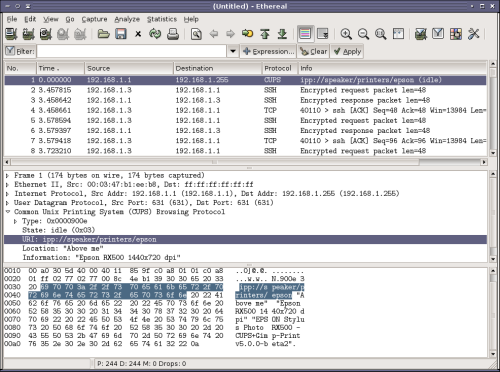
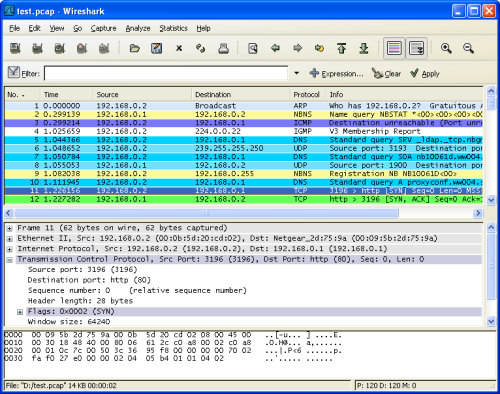
This is a lesson in user interface design. ethereal is now called wireshark, and it's the same exact gui window that it always has been (with some minor incremental improvements). Here's the difference though. They figured out that data visualization goes so much further when you actually give a thought to representation.

The before picture, googled for an old screenshot of ethereal:

The window is split into three panes. The top one is the one you'll look at first, this is the list of packets we captured. Notice how small the scrollbar is and just imagine we have a large chunk of traffic in front of our eyes. Scroll up, scroll down, sort by protocol, whatever. In the other two panes you have info on the packet that is selected right now. In the middle one you have nicely structured info, in the bottom you have the raw data. This is the way to look at packet content. Btw tcp packets can be up to 1.5kb in size, so it's not exactly a sizable amount of content.

Gear up for the after picture:

Yeap, colors. Really, that's all I had to say. People underestimate what a difference it makes to have the same exact output in contextual coloring. The same data just jumps up at you if you know it's gonna be in red and you don't have to parse the whole chunk of text to get to it. Notice how the old version and this one have the protocol column just the same, but how much easier is it now to spot different types of traffic? It makes a world of difference.

wireshark has another brilliant addition that I don't remember from years ago. You right click on a packet, like the tcp packet selected in the screenshot above that belongs to an http stream, and go Follow TCP Stream. What you now get is a new window with aaaaall the packets that belong to this conversation assembled and you can observe the whole thing in one place. Fabulous. You can also filter the data (on message level, not packet level mind you) on host if you like. It's fantastic.

If you thought *that* was bling, this will really blow you away. wireshark does not only assemble http conversations, it assembles a lot more protocols. For instance, I saw a talk the other day where the guy was demonstrating how he sniffed a voip conversation and then reassembled the whole thing to a simple audio file with a few clicks!

These two features, packets colored by protocol and packet assembly, alone make wireshark about 200% more useful than it used to be. And think about what has changed here. It's still the same data. The only difference is how you represent it.

the software stability curve

February 8th, 2008

It's always fun to start coding something from scratch, because it has no faults yet, you get a clean slate.

Being there from the beginning of the software life cycle also means that you see the whole thing up close. Baby's first steps, first school play, it's an adventure. I've noticed something that happens to my perception, though.

In the very beginning I have a clear vision of what I want to do and how I'm going to realize it. But the code isn't there yet, and the code that has been written up to this point isn't ready either. So when I'm coding and testing I find a lot of bugs. Some are things I didn't realize at the outset, and some are just errors in bad code. Both get fixed, but in the throes of this process I'm very in tune with how raw this thing still is. It's unstable: push it two inches beyond where it's supposed to be and it self destructs.

At this point I'm excited about the project, because it's new and I'm in the middle of it, enthusiasm running high. But I'm also conscious of how unstable it is presently. So although I'd like to, I'm not eager to give it to people. I don't want to expose them to this that I very well know is unlikely not to crash while they use it. I want to protect them from that. I also don't want someone to come back with a desk and bash me over the head with it. It's great, it's just not ready to be used yet.

The perception also depends on the type of bugs I find. There are both incidental and structural bugs, although the latter feeds the former much of the time. If I've coded a similar kind of thing before, I probably did something really stupid the last time, and I may have learned from that. Unfortunately, the space of mistakes is huge, so by the time I've exhausted all the mistakes and I'm guaranteed that from now on I'm not making any more, I would have aged considerably. But at least I can get it right when I'm starting with a clean slate. That or I can hack it up and redo the structure if I'm not too far into the process yet.

So when I'm in the midst of development and the code is visibly unstable, it sometimes feels like this is not only the current station but also the final destination. It's always going to feel like this.

But over time something unexpected happens. I run the code 50 times, it crashes 3 times. When I start to close in on feature completeness and say 80% code completion the code actually starts to be dependable. Structurally the system is almost ready, and what remains is to fill in the blanks. If the structure is decent the incidental bugs start dropping off too. So it's turning into a piece of code I can actually use, just what I had in mind in fact. :cap:

Without quite knowing when or how I begin to gain confidence in the code. And when I bounce off a few pieces of bad input and a couple of unforeseen scenarios get handled gracefully, my mood almost points toward celebratory.

I know I promised you a curve. Well, I lied, I don't know what the curve looks like. :P But it's there, be sure of it!

Opera: the huge missed opportunity?

January 27th, 2008

Tabs. Mouse gestures. User-agent switcher. Dedicated transfer window. Pop-up blocking and javascript abuse filtering. Integrated search box. Page zoom. Session saver.

Chew on those features. We'll be coming back to them.

Let me take you back in time to a year I like to call 1996. Those were the murky days of 28.8kbps dial-up modems and "personal websites" that said "Welcome to my website! (under construction) Here's my email address." It was also the prime of Netscape Navigator, the new browser that had taken the fast expanding internet by storm and become the successor to the venerable Mosaic. Netscape was about as ubiquitous as you can imagine, for all intents and purposes it was the world wide web. Anyone privileged enough to have access to the web (chiefly in universities) had Netscape running. Microsoft (already then king of the desktop), having famously discarded the internet as a fad, had nothing to offer and Internet Explorer in 1996 was a complete joke.

This is the climate in which a little Norwegian software company decided to launch their precocious new product: a web browser. It was very much the right time for that. The web browser was by no means an established product, it was a very fresh concept. Netscape was putting in all sorts of new features and had no competition (yet). So in 1996 Opera launched their Opera web browser 2.0 and the game was on. The project was a success: a couple of years down the road a lot of people knew about Opera. And it was cool to have a Norwegian company out there in the arena - one of the most hotly contested applications even to this day, the browser.

Of course, there were hard times ahead for Netscape. Microsoft made serious progress with IE and bundling it with Windows (adding to the ongoing internet revolution where more and more home users got connected) meant that Netscape's position was threatened. Little by little it was becoming apparent that Netscape was a dinosaur next to IE, which loaded quicker, ran faster and crashed less. Netscape was not blind to this, but their counter strategy turned out to be the cyanide pill in the cocktail. They decided to scrap the existing code and start a rewrite. And thus, give or take, we never heard from Netscape again. Over the next couple of years IE pushed out the old Netscape installations (and with no new releases, IE won by default), and basically captured the whole market. This was a time when IE actually was the best product. (I know how incredible that must sound.)

Where was Opera in all of this? Catching up, it would seem. But by 2000 Opera had caught up quite nicely and Opera 4 was a very slick browser. It wasn't as complete as IE, but it looked good and both loaded and ran faster than IE5. This seems like the first time Opera was in a position to start competing with IE. It had momentum, it had speed going for it, it had new features. Hot on the heels came Opera 5, and then Opera 6 in 2001.

This is where Opera set an important precedent. With the benefit of hindsight, knowing how incredibly difficult it has been for Firefox to unseat IE, things could have been different for Opera. I recall using Opera on and off in this period. I liked the product, I liked how lightweight it was and still worked just as well, but there was just something... off about it. It didn't quite feel right. As a user of IE, I didn't feel at home in Opera. The user interface was not just different, it was too different. Then and there, I realized that Opera would not be my first choice, in spite of everything it had going for it. Purely because of the user interface.

It wasn't just me. Opera failed to build a user base. It had adoption among technology enthusiasts, but it utterly failed to break into the realm of average users. We are talking about a browser with an attractive interface, with tabbed browsing, and faster page loading. Not only that, it was more solid than just about any Microsoft application: it just did not crash. IE5, meanwhile, was on a downhill stability slope where the crashes and freezes would only get worse and worse with the proliferation of pop-ups and various nasty advertising gimmicks that the web was becoming infested with. Opera handled this so much more gracefully. But Opera was #3 (still behind Netscape) and light years behind IE in user base, without really making progress.

In 2002 Netscape returned from the dead. The rewrite everyone had long since forgotten about was released into the open, under the name Mozilla. It had little in common with the old Netscape now, the rendering engine (Gecko) was new and the user interface had been replaced (phew). Meanwhile, it was IE's turn to stagnate, IE6 was released in 2001 just before Windows XP and there ended the trail. By 2003 I felt Mozilla was so overwhelmingly superior that I wrote an advocacy text in favor of it, to wean people off the (by now) awfully backward IE. Firebird became Firefox and a year or two later the popular Firefox revolution began for real - suddenly everyone and their grandma was using Firefox.

Today IE is the dinosaur next to Firefox. The dinosaur still dominates the market, because of the unfair advantage of being pre-installed. And for the sake of completeness, grab a can of Microsoft Anti-Competitive Practices and sprinkle the whole historical period generously. But it's completely obvious that Firefox has long since won in every dimension, on technical merit, and in folklore.

Browser market share is a notoriously contested metric, but the general consensus (to the extent that there is one), is that IE remains first, then Firefox, then Safari (they basically pulled an IE on the Mac), finally Opera at #4.

With the release of KDE 4.1 on Windows and Mac (expected in July), Konqueror (which seems to be gaining ground on Linux) will be available on all platforms. If KDE adoption on Windows goes well, which I think is entirely plausible, Konqueror (now with the webkit engine) could relegate Opera to #5.

What is wrong with this picture? Let's return to the features I mentioned at the start.

Tabs. Mouse gestures. User-agent switcher. Dedicated transfer window. Pop-up blocking and javascript abuse filtering. Integrated search box. Page zoom. Session saver.

Here is the big question: which browser was first to include these features? Opera. Opera. Opera. Opera. Opera. Opera. Opera. Opera. That's right, Opera prototyped all of these things. And it would actually take years before other browsers could be persuaded that these were good ideas. For heaven's sake, Firefox didn't include saving your tabs until version 2.0 in 2006! Futhermore, Opera has taken certain ideas from others and improved upon them. Firefox was first to save your passwords, but it works better in Opera.

Opera also predates every browser in common use except IE, its contemporary. And yet Opera has failed to make a real impact, why? It's not because the technology isn't good enough: Opera is still super stable and faster than anything else. Performance wise Opera completely dominates the embedded market, that should be sufficient proof. And it's not for a lack of ideas, clearly.

To put it bluntly: why did people rally around Firefox and not Opera? Is it because Firefox is technically superior? It isn't. Is it because Opera is closed source? No, I really don't believe the average user understands the distinction, or cares about it. Is it because of the extensions? It is definitely a great sales pitch, but again I don't believe that's the reason. "Power users" adore them, but does grandma really care? I sort of doubt it. Is it because Firefox is more "secure"? It isn't. Nor is it any less portable, you get the same Opera on every platform, just like Firefox. What's more, I don't think Opera has an unfair reputation on any of these points. It's just that Opera is the browser I'm going to use if this one crashes. It is "the alternative". It isn't the first choice.

Taking a stand to be different is bold, and deciding to make your application different and expect users to adapt is even more bold. It doesn't matter if your way is better. If there's one thing you absolutely have to know about software engineering, it is this: people hate change. If you are first to the party, you set your own rules. But if you're second, alas you have to play by someone else's. Opera is not competing for the theoretical masses of people who don't have a browser and are looking for one. They are ostensibly fighting to convert people from IE and Firefox.

I first heard about Opera through Norwegian media in 1999. I was excited about it and I've kept an eye on it ever since. I have made several attempts to adopt it (most recently because Firefox&adobe-flash is such an explosive combination, pun intended), but they've all failed. It is little things. How I cannot satisfactorily reproduce my Personal Bookmark Folder toolbar the way I have it set up in Firefox. Or how when I click to close a tab in Opera the tab that becomes active is not the one I want, I want the Firefox behavior. Or how I can't use extensions that I have come to expect (nowadays it is Firefox setting the standard for browsers). Or how when loading pages from slow servers they seem to get stuck loading and never time out, which doesn't give me a conclusive answer as to whether it's just slow or it can't connect. Or how when I want to configure something I can never seem to find that specific option amid a lot of other options I don't care about. Or how the caching mechanism seems to work slightly differently, so that I have to deliberately reload pages more often. Or how the fonts until very recently (before 9.50) have been scaled different and looked wrong. A dozen little things like that and it adds up to "I don't quite like this application".

When I've spoken to people about Opera I have never heard complaints about technical shortcomings. What people always say is "it's too different". And it was too different from IE when Firefox came along as it is too different from Firefox now. User interface is a very delicate problem. People's perceptions of how things are "right" or "wrong" are very subjective and entrenched, much like how in one city you feel at home and in another you don't. Opera has stayed true to their user base over the years by doing things slightly differently. I think this is also how they have taken themselves out of the running in the browser wars, despite having a highly competitive product at least since 2000.

That isn't to say they have failed. Opera Software is a thriving company and while they have 1% or less of the desktop market, they have made a successful land grab on the PDA/smartphone market with Opera Mobile, which is the same browser. While I find the proposition of putting a browser on a 200 pixel display is a horrible idea, I would pick Opera any day for that role.

Still, one could easily imagine a status quo where Opera is more of an influence. I think had they been more reluctant to redefine the browser this could have been the case. Ironically, most people will remember Firefox to have innovated the concept of tabbed browsing. Just like Apple "innovates" by recycling old ideas. By now Firefox has taken just about every good idea left from Opera and put it into a product and a form that people are more eager to use. That is to Opera's credit, and yet it is a bit sad that that Opera hasn't gotten the credit for it by attracting users.

I do actually think Opera has been converging on a lot of these little points of friction over the last couple of years, so it makes a stronger case than it used to. They have adopted some Firefox-bling that Firefox users expect to have, like an Adblock-lookalike, themes, about:config etc. Unfortunately, there is also more competition these days, from Safari (which sort of sucks, but not enough for people to rebel) and soon perhaps Konqueror.

a critical look at paludis

January 23rd, 2008

I've been meaning to scribble something about paludis for a while now. I was tempted to do that right after I started using it, but then I thought it would be better to get some perspective and that would also cover issues that may come up some months into actual use.

So the moment has come. I installed paludis sometime in mid-November 2007. Long before that it was announced portage compatible, so it should be safe enough. Migration is neither all that long nor that complicated, it's mostly a matter of getting used to paludis's different philosophy. One of the odd things is setting up repositories (overlays) in /etc/paludis/repositories, but it's easy enough.

From a portage user's perspective configuring paludis is not the most pleasant experience. The documentation is quite complete, but it really demands that you know exactly what you want. There aren't any texts to read, it's generally just a FAQ. As far as user guides go it's not the most friendly one:

Non-Problem: There's no PORTAGE_NICENESS equivalent.

Rationale: Learn how to use nice. There's no GCC_NICENESS or VIM_NICENESS either.

To me personally (although I'm sure I'm not alone in this), it is portage's "rounded corners" that made it such a great package manager to use from the beginning. It had all this built-in convenience, like PORTAGE_NICENESS, like color output, like output that is verbose enough to be informative, but not overly verbose, like make.conf where you could set a range of optional, useful settings, like having emerge --ask which I would use all the time etc. Contrast that with something like apt-get and there's absolutely no doubt what the nicer tool is. Perhaps this bling also undermines portage's conceptual integrity, eventually turning it into an unmanageable codebase. But it's also what made me choose gentoo: the fact that it had, as it aspires to, the best tool.

Now paludis is more puritanical about this. What that means in practice is that it pushes that burden onto you, the user. We don't want it in paludis, so it's now your problem. As evidenced by advice like this:

Non-Problem: Paludis doesn't restore the xterm title on exit.

Rationale: Neither does anything else. Some programs do set it to a guessed value based upon a default prompt for certain distributions, but they don't restore it. You should be using PROMPT_COMMAND to do that yourself -- see the bash documentation.

So since paludis won't do this for me, it's now my problem to set in place the proper infrastructure for this, and to maintain it. It ceases to be a configuration option, it becomes a user environment issue. And I have to maintain this environment across machines, because it's no longer part of the application. Paludis is a tool that is technically superior, but inferior on user friendliness.

Not having FEATURES also means that I have to set all these things on the command line:

$ type ipal
ipal is aliased to `paludis -i --dl-reinstall if-use-changed --debug-build none --log-level warning --continue-on-failure if-independent'

And I'm still not sure if I'm setting all the optimal options, because there's tons of them. (Yes, there is PALUDIS_OPTIONS, but I wonder if it's useful to have different options on install, query etc.)

One serious usability problem is that paludis is ridiculously verbose. I wonder what kind of giant monitors the paludis developers own, but for my part paludis = lots of scrolling. Even running paludis --help has to be piped to less to refresh my memory on the most useful switches. What's more, the most important output is always at the top, so I always have to scroll the longest distance. If you want to flood the screen, put the crucial bits at the bottom, that's common sense. Case in point, if I'm installing packages and I do a paludis --pretend, I have to scroll up through all the use flags, then I come to the list of packages, but each package entry is several lines long, so by the time I get to the top I'm quite annoyed. The verbosity of paludis has to be easily 3-4 times that of portage.

Furthermore, default settings matter a great deal, and as a developer I think you are entirely culpable for setting poor defaults. On my first day with paludis I reached a show stopping bug when openssl refused to compile. As it turns out, it was the test suite that was broken, and since paludis by default runs the tests (or did, anyway), it just wouldn't install. SKIP_FUNCTIONS="test" fixes this, but that was clearly a misguided default setting. But there are many examples of this. --debug-build is enabled by default, which I think is wrong because most gentoo users don't actively debug *every* package they install. Meanwhile, these files take up quite a bit of space. Furthermore, coming back to the verbosity problem, --log-level is set to qa. This means that I, as a user, have seen this message every time I invoked paludis for the last two months:

paludis@1200787359: [QA] In program inquisitio -s perl:
... When performing query action from command line:
... When handling query 'php':
... When fetching versions of 'dev-lang/php' in gentoo:
... When loading versions for 'dev-lang/php' in gentoo:
... When extracting version from '/usr/portage/dev-lang/php/php-5.2.4_pre200708051230-r2.ebuild':
... When parsing version spec '5.2.4_pre200708051230-r2':
... Number part '200708051230' exceeds 8 digit limit permitted by the Package Manager Specification (Paludis supports arbitrary lengths, but other package managers do not)

Not only is that a trifle of a bug, how exactly am I the user served by seeing this warning? I'm not a developer, so I couldn't fix it if I wanted to. Furthermore, the irony of it all is that apparently paludis, which gracefully handles this problem, is the one emitting the error, whereas portage, which may actually be affected by it, doesn't. A pure exercise in futility.

Installing packages also outputs chunks of lines that never seem to change with any package, output I have no need to see:

>>> Running ebuild phase prepare as root:root...
>>> Starting builtin_prepare
>>> Done builtin_prepare
>>> Completed ebuild phase prepare
>>> Running ebuild phases init saveenv as root:root...
>>> Starting builtin_init
>>> Done builtin_init
>>> Starting builtin_saveenv
>>> Done builtin_saveenv
>>> Completed ebuild phases init saveenv
>>> Running ebuild phases loadenv setup saveenv as root:root...
>>> Starting builtin_loadenv
>>> Done builtin_loadenv

Is this supposed to be useful information for the user? I don't even know what it means.

Clearly, there are a few glaring problems. And maybe that's not so shocking from a development team that seems dead focused on technical issues. No surprise then, perhaps, that from a technical standpoint paludis fires on all cylinders. It took me a few days to get used to paludis, but since then it hasn't done anything weird or unexpected, it hasn't crashed, it has been rock solid. And those "issues" that may come up in the fullness of time? They never came up.

And this you already knew: paludis is fast.

user settings migration

January 19th, 2008

The nice thing about being a gentoo user (as all gentoo users know), is not having to wait for your distribution to ship packages for a new release. You just decide for yourself how soon you want to jump ahead and start using either unstable code or just-released goodness. So while Ubuntu is shipping KDE 4.0 in 8.04, and thus my laptop is stuck waiting for it, on my gentoo box I can use it as soon as the ebuilds hit the tree (and even before that, with layman).

So when I launch into the nicely pre-configured KDE 4.0 desktop the first thing I notice is that my configuration settings from KDE 3 no longer apply. What's happened is that the ~/.kde symlink has been pointed from ~/.kde3.5 to ~/.kde4.0 and so every remaining KDE 3 application (of which I have many), is now trying to locate its settings under ~/.kde4.0, where it has no settings. In other words, every application I've configured from akregator to yakuake now has to be reconfigured (even though it hasn't changed!) because of KDE 4. That stinks, I don't want to waste time trying to reproduce the settings of some 20 applications to match exactly what they used to be.

What are my options? I can go into ~/.kde3.5/share/apps and copy every directory I care about over to ~/.kde4.0/share/apps. Then I have to do something similar for ~/.kde3.5/share/config versus ~/.kde4.0/share/config. But if that is all it takes why didn't KDE 4 do that on the first run? There are a lot of configuration files in there, and I've never looked at them nor should I have any reason to, they've all been written by the application they belong to. Furthermore, some applications are upgraded with KDE 4.0.0, so I don't know if it's safe to copy their config files across. For instance, kwin-4.0.0 is one of the new packages I installed. Now, I like my existing kwin settings, and as far as they still apply I want to use them in kwin4, but I don't know how kwin4 deals with old configuration files. Applications know this, users don't.

What KDE 4 could have done is to duplicate ~/.kde3.5 into ~/.kde4.0 (although that could potentially grab a lot of disk space) and then selectively migrate the configuration files on a per-application basis. So kwin4 could figure out there are some things that no longer apply, discard those, and accept the rest. It would only have to do that once. And all the KDE 3 settings would still be preserved in ~/.kde3.5.

The thing to remember is that configuration settings is still user data. Losing a user's settings is not as egregious as losing his emails, but it's still data loss. It's valuable information. And the more configurable your application is, the more you should care about keeping the user's settings safe, because a complicated configuration is a lot harder to remember and reproduce than a simple one. Preserving old settings is fine, but it isn't very useful when you don't also migrate them to a new version of your application.