September 22nd, 2007
Aah, the free world. It's beautiful, you have frequent releases, the code is there for you, everything's wondeful. But for web apps like Wordpress the maintenance cycle is less convenient than with desktop applications. There's no package manager to handle updates for you. Yes, that's the downside.
I've upgraded Wordpress now 3-4 times and I'm already sick of it. It's so mechanical. I've also rehearsed the cycle a bunch of times with vBulletin. Well, compared to the tidy and elegant Wordpress, vBulletin is a monster. But the upgrade issues are the same, albeit less painful now. I should have done this years ago, but now at least I have an organized way of handling these upgrades.
Here's the rationale. You download some Wordpress version from wordpress.org and install it. This we call the reference version. Then you hack on it a bit. You install plugins, maybe you hack the source a little. You change the theme a bit. And in the course of using Wordpress you also upload files with posts sometimes, for instance to include pictures with your posts.
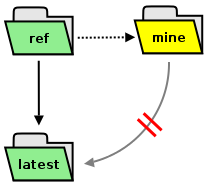
So now the state of your Wordpress tree has changed a bit, you've added some files, maybe you've changed some files. Basically, it's different from the vanilla version. This we call mine. And now you've decided that the next Wordpress version has some nice features and bug fixes you want. This version we call latest.
You want to upgrade, but there is no upgrade path from mine to latest, because the Wordpress people can't know what you did with your local version. Upgrading from mine to latest may not be safe, it hasn't been tried.
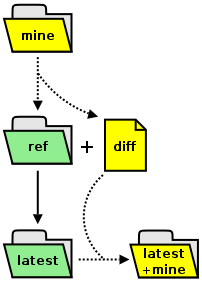 Of course, this sort of problem is nothing new. Coders have faced it forever. And that's why we have things like
 diff and patch, standard Unix tools. So here's how to upgrade safely.
- First roll back the local changes so that we return to the reference version.
- Save the local modifications.
- Do a standard Wordpress upgrade going from ref to latest.
- Re-apply, if possible, the local modifications.
And this replicates exactly what you would do manually if you wanted to be sure that the upgrade doesn't break anything. Just that it's a lot of hassle to do by hand. The upgrade is done offsite, so your blog continues to run in the meantime. And once you've upgraded, you can just move it into the right location.
In the event that merging diff and latest does not succeed, you have a list of the patches and files so that you know exactly which ones didn't succeed.
So far I've used it to do two updates, 2.2.1->2.2.2, 2.2.2->2.2.3, without any hiccups.
#!/bin/bash

# >> 0.3
# added file/dir permission tracking
# added hint for failed file merges
# added hint for failed patches

echo<<header "
################################################################################
#                                                                              #
#                      Wordpress Updater / version 0.3                         #
#                   Martin Matusiak ~ numerodix@gmail.com                      #
#                                                                              #
#  Description: A script to automate [part of] the Wordpress update cycle, by  #
#  finding my modifications to the codebase (mine), diffing them against the   #
#  official codebase (ref), and migrating files and patches to the latest      #
#  version (latest).                                                           #
#                                                                              #
#  Warning: Upgrading to a new version will probably not always work           #
#  seamlessly, depending on what changes have occurred. Do not use this as a   #
#  substitute for following the official upgrade instructions. Furthermore, if #
#  you don't understand what this script does, you probably shouldn't use it.  #
#  Also, it's always a good idea to backup your files before you begin.        #
#                                                                              #
#  Licensed under the GNU Public License, version 3.                           #
#                                                                              #
################################################################################
"
header

### <Configutation>

wpmine="/home/user/www/numerodix/blog"
version_file="${wpmine}/wp-includes/version.php"
wordpress_baseurl="http://wordpress.org"
temp_path="/home/user/t"

### </Configuration>


echo -e "Pausing 10 seconds... (Ctrl+C to abort)\007"
sleep 10


msg() {
fill=$(for i in $(seq 1 $((76 - ${#1}))); do echo -n " "; done)
echo<<msg "
++++++++++++++++++++++++++++++++++++++++++++++++++++++++++++++++++++++++++++++++
+  ${1}${fill}+
++++++++++++++++++++++++++++++++++++++++++++++++++++++++++++++++++++++++++++++++
"
msg
}


if ! mkdir -p $temp_path; then
	echo "$temp_path not created"; exit 1
fi

msg "Checking installed version... "
if [ -f $version_file ]; then
	ref=$(cat $version_file | grep "\$wp_version" | tr -d " _$'';=[:alpha:]")
	echo $ref
else
	echo "$version_file not found"; exit 1
fi


msg "Fetching version $ref... "
[ -f $temp_path/wordpress-$ref.tar.gz ] && rm $temp_path/wordpress-$ref.tar.gz
if wget -q -P $temp_path $wordpress_baseurl/wordpress-$ref.tar.gz; then
	echo "downloaded to $temp_path"
else
	echo "could not fetch $wordpress_baseurl/wordpress-$ref.tar.gz"; exit 1
fi


msg "Unpacking reference version $ref... "
[ -d $temp_path/wordpress-$ref ] && rm -rf $temp_path/wordpress-$ref
if (cd $temp_path && tar zxf wordpress-$ref.tar.gz && mv wordpress wordpress-$ref); then
	echo "unpacked to $temp_path/wordpress-$ref"
else
	echo "failed"; exit 1
fi

wpref="$temp_path/wordpress-$ref"


msg "Diffing codebase... "
( cd $wpref && find . -type f | sed "s|\./||g" | sort > $temp_path/files-$ref-ref ) &&
( cd $wpmine && find . -type f | sed "s|\./||g" | sort > $temp_path/files-$ref-mine ) &&
diff $temp_path/files-$ref-ref $temp_path/files-$ref-mine > $temp_path/diff
if [[ $? < 2 ]]; then
	echo "diff written to $temp_path/diff"
else
	echo "failed"; exit 1
fi


msg "Recording my file/dir permissions..."
cd $wpmine && \
find . -exec ls -ld --time-style=+%s {} \; | sed "s|\./||g" | sort -k 7 \
> $temp_path/files-$ref-mine.perms
if [[ $? == 0 ]]; then
	echo "written to $temp_path/files-$ref-mine.perms"
else
	echo "failed"; exit 1
fi


msg "Listing files added/removed... "
( cat $temp_path/diff | grep "^>" | awk '{ print $2 }' > $temp_path/only_mine ) &&
( cat $temp_path/diff | grep "^<" | awk '{ print $2 }' > $temp_path/only_ref ) &&
( cat $temp_path/only_mine > $temp_path/not_common ) &&
( cat $temp_path/only_ref >> $temp_path/not_common )
if [[ $? == 0 ]]; then
	echo "mine only files written to $temp_path/only_mine"
	echo "ref only files written to $temp_path/only_ref"
else
	echo "failed"; exit 1
fi


msg "Listing files changed... "
[ -f $temp_path/changed ] && rm $temp_path/changed && touch $temp_path/changed
for i in $(cat $temp_path/files-$ref-ref); do
	if ! grep -x $i $temp_path/not_common >/dev/null; then
		if ! diff -q $temp_path/wordpress-$ref/$i $wpmine/$i >/dev/null; then
			echo $i >> $temp_path/changed
		fi
	fi
done
if [[ $(wc -l < $temp_path/changed) == "0" ]]; then
	echo "No changes detected"
else
	echo "Files changed written to $temp_path/changed"
fi


msg "Writing individual diffs... "
[ -d $temp_path/diffs ] && rm -rf $temp_path/diffs
mkdir -p $temp_path/diffs
for i in $(cat $temp_path/changed); do
	e=$( echo $i | sed "s|\./||g" | tr "/" "." )
	diff -u $temp_path/wordpress-$ref/$i $wpmine/$i > $temp_path/diffs/$e
done
ds=$(ls $temp_path/diffs | wc -l)
echo "$ds diffs in $temp_path/diffs"


msg "Fetching latest version... "
[ -f $temp_path/latest.tar.gz ] && rm $temp_path/latest.tar.gz
if wget -q -P $temp_path $wordpress_baseurl/latest.tar.gz; then
	echo "downloaded to $temp_path"
else
	echo "could not fetch $wordpress_baseurl/latest.tar.gz"; exit 1
fi


msg "Unpacking latest version... "
[ -d $temp_path/wordpress-latest ] && rm -rf $temp_path/wordpress-latest
if (cd $temp_path && tar zxf latest.tar.gz && mv wordpress wordpress-latest); then
	echo "unpacked to $temp_path/wordpress-latest"
else
	echo "failed"; exit 1
fi

wplatest="$temp_path/wordpress-latest"


msg "Trying to patch diffs... "
post=$(echo $wpmine | tr -d "/")
patch_level=$(( ${#wpmine} - ${#post} ))
[ -f $temp_path/patches.failed ] && rm $temp_path/patches.failed
for i in $(ls $temp_path/diffs); do
	cd $wplatest && patch -p$patch_level < $temp_path/diffs/$i
	if [[ $? != 0 ]]; then
		echo $temp_path/diffs/$i >> $temp_path/patches.failed
	fi
done


msg "Merging in my files... "
[ -f $temp_path/file-merge.failed ] && rm $temp_path/file-merge.failed
for i in $(cat $temp_path/only_mine); do
	d=$(dirname	$wplatest/$i)
	mkdir -p $d
	if [ -e $wplatest/$i ]; then
		( echo "file already exists: $i";
		echo $i >> $temp_path/file-merge.failed )
	else
		( echo "merging: $i" && cp -a $wpmine/$i $wplatest/$i )
	fi
done


msg "Merging file/dir permissions..."
while read line; do
	f=$(echo $line | awk '{ print $7 }')
	p=$(echo $line | awk '{ print $1 }'); p=${p:1:9}
	u=$(echo ${p:0:3} | tr -d '-')
	g=$(echo ${p:3:3} | tr -d '-')
	o=$(echo ${p:6:3} | tr -d '-')
	if [ -e $wplatest/$f ]; then
		echo "setting: $p $f"
		chmod u=$u $wplatest/$f
		chmod g=$g $wplatest/$f
		chmod o=$o $wplatest/$f
	fi
done < $temp_path/files-$ref-mine.perms


msg "Removing files I deleted... "
for i in $(cat $temp_path/only_ref); do
	[ -f $wplatest/$i ] && (echo "removing: $i" && rm $wplatest/$i)
done


msg "Complete"

[ -f $temp_path/patches.failed ] &&
echo "Some of my patches failed to apply, listed in $temp_path/patches.failed"

[ -f $temp_path/file-merge.failed ] &&
echo "Some of my files failed to merge, listed in $temp_path/file-merge.failed"

echo<<close "
The upgraded version is in $wplatest

To install the new version you'll want to do something like this:
  mv $wpmine ${wpmine}.old
  mv $wplatest $wpmine

Afterwards you can remove the temporary dir $temp_path

If the new version provides any php upgrades scripts (to upgrade the
database), now would be a good time to run them"
close
Another option would be to use Subversion and just update between stable tags, but then again I don't have that on the server and most hosts probably don't install it. But the Subversion method and this one are functionally equivalent, with the small exception that this upgrade is done offsite while the Subversion way would typically (but not necessarily) be a live upgrade.