Archive for the ‘code’ Category

scanning for hosts on the local network

September 17th, 2006

One of the first things that pique my curiosity when I find myself in a new network environment is "what's around me?". To me it feels a bit like waking up from a dream and not remembering where I am or how I got there, so I want to look around a bit. I wrote a little script for this, and I can't say that it was terribly effective. It was based on using ping to send packets to every possible host on the current network (ie. the one I'm connected to presently). The scan was sequential, so it would ping 10.0.0.1, then ping 10.0.0.2 and so on. Most of these addresses had no hosts bound to them, so the scan would take forever for the ping to time out and move on to the next host. It would actually take so long (10min+) that in a wireless network, clients would come and go between the start and the end of the scan.

I didn't use ping because it was such a great choice for this problem, just that it was the first thing that occurred to me. I did get the script to run a bit faster by parallelling the pings, but this is a very silly thing to do, because with a Class C network, there are now 254 instances of ping running on the system. This would often drown out the packets from the hosts which were connected and the script would fail to report any hosts at all. I'm not sure why that is, but I improved the situation a bit by pausing for one second before starting every new thread.

Just the other day I stumbled upon a mention of using nmap to do this same thing. Sure enough, nmap was *designed* for this, so it should be the obvious choice. Somehow that never occurred to me. :lala: So I rewrote my little script to use nmap in place of ping. nmap does essentially the same thing as my script did, it pings hosts in parallell, but it does so without forking itself 254 times and it has some clever algorithms that monitor the state of the network to get best throughput at least congestion. To put that in plain English, here's a little comparison for a scan across 254 IP addresses:

  • parallell nmap: 0m 5.868s
  • parallell ping: 4m 15.912s

In other words, the ping method is absolutely rubbish. But, while I always have nmap available on my laptop, it's not an application that is installed by default on every system (unlike ping), so perhaps it would be handy to be able to fall back on the ping method, as lame as it is, if that's all we have.

Another small refinement is checking ifconfig for network info, so the user doesn't have to supply this manually. Again, this could fail (no priviliges, no ifconfig), so it's made to be an option, not a requirement.

#!/usr/bin/env python
#
# Author: Martin Matusiak <numerodix@gmail.com>
# Licensed under the GNU Public License, version 2.
#
# revision 2 - add hostname lookup


import os, string, re, sys, time, thread


def main():
	network = None
	try:
		netinfo = check_network()
		(ip, mask) = netinfo
		network = ip + "/" + mask
	except:
		print "Warning: No network connection found, scan may fail."

	if len(sys.argv) > 1:
		network = sys.argv[1]

	if not network:
		print "Error: No network range given."
		print "Usage:\t" + sys.argv[0] + " 10.0.0.0/24"
		sys.exit(1)


	if cmd_exists("nmap"):
		nmap_scan(network)
	else:
		print "Warning: nmap not found, falling back on failsafe ping scan method."
		ping_scan(network)


def nmap_scan(network):
	try:
		print "Using network: " + network
		cmd = 'nmap -n -sP -T4 ' + network + ' 2>&1'
		res = invoke(cmd)
		lines = res.split('\n')
		for i in lines:
			m = find('Host\s+\(?([0-9\.]+)\)?\s+appears to be up.', i)
			if m:
				print m, "\t", nslookup(m)
	except: pass


def ping_scan(network):
	iprange = find('(\w+\.\w+\.\w+)', network)
	print "Using network: " + iprange + ".0/24"
	for i in range(1,254):
		host = iprange + '.' + str(i)
		thread.start_new_thread(ping, (host, None))
		time.sleep(1)


def ping(host, dummy):
	try:
		cmd = 'ping -c3 -n -w300 ' + host + ' 2>&1'
		res = invoke(cmd)
		if "bytes from" in res: print host, "\t", nslookup(host)
	except: pass


def nslookup(ip):
	if cmd_exists("host"):
		cmd = 'host ' + ip + ' 2>&1'
		res = invoke(cmd)
		if "domain name pointer" in res:
			return res.split(" ")[4][:-2]
	return ""


def check_network():
	cmd = "/sbin/ifconfig"
	res = invoke(cmd)

	iface, ip, mask = None, None, None
	lines = res.split('\n')
	for i in lines:
		
		# find interface
		m = find('^(\w+)\s+', i)
		if m: iface = m
		
		# ignore loopback interface
		if iface and iface != "lo":
			
			# find ip address
			m = find('inet addr:([0-9\.]+)\s+', i)
			if m: ip = m
			
			# find net mask
			m = find('Mask:([0-9\.]+)$', i)
			if m: mask = m

	if ip and mask:
		mask = mask_numerical(mask)
		return (ip, mask)


def mask_numerical(mask):
	segs = find('(\w+)\.(\w+)\.(\w+)\.(\w+)', mask)
	mask = 0
	adds = (0, 128, 192, 224, 240, 248, 252, 254, 255)
	for i in segs:
		for j in range(0, len(adds)):
			if int(i) == adds[j]:
				mask += j
	return str( mask )


def find(needle, haystack):
	try:
		match = re.search(needle, haystack)
		if len(match.groups()) > 1:
			return match.groups()
		else: 
			return match.groups()[0]
	except: pass


def invoke(cmd):
	(sin, sout) = os.popen2(cmd)
	return sout.read()


def cmd_exists(cmd):
	if invoke("which " + cmd + " 2>&1").find("no " + cmd) == -1:
		return True
	return False


if __name__ == "__main__":
	main()

The output looks like this:

Using network: 192.168.2.119/24
192.168.2.1
192.168.2.119	james.home.lan

The first host listed, whose address ends in a 1, is often a router. Then there's the host transmitting the scan, that is localhost. At the time of the scan there were no other hosts connected on the network. Of course, beyond finding hosts, there's a lot more one can find out about them using.. *drumroll*.. nmap.

Update: I added a name lookup feature so that if there is a nameserver on the network, you not only get ip addresses, but hostnames as well. :)
fixing greedy emoticon matching in kopete

September 13th, 2006

I have a lot of admiration for the KDE project. The way that things come together and integrate into a common desktop with KDE is quite extraordinary. And all the time there are people interested in improving just about every bit of it. Now, of course, it's all about KDE4, the long awaited upgrade will come at some point in 2006, I guess the date hasn't been set yet.

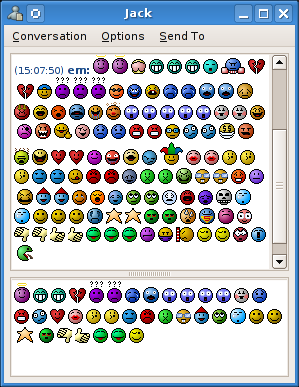
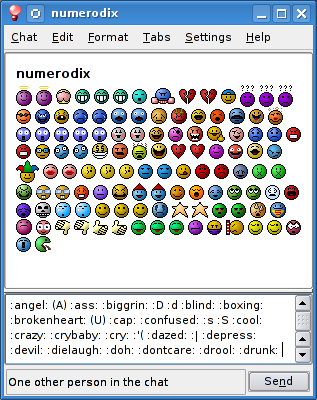
Anyway, the beauty of free software is that if there's a bug that gets to you, you can fix it yourself. And one such bug irks me in Kopete. I've been testing the xtorg emoticon theme and with a fairly rich set of emoticons (82 images, 117 replacement strings), it's quite a good testset and exposes certain problems. The emoticon theme comes with a file called test_suite.txt, which just lists all the emoticon replacement strings, so that you can paste them into a chat client and see if they come up correctly. The special thing about the xtorg theme is that I've made sure to include the most common Msn Messenger strings, so that Windows people can reuse the ones they're used to already. In Kopete 0.12.2, using the test suite gives this result.

kopete_bugged.png

So evidently, Kopete's parsing of emoticons is not as good as it could be. I have examined the issue and found that the problem lies in non-greedy matching. This means that if : s and : s t a r : are both defined as emoticon strings, and : s just happens to appear before : s t a r : in Kopete's internal list of emoticons, : s t a r : will be parsed as [: s] t a r :, not as [: s t a r :]. This is not what the user expects, having defined a list of replacement strings, the user expects all of them to work.

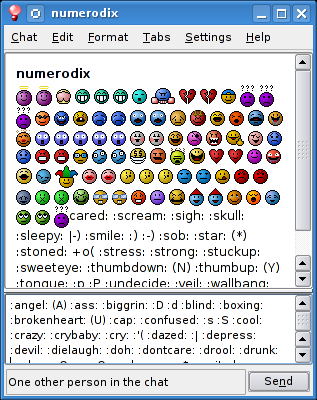
This is not the kind of bug that will affect a lot of users, because the average user does not use big emoticon styles like this one (and will probably never encounter the error). Thus if I were to report the bug, it's not likely to be very high priority. Meanwhile it does bother *me*, so I thought I would try and fix it myself. So after a little hacking, I wrote a patch for Kopete, and it now does this.

kopete_fixed.png

I've reported this on KDE Bugzilla and Kopete developers willing, the fix will find itself into Kopete at some point. In the meantime, the patch is attached below.

diff -Naur kopete-0.12.2/kopete/libkopete/private/kopeteemoticons.cpp kopete-changed/kopete/libkopete/private/kopeteemoticons.cpp
--- kopete-0.12.2/kopete/libkopete/private/kopeteemoticons.cpp	2006-08-12 02:51:47.000000000 +0200
+++ kopete-changed/kopete/libkopete/private/kopeteemoticons.cpp	2006-09-13 07:20:28.000000000 +0200
@@ -48,6 +48,8 @@
 struct Emoticons::Emoticon
 {
 	Emoticon(){}
+	/* sort by longest to shortest matchText */
+	bool operator< (const Emoticon &e){ return matchText.length() > e.matchText.length(); }
 	QString matchText;
 	QString matchTextEscaped;
 	QString	picPath;
@@ -424,6 +426,7 @@
 		node = node.nextSibling();
 	}
 	mapFile.close();
+	sortEmoticons();
 }
 
 
@@ -492,9 +495,24 @@
 		node = node.nextSibling();
 	}
 	mapFile.close();
+	sortEmoticons();
 }
 
 
+void Emoticons::sortEmoticons()
+{
+	/* sort strings in order of longest to shortest to provide convenient input for
+		greedy matching in the tokenizer */
+	QValueList<QChar> keys = d->emoticonMap.keys();
+	for ( QValueList<QChar>::const_iterator it = keys.begin(); it != keys.end(); ++it )
+	{
+		QChar key = (*it);
+		QValueList<Emoticon> keyValues = d->emoticonMap[key];
+ 		qHeapSort(keyValues.begin(), keyValues.end());
+ 		d->emoticonMap[key] = keyValues;
+	}
+}
+


diff -Naur kopete-0.12.2/kopete/libkopete/private/kopeteemoticons.h kopete-changed/kopete/libkopete/private/kopeteemoticons.h
--- kopete-0.12.2/kopete/libkopete/private/kopeteemoticons.h	2006-08-12 02:51:47.000000000 +0200
+++ kopete-changed/kopete/libkopete/private/kopeteemoticons.h	2006-09-13 07:19:17.000000000 +0200
@@ -156,6 +156,12 @@
 	 * @see initEmoticons
 	 */
 	void initEmoticon_JEP0038( const QString & filename);
+	
+	/**
+	 * sorts emoticons for convenient parsing, which yields greedy matching on
+	 * matchText
+	 */
+	void sortEmoticons();
 
 
 	struct Emoticon;

EDIT: The original conclusion of this entry was that Gaim has parsing bugs too. This seems to be incorrect. A fresh new screenshot shows that Gaim handles the xtorg theme just fine.

gaim_emoticons.png

UPDATE: The patch was accepted verbatim into kopete svn, so the next release (kde-3.5.5), whenever it will be, should have this problem fixed. :)

computer nostalgia (bringing format c: to linux)

August 23rd, 2006

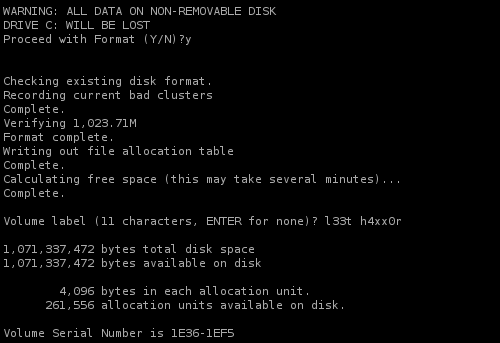
As time goes by, there are certain things from the past that stick with us, aren't there? Things that won't quickly be forgotten. Just the other day I was thinking it's been a while since I've seen the good old format c: screen. I remember seeing that screen a lot back when I was a Windows user. All the way from Windows 3.1 to Windows XP, ever so often I would format and reinstall the system. And formatting was the simplest way to start with a clean slate (virus and spyware wise, in later years), it was much quicker than deleting all the files.

format_c.png

The format command also had this mythical quality about it. It was synonymous with destruction, with sabotage even. Whenever we joked about messing up someone's system, we would always joke about formatting c:. I don't recall ever actually doing that to someone for amusement, but it was certainly tempting at times (on school computers especially :D ).

But then I remember one time back in high school, years later, when a friend of mine threw a party for our class. Lots of people showed up that noone seemed to know, but his house was big enough to fit everyone in. A couple of days after the party, he was telling me that at around 1am, at a time when the party was well underway, he came into his room, found his computer was on and the format c: screen was staring him in the face, with the counter at 80%. He said he immediately cut the power. He then turned it back on, the system hadn't been wiped yet. What a relief.

So with this in mind, it occurred to me recently that it would be fun to recreate the mythical format c: screen, given that I never see it anymore. It took me a while to figure out how to print characters and then delete them in bash, but here is the code that recreates the actual format c: screen. It's shown in the screenshot above. The font isn't correct, unless you have your terminal running on the original Lucida Mono font that Ms DOS came with. But other than that, I've tried to recreate it to a T.

#!/bin/bash

if [ "$1" = "" ]; then
	echo "Required parameter missing -"
	exit 1
fi

drive=$(echo $1 | tr [:lower:] [:upper:])

sp="\0040"
bs="\0010"

spaces() {
	e=""
	for i in $(seq 1 $1); do
		e="${e}${sp}"
	done
	echo $e
}

el=$(spaces 50)

label1="\n\nWARNING: ALL DATA ON NON-REMOVABLE DISK
\nDRIVE $drive WILL BE LOST
\nProceed with Format (Y/N)?"
label2="\n\n
\nChecking existing disk format.
\nRecording current bad clusters"
proc1="Complete. $el
\nVerifying 1,023.71M"
proc2="Format complete. $el
\nWriting out file allocation table"
proc3="Complete. $el
\nCalculating free space (this may take several minutes)..."
proc4="Complete. $el
\n\nVolume label (11 characters, ENTER for none)?${sp}"
label3="\n
\n1,071,337,472 bytes total disk space
\n1,071,337,472 bytes available on disk
\n
\n$(spaces 8)4,096 bytes in each allocation unit.
\n$(spaces 6)261,556 allocation units available on disk.
\n\nVolume Serial Number is 1E36-1EF5\n\n\n"

type_delay=0.3
counter_delay_short=0.05
counter_delay_vshort=0.005
counter_delay_long=0.3
cmd_delay=1

pause() {
	sleep $cmd_delay
}

print() {
	for i in $(seq 0 ${#1}); do
		c=${1:$i:1}
		if [ "$c" = " " ]; then
			c=$sp
		fi
		echo -ne $c
		sleep $type_delay
	done
}

counter() {
	for i in $(seq 1 100); do 
		l="${sp}$i percent completed."
		echo -ne $l
		sleep $1

		for j in $(seq 0 ${#l}); do
			echo -en $bs
		done
	done
}


echo -en $label1
pause
print "y"

echo -e $label2
counter $counter_delay_short
echo -e $proc1
counter $counter_delay_long
echo -e $proc2
counter $counter_delay_short
echo -e $proc3
counter $counter_delay_vshort

echo -en $proc4
pause
print "l33t h4xx0r"

echo -en $label3

What it does is... absolutely nothing. Except simulating what happens when you type C:\>format c: [ENTER] in Ms DOS. To run it, download the file, chmod 755 format it, and copy it to a path that is in your $PATH, like /usr/local/bin with cp format /usr/local/bin. (you may have to use sudo here, /usr/local/bin is usually only writable by root). Now you have your very own format command on linux and you can run format c: whenever a bout of nostalgia hits you and you miss the old format command.

Best of all, it doesn't actually nuke your files, but you can still use it to scare the bejeezus out of people. ;) :devil: :D And since you just set its permissions to be executed by any user, any user can run it (perhaps with some persuasion? ;) :D ).

keeping track of train routes

June 5th, 2006

OpenTTD is an open source game based on the old classic Transport Tycoon Deluxe. The original game was reverse engineered and the code is all written from scratch. The idea of rewriting this venerable game is very good, as those who loved the original have a chance to implement all kinds of improvements they may have conceived while playing the commercial game, which of course did not allow for any hacking. Not to mention that with new code in c, it could be made cross platform (the old game only ran on Windows)! I found OpenTTD a very cool initiative, and after a relatively short period of time, the developers had managed to improve lots of little usability issues, while adding new and desirable features.

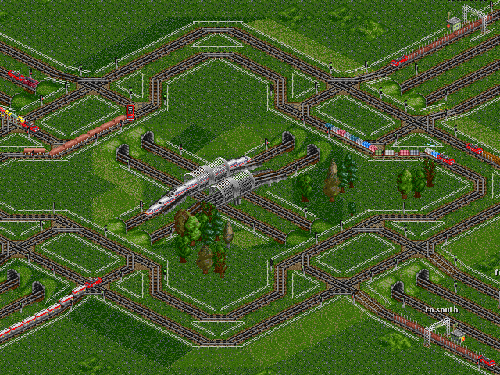
The game is about building a transportation network and there are four kinds of transportation available - aircraft, ships, buses/trucks, and trains. But this game is really mostly about trains and the magnificent networks of trains its gamers have concocted. One thing I found to be a little troublesome was to keep track of the trains as they grew in numbers, and keep track of their routes. If you build a junction such as the one shown in the screenshot, then how, by just looking at trains going by, are you going to keep track of which train has which route?

openttd_junction.png

There could be lots of ways to make this common problem less of a problem, but my idea was to keep track of routes by keeping track of names. If you were to have a set of trains called South Western 1, South Western 2 etc, all of which had the same route, then you could easily tell trains apart, and see where a train has gone where it shouldn't have. It would still require the user to set up the routes and name the trains, but from that point on, the game could assign the correct names, so if you cloned a train called New York - San Francisco 7, the clone would be assigned the name New York - San Francisco 8.

So to make that happen I wrote a patch against revision 5125 in svn.

*** vehicle.c	2006-06-05 14:59:24.000000000 +0200
--- vehicle.c	2006-06-05 15:00:35.000000000 +0200
***************
*** 30,35 ****
--- 30,37 ----
  #include "station_map.h"
  #include "water_map.h"
  
+ #include <ctype.h>
+ 
  #define INVALID_COORD (-0x8000)
  #define GEN_HASH(x,y) (((x & 0x1F80)>>7) + ((y & 0xFC0)))
  
***************
*** 1567,1572 ****
--- 1569,1580 ----
  				w_front = w;
  				w->service_interval = v->service_interval;
  				DoCommand(0, (v->index << 16) | w->index, p2 & 1 ? CO_SHARE : CO_COPY, flags, CMD_CLONE_ORDER);
+         
+ 				// if orders are shared, increment vehicle number
+ 				if (p2) {
+ 					IncrementVehicleNameOnClone(v, w, flags);
+ 				}
+         
  			}
  			w_rear = w;	// trains needs to know the last car in the train, so they can add more in next loop
  		}
***************
*** 1579,1584 ****
--- 1587,1672 ----
  	return total_cost;
  }
  
+ /** Increment the cloned' vehicles name
+ * @param v the original vehicle's index
+ * @param w the clone's index
+ */
+ void IncrementVehicleNameOnClone(Vehicle *v, Vehicle *w, uint32 flags)
+ {
+ 	int len = 32;
+ 	char vehicle_name[len];
+ 	char vehicle_number[len];
+ 	Vehicle *nvehicle;	// the next vehicle in array to check
+ 	char nvehicle_name[len];	// the next vehicle's name
+ 	uint16 e;
+ 	uint16 pool = GetVehiclePoolSize();
+ 	int i, j, f, n, largest;
+ 	int numbers[pool];	// the array of numbers our new number must fit into
+ 	
+ 	// Get the name of the old vehicle
+ 	if ((v->string_id & 0xF800) != 0x7800) {
+ 		vehicle_name[0] = '\0';
+ 	} else {
+ 		GetName(v->string_id & 0x7FF, vehicle_name);
+ 	}
+ 	
+ 	// find out how far into the name the digits start, save the index
+ 	i = 0;
+ 	while (!isdigit(vehicle_name[i]) && (i < len)) {
+ 		i++;
+ 	}
+ 	
+ 	// use the index to read an integer from the vehicle name
+ 	n = atoi(&vehicle_name[i]);
+ 	if (n != 0) {
+ 		
+ 		// find a vacant number to assign the new vehicle, check all existing
+ 		// vehicles which have the same name
+ 		memset(numbers, 0, pool);
+ 		e = 0;
+ 		j = 0;
+ 		for (e = 0; e < pool; e++) {
+ 			// verify vehicle owner and type to match this vehicle
+ 			nvehicle = GetVehicle(e);
+ 			if (CheckOwnership(nvehicle->owner) && (v->type == nvehicle->type)) {
+ 				
+ 				// get string_id
+ 				if ((nvehicle->string_id & 0xF800) != 0x7800) {
+ 					nvehicle_name[0] = '\0';
+ 				} else {
+ 					GetName(nvehicle->string_id & 0x7FF, nvehicle_name);
+ 				}
+ 				
+ 				// filter string_id's that are empty or non-equal
+ 				if (strncmp(nvehicle_name, vehicle_name, i) == 0) {
+ 					numbers[j] = atoi( &nvehicle_name[i]);
+ 					j++;
+ 				}
+ 				
+ 			}
+ 		}
+ 		
+ 		// resulting array 'numbers' has the numbers of vehicles we need to examine
+ 		largest = 0;
+ 		for (f = 0; f < j; f++) {
+ 			if (numbers[f] > largest) largest = numbers[f];
+ 		}
+ 		
+ 		// assign number to vehicle
+ 		n = largest+1;
+ 		vehicle_name[i] = '\0';
+ 		sprintf(vehicle_number, "%d", n);
+ 		strcat(vehicle_name, vehicle_number);
+ 	
+ 		// Set the name of the new vehicle
+ 		if ((flags & DC_EXEC) && vehicle_name[0] != '\0') {
+ 			_cmd_text = vehicle_name;
+ 			DoCommand(0, w->index, 0, DC_EXEC, CMD_NAME_VEHICLE);
+ 		}
+ 	}
+ 
+ }
+ 
  /*
   * move the cargo from one engine to another if possible
   */
*** vehicle.h	2006-06-05 14:59:24.000000000 +0200
--- vehicle.h	2006-06-05 14:59:52.000000000 +0200
***************
*** 297,302 ****
--- 297,304 ----
  void AgeVehicle(Vehicle *v);
  void VehicleEnteredDepotThisTick(Vehicle *v);
  
+ void IncrementVehicleNameOnClone(Vehicle *v, Vehicle *w, uint32 flags);
+ 
  void BeginVehicleMove(Vehicle *v);
  void EndVehicleMove(Vehicle *v);

It was a bit of a struggle, as I've never actually written an application in c. It also took me a while to figure out how things are done in OpenTTD, but sure enough, it does what I set out to do.

I've played the game with this patch applied, and I prefer it that way. However, the developers didn't think it was a good idea, neither for technical reasons nor gameplay, and it's not going to be an actual thing in the game. I think problem is a legitimate problem and that it should, and probably will, be addressed at some point.