Archive for the ‘technology’ Category

what operating systems say

February 16th, 2007

Windows

Computers are Windows, and Windows are computers.

Running Windows is like being given birth to, how could you possibly exist without it?

Mac

When you use a Mac, just the fact that you own one will make you look savvy, you don't even have to know what all the buttons do. Macs are designed to be really comprehensible to idiots, but they work great for advanced users too, we promise!!

And you get to look down on Windows users in contempt for supporting the evil ogre.

(We sell PCs now, but please do still call them Macs. Just watch our extremely low budget tv commercials.)

We nearly went bankrupt selling "better" computers, now we sell "cooler" computers.

Linux

We are the latest and greatest technology. The two marketing empires pretend like we don't exist, but nothing is more powerful and flexible than Linux.

BSD

If you're happy using the kind of flaky, unstable crap that comes out of a toy store and calls itself Linux, that's fine with us. We believe in stability and longevity.

It's not a BSD if it doesn't have 3 years of uptime.

Also, fuck Linux for thinking they are the only show in town.

Solaris

We used to be proprietary, but now we're open and free. And totally hip too, look we use.. ehm.. gtk.

AIX

Latest release: 2004. That's right, if it's not broken don't fuck with it. What kind of pansy needs make 3.0 anyway?

Gnu Hurd

We just have a few kinks to work out and then we'll be much better than Linux, just wait and see. Stay tuned for our upcoming first release circa 2313. Off the record: it will include Enlightenment 18.

favicons. so tiny. so cute. so tricky.

February 13th, 2007

favicon.pngKnow what a favicon is? It's the tiny little image that appears next to the bookmark of your site in the bookmark toolbar.

It is such a tiny detail, but a favicon makes the site just a little bit nicer, because it makes your site sort of stand out from the others.

I don't think I've ever made a good favicon. Well, I haven't put a lot of thought into it either, but those little images are tricky. It's like you have to approach the issue in a whole different way, because small as they are, they are surprisingly vivid. Look at the favicon from Planet KDE, it's the K-logo scaled down to a tiny size, but still completely clear what it is.

Jennifer recommends starting with a larger canvas and scaling down the image. But if you look at these fantastic examples, it becomes clear that what works best is not pixel art, but rather drawings scaled down to a tiny size. So just draw something on a bigger scale and cross your fingers that it's still going to be visible on a 16x16 pixel canvas. A bit of a leap of faith that.

So just fire up inkscape and let's get cracking. The only problem is that I can't actually draw. It took me a couple of hours to figure out how to manage transparencies, combine shapes in the way I wanted and managing my layers (which I have to say is a pain, please give us that gimp layer window, pweease :sweeteye: ). Eventually I realized that my idea, okay as it was on a larger scale, was completely unsuited to such a small format. It's a lot easier to do something complicated and sufficiently convoluted to escape scrutiny, but it's that much harder to think simple.

favicon64.png But along the way of making it happen, I came across the state, which having rejected the original idea, became the final result. The new favicon is indeed very simple, so simple that it's almost painful to witness. But at least it looks okay on the scale it is made for.

faviconjack.pngUPDATE: In a contest between talent and no talent, bet on talent. Unline me, my friend Jack actually had a good idea and his suggestion kicks ass! :strong: And since I can't but admit defeat, I'll be using his icon instead. Thanks a lot, Jack! :D
planetary eyecandy

February 11th, 2007

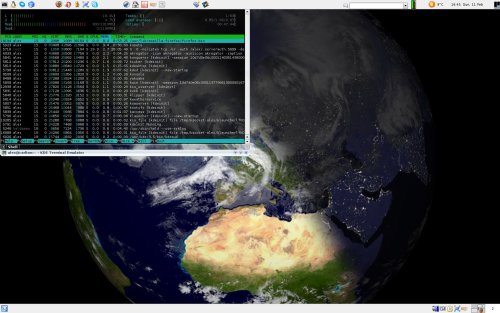
Eyecandy is somehow nicer when it serves some purpose aside from just looking pretty, wouldn't you say? Then it has the same kind of effect as a great car or fine architecture. "Wow, it's great. And it looks awesome." Otherwise the appearance on its own seems a bit shallow and pointless. Now for the demo, here's my newest wallpaper (click to see the fullsize hosted on deviantart):

we_call_it_planet_earth_by_numerodix.jpg

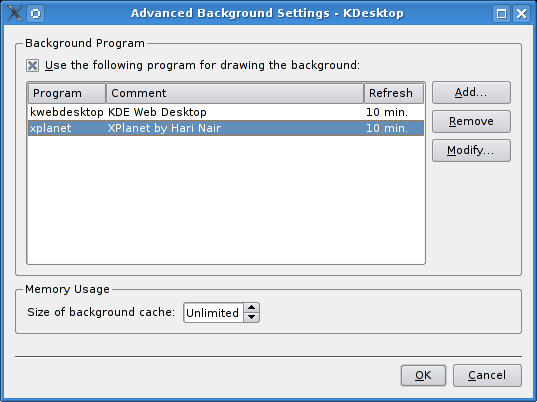
If you've ever thought that having one particular image on your desktop gets a bit dull, then this may be something for you. xplanet generates images of the Earth at set intervals (for example every 10 minutes) that shows the Earth roughly at this point in time. In addition, what I have here is cloud cover updated every 3 hours, so it's like a weather map. xplanet is phenomenally flexible, it can render multiple bodies at the same time (for example the Earth and the moon), it renders stars, it renders all the planets in the Solar System (yes, Pluto too) and many more bodies. What I have is a pretty standard configuration. So where to pick up the goodies? First, install xplanet (it's in portage :) ). Then if you run KDE, right click on the desktop and go into the config. On the Background tab, click Advanced Options and xplanet should appear in the list there.

xplanet_adv_opts.png

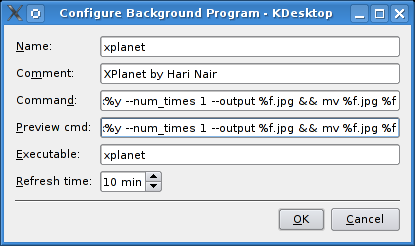
When you click Modify... xplanet will most likely have filled in the blanks for you, but otherwise something like this will do:

xplanet_params.png

The Preview cmd isn't really important, but for Command you could use:

xplanet -config ~/.xplanet.rc -radius 60 -latitude 52 -longitude 5 --geometry %xx%y --num_times 1 --output %f.jpg && mv %f.jpg %f

This will center the view on Utrecht more or less, but you can pick your own coordinates. Since we've supplied a configuration file, we have to create one.

$ echo -e "[earth]\ncloud_map=/tmp/.xplanet/clouds_2048.jpg" > ~/.xplanet.rc

Now we want to rig up a system that will download updates of the cloud map when they are available. We've already declared that they should be written to /tmp/.xplanet/clouds_2048.jpg, so let's create that path now.

$ mkdir -p /tmp/.xplanet

We'll use Michal Pasternak's python script for this. First save the file in /usr/local/bin, make it executable, then open it and edit this line:

defaultOutputFile = "/tmp/.xplanet/clouds_2048.jpg"

And finally we're going to use our friend cron to execute the script every hour:

$ crontab -e

And add this line:

0 * * * * python /usr/local/bin/download_clouds.py &>/dev/null

And that's it. Now you have a totally kickass wallpaper. :cool:

References

  1. Tomasz Karbownicki's original entry which explains how to do this in Gnome [pl]
  2. Kamil Baćkowski's follow-up entry on using xplanet in KDE [pl]
  3. xplanet website with tons of info and hacks

keepalive.sh: restarting flaky applications

February 5th, 2007

Sometimes you just want an application to run in the background for whatever reason. One that tends to crash. Well, if you're not there when it crashes, you can't start it up again. So what to do? The obvious answer is "fix the damn application already!" But maybe you don't have the source code. Or you don't know how. Or you can't be bothered. Or whatever. And you just want a way to automatically restart the application whenever it crashes.

I didn't know how to do that before, so I never had a solution for those rare cases when this was needed. But it's very easy to do.

#!/bin/sh

if [ "x$1" = "x" ]; then echo "usage: $0 <application>"; exit 1; fi


app=$1
echo "Running $app"


$app &
pid=$!
while ((1)); do
	if ! ps $pid; then 
		echo "Restarting $app"
		$app &
		pid=$!
	fi
	echo "pid: $pid"
	wait $pid
	sleep 30
done

Here's how keepalive.sh works.

  1. It starts the application.
  2. It captures the pid.
  3. Now it starts an infinite loop.
    1. Check the pid to see if the app is running.
    2. If the app is not running, start it and capture the pid.
    3. Otherwise just wait for it to finish.
    4. Goto 3.1.

It doesn't matter if you stop the application in a standard way, if you kill it, or if it dies on its own. Within 30 seconds it will be restarted. The short delay is included so that an application that dies instantly won't keep restarting and dieing all the time, bringing your system to its knees. Until you stop keepalive.sh, it will keep looping forever.

powerpoint productivity

February 2nd, 2007

I find it interesting that office suites are often dubbed "productivity suites" by vendors. Of course, they are "productive" software compared to say.. Solitaire, but are they really "productive" in the absolute meaning of the word?

Claim
By making office software easy to use, the user doesn't have to waste time on learning how to use the software, because it's so intuitive that any idiot can use it. And thus you're more productive.

Counterclaim
If it's easy enough for idiots to use, won't idiots use it? Or rather, to be a little more accurate, won't users use it at the intellectual level of an idiot? How, and why, would they rise above that level if it's all they need to get by?

As someone who thinks about software, writes software, uses software, and comments on software, it pains me to see how some people use software. It really makes me sad.

The whole office suite concept was never my cup of tea. I used it because it seemed to be "the way" to write documents, but deep down it always bugged me. Then I got into using latex for document creation and it's like a whole new world opened up. Structured documents, what an amazing thing. It took me a while to get used to the latex way, but that's because I had to de-program myself of those bad habits. Now I wouldn't use an office suite for anything ever.

Here's how Ms Office works. You sit down at the desk, your friend points to the keyboard, you press a key, the character comes up on the screen. This is pretty much the intellectual level at which most people use Ms Word. Of course, the software has other features, it has functions to get things done faster/better/nicer. But most people, and that's probably 90% or more, don't know/don't care/wouldn't care about them. As long as they can just plug along.

I gave a presentation about two weeks ago, I had 20 slides, and it took me a couple of hours to write the presentation in latex. I didn't have to re-learn anything, because latex is the same whatever document you're writing. The process was entirely smooth, as it wasn't my first time, so I knew what I was doing. I've done maybe three presentations in latex, and by the third one I felt completely comfortable.

Last week my group was obliged to give another presentation, and this time another guy did the honors. But we all wrote it together, so he manned the computer while we discussed the content. A computer screen tends to draw your eyes in, but I was fighting the urge, I really couldn't stand it. First the guy designed a little logo in Ms Paint, which he included into the slides. When I said the logo could use a slight modification, he had to change the image on every slide one by one. Then he thought it would be nice to have a little index of the presentation on the side of the slides, which was a nice touch. So everytime he added a slide or renamed another, he would update the index on every single slide manually. Then it was the layout.. when he combined images with text, or even just when adding lists of points, often the layout wouldn't fit, there would be a forced linebreak, or something would clash, so he had to reposition the text fields. He spent more time doing these updates than actually adding content, in the form of keywords mostly. I felt like chewing my arm off watching this.

Yes, Ms Powerpoint might just have templates. And it might just have indexing. But what's the difference when noone uses this? It was certainly not the first time the guy made a presentation, I'm sure he'd done plenty of them before. But this was his level of usage. Because Powerpoint encourages you to act an idiot, that's what people become.

Needless to say, this has very little to do with productivity. Busy work, that's what this is. It's the computer equivalent of digging holes and then filling them. The general level of document creation is just appalling to me. That Ms Office be the standard for exchanging documents, and seeing how bad they look and how incredibly messy the whole process is, it's astounding.