Archive for the ‘technology’ Category

the finest Microsoft product I ever owned

May 9th, 2007

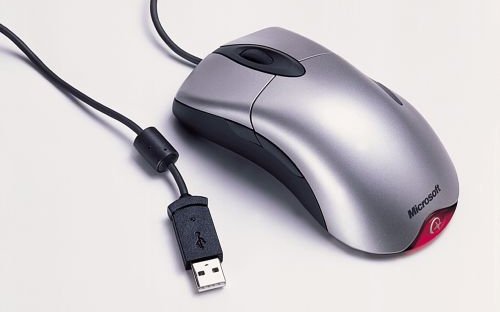
The Microsoft Intellimouse Explorer 3.0. Yeap, they may sell a whole lot of crappy software products, but this is one they really got right.
microsoft_intellimouse-explorer.jpg

Best mouse I ever had. Before the optical age, mice would clog up with dirt and wear out. Well not anymore. I've had this one for a great many years, the longest lifespan for a mouse yet.

It's so ergonomic that any other mouse feels totally alien and awkward. The only problem is that the wheel scrolls so softly that the threshold for scrolling a bit too low, and sometimes it skips on its own. So when watching a movie in mplayer, it will seek forward without being asked to.

But otherwise it's perfect. Up to now. It seems the buttons are getting worn out by now, and sometimes one click registers as two. This isn't uncommon with crappy mice, I've seen it before. But in this case a sure sign of old age. It's time to replace this old trooper.

Any recommendations?

the web: where open source is king

April 1st, 2007

If we take a quick look at free software vs proprietary software, here are the key differences:

  1. give or sell (free) vs sell (prop)
  2. free to use, modify (free) vs free to use-as-is (prop)
  3. free to give away (free) vs cannot give away (prop)

Now, people like Bill Gates believe that the only thing you would ever want to do with software is get it and use it. This is a strange and limited outlook on things. There are such huge piles of software out there that everyone can save money by reusing stuff, rather than building from scratch. And guess what? When you find code that you can use in your project (an application or a library), and you want to adjust it to your needs, you need the source code.

This is where the web comes in as a whole new dimension. Because if you recall the list above, point 3 falls out. If you build a website that uses a piece of software, that does not count as distribution. So let's say you're a big company and you want to develop a new product... You would like to use free software, because then you can save lots of time and money. But if you do that, and you want to sell your product, you have to give away the source code as well. So some other company can pick that up and resell your product. But, if you just have a website, then even though your users will use the product, it's not distribution, and you're under no obligation to give away the code.

Well, that's nice and all, but so what? Isn't that only useful for web software like apache, php and whatever? Actually, no. The web is increasingly becoming a place of rich applications. There are more and more websites that aren't just pages, they are applications. Everyone is talking about web applications these days. Some pundits are saying that the future is the web. And that browsers will be increasingly critical as a client to this world. In fact, Firefox has various ideas underway to "connect the dots" and make websites feel more like desktop applications. This is already happening with things like AJAX, when you click a button and some part of the page is refreshed, without having to reload the whole page. The distinction  between web and desktop is getting blurred.

A case study

So let's say you want to build a web application that is an image editor. (I know it sounds silly, but there are actually several people doing this at the moment.) So if you think about what a web image editor will be like, you probably want it to have the same (or many of the same) features that image editors do. If you take Photoshop, which is the most popular one, it would be really nice if you could offer the same features, wouldn't it?

But guess what, as a developer, all you can do with Photoshop is look at it. Now, if you take the gimp, you have the full source code. So you can rip out the parts you need (the code having to do with scaling images, applying filters and so on), and put that in your web application. Of course, there is still work to do, because you have to connect the bits from gimp with your web interface, perhaps you need a wrapper of some kind. But this is all easy stuff! This is just connecting the dots, it's the gimp code that's the difficult part, that's where the domain logic comes in. You don't have to know much about image editing to build a web app reusing the gimp, but you do have to know all about it to write the gimp.

The big picture

That's just one example. With gazillions of free software packages out there, there is no limit to what kind of web application you can build. All that the user will see is the webpage, so underneath you can connect any number of applications that work together in producing the result. So you can build a website that has all kinds of features. And you can make the site free, or you can fund it with ads, or you can charge a subscription fee, it doesn't matter. Either way you can reuse existing software without having to give up your advantage by offering the source code.

And that's all because you have piles of free software lying around for use. Proprietary software is completely useless here.

For companies like Microsoft, this is horrifying. "How can we survive if we can't sell our productivity software?"

Ps. I'm surprised that I've never seen anyone make this observation before. Someone must have noticed it.

coming to terms with vim

March 24th, 2007

Preface

In case you didn't already know this.. the choice of editor to a geek means more than the choice of religion to the average person. Flame wars over editors are legendary and go back decades. The Unix community split into two main currents, each following one special editor. As you would have it, these two currents are about as black and white as you can find, exactly as the two editors also are: vi and emacs. They are on either extreme of the spectrum. emacs (1975) was written by Richard Stallman and friends, and aims to be everything. It can integrate with lots of other applications, shells, you can run everything *inside* emacs, never having to leave the editor! vi (1976) aims to be nothing, it is the anti-thesis, written by a sadistic bastard called Bill Joy. :D It is as cut down, crippled and bare bones of an editor as you couldn't imagine. And so the wars have waged, emacs vs vi.

Both editors are super popular to this day. You will find vi on *every* Unix system. If you have to edit a config file on some ancient machine and you find out your editor isn't installed, eventually you'll have to fall back on vi. emacs isn't always included, because of its size. Depending on how heavy the install is, it can easily be 60mb, which for an editor, on a scaled down system, is unacceptable. vi is about 600kb.

That is not the whole story, however. A pragmatic Dutchman called Bram Moolenaar decided to liberate the world from vi and came up with vim (1991): Vi IMproved. Now, ironically perhaps, vim is much more of an emacs than a vi, it has a gazillion features. Still, it's much lighter, and compared to emacs, still lightweight. With all its extensions and plug ins, it's hard to call it a lightweight editor in absolute terms, because there are lots of smaller ones, like nano.

Choosing an editor

Since I started out with Linux around the turn of the millennium, and not in the 80s, I don't have such strong feelings about vi and emacs. I could care less. I'm happy to use kate most of the time. It's a very well designed editor, easy to use, intuitive, pleasant. But since I'm hacking Haskell a lot these days, and Haskell is just esoteric enough to not be supported by anyone, I've come to realize that, indeed, it's a choice between emacs and vim.

I'm told there is a Haskell mode for emacs, and probably quite a good one, because it's advertised by the Haskell people. On the other hand, if you search long enough, you might just find some support for vim stashed away in a corner. Syntax highlighting isn't the problem, everyone can do that. But Haskell's indentation is hell, and the vim plugin makes it a little better. I've seen Haskell mode for emacs in action, and that too is rather imperfect.

I reject emacs on the same grounds as every vim user in the world. The key bindings are just horrible. Ctrl+X Ctrl+S to save the file, Ctrl+X Ctrl+C to quit. That's already painful if you do it once, it's unbearable if you do it while hacking, every two minutes. In addition, I work in X all the time, and emacs' gui is just awful. Whether it's gnu emacs or xemacs, they both stink.

UPDATE: Last night I saw a note about emacs-cvs having a completely new gui, so perhaps that is something worth exploring at some point.

So the choice falls on vim
vim is not the guy who approaches you with a smile and an outstretched hand. It's the guy sitting in his cubicle consumed in his work and mumbling to himself. What originally got me interested in vim was not the strong endorsements from lots of people I had talked to it, it was actually this blog entry from a guy who's selling vim integration plug ins for things like Visual Studio. There were two things about his text that resonated with me. First of all, if anyone is going to be looking for vim plug ins for probably the most popular IDE out there (ie. lots of people are already very happy with this IDE), there must be something pretty special about vim. And secondly, he loves vim because it's ergonomic. Hah, ergonomic, imagine that! Have you ever tried editing away from your desk? It's awful, you don't know what to do with the mouse, the mousepad sucks, you can't use the desktop normally, bleh. But he said vim works just as well on the train as it does on your desk. That got me thinking.

So does it? I don't know. You see, vim is a lot to handle. It's like having a particle accelerator dropped in your lap. (And it's just as heavy too!) Yes, there's a manual, but by the time you read it and grasp the meaning, you'll be an old man. vim's premise is radical to everyone who uses the mouse to edit. You don't need the mouse, don't touch the mouse, you can do everything from the keyboard. I'm still not comfortable with h,j,k,l, I cling to the arrow keys. I try to force myself to use k instead of arrow-up, but it feels so unnatural. vim's gui isn't much to brag about either, it looks better, but it doesn't exactly do much for you gui wise.

And, of course, the number of key combinations to remember is completely overwhelming. You just can't learn vim, you have to take it one day at a time. In fact, that's what Moolenaar says too - today you learn something that helps you today, tomorrow you learn something that helps you tomorrow. So I feel like the journey has just begun, I know almost all the keys on the cheat sheet now, plus a few more.

Configure or die

Unfortunately, the biggest drawback with vim (and probably emacs) is configuration. It can do almost everything, but that doesn't necessarily help me. I need to tell it what I need it to do. My .vimrc is now 67 lines and growing. And if there's one thing I truly dislike about complicated applications it's this - having to configure it down to the smallest detail. And having to carry your config everywhere you go, otherwise all the pain that went into setting up these options is lost once you get on a machine where you don't have your setup. KDE solves this problem now (at least for me) quite well, it's configurable to death, but the defaults are so good that most things I don't have to change (or even know about). Not so with vim, not only aren't the options listed, it's not always that easy to figure out what they mean.

Depending on the machine, the default vim config may even have vi compatibility set, so yes, your vim is reduced to vi, how terrifying! Why Bram decided to include a vi compatibility mode one can only guess, but one suspects it was so that he could argue that vi lovers could still breathe, meanwhile he would rescue the rest of us from that terror. I can imagine this would be the only way he could make a case to every distro out there to include vim by default.

So .vimrc is not exactly a walk in the park, it's quite a mess, and the more you want to configure it, the more muddled it becomes. The first thing I wanted to fix was saving the file. By default in vim, this is accomplished with an emacs like awkward sequence of <Esc> : w i. Yes, four key presses, just like emacs. I managed to map it to one key: <F1>. Out of all the commands I type in vim, it's the one I use the most and I can't stand that :w stuff, often typing :W by mistake, which gives an error. :lazy: If you want to know how that's done, look no further:

map! <F1> <ESC>:w<RETURN>a " insert mode
map <F1> :w<RETURN> " normal mode

Yes, at least the mapping is pretty obvious, you tell it exactly what you would normally type. It's just that there are a dozen different kinds of map command, apparently this map! is a way to get something working with insert mode. :/

But vim is not too bad, certain features make you realize that kate has weaknesses that the mouse can't solve. Like navigating word-for-word (instead of by character), deleting whole words, paragraphs.. generally it's things that have to do with moving in the file that are more sophisticated. To fix a typo in kate, you could either double click to select the word, delete and type it in - or just click at the incorrect character and replace it. In vim you hit w to move word-for-word until you come to it, then hit c w (change word) to erase it and you can type it in. That's quite convenient in code. To duplicate a line: Y p, in kate: Home Shift+End Ctrl+C End Return Ctrl+V. Depending on what you're doing, *a lot* more convenient.

Of course, I'm still trapped somewhere in between, so I'm seeing the flaws in mouse oriented editing, without knowing all about the vim approach, so it's still awkward. If I had to edit a file to save my life, I would pick nano. But hopefully vim does actually work as well as people say and I'll be fluent enough to hack plug ins and make it work well for me.

idea: make systray behavior standard

February 22nd, 2007

I have akregator and amarok in the systray. Both are minimized, and when restored one covers the other because they occupy the same area on the screen.

  1. I'm looking at my desktop when I click on akregator, it appears.
  2. I click on amarok, it appears on top.
  3. I click on akregator, it appears on top.
  4. I click on akregator, it gets minimized, amarok appears.
  5. I click on amarok, it gets minimized, showing my desktop.

Akregator and amarok respond the same way to a single click, this makes them easy to use interchangeably, I can go from one to the other and both do the same thing. But not all applications behave like this, for instance some require double clicking to appear. If that's the case, I have to remember which one uses a click and which uses a double click.

Wouldn't it be nice if all applications had the same systray behavior? KDE and Gnome could set up the wiring and provide a default for this. Then an application could override this if it really needed to. :)

the cult of the leader

February 20th, 2007

I was watching some clips on Youtube and I stumbled upon some good old Apple clips among others. It's amazing how Youtube sucks you in, you're only looking for one specific thing but then you end up watching tons of "related" and "recommended" stuff. Oh well.

Anyway, it made me reflect on some of the biggest personalities in the IT industry. Not necessarily the most influential, but certainly the cult figures if you will, the billboard faces.

First up, Bill Gates. Bill is a deceptive figure in many ways, in interviews and talks he comes across as such a normal person, so much like any engineer. There's also something about this normality that gives him charisma, I have to say I find him quite a personable figure for some reason. Of course he stands at the head of a company that has built up a portfolio of shall we say practice we file under various degrees of "unethical". But still, when he talks about his visions for technology, it comes across as something a technically minded person would think about. And beyond that, being a superbly successful businessman, he seems very unassuming, very humble. The kind of guy you could talk to, and disagree with on many things, but also find agreement on many points.

In contrast, Steve Jobs just freaks me out. I don't know if you've seen one of those keynotes, but the whole thing is not unlike some religious cult. Steve's there speaking, with this strange light in his eyes, as he regards his minions and feels the power of his persona. When he speaks, he gets an immediate response, of cheers or boos (rarely), it's like a Gospel church.

And along with himself, the company image is so conceited as well. "I think you always had to be a little different to buy an Apple Computer. You had to think different about computers. I think you had to think really differently when you bought a Mac. And I think the people who do buy them do think differently. And they are the creative spirits in this world. They are the people who are not just out to get a job done, they're out to change the world." Btw, talk about the least creative company name ever.

Then there's Steve Ballmer. This guy is the creepiest company chief I've ever seen. I mean they actually made the guy from this old commercial head of the biggest company in the world, how insane is that? Ballmer has this odd quality to him that just makes him seem totally and completely unpredictable. Like a ticking time bomb and you never know when he's going to go off. It's basically the nut running the nut house. The chair throwing incident (unfortunately couldn't find the video) is really famous, but it doesn't stop there, he's just stark raving mad.